


Complete Guide to Notification Badges: A Key Feature for Improving App Engagement
Overview of Badge Value
Notification badges are a core feature for improving user engagement in mobile applications. By displaying the number of unread messages directly on the app icon, badges effectively increase return visits and notification open rates.
EngageLab provides a comprehensive, cross-platform badge solution to help developers deliver an optimal user experience.
Channel Support Overview
Due to system-level limitations across different mobile vendors, only certain push channels support badge display. The support status is as follows:
| Vendor | Badge / Badge Number Support | Implementation Notes | Badge Limitations |
|---|---|---|---|
| Google FCM | Badge supported | Displays as a dot by default, following system behavior | No explicit upper limit |
| Huawei / Honor | Numeric badge supported | Badge number increases with incoming notifications | Usually capped at 99 |
| Xiaomi | Numeric badge supported | Follows system default logic, each new notification increments by 1 | Limit defined by system, not explicitly documented |
| OPPO | Desktop numeric badge via vendor channel supported | Enable desktop numeric badge on the OPPO Open Platform; set via badge_operation_type and badge_message_count. Without permission, the request may succeed but the badge may not take effect. |
Final display limit and desktop policy follow OPPO. |
| VIVO | Vendor-channel auto-increment and SDK badge setting supported | Vendor channel uses add_badge; local notifications and SDK setNotificationBadge/resetNotificationBadge are also supported. Enable vivo badge permission and turn on the desktop badge. |
Final display limit and behavior depend on OS version and desktop policy. |
| Meizu | Numeric badge not supported | Red dot only | – |
| iOS | Numeric badge supported | Badge number can be managed via push payload or SDK APIs | Very high; no documented upper limit |
Typical Use Cases
- Social apps: Real-time synchronization of unread message counts
- E-commerce apps: Reminder for pending orders or actions
- News apps: Display of unread articles
iOS Badges: Precise Badge Management
Technical Architecture
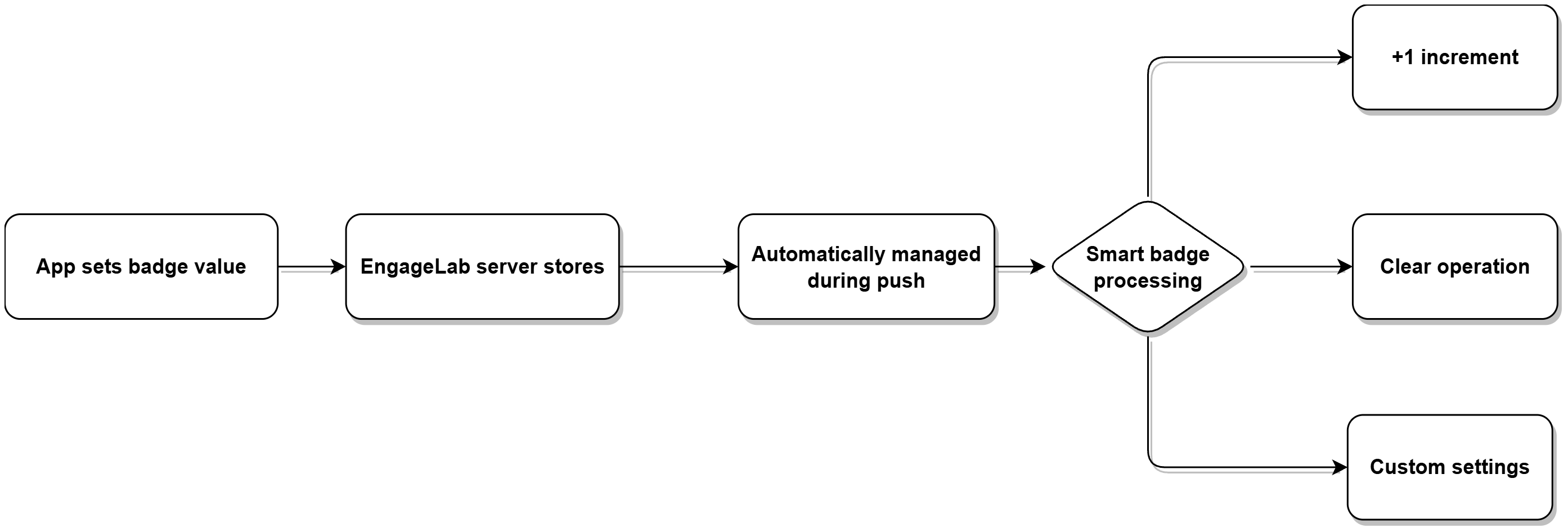
Client-Side Badge Configuration
Set Badge (with Callback)
Supported since version: v5.2.0
+ (void)setBadge:(NSInteger)value completion:(void (^)(NSError *error))completion
Clear Badge
Clears the badge value stored on the MTPush server, equivalent to calling:
setBadge: 0
+ (void)resetBadge
Server-Side Badge Configuration
When sending push notifications, the badge field must be configured under the ios payload.
| Field | Type | Optional | Description | Notes |
|---|---|---|---|---|
| badge | Int or String | Optional | App icon badge number | • Can be set as N, +N, or -N, where N ranges from [0, 99].• If the value is 10, the badge can be interpreted as N, 10+N, or 10-N (values below 0 will clear the badge).• A value of 0 or an empty string clears the badge.• If omitted, the badge number remains unchanged. • The official MTPush API libraries (SDKs) default the badge value to "+1". |
Huawei / Honor Badges
Client-Side Configuration
              <!-- AndroidManifest.xml permission configuration -->
<uses-permission android:name="com.huawei.android.launcher.permission.CHANGE_BADGE"/>
<uses-permission android:name="com.hihonor.android.launcher.permission.CHANGE_BADGE"/>
Portal Configuration
Important: The app’s entry Activity must be configured correctly. Huawei and Honor use the same configuration logic.
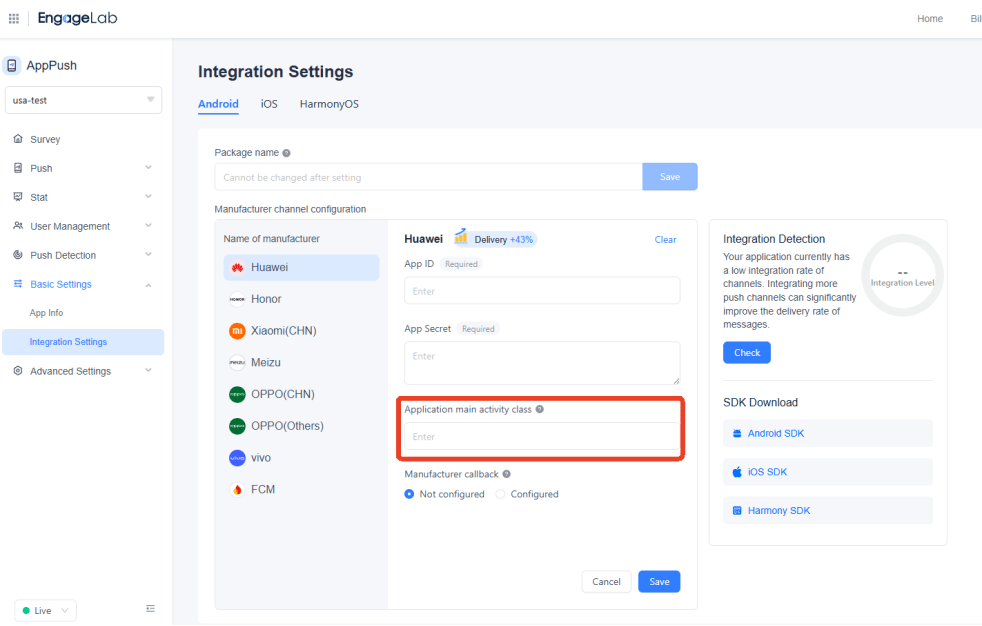
Advanced Server-Side Parameters
| Parameter | Description | Business Value |
|---|---|---|
badge_add_num |
Increment badge number | Ideal for messaging apps to avoid badge inconsistency |
badge_set_num |
Set badge to a fixed value | Suitable for state-based indicators such as pending tasks |
badge_class |
Specify launcher Activity | Ensures the badge is correctly associated with the target app |
Xiaomi Badges
Devices running MIUI 6 and above support numeric badges. The MIUI system automatically handles badge display logic:
📱 Receive notification → badge +1 (no developer action required) 🔄 Open the app → badge cleared automatically ⚡ MIUI 6+ supported across all versions, covering the majority of Xiaomi users
OPPO Badges: Vendor Server-Side Configuration
Configure under options.third_party_channel.oppo in the push request:
              {
  "badge_operation_type": 1
}
badge_operation_type=1: increase the badge by 1;badge_message_countis not required.badge_operation_type=0: overwrite the current badge withbadge_message_count;0clears the badge.- Before sending, enable desktop numeric badge capability for the app on the OPPO Open Platform; no extra badge integration is required on the app side.
vivo Badges: Vendor Channel and SDK Control
Auto-increment the badge via the vendor channel:
              {
  "add_badge": true
}
This field is under options.third_party_channel.vivo. For local notifications or business-side unread sync, call MTPushPrivatesApi.setNotificationBadge to set the value and resetNotificationBadge to clear it. Actual behavior depends on vivo badge permission, OS version, and the user desktop badge switch. On OriginOS, +1 uses the system add_badge API, and +N (N > 1) is set to the cumulative target value.
Best Practice Recommendations
Unified Cross-Platform Strategy
- Tiered implementation: Prioritize full numeric badge support on iOS, Huawei, and Xiaomi
- Fallback compatibility: Use red-dot indicators for OPPO, VIVO, and other unsupported platforms
- Consistent user experience: Keep badge logic as consistent as possible across platforms
