


Inbox Insight
Feature Introduction
Large receiving domains typically do not trust new domains that suddenly send a large volume of emails.
If a domain starts marketing activities without warming up, emails may be marked as spam or even blacklisted.
To help users understand the current inbox performance of their domains and optimize sending strategies accordingly, we provide the Inbox Insight feature.
How It Works
Inbox Insight leverages users' own domains and real email accounts to initiate authentic and sustainable email exchanges using custom email templates, recording complete sending and reply behaviors.
This sending approach closely mimics real user behavior, making it easier for major email service providers like Gmail and Outlook to recognize and build trust in the domain, thereby improving overall inbox performance.
Core Capabilities
Real Email Interaction Mechanism
Real email accounts are used for email exchanges, avoiding biases caused by one-way test emails.Inbox Monitoring for Major Receiving Domains
Covers major email service providers like Gmail and Outlook to determine whether emails land in the inbox, spam folder, or are blocked.Domain and Template Combination Testing
Tests are conducted based on different combinations of sending domains and email templates to identify the impact of content or configuration on inbox results.Visualized Results Display
View inbox results and trend changes through a unified dashboard, facilitating continuous analysis and strategy adjustments.
Recommended Use Cases
1. Warming and Cold Start for New Domains
Ideal for initiating cold outreach on new domains. Because new domains lack sending history, they are highly vulnerable to ISP blocks. During this phase, Inbox Insight serves as an essential probe for your warming strategy. By tracking real-time inbox placement in small batches, you can observe whether emails land in the inbox or the spam folder. This allows you to scientifically adjust your sending pace, safely build initial domain reputation, and lift deliverability during the cold-start stage.
2. Long-Term Reputation Monitoring for Established Domains
Designed for domains with existing high-volume email deployments. Once your domain transitions to regular, large-scale delivery, it can be integrated with Google Postmaster Tools for deep observation. By using Inbox Insight to track daily inbox placement fluctuations while leveraging official Google domain reputation metrics, you can maintain full visibility into your sending health, optimize tab placement, and receive instant early warnings if high-volume spikes trigger filtering or reputation drops.
How to Use
1. Configure Inbox Insight
Ongoing configurations and completed configurations are displayed in separate lists.
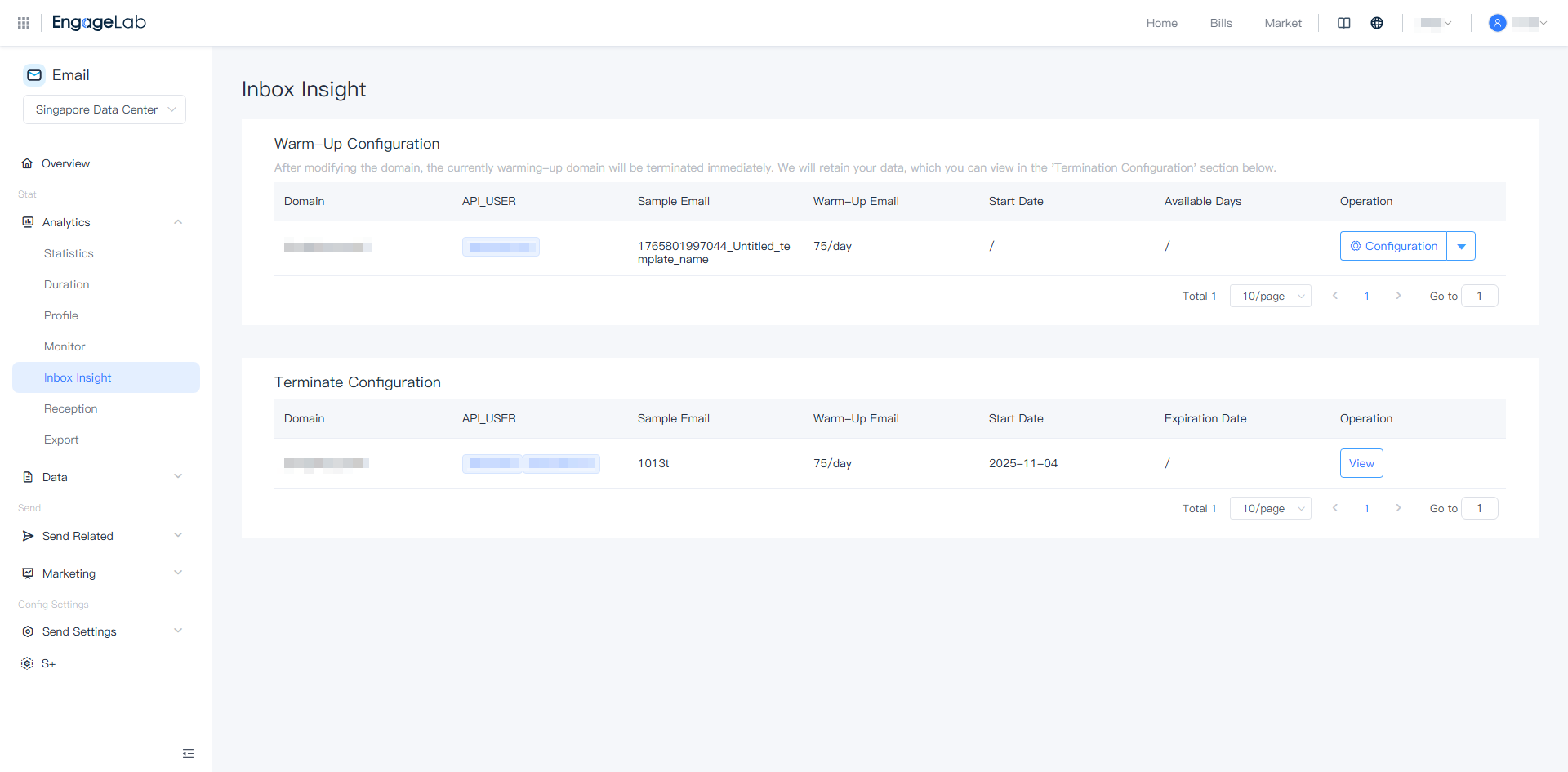
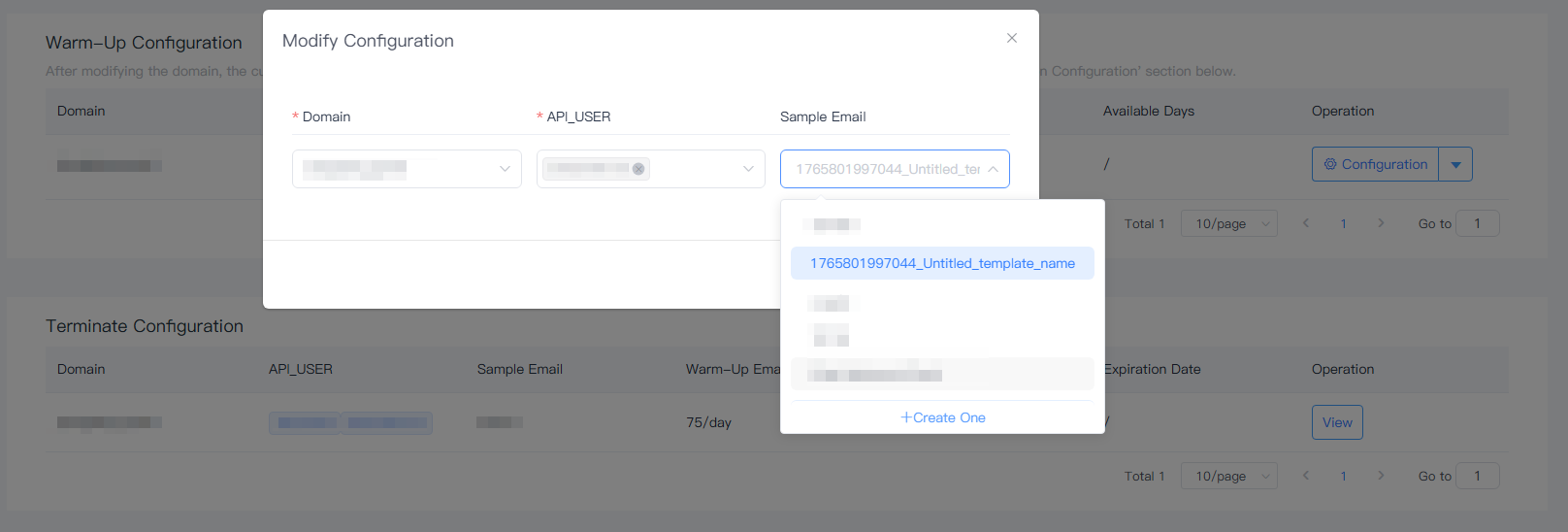
During the warming-up configuration period, you can modify the current configuration, such as replacing the domain or adjusting the sending template.
When the domain is replaced or the warming-up process ends, historical data will still be retained and displayed in the list.
You can select templates saved in Engagelab Email as the sending content.
In the early stages of warming up, it is recommended to use simple text templates without images or links.
If no template is selected, the system will use platform-provided template content for sending.
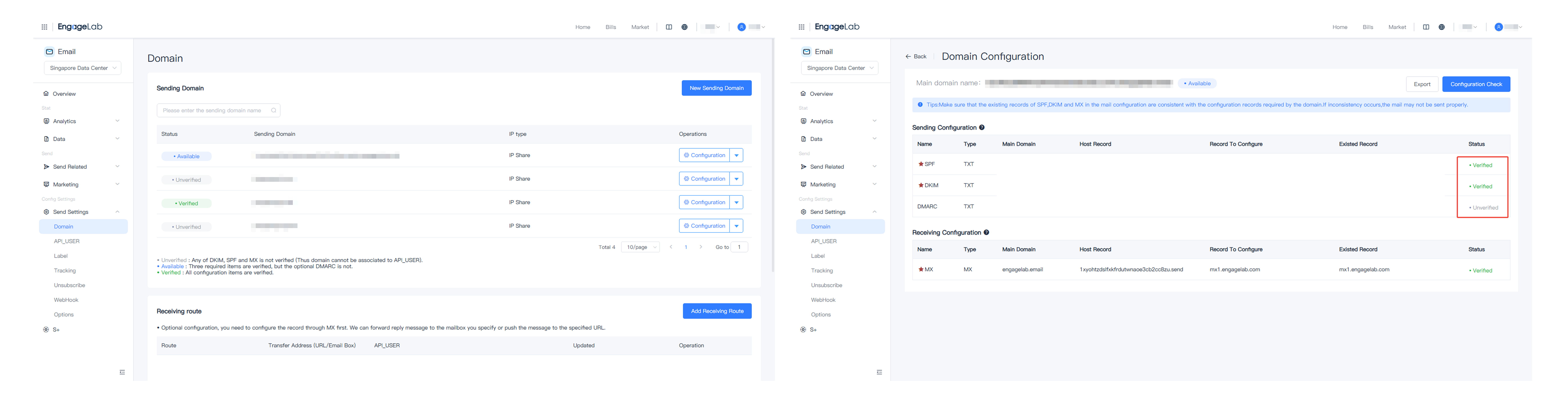
Before using Inbox Insight, it is recommended to complete the SPF, DKIM, DMARC configuration for your domain.
The configuration status of the domain can be viewed on the Domain configuration page.
2. View Data Analysis
After completing the configuration, click View to access the data page for the current domain.
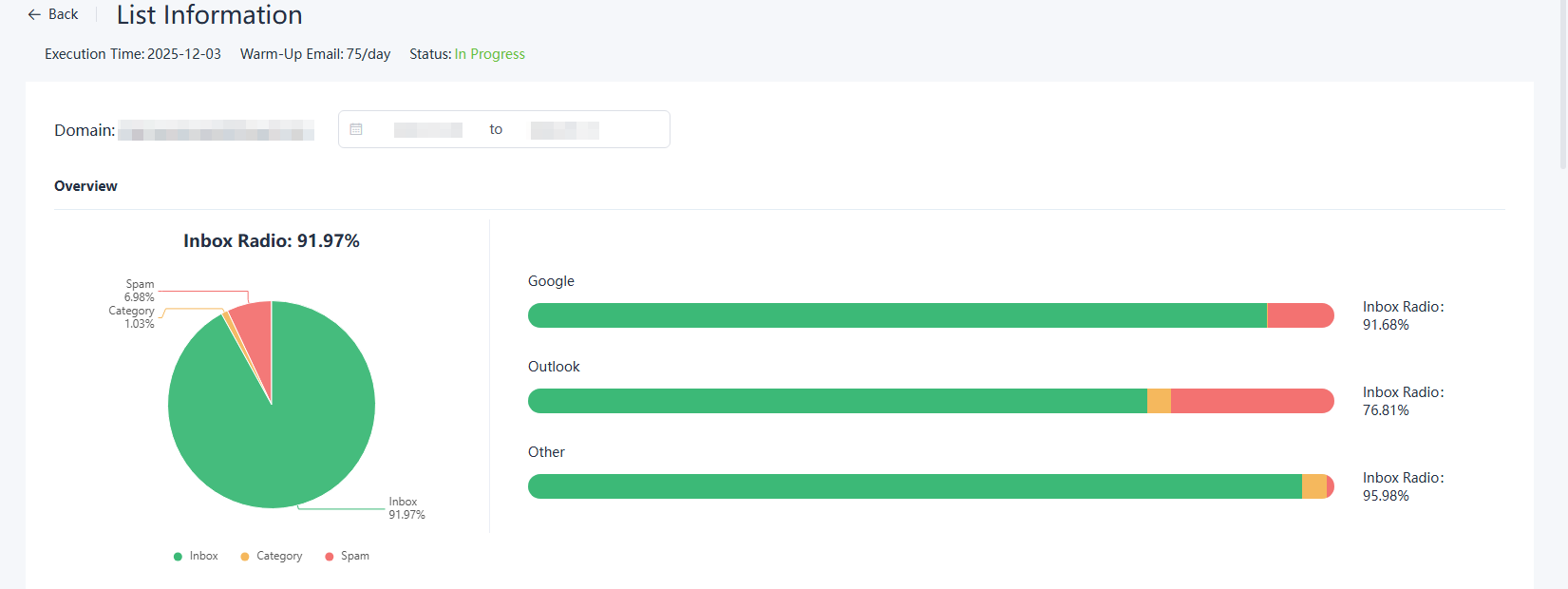
Overview
Overview displays the overall inbox performance over a period of time, allowing for a quick understanding of current performance.
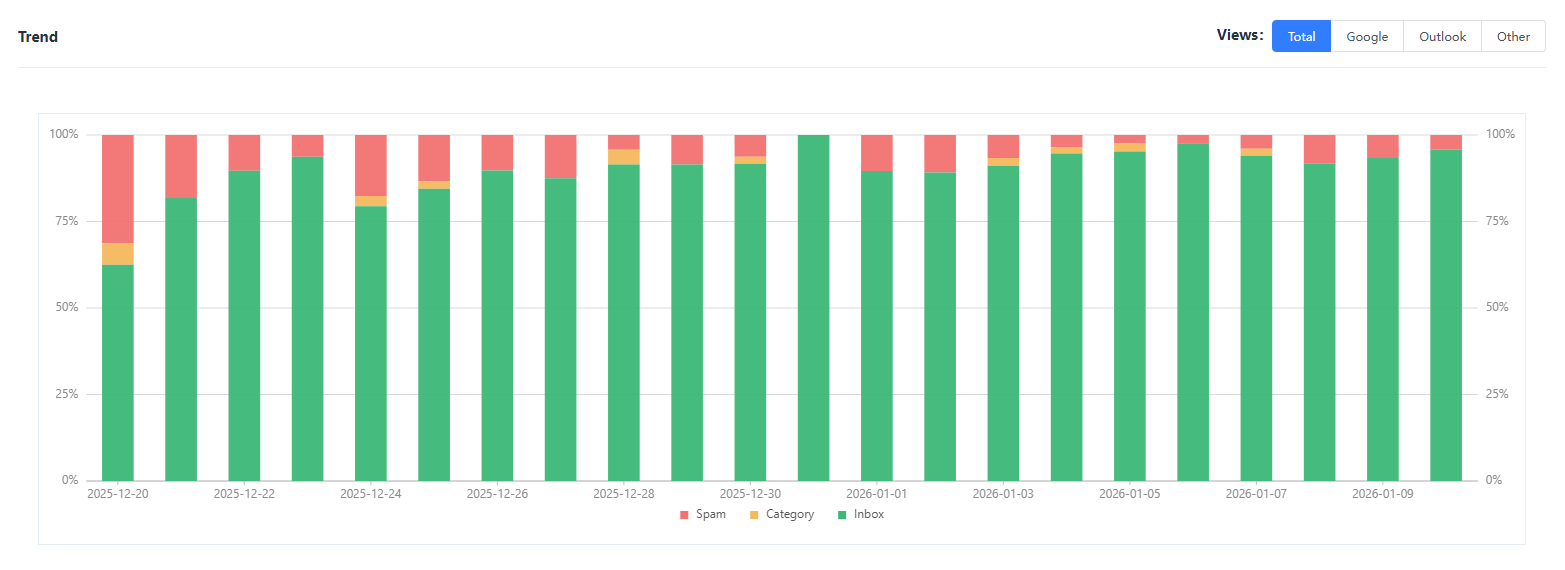
Trend
Trend shows the changes in inbox results over time and can be used to observe trends during the warming-up process. For example, in the chart below, you can see that the inbox rate gradually increases as warming up progresses.
Datasheet
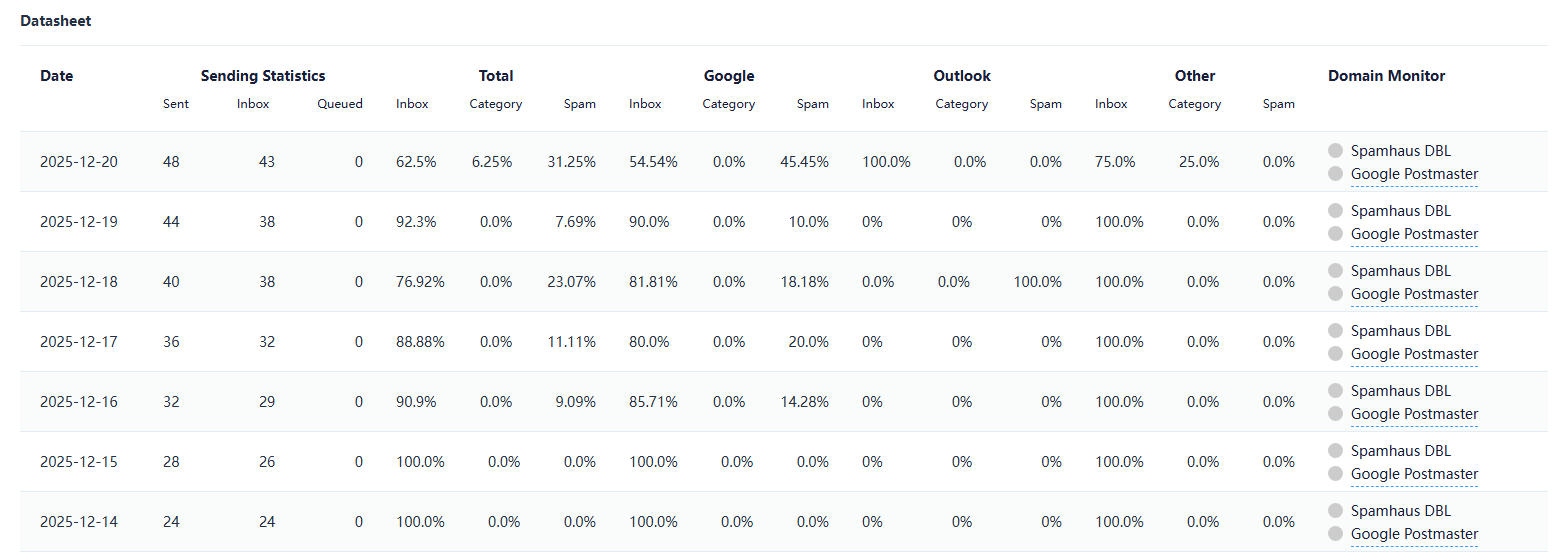
Datasheet displays daily sending data categorized by receiving domain.
Through the datasheet, you can see the daily sending status by domain. In the early stages of configuration, we start with a low initial sending volume and gradually increase it, as slowly and steadily increasing email activity is safer than immediately sending large volumes.
Frequently Asked Questions
Can I change the domain during the package process?
Yes.
A single package supports warming up one domain at a time. Once the current domain reaches the expected reputation, you can bind another domain during the remaining time to continue warming up. Historical data will be retained.
Can I skip configuring a template?
Yes.
If no custom template is selected, the system will use platform-provided templates for sending. However, during the warming-up phase, it is recommended to prioritize using simple text content.
How long does my domain need to be warmed up?
The warming-up time depends on the original reputation of the domain and cannot be fixed. Below are some references:
- New domains: approximately 3 months
- Historical domains: at least 1 month
Can I send real emails while using Inbox Insight?
It is recommended to avoid using the domain for marketing sends during the first 4–6 weeks of using Inbox Insight.
Subsequently, you can gradually increase real sending volumes while monitoring inbox performance.
