


服務端接入文檔
產品通訊流程
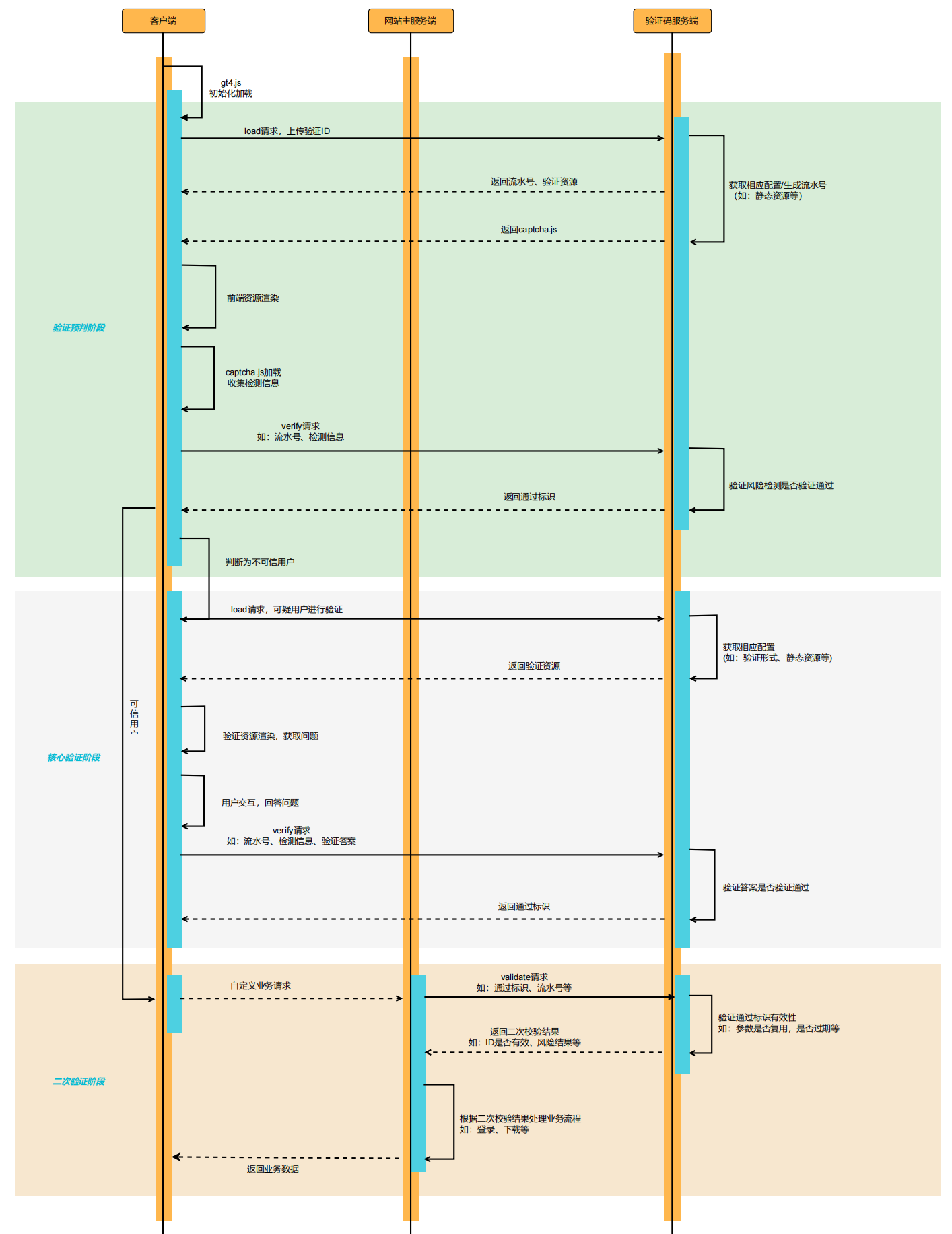
正常流程
驗證服務正常且用戶網絡加載正常時驗證碼流程,服務端需要關注二次驗證階段。
異常流程
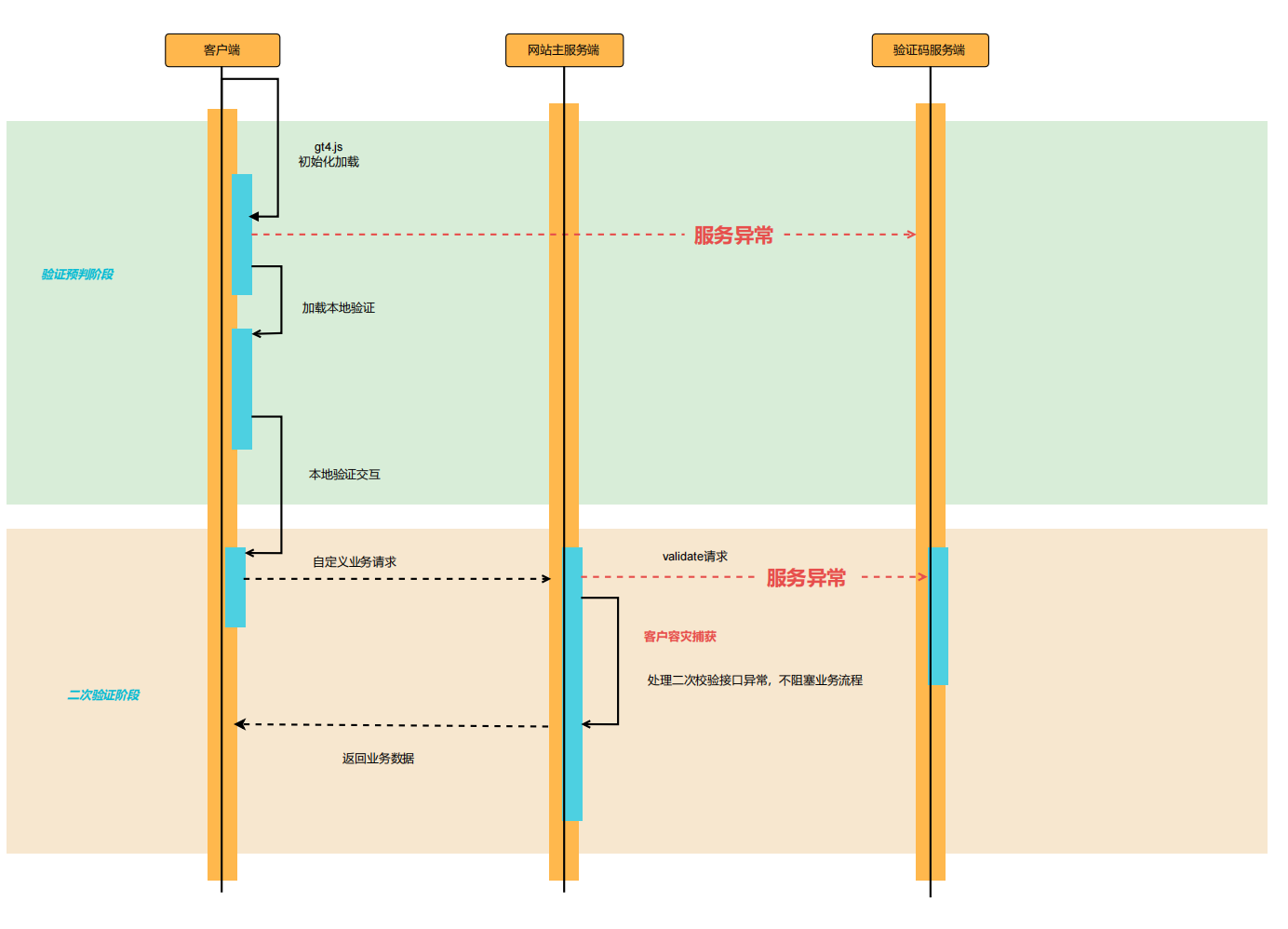
驗證碼自帶離線流程
驗證服務異常且使用驗證碼自帶的離線模式,服務端需要關注二次驗證階段,此種情況下服務端請求驗證碼服務會出現異常,建議捕獲異常後根據業務場景自行判斷是否讓用戶通過。
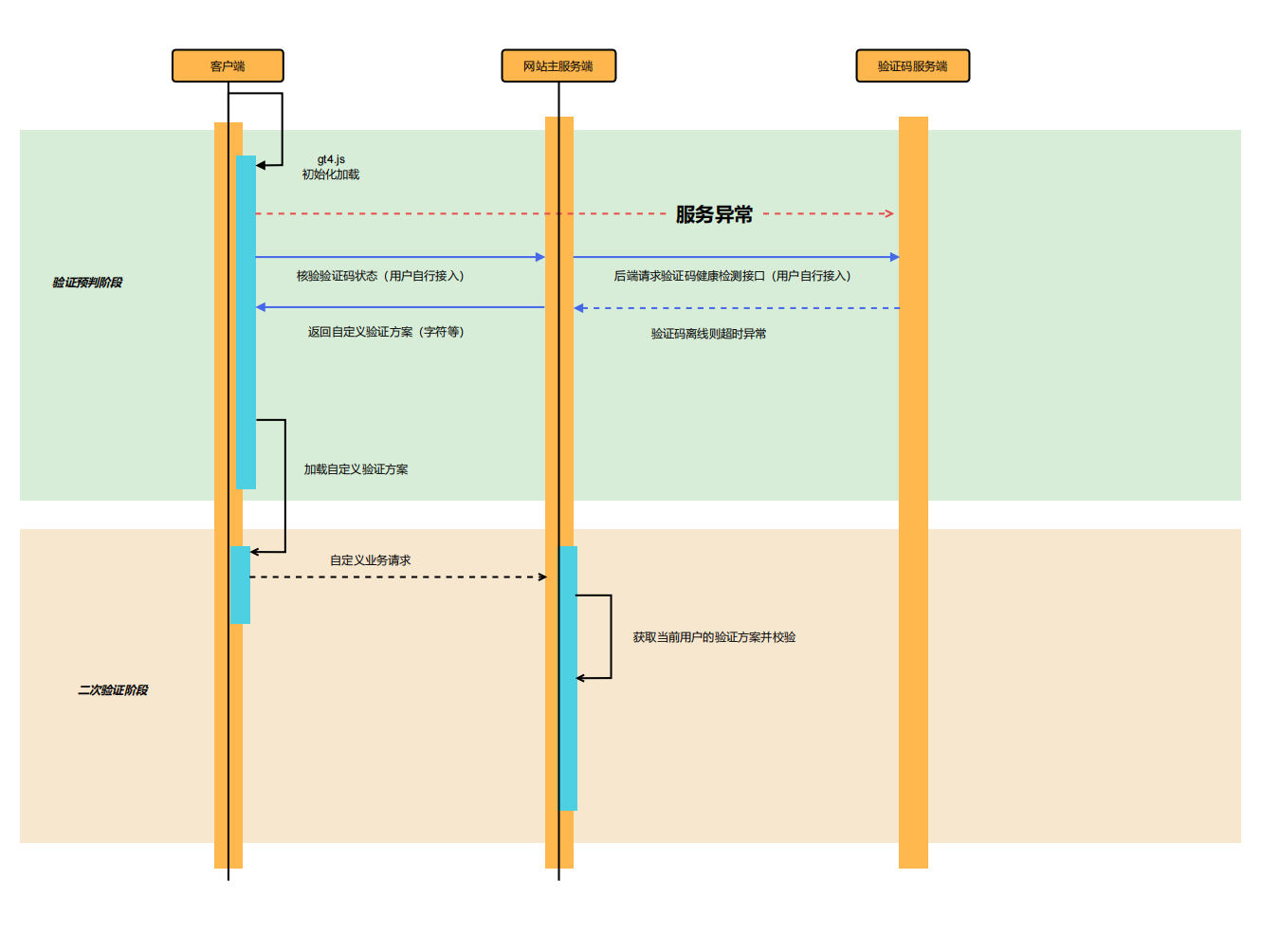
自定義降級流程(僅供參考)
驗證服務異常且自定義降級驗證如字符驗證等模式,此種情況下建議服務端新增接口或開關用於前端判定具體驗證形式,服務端可通過驗證碼提供的check_status接口判斷驗證碼是否正常。
服務端驗證碼集成方案
集成前置準備事項
請根據集成端側獲取所需資源,域名地址等信息請在部署完成後找公司內部對接人獲取。
| 端側類型 | 所需資源 | 資源說明 | 服務端 | captchaId | 驗證場景ID,可通過管理後台新建 |
| captchaKey | 驗證場景KEY,管理後台新建場景時生成,與captchaId一一對應 |
服務端集成
當用戶在前端界面通過驗證碼後,會產生一批與驗證碼相關的參數,用戶的業務請求帶上這些參數,後台業務接口再將這些參數上傳到 EngageLab 二次校驗接口,確認該用戶本次驗證的有效性。
以登錄場景為例:
- 接入驗證碼前,前端攜帶用戶名和密碼請求業務登錄接口,業務方判斷用戶名和密碼是否匹配,匹配成功則登錄,匹配失敗則拒絕登錄;
- 接入驗證碼後,前端攜帶業務信息以及驗證碼相關參數請求業務登錄接口,業務方攜帶驗證碼相關參數請求驗證碼服務端二次校驗(validate)接口獲取驗證碼判定結果,根據驗證碼判定結果以及用戶名和密碼匹配結果結合判定是否允許用戶進入後續業務流程。
validate接口說明
| 接口信息 | 說明 |
|---|---|
| 接口地址 | https://captcha-api.engagelab.com/validate |
| 請求方法 | POST |
| 請求格式 | application/json |
| 返回類型 | json |
請求參數
| 參數名 | 類型 | 參數說明 | 參數來源 |
|---|---|---|---|
| lot_number | string | 服務端驗證流水號 | 前端傳入 |
| captcha_output | string | 驗證輸出信息 | 前端傳入 |
| pass_token | string | 驗證通過標識 | 前端傳入 |
| gen_time | string | 驗證通過時間戳 | 前端傳入 |
| captcha_id | string | 驗證場景Id | 業務端配置文件,請和前端使用的captchaId保持一致 |
| sign_token | string | 驗證簽名 | 業務端簽名生成,業務端自行生成 |
其中sign_token生成方式如下:
使用用戶當前完成驗證的流水號lot_number作為原始消息message,使用客戶驗證私鑰captchaKey作為key,採用hmac_sha256散列算法將message和key進行單向散列生成最終的簽名
以Java代碼為例描述則如下:
String signToken = new HmacUtils(HmacAlgorithms.HMAC_SHA_256, captchaKey).hmacHex(lotNumber);
String signToken = new HmacUtils(HmacAlgorithms.HMAC_SHA_256, captchaKey).hmacHex(lotNumber);
此代碼塊在浮窗中顯示
請求body示例
              {
    "lot_number": "f26d13345c9980c7705b9111b9398a0f",
    "captcha_id": "59bbe0f128f0624fdd185a6a2207aa54",
    "sign_token": "2e61e2f6d40e2896b18978fe6ae1416347fc43027ab7c875460d17ffa149dd7a",
    "pass_token": "79a4b7fc89d917b346d35286991bc9bca388a78bd31c20fa00907dcb8632611c",
    "gen_time": "1684826917",
    "captcha_output": "X4oDQ5p61MhE0Zpy5wQcl98WjrDdlDyL5B_VO0zPYnS9ITuz1ZZ6o0iw4Odk9f0AbAlzraqmeLGSmQWHPwJr2Vvf_Nm2Z0SMCn2ATME67e5UhMdopMgc8_zZi-SFRyH1"
}
{
"lot_number": "f26d13345c9980c7705b9111b9398a0f",
"captcha_id": "59bbe0f128f0624fdd185a6a2207aa54",
"sign_token": "2e61e2f6d40e2896b18978fe6ae1416347fc43027ab7c875460d17ffa149dd7a",
"pass_token": "79a4b7fc89d917b346d35286991bc9bca388a78bd31c20fa00907dcb8632611c",
"gen_time": "1684826917",
"captcha_output": "X4oDQ5p61MhE0Zpy5wQcl98WjrDdlDyL5B_VO0zPYnS9ITuz1ZZ6o0iw4Odk9f0AbAlzraqmeLGSmQWHPwJr2Vvf_Nm2Z0SMCn2ATME67e5UhMdopMgc8_zZi-SFRyH1"
}
此代碼塊在浮窗中顯示
響應參數
| 參數名 | 參數類型 | 是否必傳 | 參數示例 | 參數說明 |
|---|---|---|---|---|
| status | String | 是 | success | 接口響應狀態,success表示接口返回成功 |
| data | Object | 是 | 見data字段說明 | 接口返回成功時返回字段 |
其中data字段說明如下:
| 參數名 | 參數類型 | 是否必傳 | 參數示例 | 參數說明 |
|---|---|---|---|---|
| result | String | 是 | success | 二次校驗結果,success表示驗證通過,其他值表示驗證不通過 |
| reason | String | 是 | "" | 校驗結果說明 |
| captcha_args | Object | 是 | {} | 返回給客戶的信息,主要包括一些策略結果 |
驗證碼驗證通過標識為:響應中status字段為success,同時result字段也為success
其中captcha_args包含的參數如下:
| 參數名 | 參數類型 | 是否必傳 | 參數示例 | 參數說明 |
|---|---|---|---|---|
| model_cnn | int | 是 | 0 | CNN滑動軌跡模型判斷結果,0表示正常軌跡,1表示異常軌跡 |
| model_probability | int | 是 | 0 | 是否為打碼平台請求,0為正常用戶,1為打碼請求,建議業務實時處理 |
| used_type | String | 是 | slide | 本次使用的驗證形式 |
| web_simulator | int | 是 | 0 | 是否為模擬器,0表示正常瀏覽器,1表示模擬器 |
| user_ip | String | 是 | "127.0.0.1" | 驗證通過時用戶IP |
| user_referer | String | 是 | "" | 驗證通過時用戶請求Referer |
| cnn_records | int | 是 | 0 | 整個流程中滑動模型是否有一次預測成非正常軌跡 |
| user_agent | String | 是 | "User-Agent" | 驗證通過時用戶UA |
| lot_number | String | 是 | "9b57c5289e" | 用戶驗證流水號 |
註:model_probability為打碼標識,當該表示為1時則識別為異常打碼請求,建議後續由業務方進行處理。
當data中result字段為success時,表示本次驗證結果為通過
響應示例
              {
    "status": "success",
    "data": {
        "captcha_args": {
            "cnn_records": 0,
            "lot_number": "a989b864ad08cc08f270c22d9ab1fba0",
            "model_cnn": 0,
            "model_probability": 0,
            "used_type": "slide",
            "user_agent": "Mozilla/5.0 (Windows NT 10.0; Win64; x64) AppleWebKit/537.36 (KHTML, like Gecko) Chrome/135.0.0.0 Safari/537.36",
            "user_ip": "59.174.224.96",
            "user_referer": "http://127.0.0.1:5000/",
            "web_simulator": 0
        },
        "reason": "validate success",
        "result": "success"
    }
}
{
"status": "success",
"data": {
"captcha_args": {
"cnn_records": 0,
"lot_number": "a989b864ad08cc08f270c22d9ab1fba0",
"model_cnn": 0,
"model_probability": 0,
"used_type": "slide",
"user_agent": "Mozilla/5.0 (Windows NT 10.0; Win64; x64) AppleWebKit/537.36 (KHTML, like Gecko) Chrome/135.0.0.0 Safari/537.36",
"user_ip": "59.174.224.96",
"user_referer": "http://127.0.0.1:5000/",
"web_simulator": 0
},
"reason": "validate success",
"result": "success"
}
}
此代碼塊在浮窗中顯示
Java程式碼接入示例
以業務端使用Java語言開發為例,參考程式碼如下:
              package com.engagelab.demo.controller;

import org.apache.commons.codec.digest.HmacAlgorithms;
import org.apache.commons.codec.digest.HmacUtils;
import org.json.JSONObject;
import org.springframework.http.*;
import org.springframework.http.client.SimpleClientHttpRequestFactory;
import org.springframework.util.LinkedMultiValueMap;
import org.springframework.util.MultiValueMap;
import org.springframework.web.bind.annotation.RequestMapping;
import org.springframework.web.bind.annotation.RequestMethod;
import org.springframework.web.bind.annotation.RequestParam;
import org.springframework.web.bind.annotation.RestController;
import org.springframework.web.client.RestTemplate;

import java.util.HashMap;
import java.util.Map;

@RestController
public class MainController {


    @RequestMapping(value = "/login", method = {RequestMethod.GET})
    public String userLogin(@RequestParam Map<String, String> getParams) {
        // 1.初始化參數資訊,需要與前端使用的captchaId保持一致,也可放在配置文件中
        // 1.initialize parameter
        String captchaId = "37830cbb24f5a2134d39c7cf3093bc14";
        String captchaKey = "ab8aeb88a3c30e170ab04af8ada6e6ec";
        // domain為engagelab的驗證碼服務域名
        String domain = "https://captcha-api.engagelab.com";

        // 2.獲取用戶驗證後前端傳過來的驗證流水號等參數
        // 2.get the verification parameters passed from the front end after verification
        String lotNumber = getParams.get("lot_number");
        String captchaOutput = getParams.get("captcha_output");
        String passToken = getParams.get("pass_token");
        String genTime = getParams.get("gen_time");

        // 3.生成簽名
        // 3.generate signature
        // 生成簽名使用標準的hmac算法,使用用戶當前完成驗證的流水號lot_number作為原始消息message,使用客戶驗證私鑰作為key
        // use standard hmac algorithms to generate signatures, and take the user's current verification serial number lot_number as the original message, and the client's verification private key as the key
        // 採用sha256散列算法將message和key進行單向散列生成最終的簽名
        // use sha256 hash algorithm to hash message and key in one direction to generate the final signature
        String signToken = new HmacUtils(HmacAlgorithms.HMAC_SHA_256, captchaKey).hmacHex(lotNumber);

        // 4.上傳校驗參數到二次驗證接口, 校驗用戶驗證狀態
        // 4.upload verification parameters to the secondary verification interface of EngageLab to validate the user verification status
        Map<String, String> queryParams = new HashMap<>();
        queryParams.put("captcha_id", captchaId);
        queryParams.put("lot_number", lotNumber);
        queryParams.put("captcha_output", captchaOutput);
        queryParams.put("pass_token", passToken);
        queryParams.put("gen_time", genTime);
        queryParams.put("sign_token", signToken);

        String url = String.format(domain + "/validate");
        SimpleClientHttpRequestFactory clientHttpRequestFactory = new SimpleClientHttpRequestFactory();
        clientHttpRequestFactory.setConnectTimeout(3000);  // 設置連接超時時間
        clientHttpRequestFactory.setReadTimeout(1500);  // 設置Read超時時間
        RestTemplate client = new RestTemplate();
        client.setRequestFactory(clientHttpRequestFactory);

        JSONObject responseJsonObject = new JSONObject();
        //注意處理接口異常情況,當請求二次驗證接口異常時做出相應異常處理
        // pay attention to interface exceptions, and make corresponding exception handling when requesting secondary verification interface exceptions or response status is not 200
        //保證不會因為接口請求超時或服務未響應而阻礙業務流程
        // website's business will not be interrupted due to interface request timeout or server not-responding
        try {
            RequestEntity<Map<String, String>> requestEntity = RequestEntity.post(url).accept(MediaType.APPLICATION_JSON).body(queryParams);
            ResponseEntity<String> response = client.exchange(requestEntity, String.class);
            String resBody = response.getBody();
            responseJsonObject = new JSONObject(resBody);
        }catch (Exception e){
            // Todo:訪問接口超時的情況,請業務方自行處理,demo中默認為驗證通過
            responseJsonObject.put("status", "success");
            responseJsonObject.put("data", new JSONObject("{\"result\": \"success\", \"reason\": \"request captcha api fail\"}"));
        }

        // 5.根據驗證碼返回的用戶驗證狀態, 網站主進行自己的業務邏輯
        // 5. taking the user authentication status returned from EngageLab into consideration, the website owner follows his own business logic
        JSONObject res = new JSONObject();
        // 驗證碼驗證通過的判斷條件為:1. jsonObject中status字段為success 並且 2. jsonObject中data字段中result屬性為success
        String status = responseJsonObject.getString("status");
        if (status.equals("success")) {
            String data = responseJsonObject.getJSONObject("data").getString("result");
            if (data.equals("success")) {
                res.put("login", "success");
                res.put("reason", responseJsonObject.getJSONObject("data").getString("reason"));
            } else {
                res.put("login", "fail");
                res.put("reason", responseJsonObject.getJSONObject("data").getString("reason"));
            }
            JSONObject captchaArgs = responseJsonObject.getJSONObject("data").getJSONObject("captcha_args");
            // 此處獲取協議破解識別結果,demo中僅作記錄,實際建議業務根據自行業務處理
            // model_probability為0表示正常用戶,為1表示協議破解即直接通過接口訪問(爬蟲)
            Integer model_probability = captchaArgs.getInt("model_probability");
            System.out.println("該接口爬蟲識別結果為: " + model_probability);
        } else {
            // 接口有返回但返回失敗,按照驗證失敗情況處理
            res.put("login", "fail");
            res.put("reason", "captcha verify fail");
        }
        return res.toString();

    }
}
package com.engagelab.demo.controller;
import org.apache.commons.codec.digest.HmacAlgorithms;
import org.apache.commons.codec.digest.HmacUtils;
import org.json.JSONObject;
import org.springframework.http.*;
import org.springframework.http.client.SimpleClientHttpRequestFactory;
import org.springframework.util.LinkedMultiValueMap;
import org.springframework.util.MultiValueMap;
import org.springframework.web.bind.annotation.RequestMapping;
import org.springframework.web.bind.annotation.RequestMethod;
import org.springframework.web.bind.annotation.RequestParam;
import org.springframework.web.bind.annotation.RestController;
import org.springframework.web.client.RestTemplate;
import java.util.HashMap;
import java.util.Map;
@RestController
public class MainController {
@RequestMapping(value = "/login", method = {RequestMethod.GET})
public String userLogin(@RequestParam Map<String, String> getParams) {
// 1.初始化參數資訊,需要與前端使用的captchaId保持一致,也可放在配置文件中
// 1.initialize parameter
String captchaId = "37830cbb24f5a2134d39c7cf3093bc14";
String captchaKey = "ab8aeb88a3c30e170ab04af8ada6e6ec";
// domain為engagelab的驗證碼服務域名
String domain = "https://captcha-api.engagelab.com";
// 2.獲取用戶驗證後前端傳過來的驗證流水號等參數
// 2.get the verification parameters passed from the front end after verification
String lotNumber = getParams.get("lot_number");
String captchaOutput = getParams.get("captcha_output");
String passToken = getParams.get("pass_token");
String genTime = getParams.get("gen_time");
// 3.生成簽名
// 3.generate signature
// 生成簽名使用標準的hmac算法,使用用戶當前完成驗證的流水號lot_number作為原始消息message,使用客戶驗證私鑰作為key
// use standard hmac algorithms to generate signatures, and take the user's current verification serial number lot_number as the original message, and the client's verification private key as the key
// 採用sha256散列算法將message和key進行單向散列生成最終的簽名
// use sha256 hash algorithm to hash message and key in one direction to generate the final signature
String signToken = new HmacUtils(HmacAlgorithms.HMAC_SHA_256, captchaKey).hmacHex(lotNumber);
// 4.上傳校驗參數到二次驗證接口, 校驗用戶驗證狀態
// 4.upload verification parameters to the secondary verification interface of EngageLab to validate the user verification status
Map<String, String> queryParams = new HashMap<>();
queryParams.put("captcha_id", captchaId);
queryParams.put("lot_number", lotNumber);
queryParams.put("captcha_output", captchaOutput);
queryParams.put("pass_token", passToken);
queryParams.put("gen_time", genTime);
queryParams.put("sign_token", signToken);
String url = String.format(domain + "/validate");
SimpleClientHttpRequestFactory clientHttpRequestFactory = new SimpleClientHttpRequestFactory();
clientHttpRequestFactory.setConnectTimeout(3000); // 設置連接超時時間
clientHttpRequestFactory.setReadTimeout(1500); // 設置Read超時時間
RestTemplate client = new RestTemplate();
client.setRequestFactory(clientHttpRequestFactory);
JSONObject responseJsonObject = new JSONObject();
//注意處理接口異常情況,當請求二次驗證接口異常時做出相應異常處理
// pay attention to interface exceptions, and make corresponding exception handling when requesting secondary verification interface exceptions or response status is not 200
//保證不會因為接口請求超時或服務未響應而阻礙業務流程
// website's business will not be interrupted due to interface request timeout or server not-responding
try {
RequestEntity<Map<String, String>> requestEntity = RequestEntity.post(url).accept(MediaType.APPLICATION_JSON).body(queryParams);
ResponseEntity<String> response = client.exchange(requestEntity, String.class);
String resBody = response.getBody();
responseJsonObject = new JSONObject(resBody);
}catch (Exception e){
// Todo:訪問接口超時的情況,請業務方自行處理,demo中默認為驗證通過
responseJsonObject.put("status", "success");
responseJsonObject.put("data", new JSONObject("{\"result\": \"success\", \"reason\": \"request captcha api fail\"}"));
}
// 5.根據驗證碼返回的用戶驗證狀態, 網站主進行自己的業務邏輯
// 5. taking the user authentication status returned from EngageLab into consideration, the website owner follows his own business logic
JSONObject res = new JSONObject();
// 驗證碼驗證通過的判斷條件為:1. jsonObject中status字段為success 並且 2. jsonObject中data字段中result屬性為success
String status = responseJsonObject.getString("status");
if (status.equals("success")) {
String data = responseJsonObject.getJSONObject("data").getString("result");
if (data.equals("success")) {
res.put("login", "success");
res.put("reason", responseJsonObject.getJSONObject("data").getString("reason"));
} else {
res.put("login", "fail");
res.put("reason", responseJsonObject.getJSONObject("data").getString("reason"));
}
JSONObject captchaArgs = responseJsonObject.getJSONObject("data").getJSONObject("captcha_args");
// 此處獲取協議破解識別結果,demo中僅作記錄,實際建議業務根據自行業務處理
// model_probability為0表示正常用戶,為1表示協議破解即直接通過接口訪問(爬蟲)
Integer model_probability = captchaArgs.getInt("model_probability");
System.out.println("該接口爬蟲識別結果為: " + model_probability);
} else {
// 接口有返回但返回失敗,按照驗證失敗情況處理
res.put("login", "fail");
res.put("reason", "captcha verify fail");
}
return res.toString();
}
}
此代碼塊在浮窗中顯示
