


iOS 集成指南
EngageLab行為驗證碼 iOS SDK 提供給集成 iOS 原生客戶端開發的開發者使用, SDK 不依賴任何第三方庫。
產品簡介
環境需求
| 項目 | 資源 |
|---|---|
| 開發目標 | 兼容 iOS 9+ |
| 開發環境 | Xcode 13.0+ |
| 系統依賴 | Webkit.framework |
| SDK三方依賴 | 無 |
導入SDK
如果您是手動添加 SDK , 將下載獲取的
GTCaptcha4.framework文件拖拽到工程中, 確保Copy items if needed已被勾選。請使用
Linked Frameworks and Libraries方式導入framework。在拖入GTCaptcha4.framework到工程後, 還要檢查.framework文件是否被添加到PROJECT -> Build Phases -> Linked Frameworks and Libraries。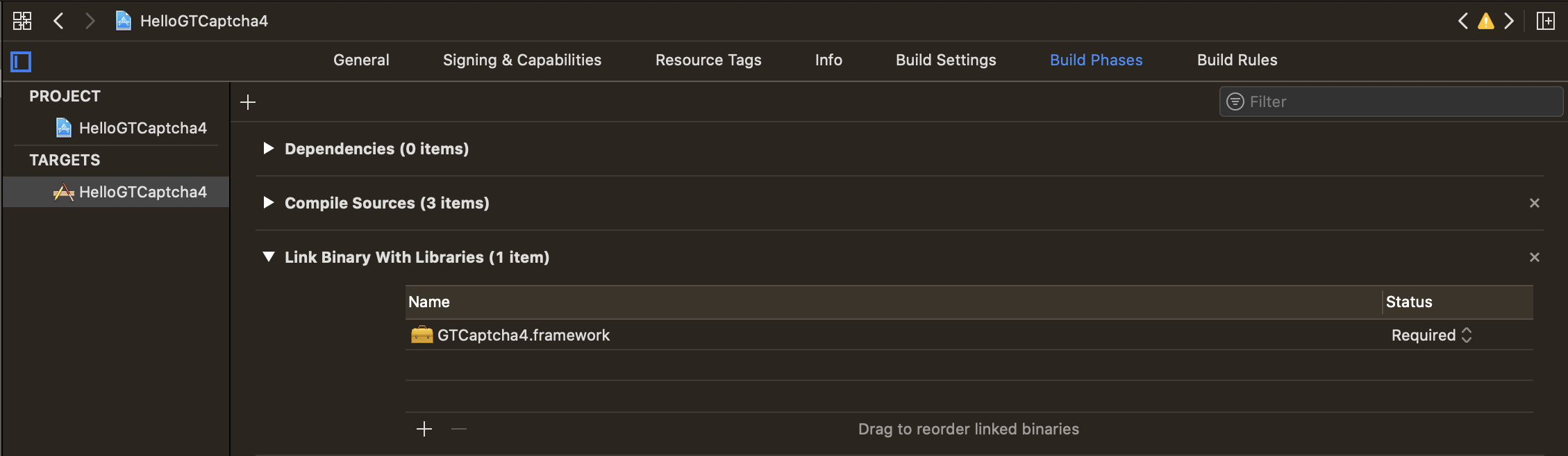
SDK 已提供 XCFramework 格式,位於下載文件的
SDK->XCFramework目錄下的GTCaptcha4.xcframework針對靜態庫中的
Category, 需要在對應target的Build Settings->Other Linker Flags添加-ObjC。
需要在工程中同時引入
GT4Captcha4.Bundle,否則無法使用驗證。把 SDK 路徑下的中的GTCaptcha4.Bundle拖入項目中。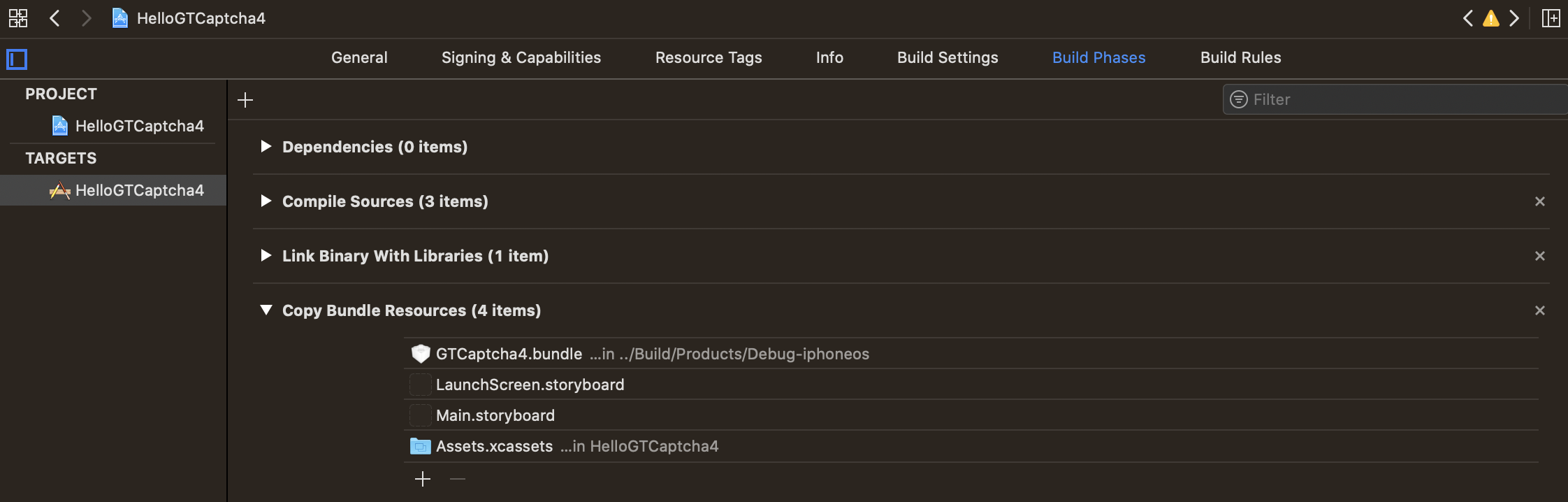
蘋果在 WWDC23 上發布了應用程序(包括 SDK)的新隱私政策,並有 Get started with privacy manifests - WWDC23 - Videos - Apple Developer 的單獨專題。7 月 27 日蘋果發布了此則新聞,新聞稱:2023 年秋季開始,如果新上傳的應用程序中使用了沒有提供隱私清單的相關 API,那麼你將會收到一封郵件通知,而從 2024 年春季開始,隱私清單會變成一個強制要求。涉及到的 API 以及使用原因可參考:Describing use of required reason API | Apple Developer Documentation,如果使用原因未在列表中列出也可直接提交具體使用理由。 如何創建新隱私清單說明,可參考 Privacy manifest files | Apple Developer Documentation
行為驗證 iOS SDK 使用了其中部分函數獲取硬盤容量、環境檢測信息用於風控目的,涉及 NSPrivacyAccessedAPICategoryDiskSpace 和 NSPrivacyAccessedAPICategoryFileTimestamp 兩個類別,特此說明。
配置接口
參考行為驗證的產品結構流程, 必須要先在您的後端搭建相應的服務端接口,並配置從EngageLab管理後台 獲取的
captchaId和Key
集成用戶需要使用 iOS SDK 完成提供的以下接口:
- 使用 ID 配置驗證初始化
- 啟動驗證
- 獲取驗證結果參數,並對提交結果參數進行二次校驗,避免偽造
- 使用錯誤代理方法處理驗證過程中可能遇到的問題
需要遵守<GTCaptcha4SessionTaskDelegate>協議以處理驗證結果和可能返回的錯誤。
集成代碼參考下方的 代碼示例
編譯並運行你的工程
編譯你的工程, 體驗行為驗證

代碼示例
初始化與調用驗證
在工程中導入驗證動態庫GTCaptcha4.framework的頭文件
#import <GTCaptcha4/GTCaptcha4.h>
以在
UIButton中集成為參考
初始化
初始化驗證管理器
GTCaptcha4Session的實例, 在UIButton初始化方法中對GTCaptcha4Session實例調用註冊方法以獲得註冊數據:#define captchaID @"xxxxxxxxxxxxxxxxxxxxxxxxxxxxxxxx" @interface ViewController () <GTCaptcha4SessionTaskDelegate> @property (strong, nonatomic) IBOutlet UIButton *startBtn; @property (nonatomic, strong) GTCaptcha4Session *captchaSession; @end @implementation ViewController - (GTCaptcha4Session *)captchaSession { if (!_captchaSession) { /// 創建實例 GTCaptcha4SessionConfiguration *config = [GTCaptcha4SessionConfiguration defaultConfiguration]; // config.timeout = 8.0f; /// 設置中間⻚地址,必須按示例設置為對應的地址 config.resourcePath = @"https://captcha-stat.engagelab.com/www/gt4-index.html"; /// 設置 apiServer 和 staticServer,必須按示例設置為對應的地址 config.apiServers = @[@"captcha-api.engagelab.com"]; config.staticServers = @[@"captcha-stat.engagelab.com/www/js"]; /// 請求協議 config.protocol = @"https"; _captchaSession = [GTCaptcha4Session sessionWithCaptchaID:captchaID configuration:config]; _captchaSession.delegate = self; } return _captchaSession; } - (void)viewDidLoad { [super viewDidLoad]; // 提前初始化驗證會話,如果不在此位置調用,將使用懶加載模式 [self captchaSession]; [self.startBtn addTarget:self action:@selector(start) forControlEvents:UIControlEventTouchUpInside]; }#define captchaID @"xxxxxxxxxxxxxxxxxxxxxxxxxxxxxxxx" @interface ViewController () <GTCaptcha4SessionTaskDelegate> @property (strong, nonatomic) IBOutlet UIButton *startBtn; @property (nonatomic, strong) GTCaptcha4Session *captchaSession; @end @implementation ViewController - (GTCaptcha4Session *)captchaSession { if (!_captchaSession) { /// 創建實例 GTCaptcha4SessionConfiguration *config = [GTCaptcha4SessionConfiguration defaultConfiguration]; // config.timeout = 8.0f; /// 設置中間⻚地址,必須按示例設置為對應的地址 config.resourcePath = @"https://captcha-stat.engagelab.com/www/gt4-index.html"; /// 設置 apiServer 和 staticServer,必須按示例設置為對應的地址 config.apiServers = @[@"captcha-api.engagelab.com"]; config.staticServers = @[@"captcha-stat.engagelab.com/www/js"]; /// 請求協議 config.protocol = @"https"; _captchaSession = [GTCaptcha4Session sessionWithCaptchaID:captchaID configuration:config]; _captchaSession.delegate = self; } return _captchaSession; } - (void)viewDidLoad { [super viewDidLoad]; // 提前初始化驗證會話,如果不在此位置調用,將使用懶加載模式 [self captchaSession]; [self.startBtn addTarget:self action:@selector(start) forControlEvents:UIControlEventTouchUpInside]; }此代碼塊在浮窗中顯示其他可選配置項見
GTCaptcha4SessionConfiguration中定義的接口或屬性。調用驗證
初始化完成後, 調用下面的方法進行驗證:
- (void)start { [self.captchaSession verify]; }- (void)start { [self.captchaSession verify]; }此代碼塊在浮窗中顯示
處理驗證結果
只有完成對驗證結果的校驗後, 本次驗證才是完整完成。您需要在遵守 GTCaptcha4SessionTaskDelegate 協議後, 處理以下代理方法:
              - (void)gtCaptchaSession:(GTCaptcha4Session *)captchaSession didReceive:(NSString *)code result:(NSDictionary *)result {
    NSLog(@"result: %@", result);
    // code 為 @"1" 則為用戶完成了驗證,為 @"0" 則為用戶驗證失敗
    if ([@"1" isEqualToString:code]) {
        if (result && result.count > 0) {
            // 字典轉為表單格式進行提交(根據實際接口數據格式要求進行構造)
            __block NSMutableArray<NSString *> *kvPairs = [NSMutableArray array];

            [result enumerateKeysAndObjectsUsingBlock:^(id  _Nonnull key, id  _Nonnull obj, BOOL * _Nonnull stop) {
                if ([key isKindOfClass:[NSString class]] &&
                    [obj isKindOfClass:[NSString class]]) {
                    NSString *kvPair = [NSString stringWithFormat:@"%@=%@", key, obj];
                    [kvPairs addObject:kvPair];
                }
            }];

            NSString *formStr = [kvPairs componentsJoinedByString:@"&"];
            NSData *data = [formStr dataUsingEncoding:NSUTF8StringEncoding];

            // 開發者業務後端提供的驗證校驗接口
            NSURL *url = [NSURL URLWithString:@"https://***/validate"];
            NSMutableURLRequest *request = [NSMutableURLRequest requestWithURL:url];
            request.HTTPMethod  = @"POST";
            request.HTTPBody    = data;

            // 提交到後端對結果進行校驗
            [[[NSURLSession sharedSession] dataTaskWithRequest:request completionHandler:^(NSData * _Nullable data, NSURLResponse * _Nullable response, NSError * _Nullable error) {
                if (!error && data) {
                    // 處理驗證結果
                    NSString *msg = [[NSString alloc] initWithData:data encoding:NSUTF8StringEncoding];
                    NSLog(@"result: %@", msg);
                }
                else {
                    NSLog(@"error: %@", error);
                }
            }] resume];
        }
    }
}
處理驗證錯誤
驗證過程中可能發生一些預料之外的錯誤, 您可以通過遵守 GTCaptcha4SessionTaskDelegate協議後, 在下面的代理方法中進行處理:
              - (void)gtCaptchaSession:(GTCaptcha4Session *)captchaSession didReceiveError:(GTC4Error *)error {
    // 向用戶展示錯誤信息和錯誤碼

    // 在日誌中記錄錯誤詳情
    NSLog(@"error: %@", error.description);
}
強烈建議在向用戶展示驗證錯誤原因時,同時展示錯誤碼,方便後續排查線上問題。
Swift 示例
更多示例代碼細節參考官方提供的 Demo,其中 Swift 示例代碼請參考 Demo 源碼中的 DefaultDemoViewController.swift 文件
