




















One Platform · Ten Products
Mobile Push Notification Service
- 8 vendor channels + 1 self-built channel, reaching a message delivery rate of 99%.
- 7+ message styles, 10+ user grouping rules to accurately reach target users.
- Full-life cycle data tracking, multi-dimensional message funnel, and user behaviour profiling.
- Global multi-data node selection, multi time zone, multi-language intelligent adaptation.
Web Push Notification Service
- Ultra-simple configuration process, 3-min online rapid development.
- W3C service + EngageLab built notifications for 100% browser coverage.
- Support for custom "Subscription Guide" to increase subscription rate by more than 70%.
- Support for Shopify and other independent platforms to quickly create WebPush.
Transactional & Marketing Email API
- Intelligent regulation of sending strategy, 99% inbox rate, 99.97% delivery rate.
- Sender, BIMI certification, increase brand awareness, build trust in the brand.
- 100+ template email, mudah membuat email yang menarik.
- Complete lifecycle email data tracking, multi-dimensional analysis, and user behavior feedback.
Bulk SMS & Transactional SMS API
- Terhubung langsung ke 200+ negara/wilayah untuk cakupan global.
- Switching channel cerdas untuk menjangkau pengguna dalam 5 detik.
- Provide real-time status return, reporting intuitive and reliable.
- Supports uplink response to incoming SMS, timely notification of user feedback.
WhatsApp Business API · Meta BSP
- Official Meta BSP: Globally competitive pricing with enterprise verification and coverage across 200+ countries.
- Reduce costs and increase efficiency: Deliver up to 95% and reduce costs by 70%.
- More than 10 types of messages for consumers to complete the deal and convert the user within WhatsApp.
- Analisis data sepanjang lifecycle dengan laporan pengiriman lengkap.
Why Global Leaders Choose EngageLab
Reliable Delivery, Owned Infrastructure
Owned infrastructure for email and push means more control over deliverability, clearer feedback loops, and lower total cost than reseller stacks.
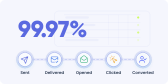
Unified Lifecycle Customer Data
Customer data integrated across verification, engagement, and support. Growth and service teams share one 360° customer view.
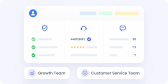
Start Anywhere, Expand into One Platform
Modular architecture lets businesses start with any single product (SMS, Email, OTP) and scale seamlessly. No system switching, no data loss.

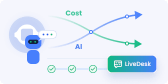
Native AI Powered by GPTBots · No Seat Fees
Native AI designed for complex tasks and business workflows, paired with no-seat-fee pricing on LiveDesk. The more AI resolves, the lower your service costs.
Global Compliance & Data Residency
Multi-region data center deployment (Europe, APAC) meeting local regulations including GDPR, PDPA, and passing enterprise security reviews.

Developer-First APIs & Proven Scale
High-performance, easy-to-integrate APIs supported by comprehensive documentation and a proven ecosystem, trusted by 800,000+ developers and processing 12B+ messages daily.
Solusi yang Disesuaikan untuk Industri Anda
EngageLab menyediakan platform all-in-one yang sangat terintegrasi untuk enterprise, mencakup beragam fungsi. Mengintegrasikan berbagai channel interaksi pelanggan dan kemampuan inti.
Keuangan
E-commerce
Berita & Media
Industri Perjalanan
Gaming

Dibangun atas Kepercayaan, Dicintai Pelanggan
Keamanan tingkat perusahaan berpadu dengan pengalaman pengguna yang telah meraih penghargaan.
- ISO 27001
- ISO 27701

- SOC 2 Type II


Membuka Lebih Banyak Kemungkinan EngageLab
New & Improved! Try Smarter Marketing Automation!


Dipercaya oleh Bisnis di Seluruh Dunia
EngageLab mendapatkan kepercayaan dari bisnis berkat teknologi mutakhir dan layanan pelanggan profesional.
Elena
Bank, Account Manager
Kami menyukai EngageLab! Ini benar-benar menjadi game-changer bagi kami. Membantu kami mengintegrasikan workflow otomatis dan pelanggan senang bisa mengajukan kartu baru serta mengubah info akun. Kami sangat puas dengan solusi messaging omnichannel EngageLab—cara terbaik bank untuk tetap terhubung dengan pelanggan kami!
Chuan Leekpai
Perusahaan Grocery Online SEA, CEO
EngageLab membantu kami menemukan cara membuat kontak pelanggan lebih mudah. Sangat sederhana berkomunikasi melalui SMS dan push notification. Ini sangat membantu untuk sebagian audiens target kami (mis. ibu rumah tangga penuh waktu) yang tidak menggunakan email atau teknologi terbaru dan biasanya tidak punya waktu untuk menelepon.
Jerry Abego
Vice President Aplikasi Berita
Engagement pengguna di aplikasi sangat penting untuk industri berita dan media. Mengejutkan, EngageLab menawarkan seperangkat alat analisis data yang lengkap! Statistik mudah ditanyakan dan diekspor, membantu kami menyempurnakan strategi distribusi.
Carlos Ramirez
Director of Operations, Platform Layanan Perjalanan
Kami tahu betapa pentingnya bisa mendapatkan bantuan dengan cepat saat bepergian. EngageLab aman dan stabil. Kami selalu siap merespons semua kebutuhan klien kami. Setelah memakai layanan kami beberapa waktu, pelanggan mengatakan pengalaman mereka menjadi jauh lebih lancar.