


Firebase Cloud Messaging (FCM) is widely used for mobile and web push delivery, and Google charges no fee for sending messages through the service. That free delivery layer makes FCM an attractive starting point, although some teams later need capabilities beyond its core messaging scope. The moment your roadmap adds email, SMS, WhatsApp, or a real customer journey, FCM stops being the whole story. At that point, you're not just picking a messaging tool anymore. You're evaluating a Firebase alternative that can carry more of the engagement workload without requiring your engineering team to integrate and maintain several separate messaging tools.
Most teams don't set out looking for a replacement. The transition usually happens as messaging requirements expand. A product team asks for onboarding emails, a growth team wants SMS for time-sensitive alerts, customer support adopts WhatsApp, or a compliance review raises questions about data residency. None of that is a knock on FCM—it simply reflects requirements that extend beyond what a push delivery API was designed to handle.
EngageLab vs Firebase at a Glance
Before you weigh features one by one, here’s how the two stack up structurally. FCM is a push delivery service with built-in targeting, scheduling, and reporting through the Firebase Notifications composer; EngageLab positions push inside a broader omnichannel engagement platform.
What Are EngageLab and Firebase Cloud Messaging?
EngageLab is an omnichannel customer engagement platform with products for push, email, SMS, WhatsApp, and OTP messaging. Firebase Cloud Messaging is Google’s push delivery service within the wider Firebase suite, which also includes products such as Firestore, Authentication, and Hosting. FCM and the Firebase Notifications composer provide push targeting, scheduling, and reporting; EngageLab extends the comparison to additional messaging channels and managed cross-channel workflows.
| Category | EngageLab | Firebase Cloud Messaging (FCM) |
|---|---|---|
| Product scope | Omnichannel engagement platform: push, email, SMS, WhatsApp, OTP, and automation | Push delivery service in Firebase, with a Notifications composer for targeting, scheduling, and reporting |
| Push support | Android (FCM plus Huawei, Xiaomi, OPPO, vivo, Honor, Meizu, and a self-built fallback channel), iOS via APNs, and web push | Android, iOS (via APNs), and web push |
| Additional channels | Email, SMS, WhatsApp Business API, OTP, Silent Auth, and live chat, on the same account | None natively – other Firebase products (Auth, Firestore) aren’t messaging channels |
| Segmentation | Tag, alias, and segment-based targeting built into the console | Topic-, token-, audience-, user-property-, language-, app-version-, and custom-segment targeting; advanced behavioral logic may need other Firebase services or custom work |
| Scheduling and automation | Visual journey builder with triggers, templates, and frequency capping | Scheduled sends are built into the Notifications composer; advanced event-driven journeys and cross-channel automation require additional services or custom work |
| Analytics | Built-in funnel, message-loss, and user-lifecycle analytics per channel | Built-in sends, received, impressions, and opens reporting; advanced behavioral analysis and raw-data exploration use Google Analytics, the FCM Data API, or BigQuery |
| Infrastructure responsibility | EngageLab operates delivery infrastructure and regional data nodes; your team owns strategy and content | FCM manages message delivery; your team owns custom business logic, advanced segmentation, application-level retry handling, and journey orchestration |
| Pricing model | DAU-scale pricing for AppPush/WebPush; usage-based for Email, SMS, and WhatsApp | No fee for FCM messaging itself; other Firebase/GCP services bill separately |
| Free trial/free service | 30-day free trial on AppPush, 15-day on WebPush, and 50 free emails per day | FCM messaging is free indefinitely; the Spark plan needs no payment method |
| Best-fit team | Marketing or growth teams needing more than push, or engineers who’d rather not build a journey engine | Engineering-led teams sending push only, with time to build orchestration in-house |
Where Firebase Wins
Give credit where it’s due. FCM earns its popularity honestly, and a few of its advantages are hard to beat.
- The messaging service itself carries no per-message or per-MAU fee. Google doesn’t charge you to send a push notification through FCM, full stop. Costs may still show up elsewhere—in infrastructure, data processing, and engineering work for custom capabilities—but the delivery mechanism itself is free.
- Signup friction is close to zero. Firebase’s Spark plan requires no payment method to start prototyping, according to Firebase’s own pricing documentation, verified July 2026. That said, a handful of integrations, Firebase App Hosting among them, do require an upgrade to the pay-as-you-go Blaze plan.
- Ecosystem lock-in works in your favor if you’re already inside it. Teams running Firebase Analytics, A/B Testing, and In-App Messaging get push that plugs directly into that same data model, with no separate SDK to reconcile.
- Google’s name carries weight in procurement conversations. For engineering-led organizations, being backed by Google Cloud infrastructure simplifies vendor security reviews and reduces the “who is this company” friction that newer vendors face.

Those are practical advantages and help explain why FCM remains a common starting point for mobile push. If your app already lives inside a Google Cloud project, adding FCM costs you an SDK integration, not a procurement cycle. For a small team validating an idea, that speed matters more than almost any feature comparison.
There’s a nuance worth naming here too. “Free” applies specifically to the FCM messaging service, not to the app built around it. Firestore reads, Cloud Functions invocations, Hosting bandwidth, and other surrounding services have their own quotas and pricing rules. Depending on the service and usage level, exceeding a free allowance may require upgrading the project to the pay-as-you-go Blaze plan. Treat FCM’s zero messaging fee as one line item in a larger infrastructure bill, not as evidence that push notifications are free to run at scale.
Where EngageLab Wins
FCM is an excellent push delivery service, but delivery is only one part of customer engagement. As campaigns become more sophisticated, the challenge often shifts from sending notifications to building, managing, and optimizing the workflows behind them. EngageLab is therefore most relevant when a team wants to strengthen its push operations, reduce ongoing engineering work, or prepare for more advanced lifecycle campaigns—not simply because it offers additional channels.
- Marketing teams manage more campaign work with less ongoing engineering support. FCM supports targeting and scheduled notifications through the Firebase Notifications composer, while advanced trigger logic often involves Cloud Functions, Analytics audiences, or other Firebase and Google Cloud services. After the required SDKs, events, and data connections are configured, EngageLab Marketing Automation gives marketers a visual interface for creating and adjusting many workflows. Marketing Automation is a separate EngageLab product and is not automatically included with AppPush, so confirm availability, pricing, and supported capabilities in the current product documentation.
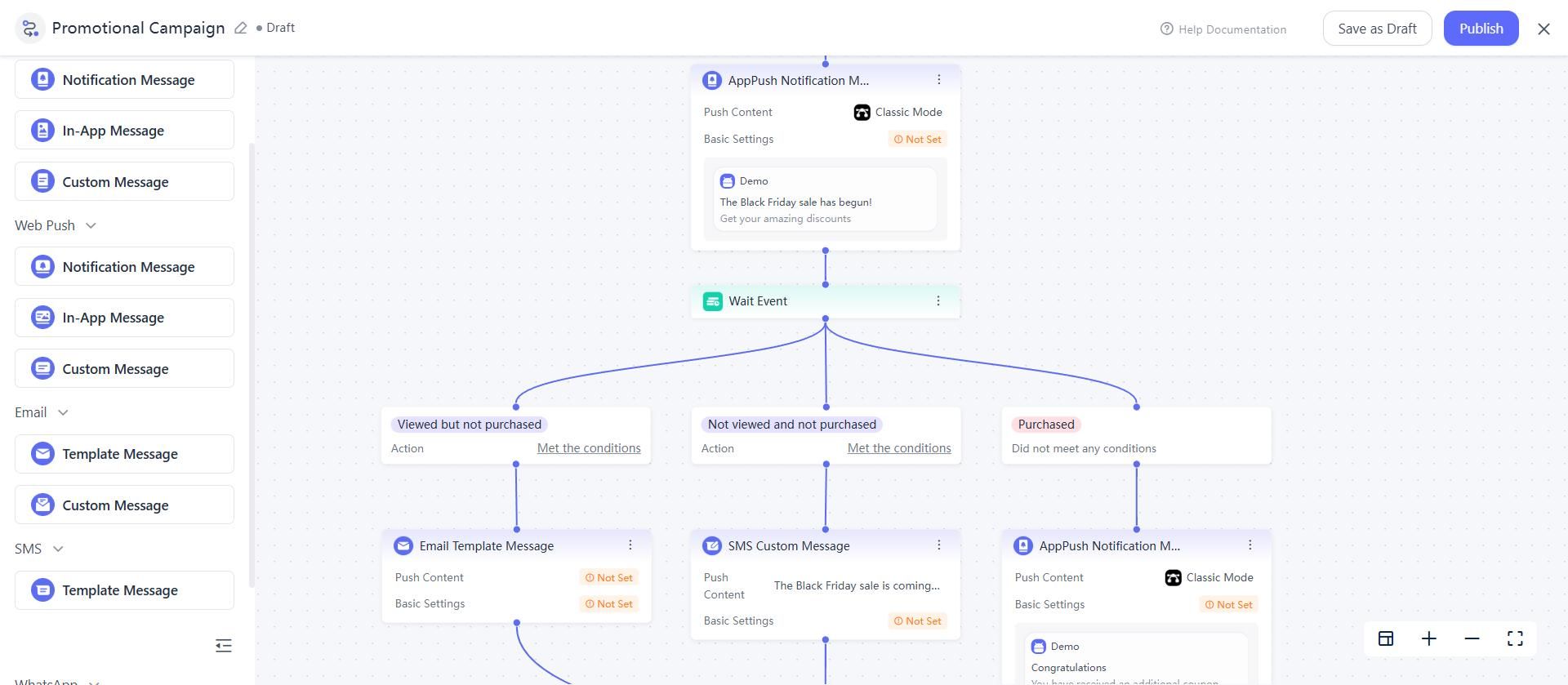
EngageLab Drag-and-drop Journey Builder - Push becomes part of a managed customer journey rather than remaining an isolated message. With the required EngageLab products and event integrations in place, teams build workflows such as a welcome push after registration, a follow-up through another channel, and a later reminder for inactive users. The value lies in coordinating lifecycle logic; additional channels support that strategy rather than serving as the primary reason to switch.
- Android delivery uses multiple configured routes. After the relevant manufacturer channels are integrated and configured, EngageLab routes Android notifications through FCM, supported manufacturer channels including Huawei, Xiaomi, OPPO, vivo, Honor, and Meizu, and the EngageLab channel according to the selected delivery strategy. The arrangement broadens channel coverage, although actual delivery still depends on device availability, manufacturer policies, user settings, and integration quality.
- Day-to-day push operations stay in a more focused console. EngageLab AppPush brings targeting, campaign creation, delivery reporting, user metrics, notification performance, and troubleshooting into a messaging-oriented interface. Firebase provides much of the same underlying capability, though the workflow often spans FCM, the Notifications composer, Google Analytics, the FCM Data API, BigQuery, or custom reporting.
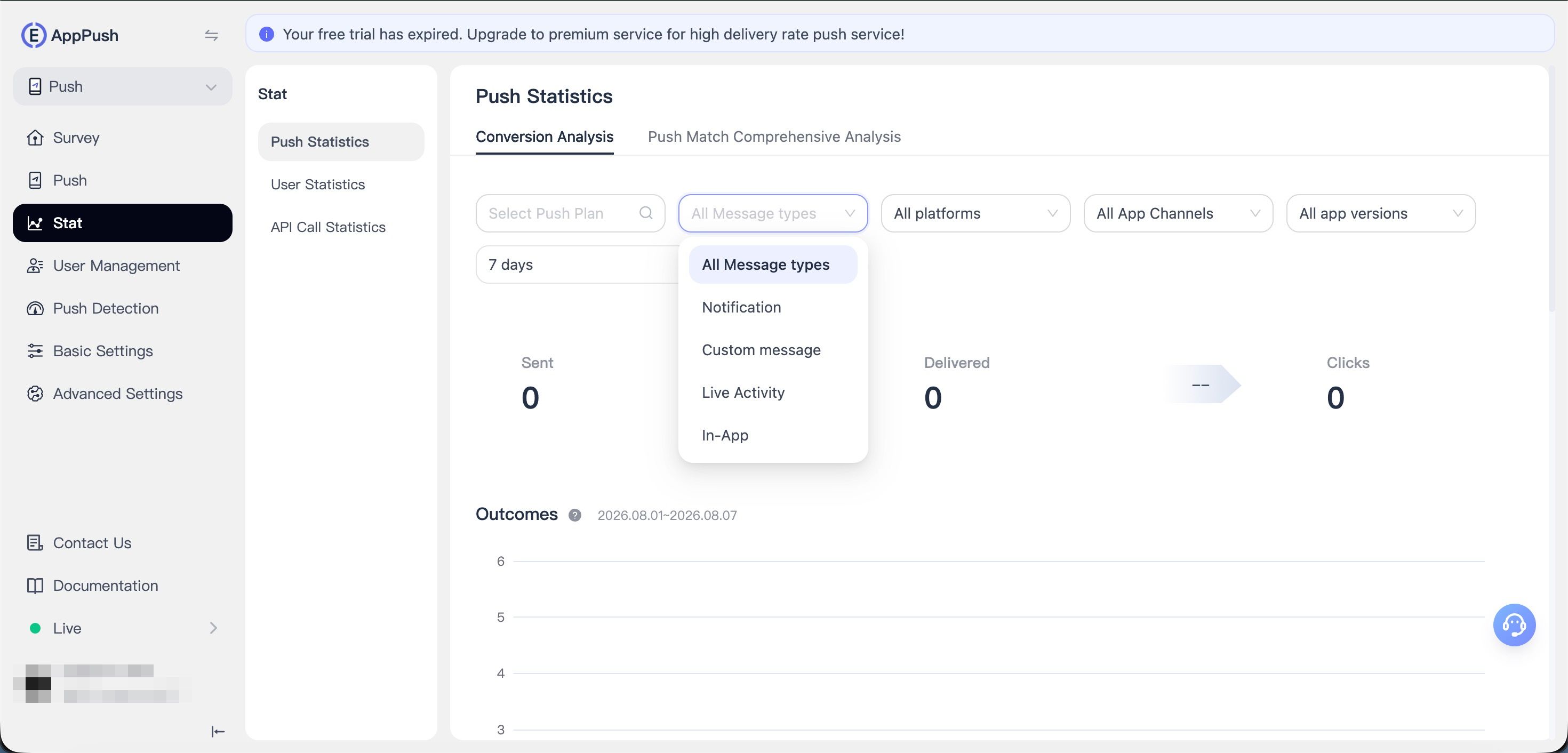
Engagelab AppPush Analytics Dashboard - Regional deployment options and published AppPush pricing provide practical evaluation inputs. EngageLab offers AppPush service nodes in Singapore, Virginia, Frankfurt, Hong Kong, Brazil, and Japan, while published starting prices offer an initial budgeting reference. Teams should still confirm the appropriate node, current quote, included capabilities, and any Marketing Automation requirements before making a decision.


Common Reasons Teams Move Beyond Firebase

Firebase Cloud Messaging is an excellent push delivery service, but teams rarely start evaluating alternatives because delivery suddenly stops working. They usually look beyond FCM when push becomes part of a more sophisticated customer engagement operation.
-
Push Evolves Into Customer Journeys
Push notifications rarely remain one-off broadcasts. Teams gradually begin building onboarding flows, inactivity reminders, upgrade campaigns, abandoned registration recovery, and other lifecycle communications. At that stage, managing customer journeys becomes more important than simply delivering notifications.
-
Marketing Wants to Launch Campaigns Independently
FCM provides reliable delivery together with targeting and scheduled sends through the Firebase Notifications composer. As campaigns become more sophisticated, marketing teams often want trigger-based automation, visual workflow editing, and the ability to make routine campaign changes with less ongoing engineering support.
-
Campaign Operations Become Harder to Manage
As campaign volume grows, teams need to coordinate segmentation, scheduling, delivery, reporting, opt-out monitoring, and performance analysis. Firebase supports these requirements through FCM and other Firebase or Google Cloud services, while some organizations prefer a platform designed around day-to-day messaging operations.
None of these reasons make Firebase a poor product. They simply reflect a different stage in a team's messaging maturity.
Marketing Teams Can Build Journeys With Less Engineering Support
One of the biggest differences between Firebase Cloud Messaging and EngageLab is not how a push notification is delivered—it is how campaigns are created and maintained.

FCM makes targeting and scheduled notifications straightforward through the Firebase Notifications composer. Behavior-based onboarding, inactivity reminders, upgrade campaigns, and other lifecycle automation often involve Cloud Functions, event logic, Analytics audiences, or additional Firebase and Google Cloud services.
After the required SDKs, events, user data, and channel connections are configured, EngageLab Marketing Automation moves much of the ongoing workflow management into a visual journey builder. Marketers create multi-step campaigns, define trigger conditions, adjust timing, and update routine campaign logic without changing application code each time.
The result is a shorter path from campaign idea to launch and less ongoing engineering involvement. For organizations where development resources are limited or shared across several teams, that operational flexibility often matters more than simply adding messaging channels.
The right approach depends on how your organization divides responsibilities between engineering and marketing. EngageLab’s journey builder is part of the separate Marketing Automation offering and is not automatically included with AppPush. Confirm package availability, pricing, event requirements, included channels, and supported capabilities before making a purchasing decision.
See how EngageLab Marketing Automation supports onboarding, reminders, and cross-channel journeys.
Which One Should You Choose?
The right answer depends on how your organization plans, builds, and operates push engagement—not on which vendor is objectively “better.”
Choose Firebase Cloud Messaging if you...
- Need reliable push delivery without a messaging fee
- Already build most messaging logic in Firebase and Google Cloud
- Have engineering resources to manage campaign logic over time
- Mainly send standalone push notifications rather than lifecycle campaigns
Consider EngageLab if you...
- Want marketers to handle more routine campaign changes with less engineering support
- Need trigger-based onboarding, reminder, or re-engagement journeys
- Prefer managing segmentation, scheduling, reporting, and delivery in one place
- Expect customer engagement workflows to become more sophisticated over time
- Also plan to add email, SMS, WhatsApp, or OTP as your messaging strategy expands
Pricing: No Messaging Fees vs. Published AppPush Pricing
Firebase Cloud Messaging charges nothing per message and nothing per monthly active user for the messaging service itself. Additional costs may arise from the Firestore reads and writes, Cloud Functions, or engineering work used to support custom segmentation, triggers, and reporting. Those costs depend on the cloud services used, traffic volume, and implementation complexity, so no single figure applies across setups. Google Cloud budgets generally provide alerts rather than automatic hard spending caps; teams should configure monitoring and service-specific usage controls carefully.
The starting pricing of EngageLab AppPush is in the range of $299 for 10,000 DAU plus a $199 monthly platform fee, with per-DAU rates stepping down above 100,000 DAU. Verify current figures against EngageLab’s live pricing calculator before budgeting, since published rate cards change. This price covers the AppPush product’s included targeting, segmentation, and delivery capabilities. Compare the exact package and required add-ons with the Firebase services in your own implementation.

Cost check: Neither number tells the full story alone. FCM can remain inexpensive for straightforward push use cases, while advanced custom workflows may add infrastructure and engineering costs. EngageLab’s price bundles a defined set of product capabilities into the subscription. Compare them on total delivered capability, not sticker price.
Frequently Asked Questions
Is Firebase Cloud Messaging really free?
Yes, for the messaging service itself, Google confirms no per-message or per-MAU charge for FCM. Surrounding services such as Firestore and Cloud Functions have separate quotas and pricing rules; depending on the service, additional usage may require moving the project to the Blaze plan.
Can I use FCM and EngageLab together?
Technically, coexistence is often possible, depending on your SDK configuration, token management, and how you handle event flows during a migration. It isn’t necessarily a common production setup, so confirm the specifics with EngageLab’s technical documentation before designing around it.
Does EngageLab replace all of Firebase?
No. EngageLab can replace or supplement parts of the messaging and engagement layer, including push, email, SMS, WhatsApp, and OTP. It doesn’t touch Firestore, Firebase Authentication, or Firebase Hosting, which remain separate infrastructure decisions entirely.
How does EngageLab’s pricing compare to Firebase’s Blaze plan?
They’re structured differently, so a direct comparison needs care. EngageLab bundles a defined set of delivery, targeting, and engagement capabilities into its product pricing. Firebase’s Blaze plan bills eligible cloud usage separately; Firebase includes basic targeting, scheduling, and reporting, while advanced segmentation and cross-channel orchestration may require additional services or custom work.
What happens if I exceed Firebase’s free Spark plan limits?
It depends on the specific Firebase product. Some services pause additional usage for that product once you hit its free-tier limit, rather than taking your entire app offline. Check Firebase’s official pricing documentation for the exact behavior of each product you're using, since limits and enforcement vary by service.
The Bottom Line
There is no universal winner because the two products solve different problems. If your goal is reliable push delivery and your engineering team is comfortable building and maintaining campaign logic around Firebase, FCM remains an excellent choice: its messaging service has no messaging fee, is mature, and integrates deeply with the Firebase ecosystem. If your focus is shifting from simply sending push notifications to operating lifecycle campaigns, reducing ongoing engineering dependency, and giving marketing teams greater control after the required technical setup, EngageLab becomes more relevant to evaluate. EngageLab Marketing Automation is a separate product from AppPush, while additional channels such as email, SMS, WhatsApp, and OTP are extensions of that engagement strategy rather than the primary reason to switch. Choose the platform that matches how your organization plans, builds, and operates customer engagement—not just how it delivers push notifications.
Build trigger-based push campaigns, customer journeys, and omnichannel messaging from one platform—all without managing multiple messaging tools.

