


Jacob Morrow
Updated: 2026-08-27
Imagine a payment platform detects a suspicious login at 2:14 p.m. Its SMS API accepts the alert seconds later, but the message remains queued until 2:22. By then, the account owner has already approved a fraudulent transaction.
Technically, the message was sent. Operationally, the alert failed.
This is the difference between sending an SMS and building a reliable SMS alert system. The system must detect the right event, reach the right person before the moment to act has passed, show what happened after sending, and know what to do when delivery fails.
What Is an SMS Alert System?
The word alert implies that timing or action matters. An SMS alert system is a business messaging workflow that sends a text when a defined event, threshold, or schedule requires attention. The trigger might be a suspicious login, a payment failure, an appointment time, a delivery delay, or a monitoring tool detecting an outage.
The terms SMS alert and SMS notification are often used interchangeably, but they are not always identical. An alert usually emphasizes a change that needs timely awareness or action, while a notification can describe any informational text message.
| Message type | Main purpose | Typical trigger | Example |
|---|---|---|---|
| SMS alert | Draw attention to a time-sensitive change or condition | Event, threshold, schedule, or authorized manual action | Service outage, fraud warning, or delivery delay |
| SMS notification | Provide a broader range of updates | Business process or communication schedule | Order confirmation or account update |
| Transactional SMS | Support a transaction or user-initiated activity | User action or account event | Payment receipt or login verification |
| Promotional SMS | Encourage a marketing action | Campaign schedule or audience segment | Sale announcement or product offer |
| Public emergency alert | Warn people in an affected area | Authorized public-safety event | Severe-weather or evacuation warning |
Public emergency alerts may use cell broadcast or another government warning network rather than ordinary person-to-person SMS. Businesses should not assume that a commercial SMS platform provides the same reach or priority as an official public warning system.
When Are SMS Alerts a Good Fit?
SMS suits concise, time-sensitive information when recipients may not have an app or internet connection. It should not be the default for every update: email is often better for detailed records, while push may suit routine app messages. Choose the channel—and any fallback—according to urgency and the action required.
How Does an SMS Alert System Work?
Most alert failures do not begin with the SMS itself. They begin with a late trigger, the wrong recipient, a duplicated event, or a workflow that stops as soon as the API returns “accepted.” A reliable workflow controls the full path from the original event to the recipient's action—and defines what happens when any step breaks.
-
Detect the trigger
An order system, monitoring tool, CRM, calendar, payment platform, or employee identifies an event that requires an alert.
-
Apply business rules
The system checks severity, recipient preferences, consent, location, time zone, and whether the same event already generated a message.
-
Build the message
An approved template is filled with relevant details such as a name, order number, location, or expected resolution time.
-
Select the sender and route
The platform uses an approved sender type and an appropriate carrier route for the destination.
-
Track the status
The platform records whether the request was accepted, queued, delivered, rejected, or still waiting for a carrier result.
-
Handle failure or escalation
Based on the error and urgency, the workflow can retry, notify another person, or use a fallback channel such as voice, push, or email.
Where Do APIs, Webhooks, and Automation Fit?
An SMS API lets a business system request a message automatically—for example, when an estimated delivery time changes. A webhook or callback returns status changes to that system. Business and technical teams should agree on the trigger, audience, urgency, owner, and failure action so a working integration does not produce duplicate, mistimed, or unclear alerts.
Delivery Status, Retries, and Fallback
“Accepted” means the platform received the request; it does not necessarily mean the recipient's phone received the SMS. Delivery may still depend on the carrier, sender approval, phone-number validity, device availability, and local filtering rules.
- Retry only temporary failures and limit the number of attempts.
- Prevent the same event from creating duplicate alerts.
- Stop retrying permanent failures such as an invalid number.
- Escalate high-priority alerts when the responsible person does not respond.
- Use a fallback channel when the business impact justifies it.
- Record the final status so operations and support teams can investigate.
Common SMS Alert Types, Use Cases, and Examples
A fraud warning and a delivery-delay update may use the same SMS channel, but they should not use the same workflow. The fraud warning may require immediate fallback and escalation; the delivery update may only need a tracking-page update. That is why alert design starts with the business event and the time available to act—not the industry label.
| Scenario | Typical trigger and recipient | Alert content | Failure action |
|---|---|---|---|
| Account and security | Risk rule or new login; account owner or security team | Time, location, affected account, and a safe action | Retry quickly and escalate through another verified channel |
| Payment and banking | Payment, decline, or unusual transaction; customer or finance team | Amount, status, reference, and verification path | Record the failure and provide an alternate account channel |
| Orders and deliveries | Status or ETA change; customer or receiving team | Order reference, new status, and expected next update | Update the tracking page and notify support when necessary |
| Appointments | Scheduled reminder or change; patient, guest, or customer | Date, time, location, and confirmation or rescheduling action | Use a second reminder only when consent and policy allow it |
| IT and service operations | Monitoring threshold or outage; on-call employee or customer segment | Affected service, impact, start time, and response instruction | Escalate to the next owner and suppress repeated alert noise |
| Travel and events | Delay, cancellation, gate, venue, or schedule change; affected traveler or attendee | What changed, effective time, and available options | Publish the same status through the official service channel |
| Workforce and safety | Shift change, closure, site incident, or authorized warning; staff or affected group | Location, impact, instruction, and update source | Escalate critical alerts and use approved emergency procedures |

SMS Alert Message Templates
A useful alert identifies the sender, explains what changed, and states the next action. Replace the brackets with approved data fields and use a recognizable official destination for links.
- Security: “[Company]: We detected a sign-in to [Account] from [Location] at [Time]. If this wasn't you, secure your account at [Official Link].”
- Payment: “[Company]: Payment [Reference] for [Amount] was [Status]. Review the details in your account: [Official Link].”
- Delivery: “[Company]: Order [Order ID] is delayed. The new estimated delivery time is [Date/Time]. Track it here: [Official Link].”
- Appointment: “[Company]: Reminder—your appointment is at [Time] on [Date] at [Location]. Reply [Option] or use [Official Link] to reschedule.”
- Service incident: “[Company]: [Service] is currently affected in [Area]. We are investigating. Next update by [Time]: [Status Link].”
- Workforce: “[Company]: [Site/Shift] has changed due to [Reason]. Follow [Instruction] and confirm at [Official Link].”
Security alerts should never ask recipients to send passwords, verification codes, or sensitive account information by text.
How to Set Up Reliable SMS Alerts
A message can reach a phone and still fail as an alert. It may arrive too late, reach the wrong person, come from an unrecognizable sender, omit the next step, or repeat until the recipient starts ignoring it. Reliable setup begins by designing around these failure modes, not by starting with a send button.
An SMS alert can fail even when it is delivered: it reaches the wrong person, arrives after the decision window closes, hides behind an unfamiliar sender, gives no clear next step, or repeats the same event until the message becomes noise.
Business, operations, compliance, procurement, and technical teams should use the following process before putting an alert workflow into production.
- Define the purpose and owner. Document the event, urgency, audience, expected action, and team responsible for the workflow.
- Confirm consent and recipient preferences. Record the appropriate opt-in basis, provide required opt-out methods, and respect local rules, quiet hours, and time zones. Requirements vary by country and message type, so obtain qualified legal advice for each market.
- Select the sender. Choose a supported short code, long code, toll-free number, or alphanumeric Sender ID based on destination, reply needs, volume, and registration rules.
- Create clear templates. Keep alerts concise, identify the sender, include a safe action, and localize wording where necessary.
- Connect the trigger. Use a console, schedule, API, webhook, or automation tool and define controls that prevent duplicate or unnecessary alerts.
- Test the full path. Test valid, invalid, delayed, and failed deliveries—not just whether the API accepts a request.
- Monitor and improve. Review delivery outcomes, latency, failures, opt-outs, responses, escalations, and support incidents by country, sender, carrier, and alert type where data is available.
How to Choose a Reliable SMS Alert Service or API
Compare providers against the needs of the alert workflow. A service-level agreement, or SLA, may cover platform availability without guaranteeing that every SMS reaches a handset within a fixed time, so confirm exactly which systems, delivery stages, exclusions, and support response times it covers.
-
Coverage and senders
Verify destination coverage, approved sender options, registration requirements, and local restrictions.
-
Integration and control
Compare console, API, webhook, automation, templates, localization, and user-access controls.
-
Visibility and recovery
Check delivery statuses, timestamps, logs, retry controls, escalation, fallback, and incident support.
-
Commercial terms
Review throughput, rate limits, SLA scope, exclusions, service credits, and all message, number, registration, and support charges.
Ask providers to demonstrate a failed delivery, not only a successful send. Business and support teams should be able to understand the result and act.
How to Send SMS Alerts with EngageLab
The most useful way to test an SMS platform is not to send a perfect message. It is to simulate a delayed or failed one and see what your team can learn from the result.
EngageLab SMS supports both console-based sending and a REST API, so business teams can manage approved senders and templates while technical teams connect alerts to business events. Sending records and status callbacks add the visibility needed to investigate what happened after a request was accepted.
This makes EngageLab relevant to the workflow described above: trigger an alert from a system, keep the message controlled with approved templates and variables, then return its status to the team responsible for follow-up. Confirm sender, routing, and regulatory requirements for every destination before production use.
-
Open the SMS workspace. Create an
EngageLab account,
enable SMS, and create an application.

- Set up the sender. Create the required sender signature or Sender ID and allow time for review.
-
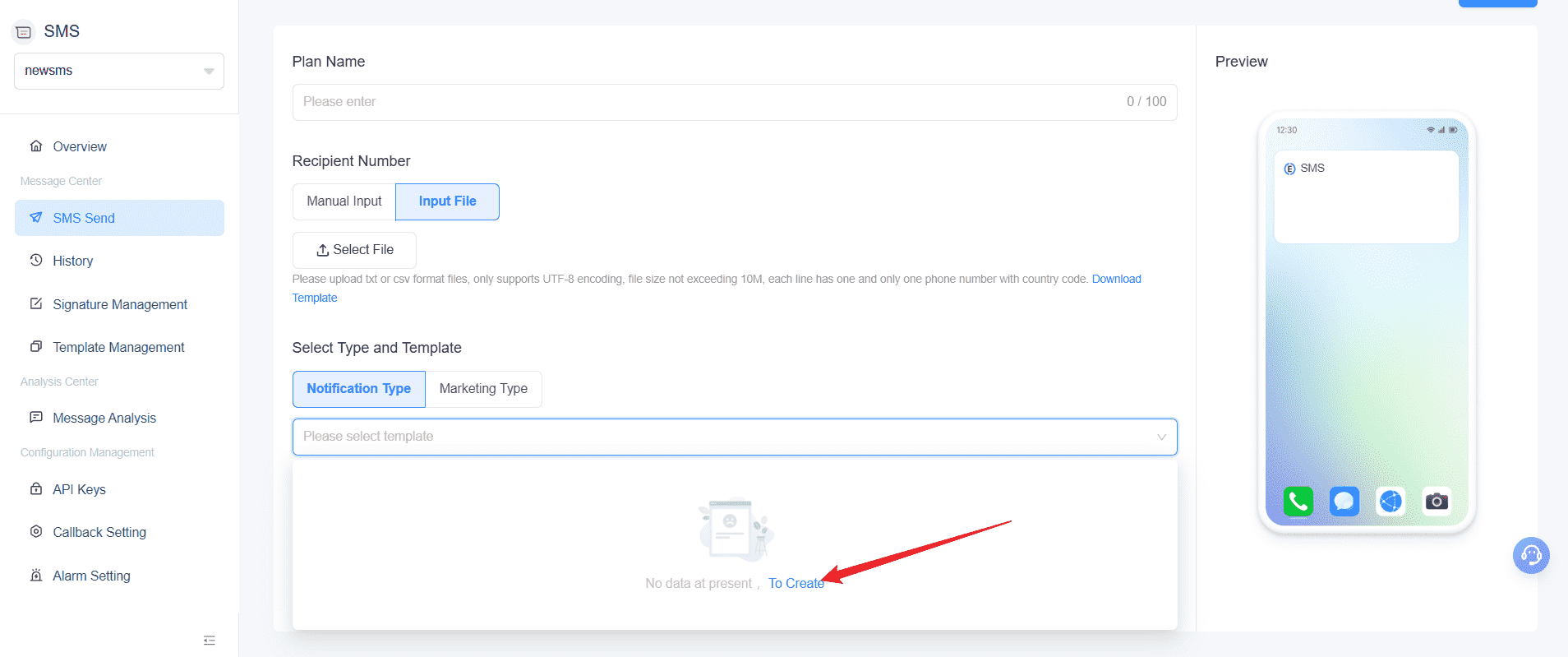
Create a notification template. In
Template Management, create the template and submit it for
review.
-
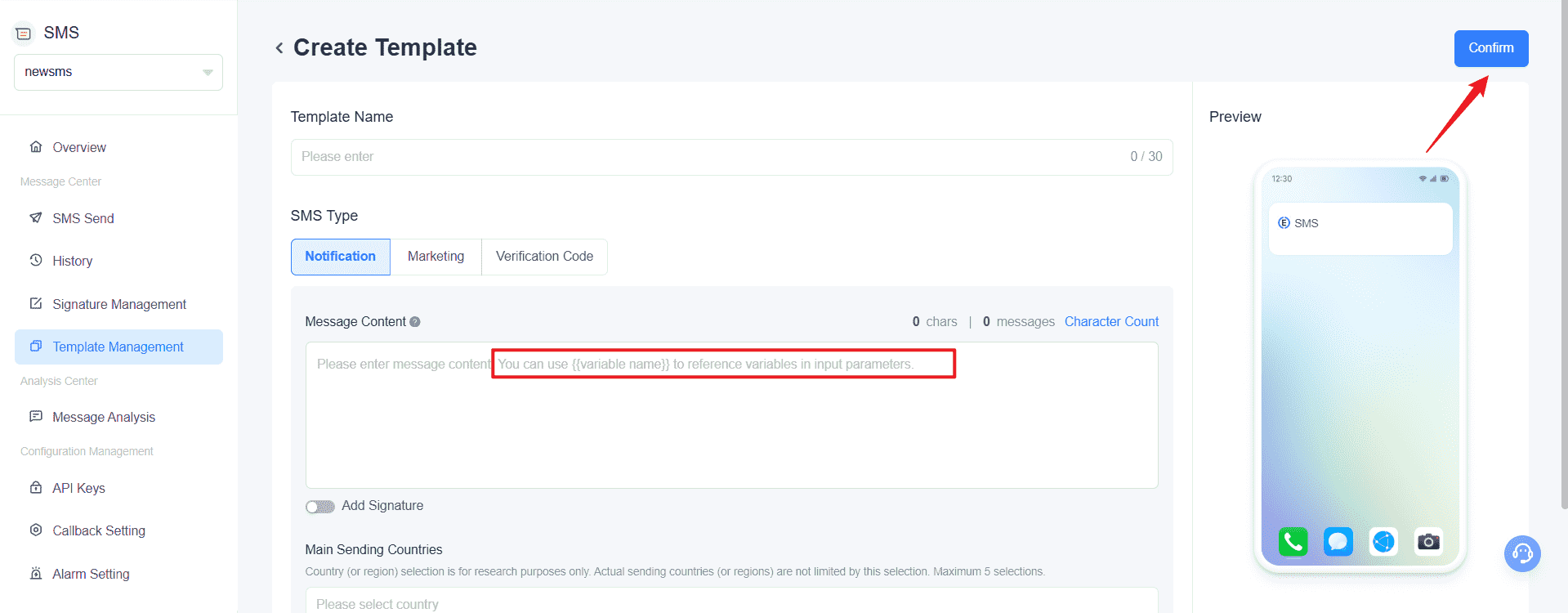
Add the alert content and variables. Write the message and
add approved fields such as a name, order ID, status, or time. Make sure the
final text still makes sense when real values replace the placeholders.
- Choose how the alert is triggered. Use the console for a controlled manual send or the EngageLab REST API for event-driven delivery. Keep API secrets out of browsers, client-side applications, and public repositories.
- Return and test the result. Configure status callbacks, test representative destinations and failure cases, and review sending records before expanding the workflow.


If you want to validate the console flow first, follow the EngageLab SMS Quick Start.
Start with one trigger, one approved template, and one failed-delivery test before scaling.
Conclusion
An SMS alert is only useful if it arrives before the moment to act has passed. That requires more than successful API acceptance: the right trigger, the right recipient, a recognizable sender, delivery visibility, and a planned response when the message does not arrive. Test those controls around one important business scenario before expanding to more audiences, countries, or alert types.
![70 Holiday Greeting Messages for Business on Every Occasion [2026]](https://img.engagelab.net/article/happy-holiday-msg-cover.png)


![Best SMS Short Code Providers: 10 Options Compared [2026 Updated]](https://img.engagelab.net/article/sms-short-code-service-provider.png)

