Jacob Morrow
Updated: 2026-05-08
The short answer: SMS uses cellular networks and reaches every phone, while iMessage uses Wi-Fi or mobile data and works only between Apple devices. The deeper answer matters for businesses: SMS supports bulk messaging, two-way campaigns, and CRM integration; iMessage does not. This guide compares SMS vs MMS alongside SMS vs iMessage across six dimensions and explains how RCS in iOS 18 reshaped the conversation.
Part 1: What Is iMessage?
 Note
Note
iMessage is Apple's instant messaging service for iOS, iPadOS, macOS, and watchOS devices. It sends messages over the internet (Wi-Fi or mobile data) instead of the cellular network used by SMS, and is built directly into the Messages app on iPhone, iPad, Mac, and Apple Watch.

Image Source: Apple Support
iMessage integrates directly with Apple's ecosystem: iOS 18 ships with built-in apps inside Messages (Send Later, Photos, Memoji, Check In, Stickers, Audio), and conversations sync across iPhone, iPad, Mac, and Apple Watch through the same Apple ID. For individual users, this is seamless. For businesses evaluating messaging channels, the device-only architecture is a hard ceiling that Part 2 quantifies directly.
Why Consumers Prefer iMessage
Four features explain why Apple users default to iMessage, and why these same strengths do not translate to business messaging at scale:
-
Enhanced Features: iMessage supports multimedia files, stickers, and effects. iOS 18 devices ship with multiple iMessage apps (Send Later, Photos, Memoji, Stickers, Audio) installed by default.
-
Seamless Integration: Messages sync across iPhone, iPad, Mac, and Apple Watch through the same Apple ID, providing one continuous thread regardless of device.
-
End-to-End Encryption: Messages are encrypted between sender and recipient. Apple cannot read message content, and law-enforcement requests for content typically cannot be fulfilled (metadata can).
-
Rich User Experience: Read receipts, typing indicators, message effects, Tapback reactions, and group chat with admin controls.

Image Source: Apple Support
iOS 18, RCS, and the Cross-Platform Shift
iOS 18 introduced two changes that reshaped the SMS vs iMessage conversation. First, the Send Later app added scheduled message delivery directly inside Messages. Second, and more significantly, Apple added RCS (Rich Communication Services) support for messaging Android devices.
RCS replaces traditional SMS for cross-platform messaging when both sender and receiver support it. Practical effects since iOS 18 shipped in late 2024:
-
iPhone users can send images, videos, links, and read receipts to Android users without falling back to MMS or third-party apps.
-
By 2026, RCS coverage spans most major US, UK, EU, and Asia-Pacific carriers, with Google Messages on the Android side.
-
RCS still uses cellular data or Wi-Fi (similar to iMessage), and message bubbles in iOS appear with a distinct style for RCS conversations.
-
For business messaging, RCS Business Messaging (RBM) is a separate paid channel and is not the same as consumer RCS.
For business teams choosing a messaging channel, consumer richness is the wrong decision criterion. Reach, bulk-send capability, CRM integration, and compliance tooling determine whether a channel works at scale. Part 2 compares SMS and iMessage on exactly those dimensions.
Part 2: SMS vs iMessage: 6 Key Differences
SMS and iMessage both deliver text messages, but they differ across delivery channel, message size, security, reach, bulk-messaging support, and pricing. The table below summarizes; the sub-sections below break down each dimension:
| Dimension | iMessage | SMS |
|---|---|---|
| Delivery Channel | Internet (Wi-Fi or mobile data) | Cellular network |
| Message Size and Features | No character limit; rich media, reactions, effects, encryption |
160 characters per segment; plain text only (rich media via MMS) |
| Security | End-to-end encryption | No encryption (plaintext over carrier network) |
| Reach and Coverage | Apple devices only (iPhone, iPad, Mac, Apple Watch) | All mobile devices regardless of brand or model |
| Bulk Messaging Support | No | Yes (via SMS API providers) |
| Pricing | Free over the internet (mobile data fees apply) | Per-message rate; varies by provider, country, and route |
#1 Delivery Channel
SMS messages travel over cellular networks and require no internet connection. iMessage requires Wi-Fi or mobile data; without a connection, iMessage falls back to SMS automatically (visible as the bubble color shifting from blue to green on iPhone). For businesses, this fallback is important: an iMessage delivery failure does not always reach the user.
#2 Message Size and Features
An SMS segment caps at 160 characters in GSM-7 encoding (or 70 characters in Unicode). Longer messages get split into segments and billed per segment, which materially affects budgets at scale. Attachments require MMS, billed separately.

Image Source: Apple
iMessage has no practical character limit and supports images, videos, GIFs, voice notes, location pins, and inline app integrations. For consumer chat, the difference is large; for transactional business messaging (OTP, shipping alerts, appointment confirmations), the SMS character limit is rarely a constraint.
#3 Security
iMessage encrypts content end-to-end between Apple devices, meaning carriers and Apple cannot decrypt the message body. SMS travels in plaintext over carrier infrastructure and is interceptable in transit, which is why SMS should never carry sensitive data such as full account credentials or large monetary amounts. SMS remains the dominant channel for OTP verification because of universal device support, not because of security.
#4 Reach and Coverage
SMS reaches roughly 8 billion mobile devices worldwide regardless of operating system, brand, or model. iMessage reaches Apple users only, which is approximately 1.3-1.5 billion active devices globally. For business campaigns where audience composition is mixed (Android plus iOS plus feature phones), SMS is the only universally reachable text channel.
#5 Support for Bulk Messaging
SMS supports bulk messaging through SMS API providers, with sender IDs, opt-out compliance, and delivery callbacks. iMessage does not offer a bulk-messaging API; Apple does not license iMessage for marketing or transactional business sends. Apple's business messaging product (Apple Messages for Business) is conversation-based and routed through Messages, not a bulk-blast tool.
#6 Pricing
iMessage is free over the internet. Sender pays only for mobile data when not on Wi-Fi. SMS is billed per message segment by the SMS provider, with rates varying significantly by destination country, route type (transactional vs marketing), and volume tier. Typical 2026 wholesale rates range from $0.005 to $0.05 per segment in the US and from $0.02 to $0.10 in Europe and Asia-Pacific markets.
Part 3: Why Businesses Cannot Use iMessage for Marketing
iMessage is engineered for personal communication. Three structural limitations make it unsuitable for business marketing:
-
Restricted Audience: iMessage reaches only Apple devices, excluding the majority of global mobile users.
-
No Bulk Messaging API: Apple does not provide a bulk-send API for iMessage. Marketing campaigns at scale cannot be delivered through iMessage.
-
Limited Integration: iMessage does not connect to CRMs, CDPs, marketing automation platforms, or analytics tools at the API level.
EngageLab: SMS for Enterprise Messaging at Scale

For businesses that need SMS at scale without iMessage's device constraints, EngageLab SMS delivers marketing campaigns, transactional notifications, and OTP verification across 200+ countries from a single platform, backed by carrier-direct routes, 98%+ delivery rate in major markets, and compliance tooling built in.
Key SMS capabilities:
-
Global Reach: SMS API integrated with carriers across 200+ countries and regions, with carrier-direct routes available for transactional and OTP traffic.
-
High Deliverability: Average delivery rate above 98% in major markets, with intelligent routing to prioritize speed and cost based on use case.
-
Compliance and Analytics: Built-in delivery, click, and conversion tracking; opt-out handling; and regional compliance support (TCPA in US, GDPR in EU, regional sender-ID requirements in MENA and APAC).
-
Two-Way Messaging: Inbound SMS handling for replies, opt-outs, and conversational campaigns through one console or webhook callbacks.
-
Transparent Per-Message Pricing: Volume tiers and carrier-direct rates available on request; no minimum contract for self-serve plans.
5 Steps to Send Business SMS Globally: 200+ Countries, 98%+ Delivery Rate
-
Step 1: Sign Up: Create a free account on EngageLab and complete email verification to access the console.
-
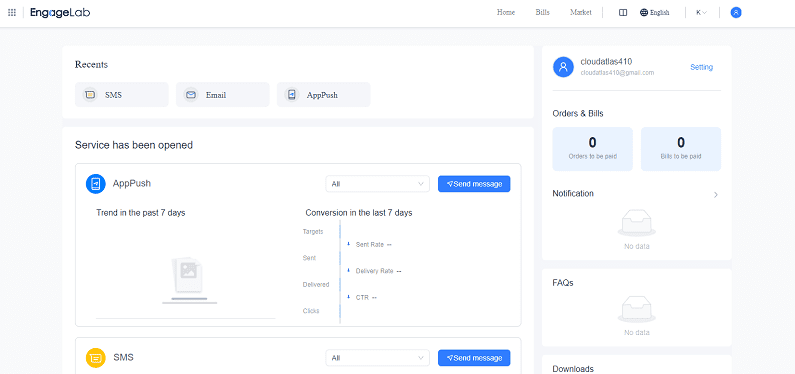
Step 2: Access the SMS Console: From the main navigation, click SMS to enter the SMS dashboard and begin setting up your messaging campaigns.
-
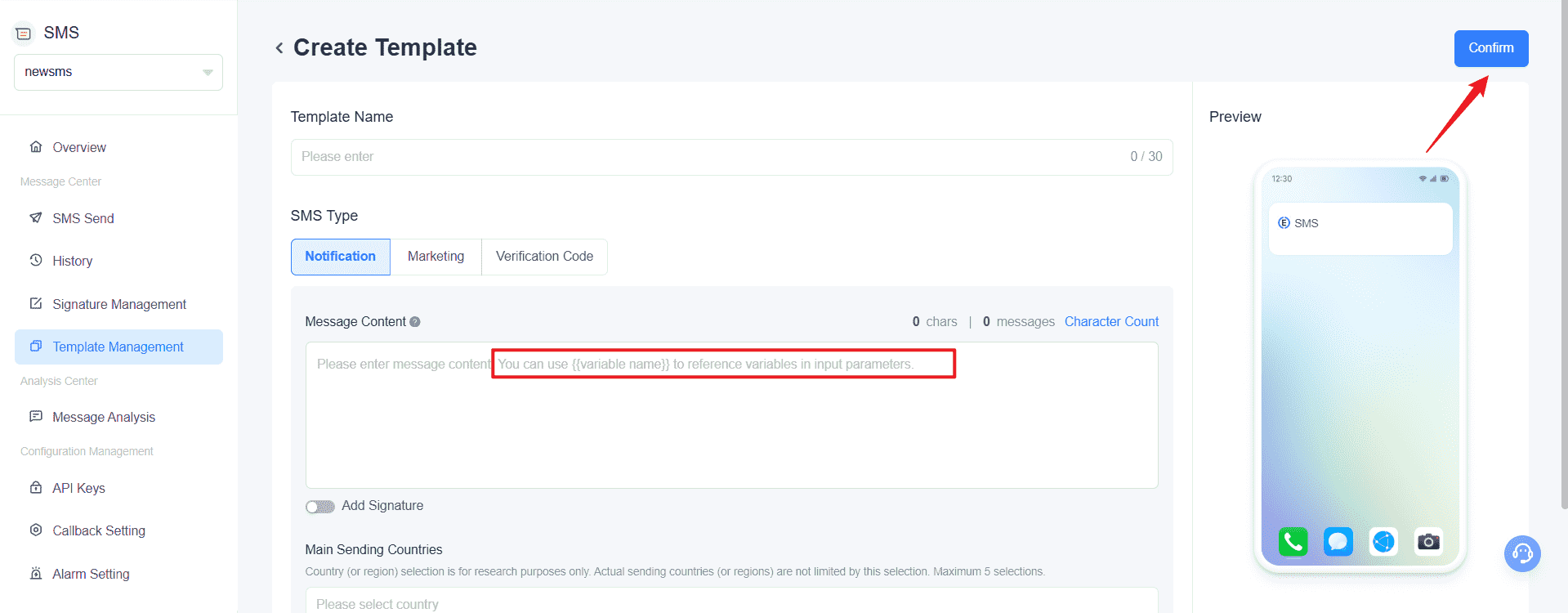
Step 3: Create an SMS Template: In Template Management, click Create Template to draft your message. You can preview the content during design. Submit it via the Confirm button. The compliance team reviews each template before it can be used for sends.
-
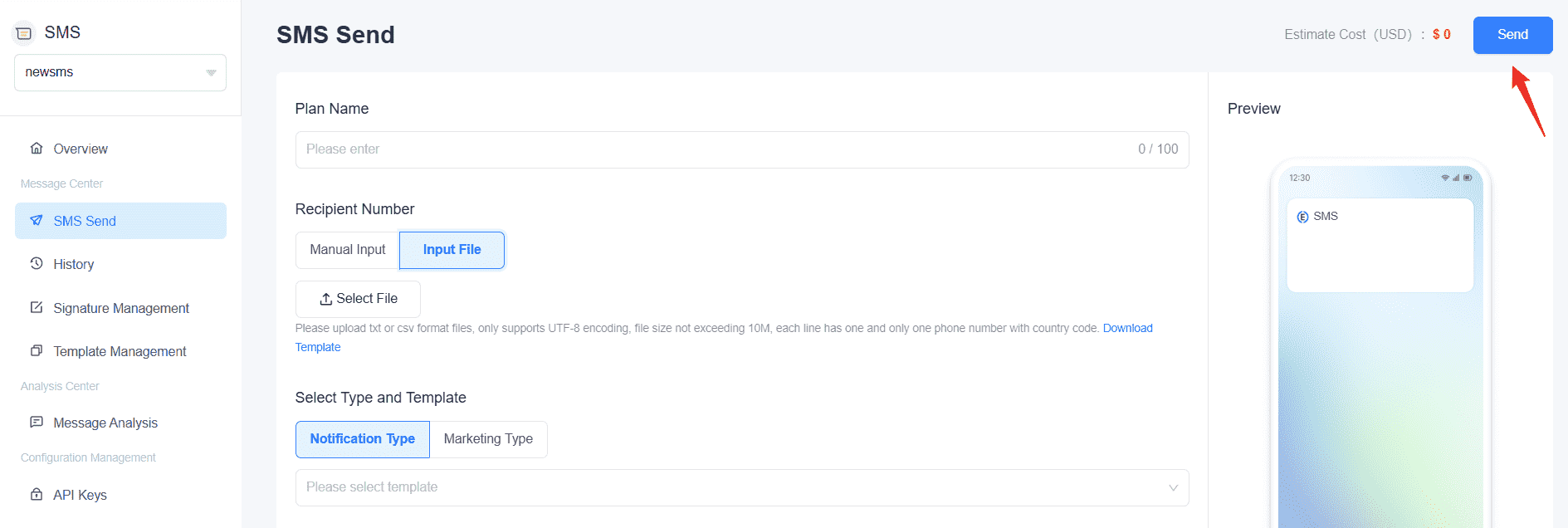
Step 4: Prepare and Send Your Message: Go to SMS Send, choose your approved template, select recipients via Manual Input or Input File, and set sending preferences. Use the test option to preview how the message renders before full delivery.
-
Step 5: Monitor Your Campaigns: Visit Analysis Center > Message Analysis to track delivery rates, click rates, and overall campaign performance in real time.


Frequently Asked Questions
What is the main difference between SMS and iMessage?
SMS uses cellular networks and works on every mobile phone regardless of brand. iMessage uses Wi-Fi or mobile data and works only between Apple devices (iPhone, iPad, Mac, Apple Watch). On iPhone, iMessage shows in blue bubbles and SMS shows in green; with iOS 18, RCS messages to Android also appear in a distinct style.
Why are some texts green and others blue on iPhone?
Blue bubbles are iMessages, which travel between Apple devices over the internet. Green bubbles are traditional SMS or MMS messages, which travel over cellular networks. Since iOS 18, messages to Android devices using RCS appear in a separate style and inherit features such as read receipts and high-resolution media that SMS does not support.
Does iMessage work without Wi-Fi?
iMessage requires an internet connection. It works on mobile data when Wi-Fi is unavailable. If both Wi-Fi and mobile data are off, the message falls back to SMS (assuming the recipient is on iPhone and has cellular service); the bubble shifts from blue to green to signal the change.
Can iMessage send to Android phones?
iMessage itself does not deliver to Android. Since iOS 18, iPhones send RCS messages to Android devices instead, which preserves features such as high-resolution media, read receipts, and typing indicators. Before iOS 18, iPhone-to-Android messages fell back to SMS or MMS with reduced functionality.
Is iMessage free?
Yes for the message itself. iMessage uses internet bandwidth (Wi-Fi or mobile data) instead of charging per message. SMS, by contrast, is billed by the carrier or, for businesses, by the SMS provider per message segment.
Can businesses use iMessage to send marketing messages?
Not for bulk marketing. Apple does not provide a bulk-send API for iMessage, and the platform is engineered for personal communication. Businesses needing scale use SMS through providers such as EngageLab, which support 200+ countries, two-way messaging, and CRM integration. Apple Messages for Business exists for one-to-one customer service conversations but is conversation-based, not a marketing-blast channel.
Will RCS replace SMS?
Not in the near term. RCS is a richer cross-platform option for consumer messaging between Apple and Android users, but SMS remains the universal fallback that works on every phone, including older devices and feature phones. For business messaging, SMS still dominates because of its reach and simplicity; RCS Business Messaging (a separate paid channel) is growing but coverage and carrier support vary by region.
Bottom Line
SMS and iMessage solve different problems. iMessage is a consumer messaging service locked to Apple devices: feature-rich for personal use, structurally unusable for business campaigns. SMS is the universal channel: it reaches every mobile phone on the planet, supports bulk delivery to millions of recipients, integrates with CRMs and marketing automation, and operates independently of device brand or internet connection. RCS in iOS 18 narrows the consumer experience gap with Android, but it does not replace SMS for transactional messaging, OTP, or marketing at scale.
If your business sends marketing campaigns, transactional notifications, or OTP verifications to a mixed or global audience, SMS is the channel. EngageLab delivers it to 200+ countries with 98%+ delivery rate, built-in compliance for TCPA, GDPR, and APAC regulations, and real-time analytics from a single console. Start free and send your first campaign today.
Last updated: May 2026.
![70 Holiday Greeting Messages for Business on Every Occasion [2026]](https://img.engagelab.net/article/happy-holiday-msg-cover.png)


![Best SMS Short Code Providers: 10 Options Compared [2026 Updated]](https://img.engagelab.net/article/sms-short-code-service-provider.png)