Elena Rodriguez
Updated: 2026-08-17
A user requests a password reset. You trigger the email and wait. Ten seconds pass, then twenty. At 47 seconds, the message finally lands. The user has already tapped “Resend” twice, opened a support ticket, and is close to uninstalling. Your logs show no errors, just a throttled SMTP relay sharing the same sender domain as your marketing campaigns.
This is where a properly configured transactional email API stops being infrastructure and starts becoming product reliability. Transactional emails typically see 80–85% open rates, roughly 4 times higher than marketing messages, according to Mailgun's email open rates research . That means users are actively waiting for these emails, often with the screen open. When delivery slows down, you are not just losing a message. You are interrupting a critical user flow and increasing support load.
A production transactional setup has two halves, and most guides only cover the first. The send side is the API: authentication, delivery, webhooks, retries. The follow-up side is automation: what happens when the message is delayed, ignored, or acted on, and which channel picks it up next. This guide covers both. You will choose a provider, integrate it step by step, and then build the automated cascade that turns a single delivered email into a completed user action across push and SMS.

What a Transactional Email API Does (and Why SMTP Alone Falls Short)
A transactional email API allows applications to send automated, event-triggered emails directly from backend systems. These emails are tied to user actions such as account creation, purchases, or password resets, and must be delivered quickly and reliably.
Transactional Email API Service vs. SMTP
A transactional email API service replaces traditional SMTP workflows with structured API calls. The core difference is control: REST APIs give you explicit status codes, retry hooks, and real-time event tracking. SMTP does not.
| Aspect | REST API approach | SMTP approach |
|---|---|---|
| Request model | Single HTTP POST request | Legacy protocol with queued delivery |
| Error handling | Explicit status codes, structured errors | Limited visibility into failures |
| Retry logic | Built-in retry handling | Harder retry logic |
| Delivery tracking | Real-time tracking with webhooks | Limited delivery feedback |
| Operational risk | Easier monitoring and logging | Shared infrastructure risk, throttling on traffic spikes |
SMTP still works, but it offers less control. When marketing campaigns share the same sender domain, transactional emails can slow down without clear warning.
What a Transactional Email API Abstracts for You
Most providers handle operational complexity automatically:
- SPF, DKIM, and DMARC authentication
- Bounce and complaint processing
- Delivery tracking and analytics
- Retry logic for temporary failures
- Webhooks for delivery events
This reduces setup time and prevents common deliverability issues before they affect users. Transactional messages are also treated differently under compliance rules. Under CAN-SPAM, transactional emails do not require an unsubscribe link, but adding promotional content can reclassify them based on the FTC “primary purpose” test.
Deliverability Is Still the Biggest Risk
Even with proper authentication, inbox placement is not guaranteed. According to Validity's 2025 Email Deliverability Benchmark Report , the global average inbox placement rate across 2024 was 83.5%, with 6.7% of mail filtered to spam and 9.8% going missing entirely. That average hides a wide spread by mailbox provider: Gmail placed 87.2% in the inbox, while Microsoft, which includes Outlook and Hotmail, reached only 75.6% and filtered 14.6% to spam.
For a marketing campaign, a 16% shortfall is a reach problem you make up on the next send. For an OTP or a password reset there is no next send. It is roughly one user in six meeting a failed login, a resend loop, and a support ticket, and closer to one in four if your users sit on Outlook.
Understanding these tradeoffs makes provider selection critical, which is why the next section compares the most widely used transactional email API platforms by pricing, deliverability, and developer experience.
Transactional Email API Services Compared: Pricing, Deliverability, and Developer Experience [2026]
Most teams assume all email providers work the same, but that is not true. The transactional email API you choose directly affects delivery speed, inbox placement, monitoring visibility, scaling cost, and how your application handles failures. A delayed password reset or OTP message is not just an email issue. It becomes a product experience issue that increases drop-offs and support requests.
The providers below represent the most commonly used options in 2026, each optimized for a different type of team or application.
| Provider | Free tier | Pricing model | Best for | Key tradeoff |
|---|---|---|---|---|
 |
AWS Free Tier credits for new accounts; no standing monthly email allowance | Pay-as-you-go per 1,000 emails | Cost at scale | Requires AWS ecosystem; monitoring is DIY |
|
|
60-day trial (100/day); the permanent free plan was retired in 2025 | Tiered plans with included volume | Enterprise reliability | Trial converts to a paid plan; complex UI |
|
|
100/month on the developer plan, no expiry | Tiered plans with included volume, plus per-1,000 overage | Speed and deliverability | Small free allowance; not built for marketing |
|
|
3,000/month (capped at 100/day) | Tiered plans with included volume, plus per-1,000 overage | Modern developer experience | Smaller infrastructure than incumbents |
|
|
100/day free plan; paid tiers free for the first month | Tiered plans with included volume | Routing and event logic | Higher than SES at scale |
|
|
300/day | Tiered plans priced by monthly send volume | All-in-one (email + SMS + marketing) | Mixing marketing and transactional can hurt reputation |
|
|
50/day | Usage-based; estimate your volume in the pricing calculator | Email, push, and SMS from one vendor | Newer email product vs. long-established providers |
Free tiers and pricing models above were checked against each provider's public pricing page in August 2026. Plans change often, so confirm the current rate for your own volume on the provider's pricing page before you budget.
1 Amazon SES

Amazon SES offers low-cost sending with deep integration into AWS infrastructure. While highly scalable, it requires manual configuration for authentication, monitoring, and reputation management, which increases setup complexity.
Technical strengths:
- REST API and SMTP relay both available
- Deep integration with AWS services (CloudWatch, SNS, Lambda)
- Highly scalable infrastructure with global delivery
- Dedicated IP and deliverability tools available
- Very low cost per email at high volume
Tradeoffs to consider:
- Setup is more complex than other providers
- Deliverability monitoring must be configured manually
- No built-in templates, automation, or analytics dashboards
- Requires SPF, DKIM, bounce handling, and reputation monitoring setup
2 SendGrid (Twilio)

SendGrid is commonly used for both transactional and marketing workflows, offering scalable APIs and strong documentation. It suits growing applications that need flexibility, though deliverability can vary on shared infrastructure and advanced features often require higher-tier plans.
Technical strengths:
- Mature REST API with SDKs for multiple languages
- Webhooks for delivery, bounce, open, and click tracking
- Template engine and dynamic email templates
- Dedicated IP support and deliverability tools
- Large infrastructure proven at enterprise scale
Tradeoffs to consider:
- The permanent free plan was retired in 2025; new accounts start on a 60-day trial that converts to a paid plan
- Dashboard and UI can feel complex
- Mixing marketing and transactional emails can affect reputation if not separated
- Less developer-focused than newer platforms
3 Postmark

Postmark emphasizes fast transactional delivery and strong reputation management. It is designed for time-sensitive notifications, though it offers fewer marketing automation or multi-channel capabilities compared to broader platforms.
Technical strengths:
- Transactional-only infrastructure improves deliverability
- Very fast delivery times (often around 1–2 seconds)
- Excellent webhook and event tracking system
- Simple API and clear documentation
- Strong reputation management and bounce handling
Tradeoffs to consider:
- More expensive than most competitors
- The free developer plan is capped at 100 emails/month, so production sending starts on a paid plan
- Not designed for marketing emails
- Limited automation and marketing features
4 Resend

Resend is a newer developer-focused email platform that has gained popularity quickly, especially among modern JavaScript and React developers. It focuses heavily on developer experience, API simplicity, and building email templates using React components.
Technical strengths:
- Very clean REST API and SDKs
- React Email templates and component-based email design
- Simple webhook and event system
- Easy domain authentication setup
- Good free tier for early-stage products
Tradeoffs to consider:
- Smaller infrastructure compared to SendGrid or AWS
- Deliverability tools still evolving
- Can become expensive at very high volume
- Fewer enterprise features and analytics tools
5 Mailgun

Mailgun provides developer-focused APIs with detailed event tracking and inbound routing capabilities. It works well for engineering teams that need visibility into delivery metrics, but pricing can increase as advanced analytics and higher volumes are added.
Technical strengths:
- RESTful API with clear and well-documented endpoints
- Advanced routing and filtering rules for incoming and outgoing emails
- Webhooks for delivery, bounce, open, and click tracking
- Support for both SMTP relay and HTTP API integration
- Good deliverability tools with domain authentication support
Tradeoffs to consider:
- The free plan is capped at 100 emails/day, and the paid-tier trial expires after the first month
- Pricing is higher than Amazon SES at scale
- Dashboard and setup can feel technical for non-developers
- Requires careful configuration for optimal deliverability
6 Brevo (formerly Sendinblue)

Brevo combines transactional email with marketing automation features, making it accessible for small to mid-sized teams. However, advanced deliverability controls are more limited compared to developer-focused platforms.
Technical strengths:
- REST API for transactional email sending
- Built-in marketing automation and campaign tools
- SMS and email available in one platform
- Pre-built templates and visual workflow builder
- Easy onboarding for non-developers
Tradeoffs to consider:
- Mixing transactional and marketing emails can impact sender reputation
- Deliverability may not match specialized providers
- Less flexibility for advanced backend workflows
- Not ideal for high-scale or performance-critical applications
7 EngageLab

EngageLab takes a different approach compared to traditional providers. Instead of treating email as a standalone service, it positions transactional messaging as part of a broader multi-channel system. Your transactional email API is not isolated. It becomes the trigger point for push notifications, in-app messages, and SMS, coordinated under one account and one console instead of three separate vendor contracts.
This architecture directly addresses a major gap highlighted in any serious transactional email API comparison. Most providers focus only on deliverability and stop at the inbox. EngageLab extends that flow beyond email, which is critical when delivery delays or failures impact user actions like OTP verification or account access.
Technical strengths:
- Email, app push, web push, SMS, and WhatsApp under one account and console
- Automatic channel fallback in the OTP product: one primary channel plus up to two backups across SMS, WhatsApp, and Voice
- A single event reported to Marketing Automation can fan out across channels through journey logic you configure rather than code
- Delivery event webhooks on each channel
- Centralized analytics for cross-channel performance tracking

Tradeoffs to consider:
- Email product is newer compared to long-established providers
- Smaller ecosystem than AWS or Twilio-based platforms
- Advanced enterprise customization may require consultation
Pricing: EngageLab prices email on a usage-based model rather than fixed monthly tiers, with a free tier of 50 emails per day. Because the same account also covers push notifications and SMS, the number worth comparing is total cost across the channels you actually send on, not the email line item alone. One practical difference from tiered providers: there is no plan minimum, so a low-volume product pays only for what it sends instead of buying an entry tier it will not fill. Run your own volume through the EngageLab pricing calculator for a figure you can budget against, and request a quote if you are sending at high volume.
Need transactional email that can fall back to push and SMS?
- Send transactional email through API or SMTP for password reset, OTP, and receipt flows.
- Track delivery, bounce, open, and click events from one dashboard.
- Reach the same user on push or SMS when a time-sensitive email is delayed or missed.
- Use templates and shared analytics without stitching several providers together.
If your goal is only to send emails, SES or Mailgun work fine. If your goal is to make sure the user action actually completes, even when email is delayed or undelivered, EngageLab becomes a strong candidate for the best transactional email API, not because of email alone, but because of what happens after the email is sent. Whichever provider you shortlist, the integration work that follows is broadly the same, and that is where most delivery problems are actually made.
How to Integrate a Transactional Email API: A Full-Stack Walkthrough
Integrating email infrastructure is not just about sending your first message successfully. Many teams complete the “send email” step and skip the rest, which later surfaces as deliverability problems, missing analytics, and silent delivery failures. Think of a transactional email system as a pipeline, not a single API call: domain authentication → API key setup → send request → webhook events → monitoring and retries. The seven steps below cover that pipeline end to end, and they apply to whichever provider you picked in the previous section.

1 Choose Your Delivery Model (REST API vs. SMTP Relay)
Most modern stacks should use a REST API over SMTP relay. The differences are operational, not cosmetic:
| Aspect | SMTP Relay | REST API (recommended) |
|---|---|---|
| Error handling | Limited status feedback | HTTP status codes and structured errors |
| Event tracking | Limited | Webhooks for delivery, bounce, open, click |
| Monitoring | Harder to instrument | Easier to log, trace, and alert on |
| Best fit | Legacy systems already using SMTP | Any modern backend service |
2 Authenticate Your Sending Domain (SPF, DKIM, DMARC)
Before sending any production emails, publish three DNS records on your sending domain:
- SPF declares which servers may send mail from your domain.
- DKIM signs outgoing mail so receivers can verify it was not tampered with.
- DMARC tells receivers what to do when SPF or DKIM fail, and provides reporting.
DNS propagation takes 24–48 hours. Verify records with tools like MXToolbox before the first production send. This is the single highest-leverage step for deliverability. Under Google's sender guidelines , every sender needs at least SPF or DKIM, and senders above roughly 5,000 messages a day to Gmail need SPF, DKIM, and DMARC together; mail that fails these checks may be rejected or filtered to spam. Publishing all three from the start means you do not have to revisit DNS when volume grows.
3 Generate and Secure API Credentials
Generate an API key from your provider dashboard and keep it server-side only. Store it in environment variables, use separate keys per environment (dev / staging / production), restrict permissions where the provider supports scoped keys, and rotate on a fixed schedule. A leaked key lets attackers send from your domain and burn your sender reputation in hours.
- Environment variables:
EMAIL_API_KEY=your_api_key_here
;
EMAIL_FROM=noreply@yourdomain.com
4 Build the Send Email API Call
A send request is an HTTP POST carrying the sender, recipient, subject, HTML body, plain-text body, and optionally headers or a template ID. The shape below is the general pattern, not any one provider's contract: endpoint path, authentication scheme, and field nesting all differ between providers, so read your provider's reference before you write the call.
POST https://<provider-api-host>/<send-path>
Content-Type: application/json
Authorization: <scheme defined by your provider>

{
  "from": "noreply@yourdomain.com",
  "to": "user@example.com",
  "subject": "Password Reset",
  "html": "<p>Click here to reset your password</p>",
  "text": "Click here to reset your password"
}
How much that differs in practice is easy to underestimate. Resend accepts close to the flat shape above with a bearer token. Postmark uses capitalised field names and its own token header. SendGrid nests recipients under personalizations . Amazon SES expects AWS SigV4 signing rather than a static key. EngageLab uses HTTP basic authentication and nests the subject and content one level down, so the same message becomes a POST to /v1/mail/send with subject and content inside a body object and to as an array. Copying a payload from one provider's documentation into another is the most common reason a first send returns a 400.
Always log the API response. Custom headers (message ID, user ID) make it possible to correlate webhook events back to application state. Skip them and you are sending blind.
5 Configure Webhooks for Delivery Events
Sending an email is not the same as delivering it. Expose a webhook endpoint and subscribe to delivered, bounced, opened, clicked, spam complaint, dropped . Persist the events so you can track delivery, bounce, and engagement rates over time. Without webhooks, you have no feedback loop on what actually reached the inbox.
- Webhook endpoint:
POST /email/webhook
 EngageLab integration reference
For EngageLab, follow the Email API documentation to wire up sending domains, API keys, and event webhooks step by step.
6 Handle Failures and Retries
Retry transient failures with exponential backoff (1 min → 5 min → 30 min → 2 h, then stop), and route permanent failures to a suppression list instead of retrying them. Bounce handling is where this most often goes wrong, so it gets its own treatment in the next section. Some platforms provide retry and cross-channel orchestration themselves. EngageLab does this through Marketing Automation journeys and through automatic channel fallback in its OTP product, so a failed or unopened message can hand off to another channel by configuration rather than custom workflow code.
7 Separate Development, Staging, and Production Environments
Never send test traffic from the production sender identity. Use separate subdomains with dedicated API keys per environment. This keeps test emails from polluting the reputation of the domain that handles real user traffic.
- Sender identities:
dev.yourdomain.com
, staging.yourdomain.com
, and the production sending domain.
It is easy to stop at Step 4, but a production-grade transactional email system needs all seven. That gets email itself working. The next question is what happens after the send, because a delivered email is not the same as a completed user action.
Why Reliable Transactional Email Is Only Half the Retention Equation
Most teams treat email infrastructure like plumbing: if the message is delivered, the system is working. Engineers focus on delivery rate, inbox placement, bounce handling, and latency. All of that matters, but it only solves the delivery problem. It does not solve the engagement problem, and it definitely does not solve the retention problem.

When a user triggers a password reset, OTP, or account alert, they are actively waiting for the message with attention already on your product. This is one of the few moments you have guaranteed user attention. If the email only contains a link and nothing else happens after that interaction, you are wasting the highest-attention touchpoint in your entire product lifecycle. That matters even more when day-30 app retention averages around 4% according to Adjust (2025) . Out of 100 signups, only four are still active after a month, which makes every transactional touchpoint a retention lever, not a system notification.
The architectural shift is to treat email as the first step in a communication chain, not the final one. The transactional email becomes the trigger: if it is not opened quickly, a push notification follows; an in-app message can guide the next action once the user returns; SMS acts as a last-resort fallback for time-critical flows. Platforms like EngageLab are built around this model: one backend event can drive email, push, in-app, and SMS through a shared workflow layer and a push notification API that covers iOS, Android, and web, instead of stitching separate providers together.
Rule of thumb: measure action completion, not emails sent
Delivery rate tells you the pipe is healthy. Action completion rate tells you the product is healthy. Track both, but optimize for the second.
The engagement data backs this up: brands using three or more coordinated channels see roughly 2.5× higher engagement than single-channel senders, according to Salesforce’s State of Marketing (2025) . The real goal is not email delivery rate but action completion rate, and that requires designing a multi-channel transactional messaging system. The next question is how to actually build that pipeline.
How to Build a Scalable Transactional Messaging Stack
Password resets, OTP codes, payment confirmations, and login alerts are not marketing — they are trust messages. Once your user base grows, email alone is not enough, because email delivery is never guaranteed and open timing is uncertain. A scalable system treats email as the primary channel but keeps push notifications and SMS on standby for when email is delayed or fails.
The Problem with Using Multiple Providers
The first decision is how many vendors that stack runs on. Using one vendor per channel (email, push, SMS) adds three contracts, three dashboards, three support paths, and custom fallback code to tie them together. Engineering spend shifts from messaging logic to integration maintenance. Consolidating channels with a single vendor removes part of that overhead. With EngageLab , email, push, SMS, and WhatsApp sit under one account and console, and a single event reported to Marketing Automation can fan out across those channels through journey logic you configure instead of code. Be precise about what this does and does not remove: each channel still has its own REST endpoint and credentials, so the saving is fewer vendors and less routing logic, not a single send call.
This is a different layer from the seven-step integration earlier in this guide, and the distinction matters because both are called configuration. That walkthrough configured your backend : DNS records, API credentials, the send call, and the webhook endpoint you host. What follows configures the orchestration in a console UI: which channels a journey may use, and what happens after a message is delivered, ignored, or bounced. The first is code you deploy. The second is a rule set you edit. They are sequential, not alternatives, and the events your send integration emits are what the journey branches on.
Building the cascade in the console takes four steps, and none of them require backend work beyond the send integration you already have.
Step 1: Create an account and complete the basic setup. Registration is free, and the free tier is enough to build and test a journey end to end before you commit any volume. Once you are in, open Marketing Automation and work through the initial setup: connect the app or site the events will come from, confirm the sending identity you authenticated earlier in this guide, and check that user data is reaching the platform. Journeys can only branch on events they actually receive, so it is worth confirming this before you build anything on top of it.
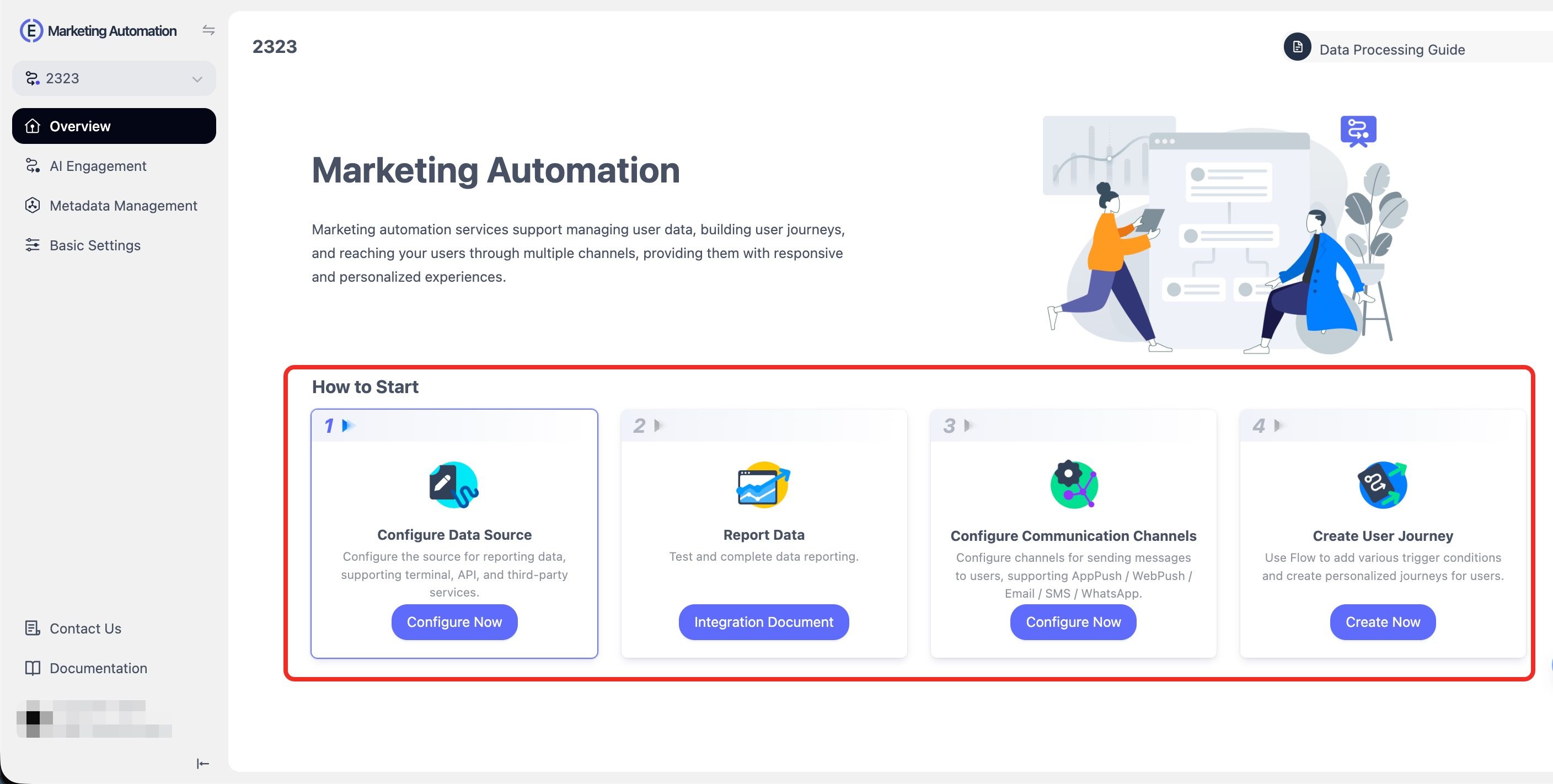
Step 2: Enable the channels the journey may use. In the Marketing Automation basic settings, add email, SMS, and push as reach channels so the same workflow can address all three rather than each being wired up separately in your own code.

Step 3: Start from a template or a blank journey. Templates give you a working structure to adapt; a blank canvas is usually faster for transactional flows, which tend to be shorter and stricter than marketing sequences.
Step 4: Lay the sequence out and set the triggers. Place the entry event, the first message, a wait condition, and the next channel if the user has not acted, then define who enters and what ends the journey. Test with a small audience before enabling it. The branching logic that would otherwise live in your fallback service becomes configuration you can read and change without a deploy.

The Multi-Channel Fallback Architecture
Whether you configure that cascade in a console or build it yourself, the underlying design is the same. It is worth understanding it before you wire anything up, because the shape of the logic determines what you can debug later.

The flow is driven by delivery events rather than blind timers. A typical OTP or password-reset sequence: the backend publishes an event, the system sends the email, then watches delivery and open webhooks. If the email is not opened within a short window, push is triggered; if push fails, SMS is sent. Once the user completes the action, the workflow halts. The principle is simple: react to delivery events, not just send events. Systems that measure emails sent instead of actions completed break at scale.
- Fallback flow:
Email → Push Notification → SMS

Core Components of a Scalable Messaging Stack
A production-grade messaging system has five backend components:
- Event trigger system. The application publishes events (signup, password reset, payment success) instead of sending messages directly.
- Message queue. Absorbs provider slowdowns and enables retries, prioritization, and rate limiting.
- Worker service. Consumes events and dispatches to the provider, decoupling app code from messaging infrastructure.
- Delivery event webhooks. Listen for delivered, bounced, opened, clicked, push delivered, SMS delivered ; these drive fallback decisions.
- Fallback logic engine. Applies rules such as email bounced → push immediately , email delivered but unopened → push after 60s , push not delivered → SMS , SMS delivered → stop .
Metrics You Should Track in a Scalable Messaging System
Track system performance across channels, not just email. The metrics that matter are email delivery, bounce rate, time-to-inbox, open rate, push delivery rate, SMS delivery success, cost per delivered message, and most important of all, cross-channel completion rate : the percentage of users who complete the action regardless of which channel delivered the message. Users do not care whether OTP arrived via email, push, or SMS; they care that it arrived in time.
None of this holds up if the email leg is misconfigured underneath it. Before you ship, check your setup against the four mistakes that break deliverability most often, even when the integration itself is correct.
4 Transactional Email API Mistakes That Hurt Deliverability and User Trust
Most delivery problems are not caused by the provider. They come from configuration, architecture, and monitoring decisions that look fine in testing and only surface once real traffic scales. These four account for most of the deliverability problems teams hit once transactional email is running in production.
1 Missing DNS Authentication (SPF, DKIM, DMARC)
The most common and most damaging mistake. Many teams start sending before configuring SPF, DKIM, and DMARC records (see Step 2 above for setup details). Gmail and Yahoo both require authentication and will reject or spam-route mail that fails it, so without these records deliverability stays unreliable no matter which provider you pick.
2 Mixing Transactional and Marketing Emails on the Same Domain
Transactional traffic is high-engagement and low-complaint. Marketing traffic is the opposite. Sending both from the same domain or IP lets marketing complaints drag down the reputation of your OTP and password-reset flows. The fix is simple: split streams by subdomain so the streams earn and lose reputation independently.
- Stream separation:
use transactional.yourdomain.com
for product emails and
marketing.yourdomain.com
for campaigns.
3 Ignoring Bounce Handling and Suppression Lists
Bounces come in two flavors: soft (mailbox full or server down; retry with backoff) and hard (invalid address; stop permanently). Teams that keep retrying hard bounces burn sender reputation across all their mail, not just the invalid addresses. A correct setup auto-suppresses hard bounces, retries soft bounces with exponential backoff, and alerts when overall bounce rate spikes. Ignoring it is one of the fastest ways to kill deliverability.
4 Exposing API Keys or Sending Emails from Client-Side Code
A transactional email API must be called from your backend, never from frontend JavaScript or a mobile client. A leaked key lets anyone send from your domain, triggering spam abuse and blacklisting. Treat API keys like database passwords: store them in environment variables, never commit them to Git, use separate keys per environment, and rotate on a schedule. Scope permissions with the provider's keys when possible.
Get these four right and the rest of the stack has something solid to sit on: a sender reputation that holds, clean bounce data feeding your automation, and credentials that cannot be abused.
Transactional Email API FAQ: 7 Questions on Pricing, Integration, and Automation
Q1: What is a transactional email API?
A transactional email API is a REST or SMTP interface that allows your application to send automated emails triggered by user actions such as password resets, receipts, OTP codes, and account notifications. Unlike marketing email platforms, transactional email systems focus on reliability, speed, and deliverability because these emails are essential for account access, security alerts, and system communication rather than promotional campaigns or newsletters.
Q2: What is the best transactional email API?
There is no single best transactional email API, because the right provider depends on your priorities such as cost, delivery speed, developer experience, and whether you also need push notifications or SMS. Services like Amazon SES are known for low cost at scale, Postmark for fast delivery, and SendGrid for enterprise use cases, while platforms like EngageLab are a strong option when you want email, push notifications, and SMS from one vendor instead of managing multiple providers separately.
Q3: How much does a transactional email API cost?
The cost of a transactional email API depends on sending volume, the pricing model your provider uses, and which channels you need alongside email. Two models dominate: pay-as-you-go per 1,000 emails, and tiered plans that bundle a fixed monthly volume with per-1,000 overage above it. Pay-as-you-go is usually cheaper at high volume but ships with less built-in tooling, while tiered plans cost more per email and are easier to forecast. Amazon SES publishes a base outbound rate of $0.10 per 1,000 emails as a useful floor for comparison. Because plans and included volumes change several times a year, price your own volume on each provider's pricing page rather than relying on a published estimate, and factor in push or SMS if a single vendor will carry those too.
Q4: What is the difference between transactional and marketing email?
Transactional email is triggered by a user action such as account signup, password reset, or payment confirmation, while marketing email is sent by the company for promotions, newsletters, or campaigns. Transactional emails are considered functional messages and usually do not require unsubscribe links under CAN-SPAM if the primary purpose is transactional, while marketing emails require consent and must include unsubscribe options.
Q5: Do transactional emails need an unsubscribe link?
Transactional emails usually do not require an unsubscribe link if the primary purpose of the email is transactional or service-related communication. Under CAN-SPAM regulations, the primary purpose test determines whether an email is transactional or marketing, and if promotional content becomes the main purpose of the message, the email may be reclassified as marketing and require an unsubscribe link.
Q6: How do I integrate a transactional email API?
To integrate a transactional email API, first authenticate your domain using SPF, DKIM, and DMARC records. Then generate an API key from your provider and send emails through a POST API request from your backend application. After that, configure webhooks to track delivery, bounce, and open events so your system can monitor email performance and trigger fallback messaging if needed.
Q7: Can I automate follow-up messages after a transactional email?
Yes, and this is usually handled by a marketing automation or journey tool rather than by the email API itself. The email API delivers the message and emits delivery, bounce, open, and click events; the automation layer listens to those events and decides what happens next, such as sending a push notification if a password-reset email goes unopened for 60 seconds, or an SMS if push is not delivered. Building this in your own code means writing a fallback service and maintaining it; building it in a journey tool such as EngageLab Marketing Automation means configuring the branching visually and changing it without a deploy. Keep the transactional send itself on the API path, where latency is predictable, and use automation for what happens after.
Conclusion
The decision process for a transactional email API usually starts with free tiers for early-stage products and then moves to paid infrastructure when sending volume increases or deliverability guarantees become important. The real differentiator is not which API you pick, but whether transactional email remains isolated infrastructure or becomes the entry point to a multi-channel messaging system.
Transactional emails typically have open rates between 80 and 85 percent, which makes them the highest-trust communication touchpoint in most products. When these messages are connected to push notifications, in-app messages, and SMS, every triggered email becomes a retention and engagement opportunity rather than just a notification. Delivery rate alone does not measure success. Cross-channel completion rate and long-term retention are the metrics that actually matter.
If you want to build this type of multi-channel transactional messaging system from a single integration, EngageLab covers both halves: an email API for the send, and Marketing Automation journeys for the follow-up across push and SMS, with shared analytics over the whole sequence.
![How to Make SMS Segmentation Worth the Effort [With 6 Examples]](https://img.engagelab.net/en/article/sms-segmentation-cover.webp)
![[2026 Update] Top 7 B2B Automation Platforms to Get You Started Today](https://img.engagelab.net/article/b2b-automation-platforms.png)