





















Eine Plattform · Zehn Produkte
Mobile Push-Benachrichtigungsdienst
- 8 Herstellerkanäle + 1 eigener Kanal erreichen eine Zustellrate von 99 %.
- 7+ Nachrichtenstile, 10+ Gruppierungsregeln, um Zielnutzer präzise zu erreichen.
- Datentracking über den gesamten Lebenszyklus, multidimensionaler Nachrichten-Funnel und Analyse des Nutzerverhaltens.
- Globale Multi-Data-Node-Auswahl, Multi-Zeitzonen und intelligente Multi-Sprachen-Anpassung.
Web-Push-Benachrichtigungsdienst
- Extrem einfacher Konfigurationsprozess, in 3 Minuten online und einsatzbereit.
- W3C-Service + EngageLab-eigene Benachrichtigungen für 100 % Browser-Abdeckung.
- Unterstützung für einen individuellen „Subscription Guide“ zur Steigerung der Abonnementrate um mehr als 70 %.
- Unterstützung für Shopify und andere unabhängige Plattformen zur schnellen Erstellung von WebPush.
Transaktions- und Marketing-E-Mail-API
- Intelligente Steuerung der Sendestrategie, 99 % Posteingangsrate, 99,97 % Zustellrate.
- Absender- und BIMI-Zertifizierung zur Steigerung der Markenbekanntheit und des Markenvertrauens.
- 100+ E-Mail-Vorlagen zum einfachen Erstellen attraktiver E‑Mails.
- Datentracking über den gesamten E-Mail-Lebenszyklus, multidimensionale Analyse und Feedback zum Nutzerverhalten.
Bulk-SMS- und Transaktions-SMS-API
- Direkte Anbindung an über 200 Länder/Regionen für weltweite Abdeckung.
- Intelligente Kanalumschaltung, um Nutzer innerhalb von 5 Sekunden zu erreichen.
- Echtzeit-Statusrückmeldung sowie intuitive und zuverlässige Berichte.
- Unterstützt Antworten auf eingehende SMS (Uplink) zur zeitnahen Benachrichtigung bei Nutzerfeedback.
WhatsApp Business API · Meta BSP
- Offizieller Meta BSP: International wettbewerbsfähige Preise, Verifizierung für Unternehmen und Abdeckung in über 200 Ländern.
- Kosten senken und Effizienz steigern: Bis zu 95 % Zustellung bei 70 % reduzierten Kosten.
- Mehr als 10 Nachrichtentypen für Geschäftsabschlüsse und Nutzerkonvertierung direkt in WhatsApp.
- Analyse der Daten des gesamten Lebenszyklus mit vollständigem Zustellbericht.
Warum führende Unternehmen weltweit auf EngageLab setzen
Zuverlässige Zustellung, eigene Infrastruktur
Eigene Infrastruktur für E-Mail und Push bedeutet mehr Kontrolle über die Zustellbarkeit, klarere Feedback-Schleifen und geringere Gesamtkosten als bei Reseller-Lösungen.

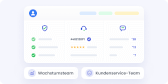
Einheitliche Lifecycle-Kundendaten
Kundendaten integriert über Verifizierung, Engagement und Support hinweg. Growth- und Serviceteams teilen sich eine einzige 360°-Kundensicht.
Überall starten, zu einer Plattform erweitern
Die modulare Architektur ermöglicht Unternehmen den Start mit einem einzelnen Produkt (SMS, Email, OTP) und nahtlose Skalierung. Kein Systemwechsel, kein Datenverlust.

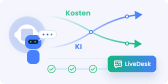
Native KI powered by GPTBots · Keine Sitzplatzgebühren
Native KI für komplexe Aufgaben und Geschäftsprozesse, kombiniert mit einer Preisgestaltung ohne Sitzplatzgebühren bei LiveDesk. Je mehr die KI übernimmt, desto niedriger Ihre Servicekosten.
Globale Compliance & Datenresidenz
Mehrregionale Rechenzentrumsbereitstellung (Europa, APAC) erfüllt lokale Vorschriften wie GDPR und PDPA und besteht Unternehmens-Sicherheitsprüfungen.

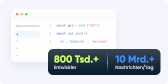
Entwicklerorientierte APIs & bewährte Skalierung
Hochperformante, einfach zu integrierende APIs mit umfassender Dokumentation und einem bewährten Ökosystem, dem 800,000+ Entwickler vertrauen und das täglich 12 Mrd.+ Nachrichten verarbeitet.
Maßgeschneiderte Lösungen für Ihre Branche
EngageLab bietet Unternehmen eine hochintegrierte All-in-One-Plattform, die alle Funktionen abdeckt und mehrere Kanäle für Kundeninteraktionen vereint.
Finanzwesen
E-Commerce
Nachrichten & Medien
Reisebranche
Gaming

Auf Vertrauen gebaut. Von Kunden geschätzt
Sicherheit auf Enterprise-Niveau trifft auf herausragende Nutzererfahrung.
- ISO 27001
- ISO 27701

- SOC 2 Type II


Entdecken Sie weitere EngageLab Möglichkeiten
Neu & besser! Jetzt smarter testen!


Unternehmen weltweit vertrauen uns
EngageLab überzeugt Unternehmen durch innovative Technologie und professionellen Kundenservice.
Elena
Bank, Account Managerin
Wir lieben EngageLab! Es ist ein echter Gamechanger für uns. Es hilft uns bei der Integration automatisierter Workflows, und Kunden lieben es, neue Karten zu beantragen oder Kontoinfos zu ändern. Wir sind begeistert von der Omnichannel-Lösung – der beste Weg für die Bank, mit Kunden in Kontakt zu bleiben!
Chuan Leekpai
SEA Online Grocery Company, CEO
Mit EngageLab finden wir Wege, den Kundenkontakt zu erleichtern. Die Kommunikation per SMS und Push-Benachrichtigungen ist so einfach. Das ist sehr hilfreich für Teile unserer Zielgruppe (z. B. Vollzeitmütter), die keine E-Mails oder neueste Technik nutzen und meist keine Zeit zum Telefonieren haben.
Jerry Abego
Vice President einer News-App
Nutzer-Engagement in der App ist für die Nachrichten- und Medienbranche sehr wichtig. Überraschenderweise bietet EngageLab ein komplettes Set an Datenanalysetools! Die Statistiken sind einfach abzufragen und zu exportieren, was uns hilft, unsere Verteilungsstrategien zu verfeinern.
Carlos Ramirez
Director of Operations, Reisedienstleistungsplattform
Wir wissen, wie wichtig schnelle Hilfe auf Reisen ist. EngageLab ist sicher und stabil. Wir sind immer bereit, auf alle Bedürfnisse unserer geschätzten Kunden einzugehen. Nach einiger Zeit der Nutzung bestätigen uns unsere Kunden, dass wir ihr Erlebnis deutlich reibungsloser gestaltet haben.