

How to View User Behavior Paths in CDP?
You can view a user's complete behavior trail on the platform by following these steps:
- Go to MA portal → Select the desired project → User Management.
- Click the row containing the target user’s EUID to open their detail page.
- Select the User Activity tab to view all activities generated by that user.
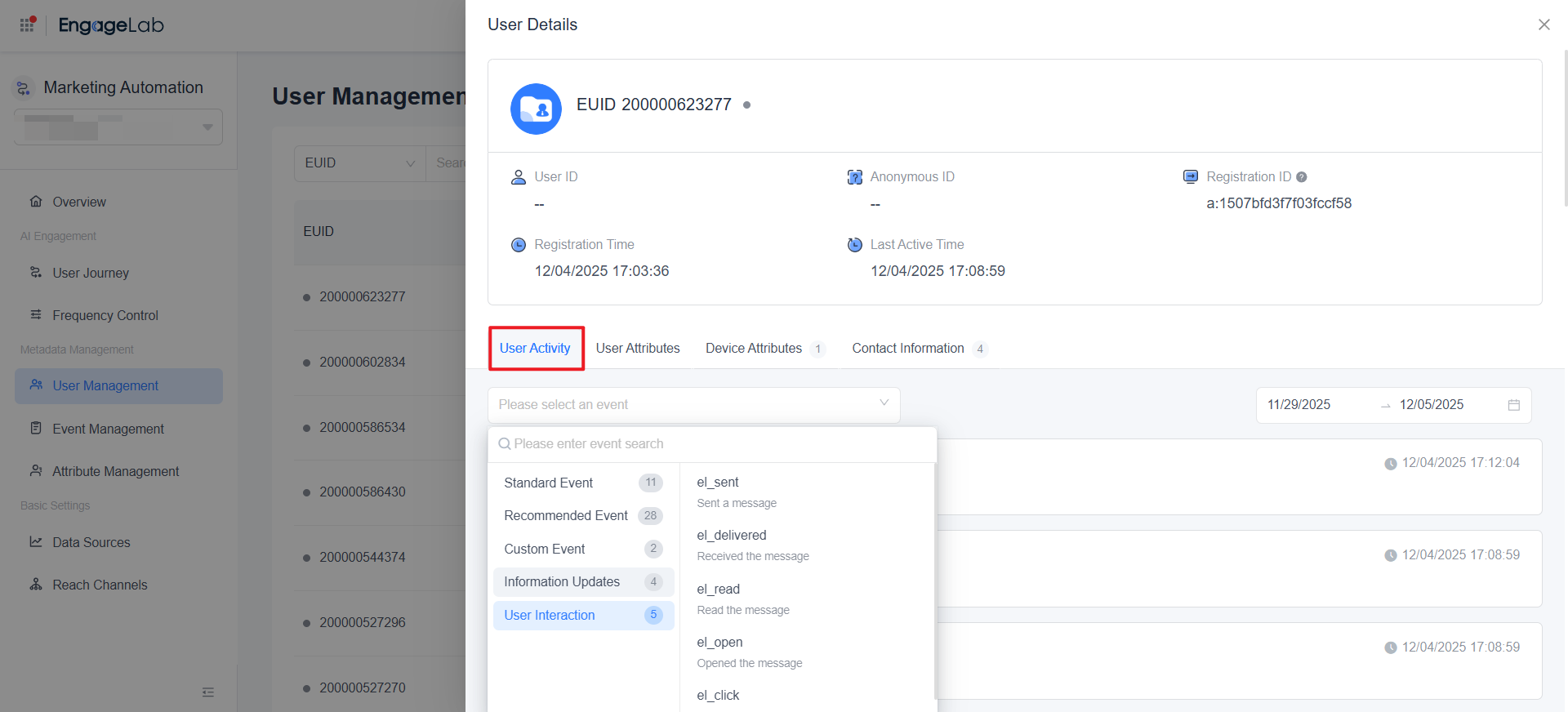
In the user activity timeline, the system displays the user’s full behavior records, categorized into three main types: Events, Information Updates, and User Interactions.
Click any activity entry to view its detailed content, which includes:
| Activity Type | Description & Details |
|---|---|
| Events | All events triggered by the user, categorized into: • Standard Event • Recommended Event • Custom Event |
| User Attributes | User attributes at the time the event occurred. • Events reported from the client are automatically enriched with user attributes by the MA SDK. • Events reported from the server are automatically snapshotted with the user attributes stored in the MA system at that moment. |
| Event Attributes | Custom attributes defined by the business when reporting the event. |
| Device Attributes | Automatically captured and reported by the MA SDK. |
| Information Updates | Activities generated when user identifiers, user attributes, device attributes, or contact information are updated – showing both the previous and updated values. |
| User Interactions | Activities generated when messages are sent, including journey name, channel, target user, message ID, message status, and other delivery details. |
With this timeline, you can clearly trace the user’s historical behavior path and perform precise attribution analysis.

Still Have Questions?
Can't find what you're looking for? Our experts are here to provide personalized assistance. Ask your question now and get a timely response.

