


Jacob Morrow
Updated: 2026-08-13
An urgent promotion or service update can lose its value if customers see it too late. An SMS blast solves the speed problem, but it also scales every mistake—a poorly chosen audience, broken personalization, or an unclear sender can reach thousands of people at once. The real challenge is not pressing “send”; it is making one timely campaign relevant, controlled, and measurable at scale.
What Is an SMS Blast and How Does It Work?
An SMS blast works as a one-to-many campaign, but each recipient receives an individual text rather than joining a visible group conversation. A business messaging platform takes the selected contact list, applies any personalization fields, passes the messages through the appropriate carrier routes, and returns delivery results to the sender.
The core message can remain consistent while details such as a name, location, offer, or event time change by segment or recipient. The campaign therefore has two layers: a shared announcement and the audience data that determines who receives it and which details they see.
SMS Blast vs. Text Blast, Bulk SMS, and SMS Broadcast
These terms overlap, but each emphasizes a slightly different aspect of business messaging:
| Term | Common emphasis | Practical distinction |
|---|---|---|
| SMS blast / text blast | A campaign sent to many contacts at once | Often used for a specific promotion, announcement, alert, or update |
| Bulk SMS | Message volume and sending infrastructure | Can describe both marketing and operational messages sent at scale; the broader process is covered in this bulk SMS marketing guide |
| SMS broadcast | One-to-many distribution | Often used as a broader term for sending one message to a group; see how SMS broadcast is used for business communication |
| Triggered SMS | One recipient's action or lifecycle event | Order updates and abandoned-cart reminders are usually automated, not blasts |
One terminology caution: SMS blaster can also refer to illicit equipment that impersonates a cellular network. This article is only about permission-based business messaging through legitimate providers.
When Should a Business Use an SMS Blast?
An SMS blast works best when the same time-sensitive information is relevant to a clearly defined group. It is a poor fit when every message depends on an individual event, such as an order shipment or a unique appointment time.
| Scenario | Use an SMS blast? | Better approach | Why |
|---|---|---|---|
| Storewide flash sale | Yes, with segmentation | Send by interest, location, or engagement | The offer is urgent but may not be relevant to every subscriber |
| Emergency closure | Yes | Send to everyone affected | The same urgent update applies to the whole audience |
| Regional event update | Yes, to one segment | Filter by location or registration | Only a defined group needs the information |
| Order shipment notice | No | Triggered transactional SMS | Timing and tracking details differ for each customer |
| Abandoned-cart reminder | No | Behavior-triggered automation | The message depends on an individual's action |
| Appointment reminder | Usually no | Personalized transactional SMS | Recipient, time, location, and response options differ |
Common uses: SMS blasts are best suited to time-sensitive promotions, business or event announcements, urgent alerts, and feedback requests that are relevant to a defined group—not individual updates triggered by one customer's activity.
From Broad to Relevant: Three Levels of SMS Blasting
Not every SMS blast needs the same degree of targeting. Choose the simplest approach that makes the message relevant to everyone receiving it.
Level 1. A broad blast sends one message to the full eligible audience. It works when the information genuinely affects everyone, such as a companywide closure or a critical service announcement. The main priority is reach, so monitor delivery failures and confirm that affected recipients received the update.
Level 2. A segmented blast divides the eligible audience by factors such as location, interests, purchase history, or engagement. Each group receives the version most relevant to it. For example, a retailer could send different offers to customers interested in different product categories. Compare clicks, conversions, and opt-outs across segments to determine whether the targeting improved results.
Level 3. A personalized blast builds on segmentation by inserting controlled fields such as a recipient’s name, nearest store, event time, or eligible offer. Personalization is useful only when the underlying data is reliable. Configure fallback text for every dynamic field and test records with missing or unusually long values before sending.
The goal is not to advance every campaign to level three. Use the lowest level that makes the message fully relevant. An emergency closure may need a broad blast, while a retail promotion may work better when split by location and product interest. Personalization adds value only when the data is accurate; a wrong name or store can damage trust more than a neutral message. As the campaign becomes more targeted, compare results between segments and keep a safe fallback for every dynamic field.
How to Send an SMS Blast in 6 Steps
-
Confirm That the Message Belongs in a Blast
Write one sentence describing what every intended recipient needs to know now. If the timing or content depends on an individual action, use a triggered message instead. This prevents order updates, appointment details, and other one-to-one events from being forced into a batch campaign.
-
Build the Final Send List
Start with contacts whose consent covers the message, then select the relevant segment. Deduplicate phone numbers and remove opt-outs, invalid numbers, employees, test records, and anyone who recently received an overlapping campaign. Record the final list size so unexpected changes are visible before launch.

Build and verify the audience that will receive the blast. -
Match the Sender to the Required Action
Choose a sender supported in the destination market and decide whether recipients need to reply. For example, a retailer may use an alphanumeric Sender ID to display its brand for a one-way flash sale. If customers must reply with a keyword or question, it needs a reply-capable number instead. Identify the brand in the message in case the handset changes how the sender appears.
-
Create One Message with Safe Variations
Keep the shared announcement and CTA consistent, then add only variables that improve relevance, such as store, event time, or offer. Set a fallback for every field. Check encoding and message parts because Unicode or longer personalized values can turn one planned SMS into multiple billable parts.
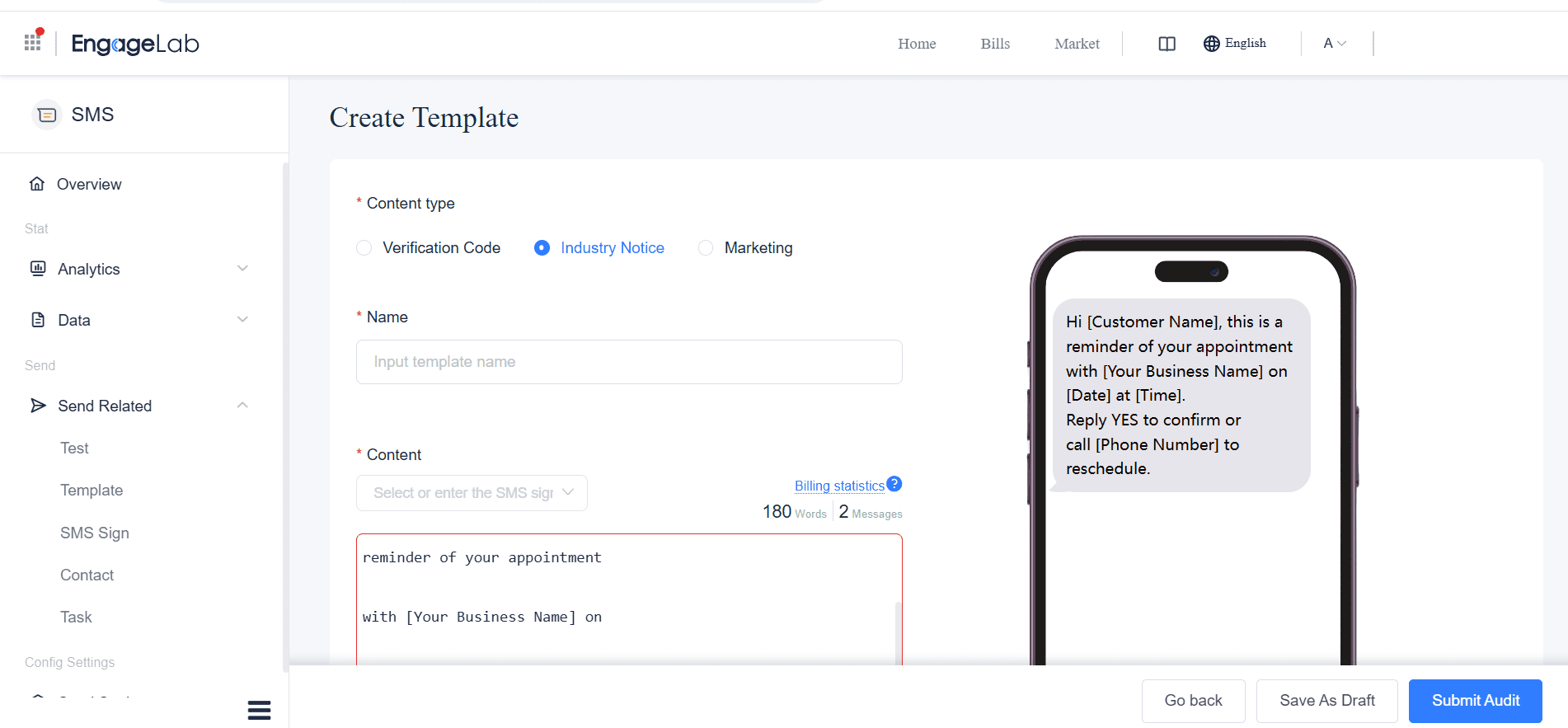
Create the shared message and validate every dynamic field. -
Preview the Batch and Control the Release
Preview records with complete, missing, and unusually long field values. Test the sender, reply path, links, landing page, opt-out instructions, and message-part count on representative devices. For a large or unfamiliar list, release a small batch first and confirm delivery errors before sending the remainder by local time zone.
-
Reconcile the Results with the Send List
Compare submitted, delivered, failed, clicked, converted, and opted-out contacts. Review results by segment and message version, not only as one campaign total. Suppress invalid numbers immediately and investigate any segment with unusually high failures or opt-outs before the next blast.

Reconcile delivery and response data against the original send list.


SMS Blast Examples and Templates
Adapt these examples to your audience, brand, destination market, and consent basis. Bracketed fields should be replaced before sending.
Flash Sale
Template: [Brand]: Your member flash sale ends at 8 PM. Use code SAVE20 at checkout: [link]. [Required opt-out text]
- Audience: Opted-in members who are eligible for the offer
- Personalize: Product category, store, or landing page
- Measure: Clicks, conversions, and opt-outs
Business Announcement
Template: [Brand]: Our [location/service] opens on [date]. See hours and details: [link]. [Required opt-out text]
- Audience: Customers affected by the announcement
- Personalize: Nearest location or preferred language
- Measure: Delivery and information-page visits
Event Update
Template: [Event]: Today's start time is now [time] at [venue]. Entry details: [link]. Reply HELP for assistance.
- Audience: Registered attendees
- Personalize: Session, entrance, or venue
- Measure: Successful delivery and support replies
Urgent Alert
Template: [Organization] ALERT: [Location] is closed today due to [reason]. Updates: [link].
- Audience: Everyone directly affected
- Personalize: Location or service area
- Measure: Delivery failures and update-page visits
These templates share one campaign across a defined audience. Messages tied to one person's behavior or schedule need a different workflow: an appointment reminder with a unique time, for example, should be sent as an automated text message triggered from the appointment record, not as a broad blast.
SMS Blast Best Practices and Common Pitfalls
Pre-Send Checklist
- Confirm that consent covers the message type and destination market.
- Apply opt-outs, invalid-number suppressions, and internal exclusions.
- Send only to the segment for which the message is relevant.
- Identify the sender and include required opt-out instructions.
- Check personalization fallbacks so blank fields cannot reach recipients.
- Review encoding, character count, and the number of billable message parts.
- Test every link, CTA, reply path, and landing page.
- Schedule for recipients' local time and applicable sending-hour rules.
- Send test messages before releasing the full campaign.
Common Pitfalls to Avoid
-
Wrong audience
A large eligible list is not automatically a relevant list. Segment by the information or offer being sent.
-
Broken variables
Missing or unusually long values can expose placeholders or increase message parts. Test edge-case records.
-
Uncontrolled release
Sending the entire list at once leaves little room to react. Use a test batch when scale or routing is uncertain.
-
Misread results
A delivered message is not necessarily an effective one. Compare action and opt-outs by segment.
Plan for Global Sending Differences
Consent, opt-out wording, permitted sender types, registration, message templates, and sending hours can vary by destination. Check the requirements for every market rather than applying one country's rules globally. A platform can provide compliance controls, but the sender remains responsible for determining which laws and industry rules apply. Obtain qualified legal advice when needed.
Diagnose SMS Blast Performance Problems
| What you see | Possible cause | What to check next |
|---|---|---|
| Failure rate rises suddenly | Invalid numbers, formatting, sender registration, or routing | Failure codes, number format, destination, and sender status |
| Delivery is normal but clicks are low | Weak relevance, unclear CTA, or a poor landing experience | Segment fit, message promise, link, and page speed |
| Opt-outs increase | High frequency or a mismatch with subscriber expectations | Frequency, targeting, consent language, and content value |
| Messages appear to be filtered | Sender, content, link, or sending-pattern concerns | Provider error details, sender registration, domains, and send pattern |
| Cost is higher than expected | Unicode, long messages, destination rates, or excess volume | Encoding, message parts, country mix, and duplicate recipients |
SMS blasts offer speed and direct reach, but they also have limitations: short messages leave little room for explanation, each message part can add cost, irrelevant campaigns can accelerate opt-outs, and carrier delivery does not guarantee a click or conversion. These constraints make audience quality and message relevance more important than list size.
How to Choose an SMS Blast Service
Evaluate services against the way you plan to send, not a generic feature count. Prioritize:
- Destination coverage: Supported countries, sender types, registration guidance, and local routing.
- Audience controls: Imports, segmentation, duplicate handling, consent records, and suppression lists.
- Message tools: Templates, variables, encoding and segment counters, link handling, and test sends.
- Scheduling: Time-zone-aware delivery, rate controls, and automation only where it is appropriate.
- Reporting: Delivery receipts, clear error codes, link tracking, exports, and segment-level analysis.
- Integration: A usable dashboard for campaign teams and APIs or connectors for operational workflows.
- Pricing clarity: Destination rates, message-part billing, sender fees, and volume commitments.
- Support and security: Responsive assistance, access controls, and documented data-handling practices.
Use one opted-in segment to verify audience controls, variables, sender setup, and delivery reporting before committing a full campaign.
SMS Blast FAQ
Is SMS Blasting Legal?
SMS blasting can be lawful when the sender has the appropriate consent, identifies itself, honors opt-outs, and follows the rules that apply to the message type and recipient location. Requirements vary, so do not treat a contact list or platform feature as proof that a campaign is compliant.
How Much Does an SMS Blast Cost?
Cost generally depends on the destination, sender type, number of recipients, number of SMS parts per message, and provider pricing. Unicode characters or long content can increase the number of billable parts. Calculate the total from the final audience and tested message rather than multiplying contacts by a headline rate.
Can You Personalize an SMS Blast?
Yes. You can first segment recipients, then insert approved fields such as a name, location, offer, or event time. Always configure fallback text and test the data before sending.
How Do You Avoid Sending a Spammy Text Blast?
Use permission-based lists, send only relevant messages, identify the sender, limit frequency, provide a working opt-out path, and monitor failures and opt-outs. Purchased lists and indiscriminate sends create both trust and compliance risks.
Is an SMS Blast the Same as a Group Text?
No. In a typical SMS blast, each recipient receives an individual message and cannot see the other contacts. In a group text, members may see the group and each other's replies, depending on the messaging application.
Run More Controlled SMS Blasts with EngageLab
An SMS blast gets harder to control as the audience grows. EngageLab keeps the core campaign workflow in one place:
- Targeted audience lists for broad or segmented sends
- Reusable SMS templates with personalization
- Delivery analytics to track results and diagnose issues
That makes it easier to catch audience, content, or delivery problems before they are repeated across thousands of messages—and to use what happened in one blast to improve the next.

Build a small campaign in EngageLab, or discuss sender and destination requirements before you launch.
![70 Holiday Greeting Messages for Business on Every Occasion [2026]](https://img.engagelab.net/article/happy-holiday-msg-cover.png)


![Best SMS Short Code Providers: 10 Options Compared [2026 Updated]](https://img.engagelab.net/article/sms-short-code-service-provider.png)

