


LiveDesk Conversation Assignment Order for Agents
Each channel assigns new conversations according to a fixed priority: Rule Agent > AI Agent > Human Agent. The Rule Agent handles conditional routing, while the AI Agent and Human Agent handle and respond to customers. Each channel can be configured separately with its corresponding Rule Agent, AI Agent, and Human Agent.
flowchart TD
    A[Customer starts a conversation through a channel] --> B{Match Rule Agent in sequence}
    B -->|Trigger conditions met| C[Assign according to the matched Rule Agent]
    B -->|No rules matched| D{AI Agent configured?}
    D -->|Yes| E[Assign AI Agent]
    D -->|No| F[Assign Human Agent or team]
    E -->|Unable to handle, error, or escalation required| F
Assignment Steps
- Rule Agent takes priority. The system first determines whether the current conversation meets the requirements of a Rule Agent. When multiple Rule Agents exist, they are matched one by one according to their configuration order. Once a rule is matched, the conversation is assigned according to that rule.
- AI Agent comes next. If no Rule Agent is matched and an AI Agent is configured for the channel, the AI Agent handles the conversation.
- Human Agent as a fallback. If no Rule Agent is matched and no AI Agent is configured, the conversation is assigned to the corresponding Human Agent or customer service team. Human assignment can be performed based on concurrent workload, evenly in sequence, or according to a custom workload defined by customer service staff. The specific options depend on the configurations supported by the channel.
Conversation Assignment Details
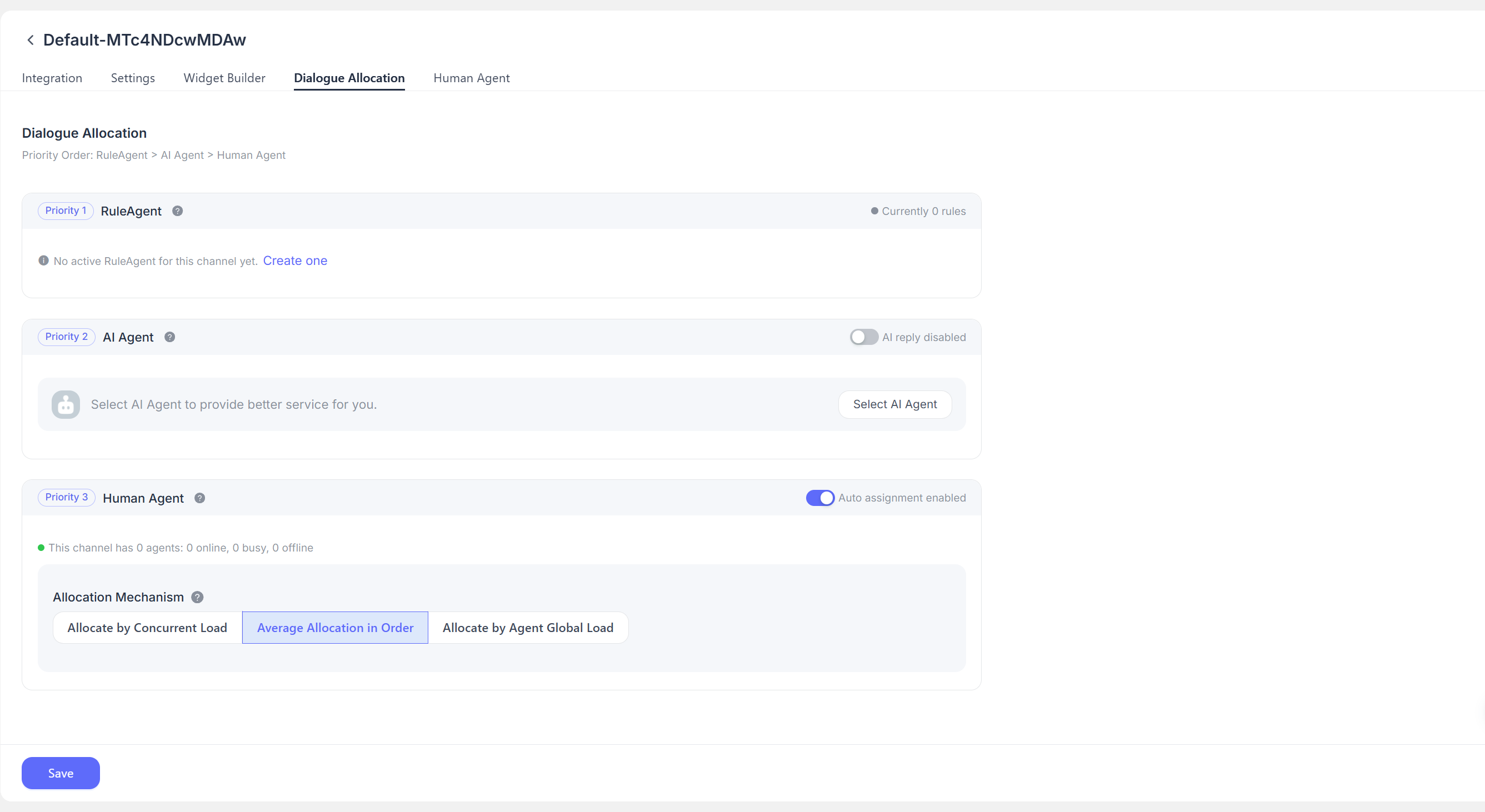
This section displays the conversation assignment rules for the current channel. It supports responses from the Rule Agent, AI Agent, and Human Agent. Conversation assignment priority is: Rule Agent > AI Agent > Human Agent.
When a conversation matches a Rule Agent, the system first determines whether it meets the Rule Agent requirements. When multiple Rule Agents exist at the same time, the Rule Agent execution mode determines whether matching is exclusive or parallel. The system evaluates them in order and assigns the conversation according to the matching rule.
If the current scenario does not meet the trigger conditions, the conversation is assigned to the AI Agent first.
If no AI Agent exists, the conversation is assigned to the corresponding Human Agent. Automatic assignment is supported, including assignment based on concurrent workload, even distribution in sequence, and custom workload assignment based on customer service staff settings.
Workload-based assignment
Assignments are made according to the defined workload limit. Customer service staff in the channel share the same workload limit for that channel. When a new conversation is created, it is assigned first to the customer service staff member with the lowest concurrent workload.
Even sequential assignment
The workload settings of each customer service staff member are not considered. Conversations are assigned evenly to each staff member in sequence.
Global customer service workload assignment
A custom workload value is set individually for each customer service staff member, and conversations are assigned first to the staff member with the lowest concurrent workload. This workload value is the staff member's total workload limit within the project. When a new conversation is created, the system considers the total number of conversations assigned to the staff member across all channels in the project and assigns it first to the staff member with the lowest workload.
Global workload settings for customer service staff are configured on the Human Agent page.
Configuration Recommendations
- Configure clear Rule Agent routing conditions for high-priority conversations, specific languages, specific channel sources, AI errors, and customer requests for human assistance.
- Place the most specific conditions first when configuring multiple routing rules, and keep an AI or human fallback for unmatched conversations.
- When the AI Agent cannot handle a conversation, human judgment is required, or the customer explicitly requests a human agent, use a Rule Agent Flow to transfer the conversation to a Human Agent.
- Before assigning a Human Agent, confirm that the target customer service staff member is included in the Human Agent list for the current channel. Otherwise, the assignment will fail and the conversation will enter an unassigned state.
For related LiveDesk configuration, see Rule Agent Configuration, AI Agents, and Human Agents.
