


Flow Node Parameter Guide
This is an on-demand reference for node configuration. Each node is described using the fixed structure of “Purpose, Applicable Scenarios, Key Parameters, Exits, Considerations, and Example,” making it easy to quickly find the information you need when building a Flow.
Available capabilities may vary by channel and workspace. Refer to the configuration options and prompts available in the Flow editor.
How to Use This Reference
Each node in this guide is described using the following structure:
- Purpose: What the node does
- Applicable Scenarios: When it is suitable for use
- Key Parameters: The parameters that require the most careful attention during configuration
- Output Exits: The paths the node may lead to
- Considerations: The limitations or boundaries most likely to be overlooked during configuration
- Example: A common usage example
Node Category Overview
| Node Category | Node Name |
|---|---|
| Entry | Event Trigger |
| Decision and Control | Conditional Branch, Behavior Wait, Delay Wait, A/B Random Split, Merge |
| Messaging | Send Message, Invite for Feedback, Send Email |
| Actions | Assign Agent, Assign AI Agent, Add Tag, Change Status, Change Priority, Mute Conversation, Update Customer Profile, Update Conversation Profile, Block Contact, Webhook Push, Call API to Retrieve Data |
Entry Nodes
Event Trigger
Purpose
Define where the process starts, how it is triggered, and who the audience is.
Applicable Scenarios
- Conversation created
- Visitor sends a message
- A specified event occurs
- An AI or system event is triggered
Key Parameters
| Parameter | Meaning | Required | Description |
|---|---|---|---|
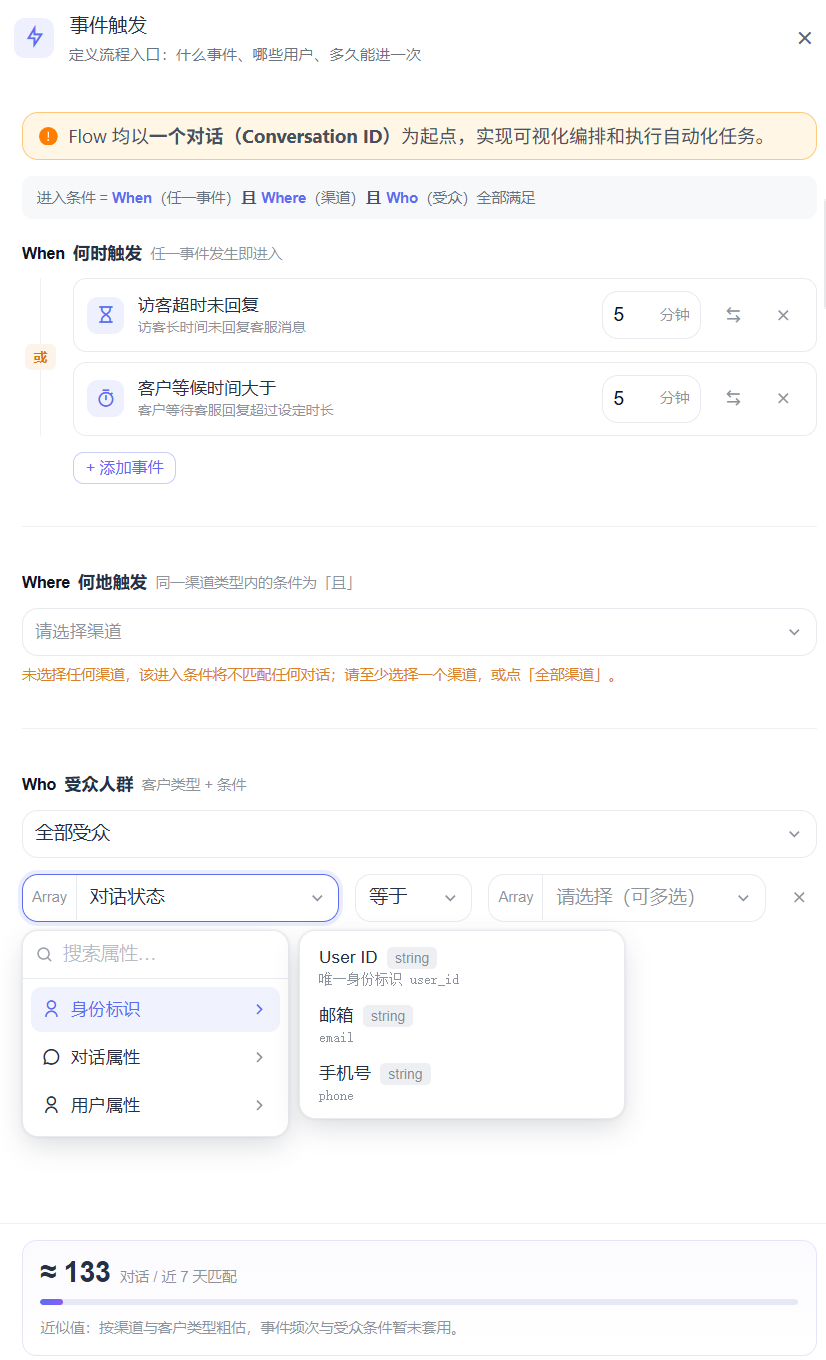
| Trigger Event | The process entry event | Yes | Determines when the Flow starts, including when a visitor sends a message, a conversation is created, a conversation is opened, a conversation is updated, a customer waiting event exceeds a specified threshold, a visitor does not reply within the timeout period, or an AI Agent response fails. |
| Audience Scope | Who can enter | Yes | Anonymous and registered users. Anonymous users are users who have not provided identity information, a mobile phone number, or an email address. Additional conditions can be added to filter users based on contact and conversation attributes. |
| Channel Scope | Which channels can trigger the Flow | Recommended | For multichannel processes, it is recommended to define this explicitly. If no channel is selected, this entry condition will not match any conversation. |
Output Exits
- Continue by default
Considerations
- The trigger defines not only “when to start,” but also “who can start.”
- If the audience and frequency are unclear in the same business scenario, duplicate triggers may occur.
Example
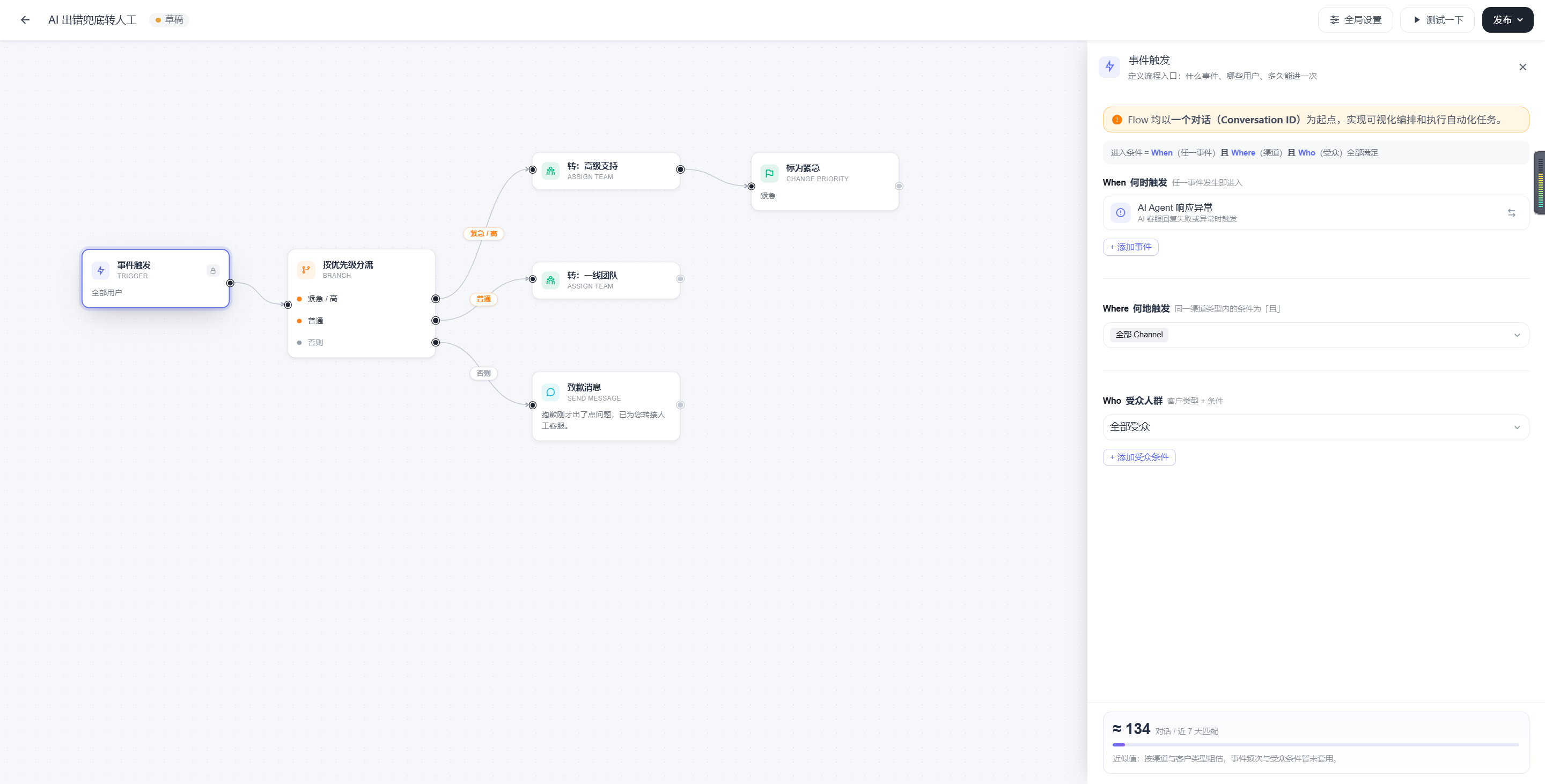
“When an AI Agent encounters an error, start a fallback Flow to transfer the conversation to a human agent.”
Decision and Control Nodes
Conditional Branch
Purpose
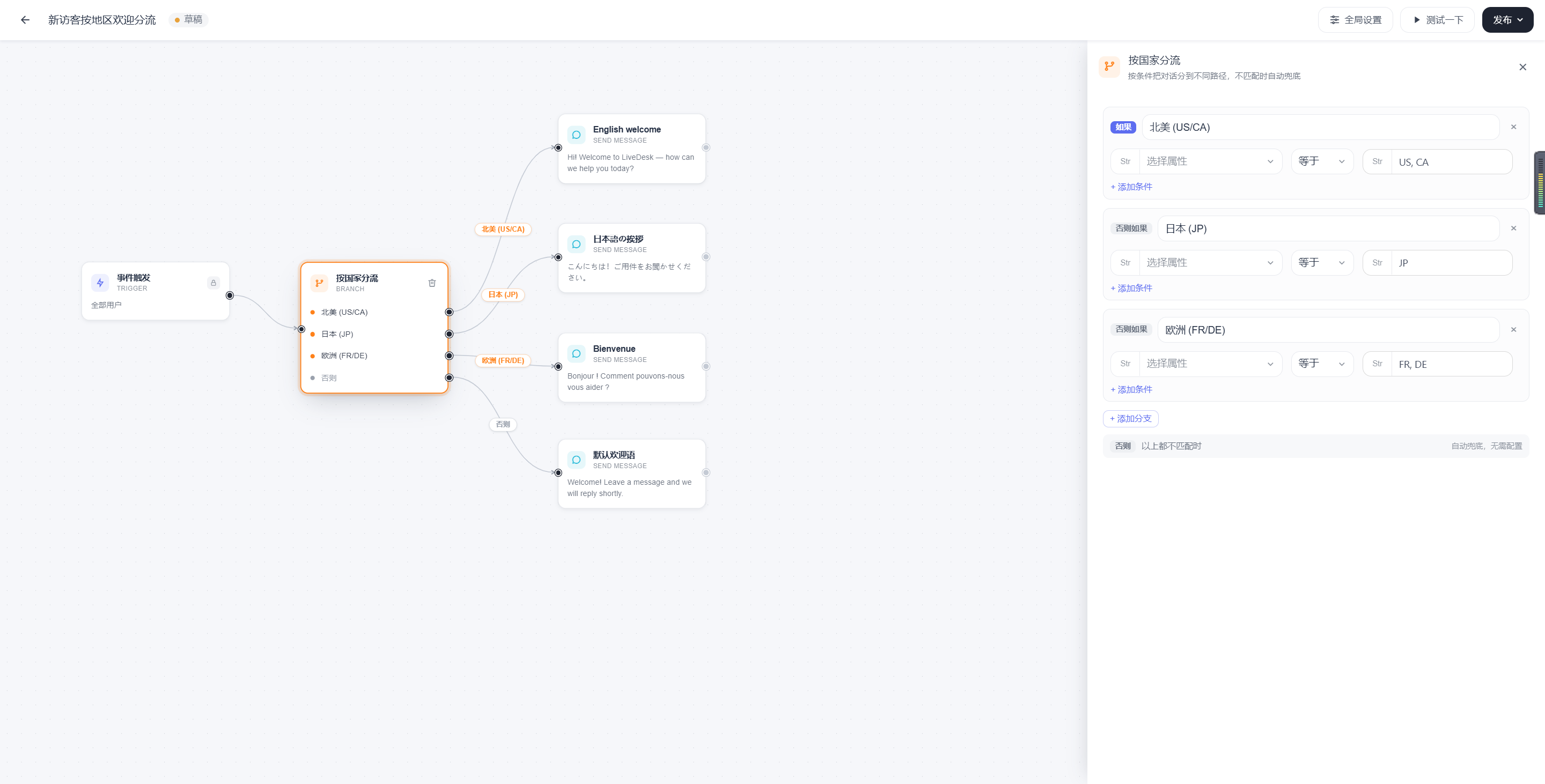
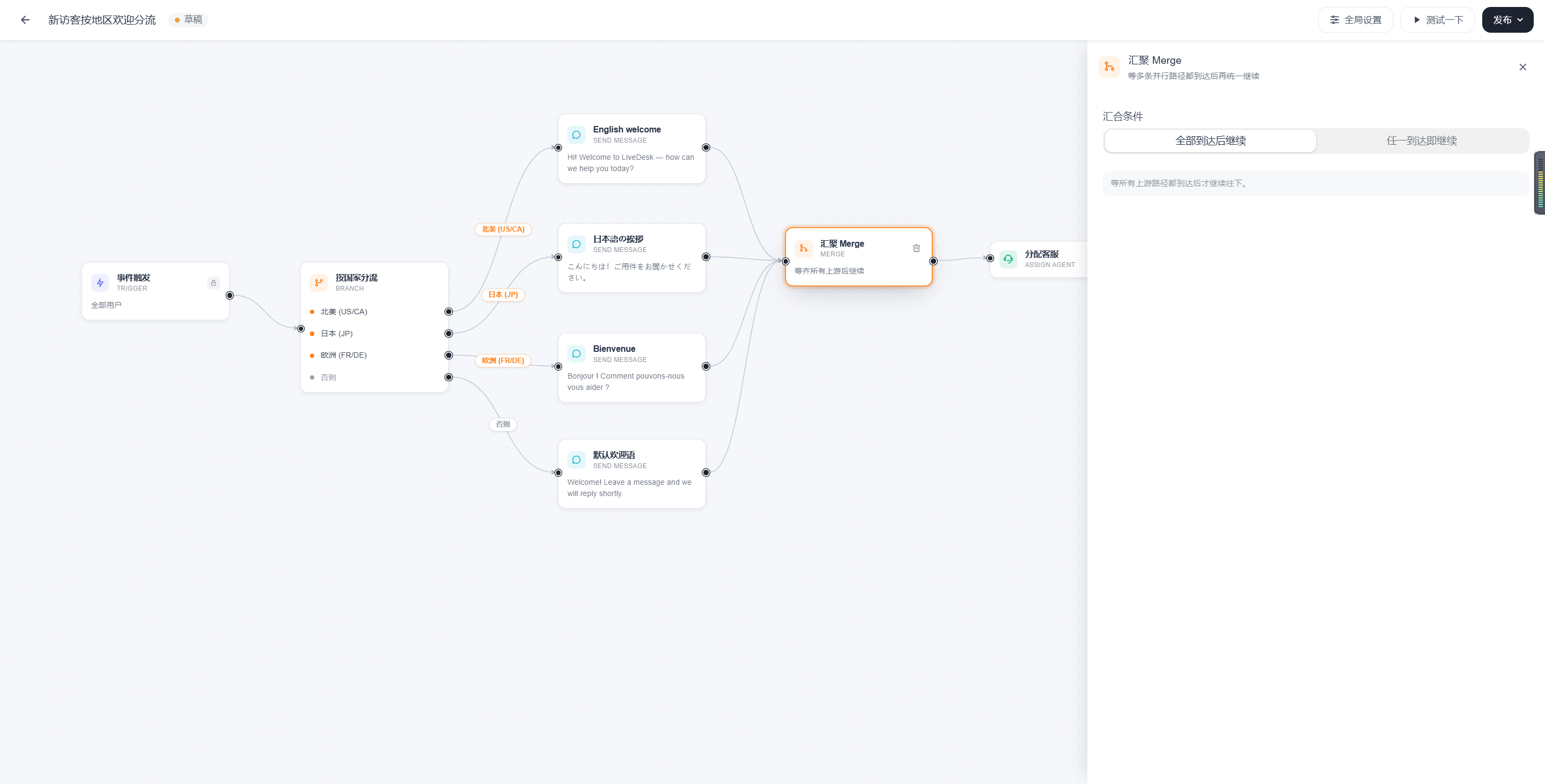
Route the process to different paths based on current conversation or customer information. A fallback path is used automatically when no conditions match.
Applicable Scenarios
- Route by country
- Route by tag
- Route by source or channel
- Route by status, priority, or language
Key Parameters
| Parameter | Meaning | Required | Description |
|---|---|---|---|
| Branch Conditions | The decision rules for each branch | Yes | Multiple cases can be configured. Conditions can be filtered based on relevant contact and conversation attributes. |
| Branch Name | The branch label | Recommended | Makes the canvas easier to understand and testing easier to track. |
| Fallback Path | The path to use when no conditions match | Recommended | Used to handle uncovered cases. Select the Otherwise branch. When none of the conditions are met, the process follows the branch configured for Otherwise. |
Output Exits
- An exit for each conditional branch
- Fallback exit
Considerations
- Make sure conditions do not conflict with one another.
Example
“Use the corresponding welcome message for North America, Japan, and Europe, and use the default-language welcome message for other visitors.”
Behavior Wait
Purpose
Wait for an action to occur before deciding how to proceed. A wait duration can be configured.
Applicable Scenarios
- Wait for a user reply
- Wait for an event to change
Key Parameters
| Parameter | Meaning | Required | Description |
|---|---|---|---|
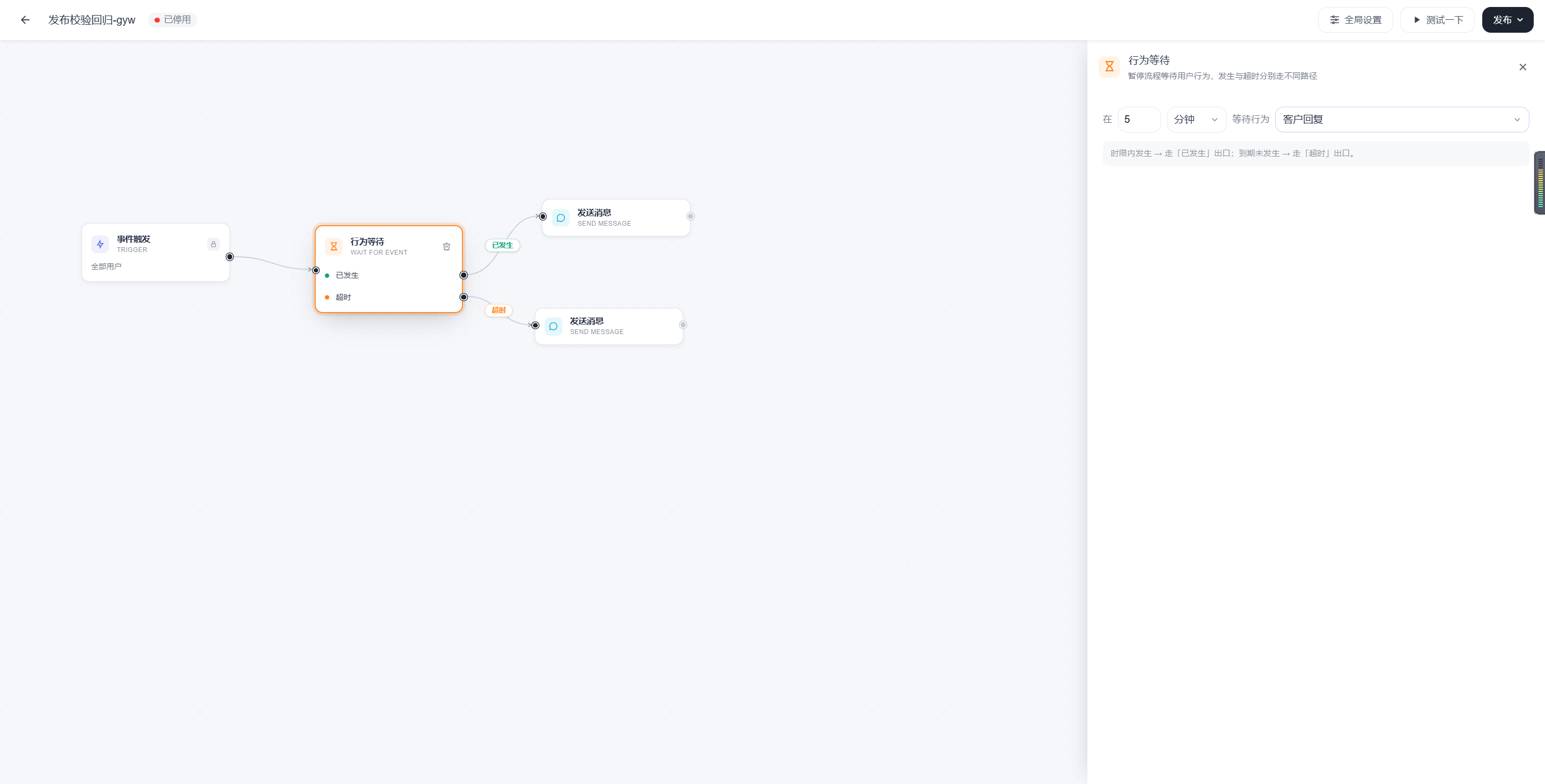
| Wait Behavior | The event to wait for | Yes | For example, message, conversation, and contact events. Supported behaviors include customer replies, agent replies, conversation opened, status changed to Resolved, and contact profile updated. |
| Timeout | The maximum wait time | Yes | It is recommended to always configure this. Minutes, hours, and days are supported. |
| Path After Timeout | What to do if the event does not occur | Recommended | Used as a fallback. |
Output Exits
- Occurred
- Timed out
Considerations
- A wait node without a timeout exit can easily cause the process to stall.
- The longer the wait, the more clearly the business objective and fallback path need to be defined.
Example
“After sending a welcome message, wait 10 minutes. If the user replies, continue the inquiry; otherwise, end the conversation.”
Delay Wait
Purpose
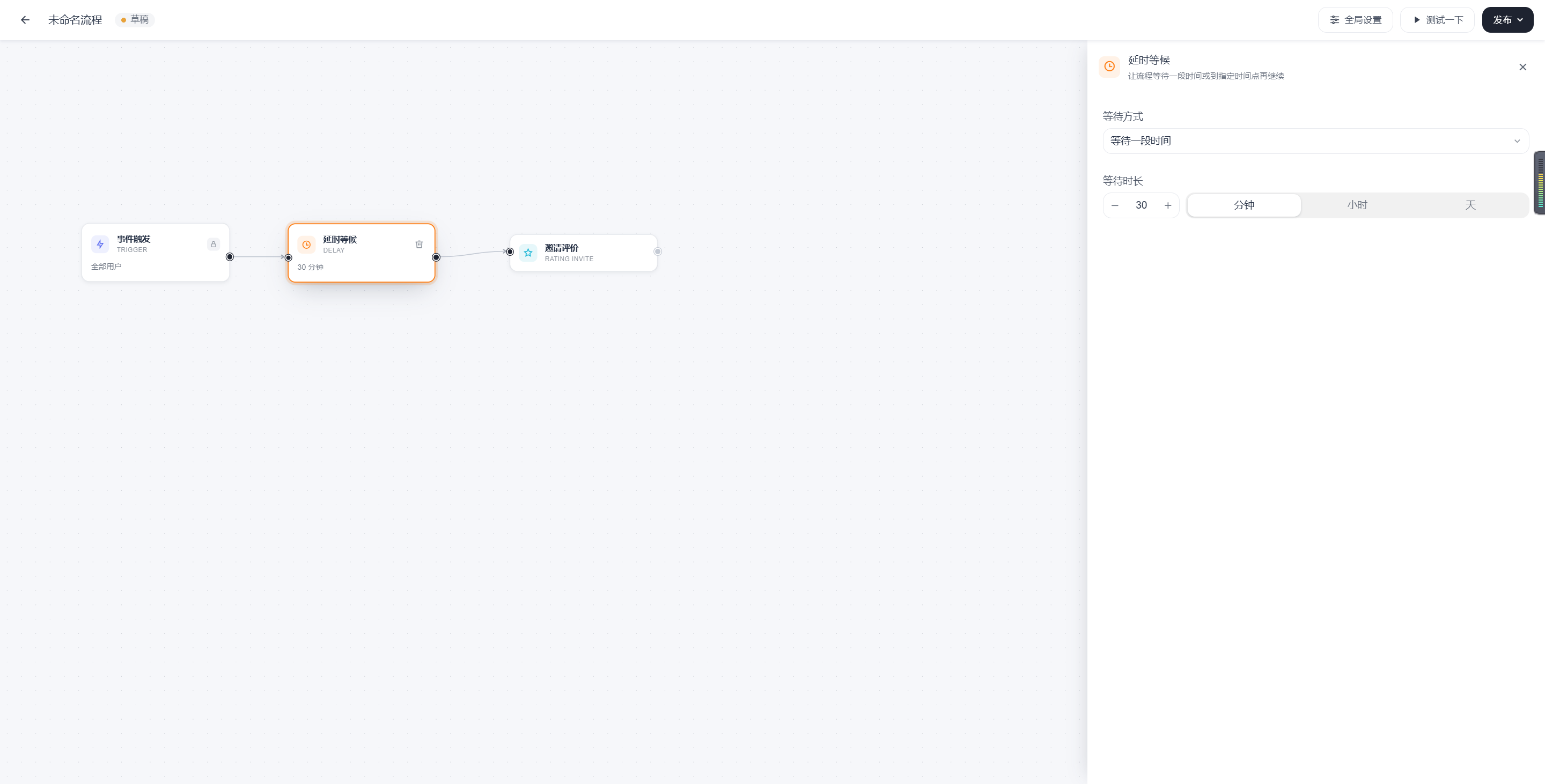
Allow the process to continue after a specified amount of time.
Applicable Scenarios
- Delay sending a reminder
- Send a feedback invitation some time after a conversation ends
- Continue the process at a fixed time the next day
Key Parameters
| Parameter | Meaning | Required | Description |
|---|---|---|---|
| Delay Duration / Time | When execution should continue | Yes | Can be understood as either a duration or a specific point in time. |
| Continuation Path | Where to go after the delay ends | Present by default | Usually Continue by default. |
Output Exits
- Continue by default
Considerations
- A delay node controls timing; it does not evaluate business conditions.
- If conditions still need to be evaluated after the delay, add a conditional branch as the next node.
Example
“Send a satisfaction survey invitation 30 minutes after the conversation ends.”
A/B Random Split
Purpose
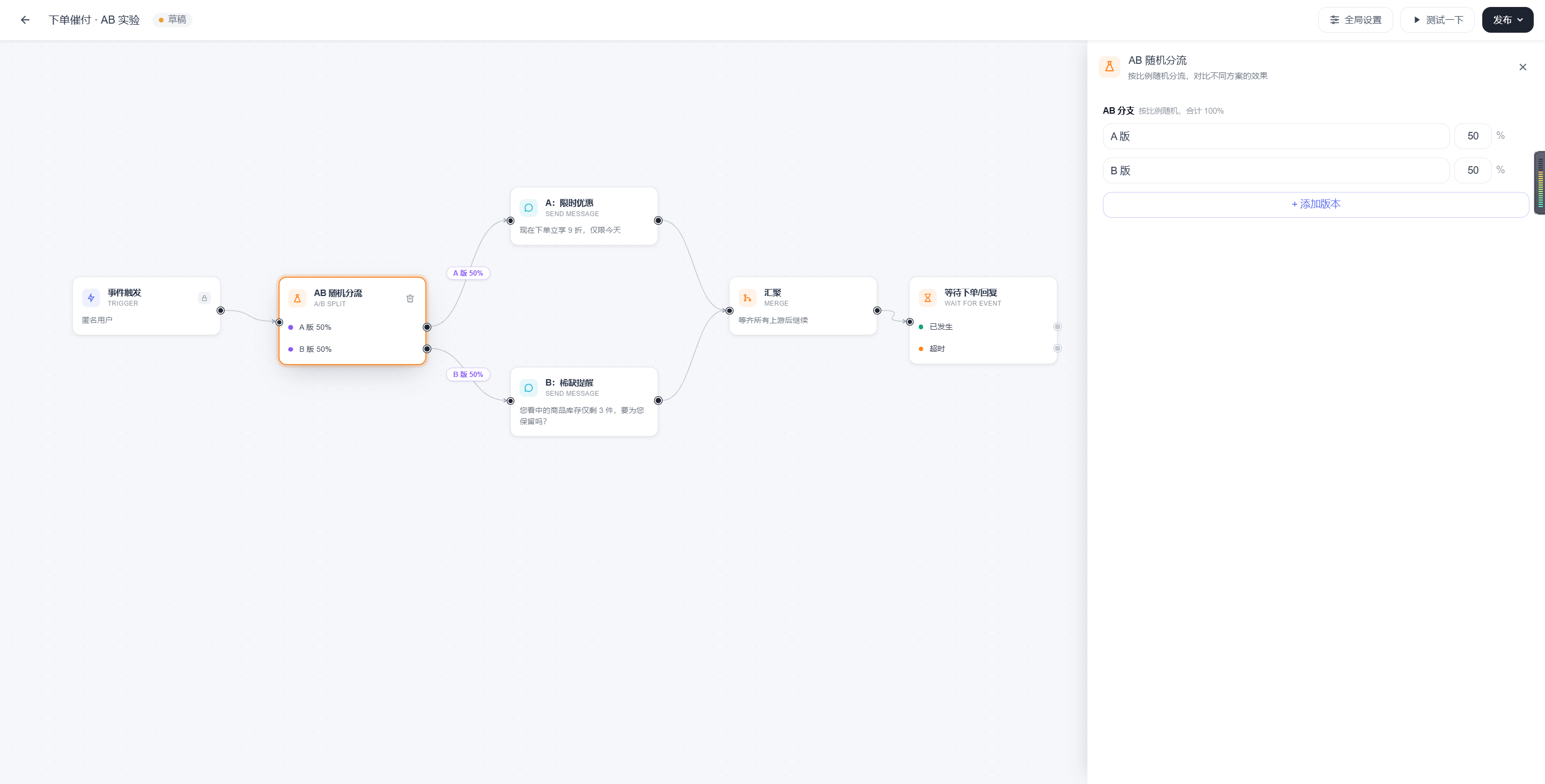
Randomly divide traffic among multiple versions to test different copy or paths.
Applicable Scenarios
- Compare the effectiveness of welcome messages
- Compare payment reminder copy
- Compare the performance of two conversion paths
Key Parameters
| Parameter | Meaning | Required | Description |
|---|---|---|---|
| Version Name | The identifier for each experiment version | Yes | Clear naming is recommended. |
| Split Ratio | The proportion allocated to each version | Yes | The total of all versions should provide complete coverage. |
Output Exits
- One exit for each experiment version
Considerations
- An A/B node must be paired with a clearly defined target event to evaluate the results.
- It is recommended to change only one or two key variables at a time between versions.
Example
“Fifty percent of users see payment reminder copy focused on discounts, while the other 50% see payment reminder copy focused on urgency.”
Merge
Purpose
Bring multiple paths back together at the same subsequent step.
Applicable Scenarios
- Different branches handle different tasks initially but share the same subsequent action
- After multilingual welcome messages, enter the same inquiry process
Key Parameters
| Parameter | Meaning | Required | Description |
|---|---|---|---|
| Merge Rule | Which paths should merge | Yes | Usually represented by the connection lines. Two merge conditions are available: continue after all processes arrive, or continue when any process arrives. |
Output Exits
- Continue by default
Considerations
- Before merging, confirm that all paths have completed the necessary actions.
Example
“After the welcome message for each country is sent, all paths enter the same Assign Agent node.”
Messaging Nodes
Send Message
Purpose
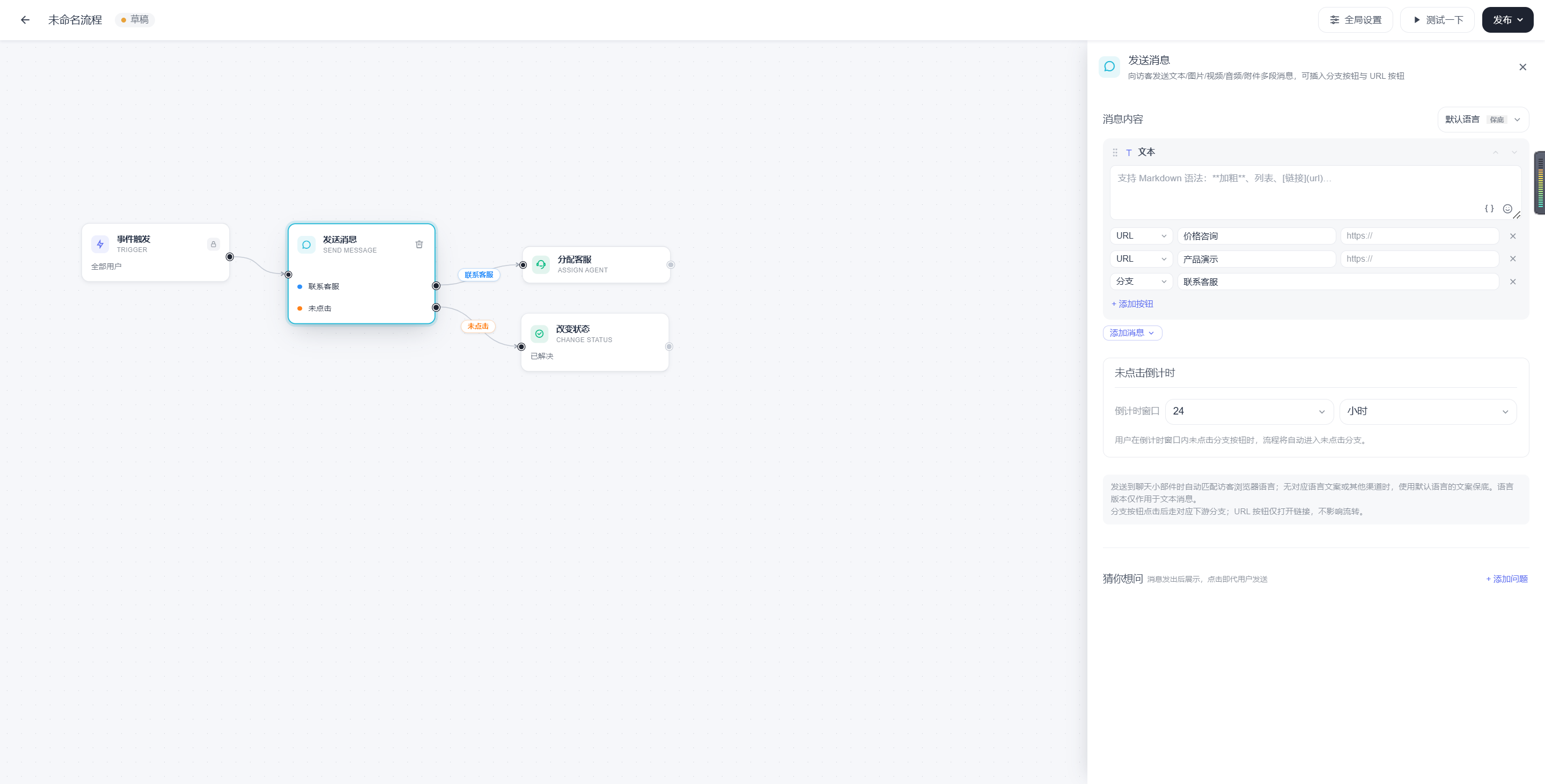
Send basic text, images, videos, attachments, and other multipart messages to users, with URL buttons or branch buttons.
Applicable Scenarios
- Welcome messages
- Reminder messages
- Guidance messages
- Messages for button-based routing
Key Parameters
| Parameter | Meaning | Required | Description |
|---|---|---|---|
| Message Block | The text content to send | Yes | Supports editing by message block. |
| Language Version | The language classification for each text | Optional | Multiple language versions can be configured for the same text. |
| Default Language | The fallback copy used when no language matches | Required | Used as a fallback. |
| Button Type | URL button or branch button | Optional | Different button types serve different purposes. |
| Button Copy | The button name shown to users | Optional | Keep it short and clear. |
| Redirect URL / Branch Key | Button behavior | Complete according to the button type | A URL button redirects to the corresponding link, while a branch button continues the process according to the branch. |
| Unclicked Time Window | The countdown when a button is not clicked | Recommended when using branch buttons | Used to control the unclicked exit. |
Output Exits
- Continue by default
- Button branch
- Unclicked
- Send failed
Considerations
- For multilingual content, configure different language versions in the same text message and retain a default language.
- Branch buttons are more suitable when users need to explicitly choose the next step.
- For unclicked buttons, it is recommended to configure a countdown window and an unclicked fallback branch. The countdown window supports custom durations.
- Support for buttons, attachments, and rich media may vary by channel.
Example
“Hello. Please select what you would like to learn about: pricing, product demo, or contact support.”
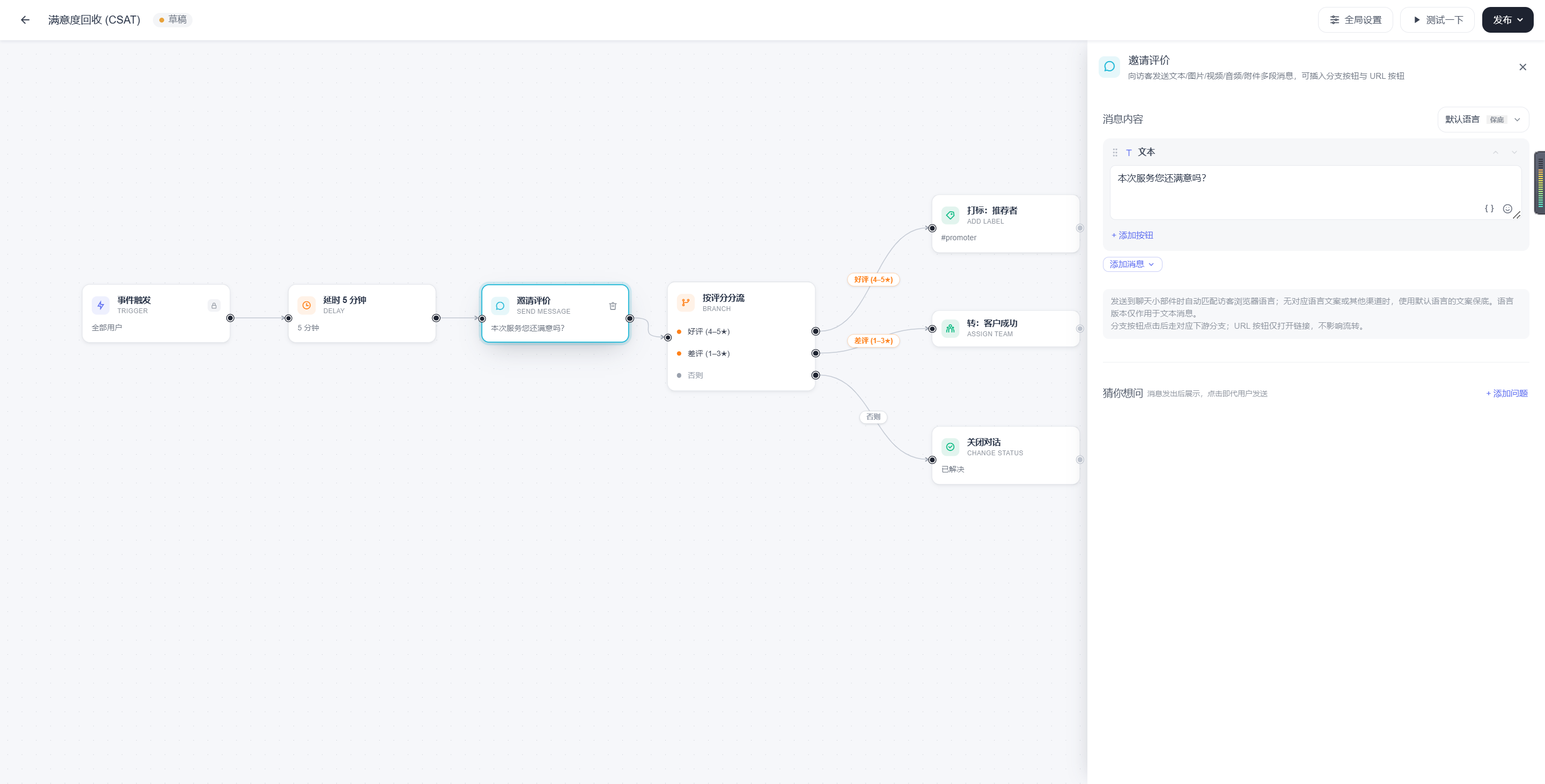
Invite for Feedback
Purpose
Initiate a rating or satisfaction survey at an appropriate time.
Applicable Scenarios
- Collect CSAT after a conversation ends
- Collect satisfaction feedback after after-sales service
Key Parameters
| Parameter | Meaning | Required | Description |
|---|---|---|---|
| Invitation Copy | How to invite the user to provide feedback | Yes | Keep it short and polite. |
| Rating Method | How to collect the rating | Yes | Consistent with the LiveDesk CSAT rating system. |
| Result Handling | How to proceed after receiving feedback | Recommended | Can lead to a tagging, escalation, or follow-up path. |
Output Exits
- Continue by default
- Send failed
Considerations
- Feedback invitations are generally suitable for use after a delay node.
- It is recommended to trigger them after the business process is complete or the issue is resolved, rather than sending them too early.
Example
“Were you satisfied with this service? We welcome your feedback.”
Send Email
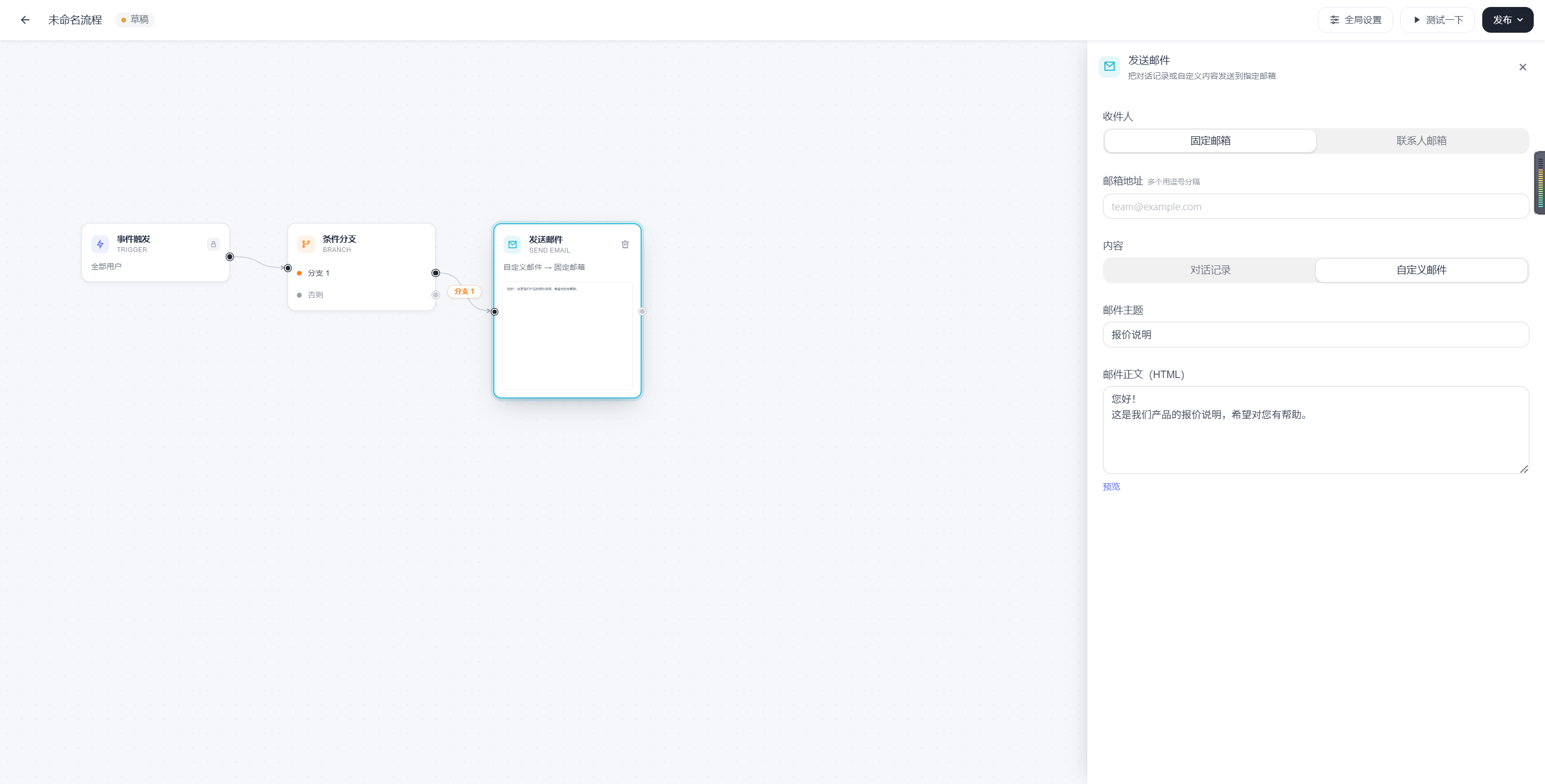
Purpose
Reach users outside the site through email or send conversation records.
Applicable Scenarios
- Send quotations or materials
- Send conversation records
- Provide additional off-site notifications
Key Parameters
| Parameter | Meaning | Required | Description |
|---|---|---|---|
| Recipient | Who receives the email | Yes | Can be a specified email address or a collected email address. |
| Subject | The email subject | Recommended | Affects the open rate. |
| Body / Template | The email content | Yes | Can be customized or based on a template. |
| Content Mode | Custom content or conversation record | Complete according to the scenario | Used to distinguish contact methods. |
Output Exits
- Continue by default
- Send failed
Considerations
- Before sending an email, confirm that the target email address exists and is valid.
- Email is suitable for supplementary information and should not replace the primary conversation flow.
Example
“After a user provides an email address, automatically send a quotation email.”
Action Nodes
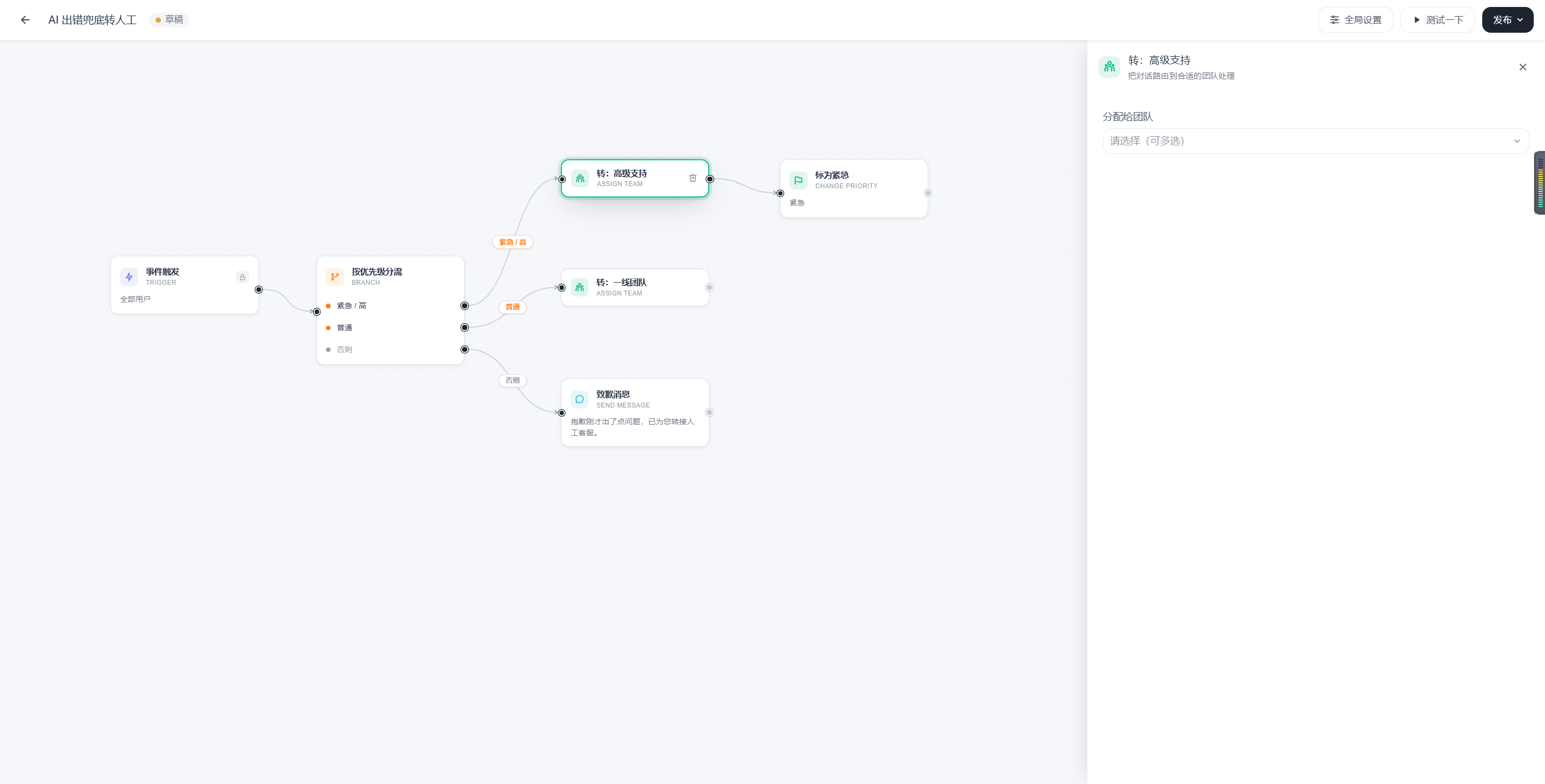
Assign Agent
Purpose
Assign the current conversation to a human agent or agent group. The specified agent must be included in the Human Agent list for the corresponding channel. If the assigned agent is not configured for the channel, the assignment will fail and the conversation will enter the unassigned state.
Applicable Scenarios
- Transfer high-value customers to human agents
- Escalate when a user has not been handled within the timeout period
- Transfer to a human agent after an AI fallback fails
Key Parameters
| Parameter | Meaning | Required | Description |
|---|---|---|---|
| Assignment Method | How to assign | Yes | This may include assignment to a specific agent, by group, or by strategy. A clear assignment strategy is required when assigning a specific human agent. |
| Target Agent / Agent Group | Who to assign to | Complete according to the method | Must comply with the business scope. |
| Handoff Message | Whether to send an additional explanation after assignment | Optional | Often used together with a message node. |
Output Exits
- Continue by default
Considerations
- The assigned target should belong to the inbox or business scope of the current conversation.
- It is recommended to use an explanatory message together with this node to prevent the user from perceiving a sudden interruption.
Example
“Immediately assign high-priority conversations to the human support team.”
Assign AI Agent
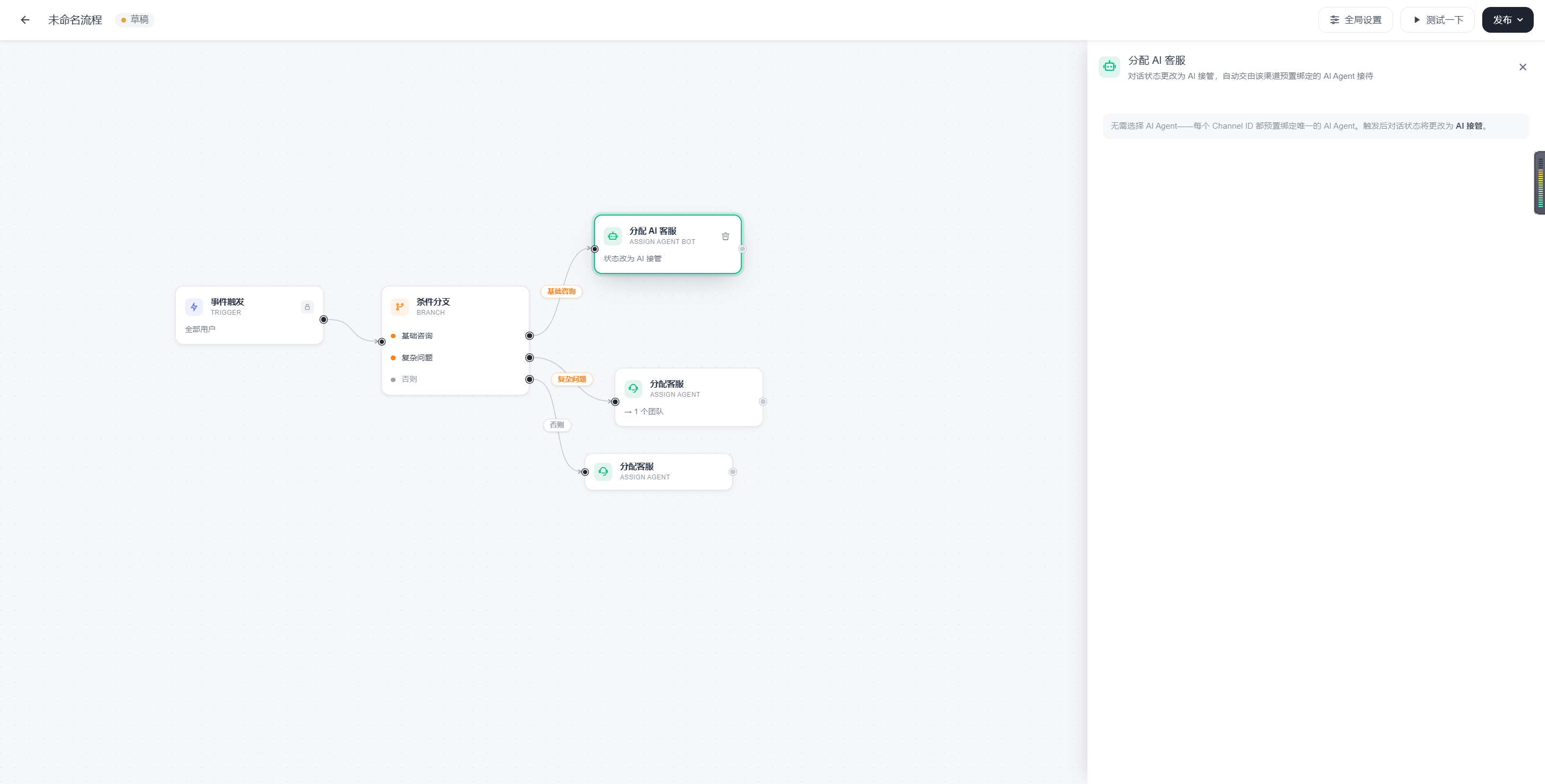
Purpose
Hand the conversation over to an AI Agent.
Applicable Scenarios
- Automatically handle standard questions
- Provide unattended service during off-hours
Key Parameters
| Parameter | Meaning | Required | Description |
|---|---|---|---|
| AI Target | Which AI to assign the conversation to | Yes | The target AI must be prepared in advance. |
| Activation Condition | When to assign the conversation to AI | Recommended as a preceding decision | Often used together with a branch node. |
Output Exits
- Continue by default
Considerations
- It is recommended to configure a fallback path so that the conversation can be transferred to a human agent when the AI cannot handle it.
Example
“Send basic inquiries to AI while retaining a human path for complex inquiries.”
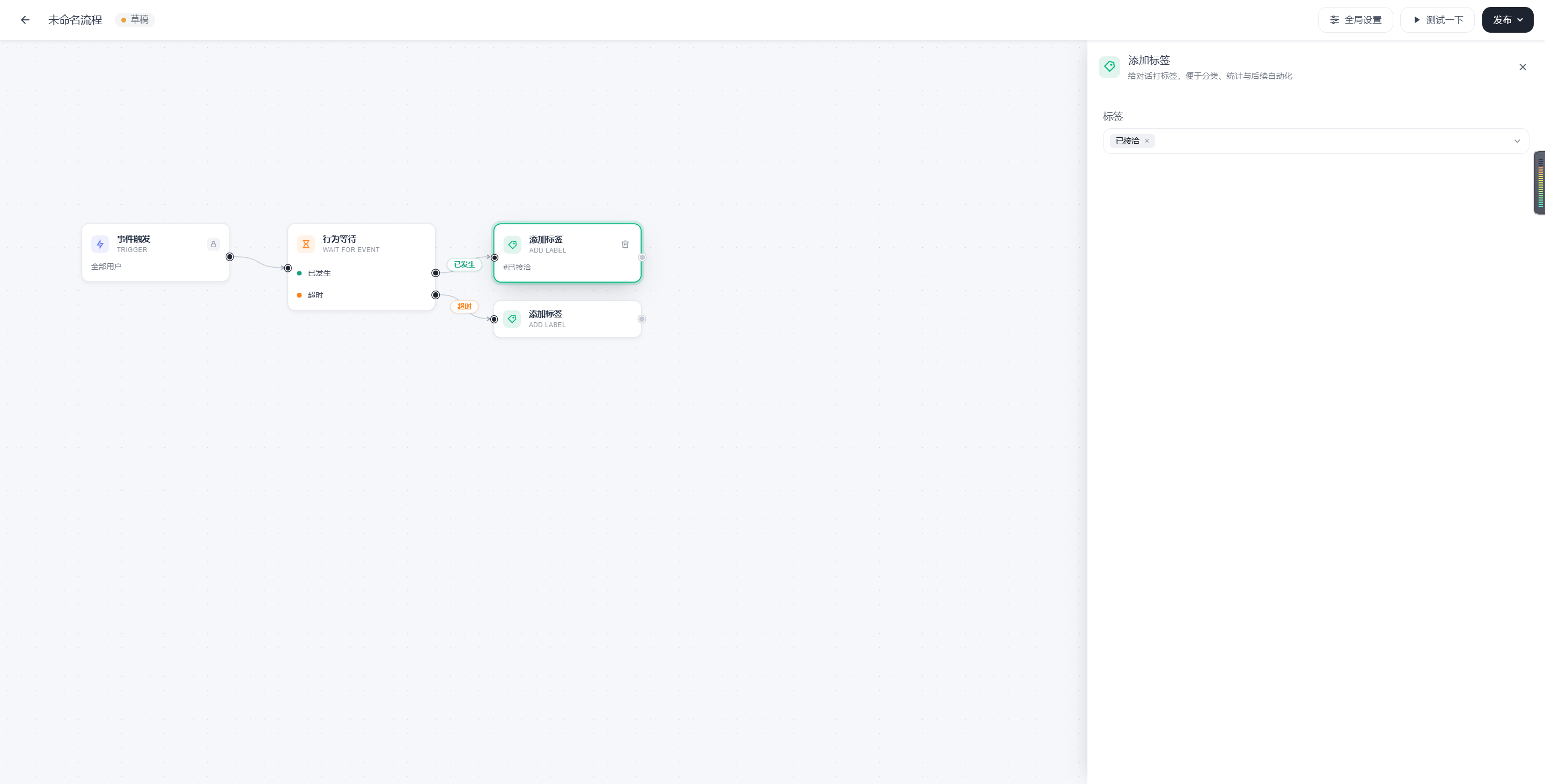
Add Tag
Purpose
Add a classification tag to a conversation.
Applicable Scenarios
- Mark the source
- Mark the intent
- Mark the process stage
Key Parameters
| Parameter | Meaning | Required | Description |
|---|---|---|---|
| Tag Value | The tag to add | Yes | Can be used for subsequent reporting and branch decisions. |
Output Exits
- Continue by default
Example
“After the user replies, add the ‘Contacted’ tag.”
Change Status
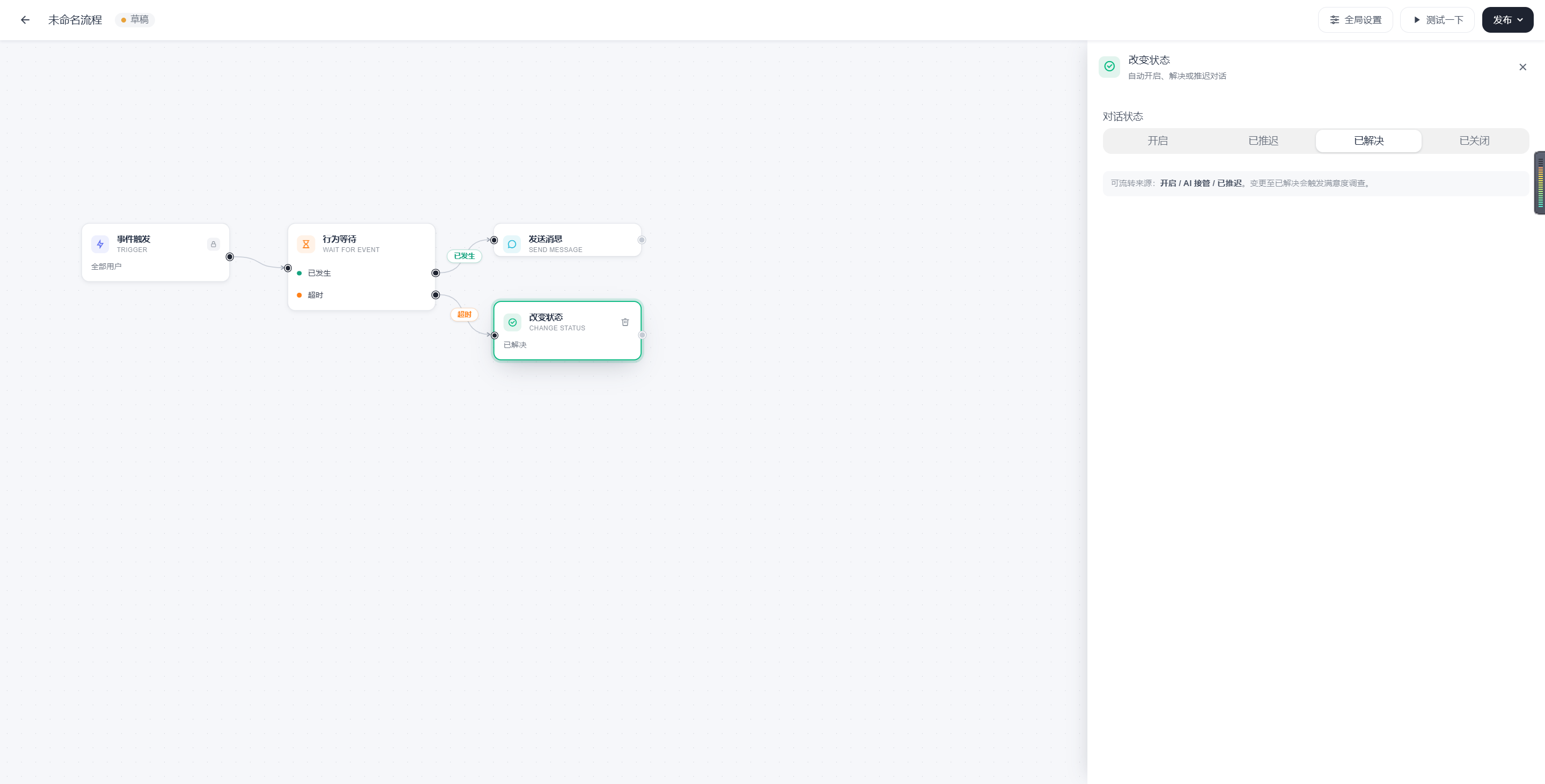
Purpose
Update the conversation status.
Applicable Scenarios
- Close automatically
- Mark as being handled
- Mark for delayed handling
Key Parameters
| Parameter | Meaning | Required | Description |
|---|---|---|---|
| Target Status | The status to change to | Yes | Keep it consistent with the business status system. |
Output Exits
- Continue by default
Example
“Change conversations with no reply after the timeout to Resolved.”
Change Priority
Purpose
Increase or decrease the conversation priority.
Applicable Scenarios
- Escalate complaints
- Expedite handling for high-value customers
Key Parameters
| Parameter | Meaning | Required | Description |
|---|---|---|---|
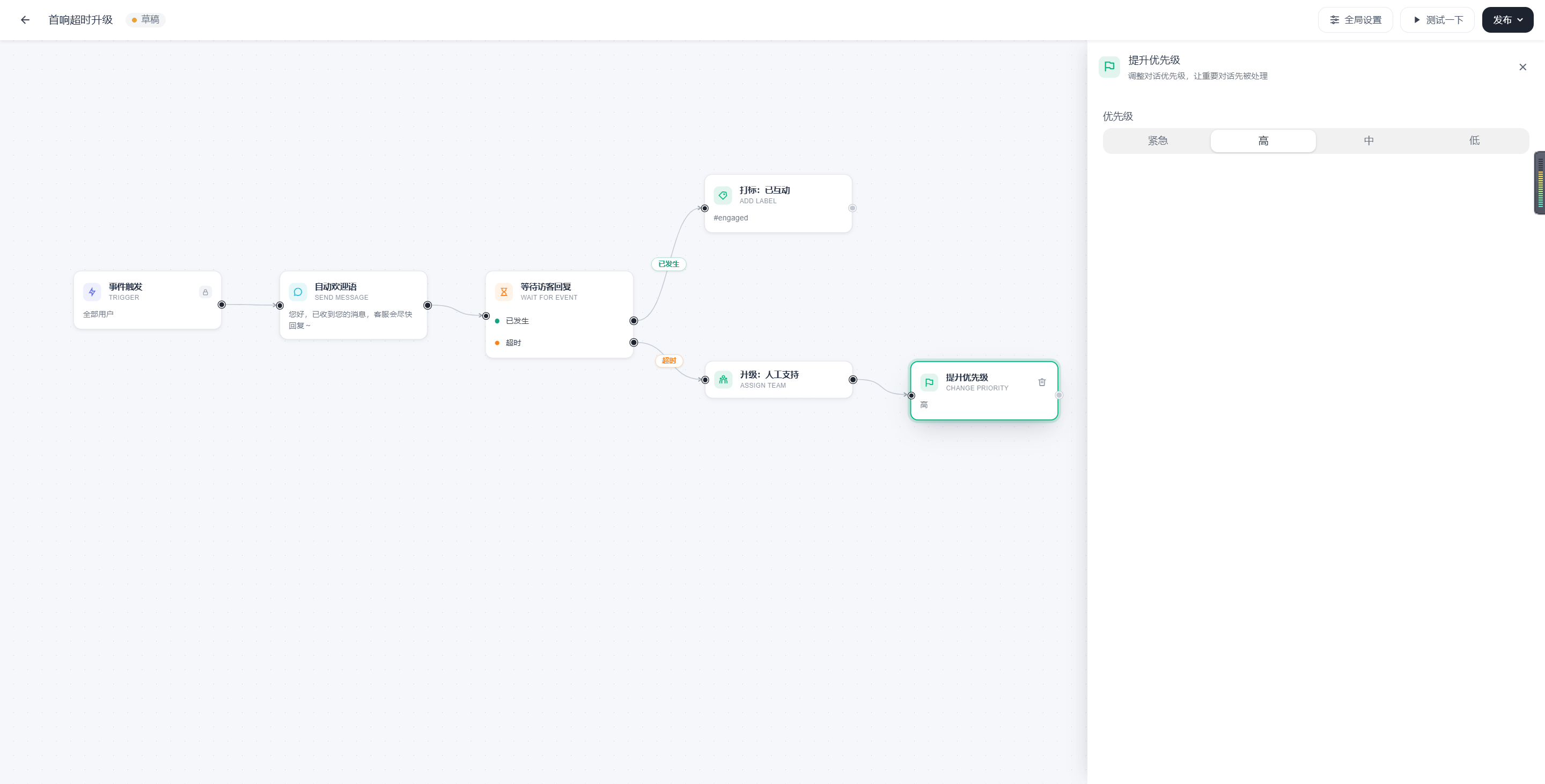
| Priority | The target priority | Yes | Used for subsequent assignment and handling order. |
Output Exits
- Continue by default
Example
“After identifying an urgent issue, increase the conversation priority to High.”
Update Customer Profile
Purpose
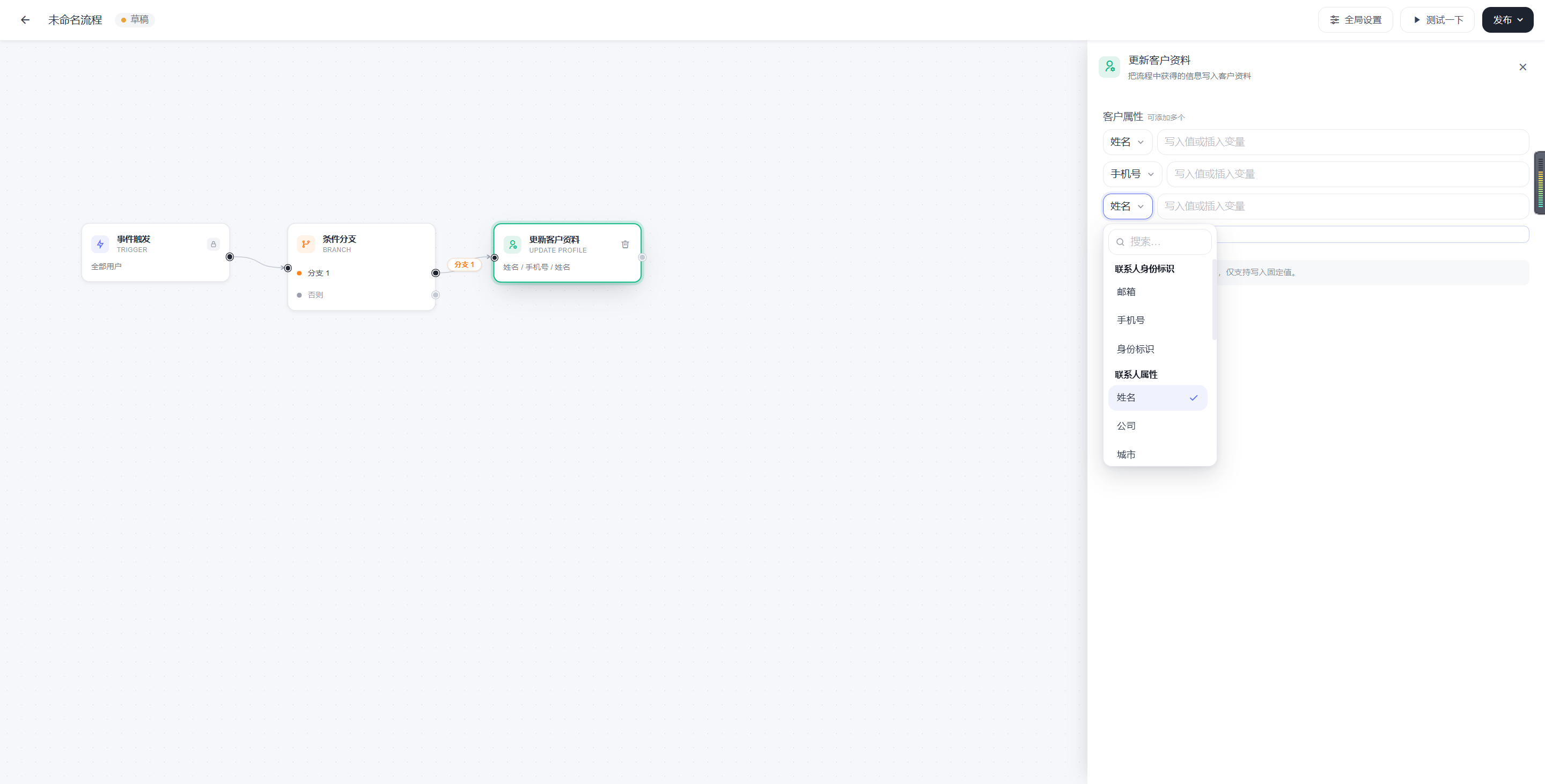
Write information collected during the process back to the customer profile.
Applicable Scenarios
- Write lead information back to the contact
- Record the customer’s language or region
Key Parameters
| Parameter | Meaning | Required | Description |
|---|---|---|---|
| Field | Which profile field to update | Yes | Corresponds to a customer profile field. |
| Value | What to update it to | Yes | Can be a fixed value or a process variable. |
Output Exits
- Continue by default
Example
“If the message contains an email address, update the customer profile.”
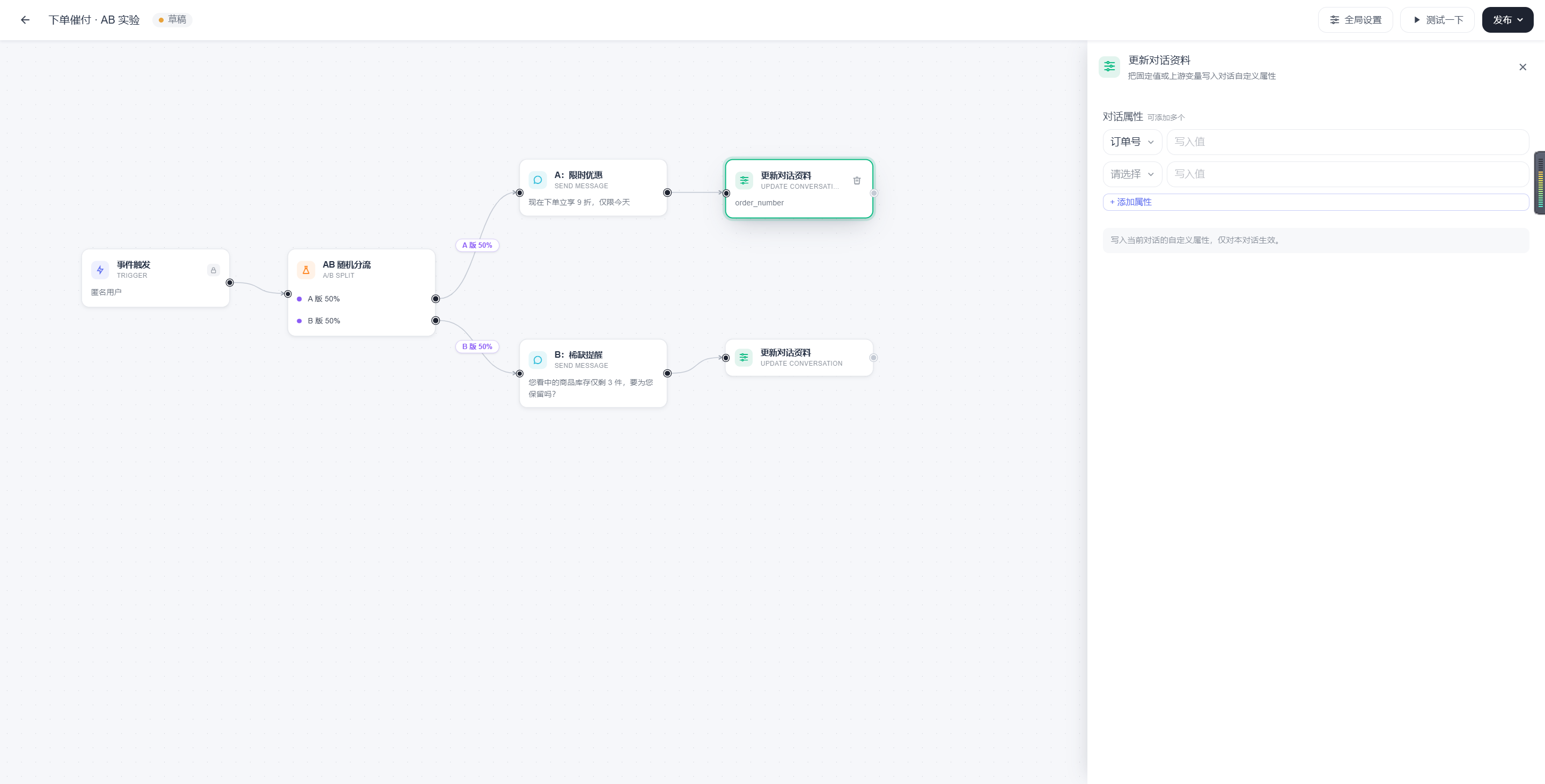
Update Conversation Profile
Purpose
Write information generated during the process back to conversation-level attributes.
Applicable Scenarios
- Record the stage of the current process
- Store results returned by an external interface
Key Parameters
| Parameter | Meaning | Required | Description |
|---|---|---|---|
| Attribute Name | The conversation attribute name | Yes | Makes it easier for subsequent branches to reference. |
| Attribute Value | The value to write | Yes | Can be a fixed value or a variable. |
Output Exits
- Continue by default
Example
“Write the result of this routing process to the conversation profile for subsequent reporting.”
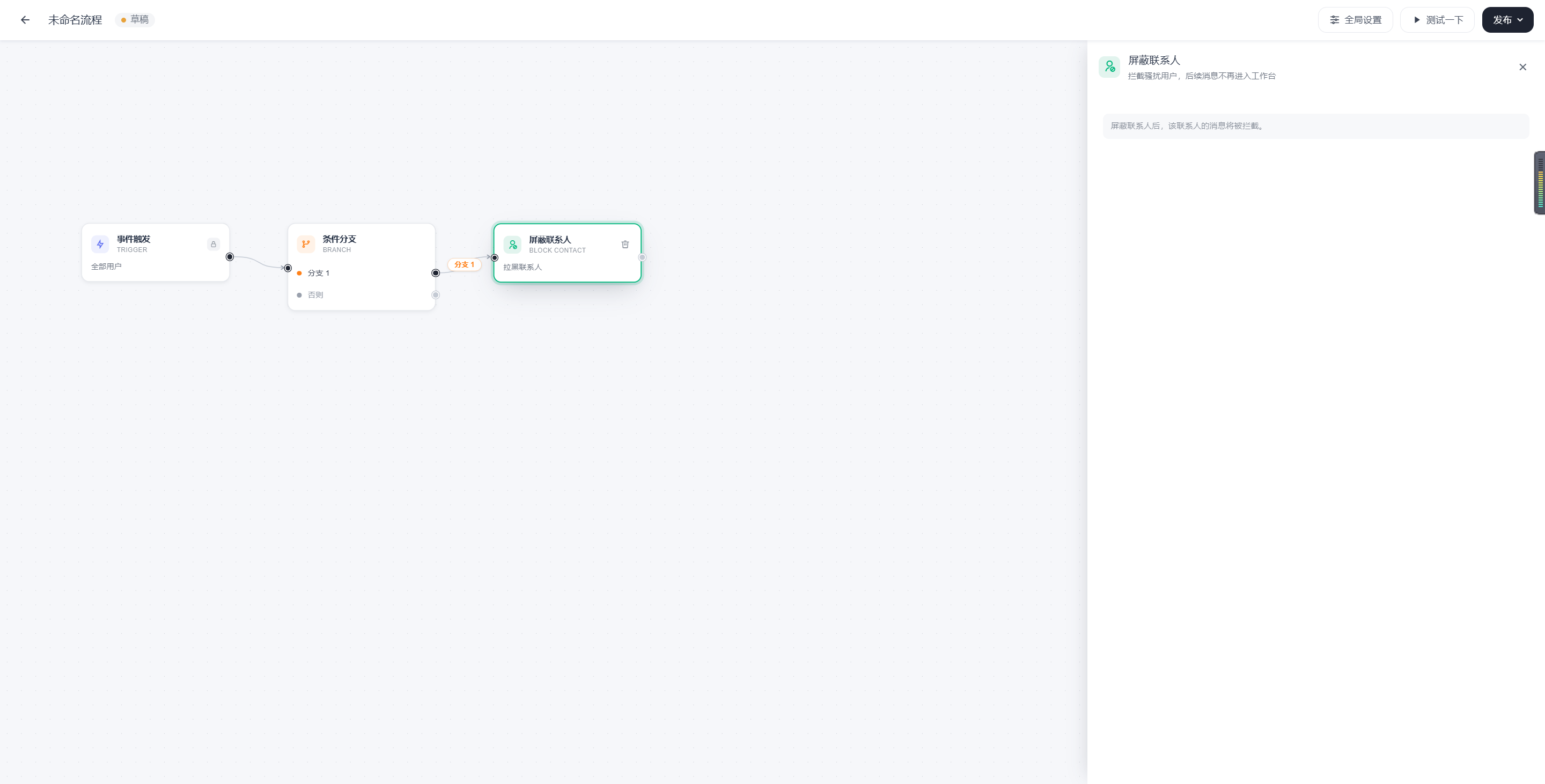
Block Contact
Purpose
Restrict users who pose a risk. Messages from the contact will not be accepted.
Applicable Scenarios
- Malicious harassment
- Frequent invalid triggers
Key Parameters
| Parameter | Meaning | Required | Description |
|---|---|---|---|
| Handling Rule | Block the contact | Yes | Should be consistent with business governance rules. |
Output Exits
- Continue by default
Example
“After sensitive words are detected in the message, add the contact to the blacklist.”
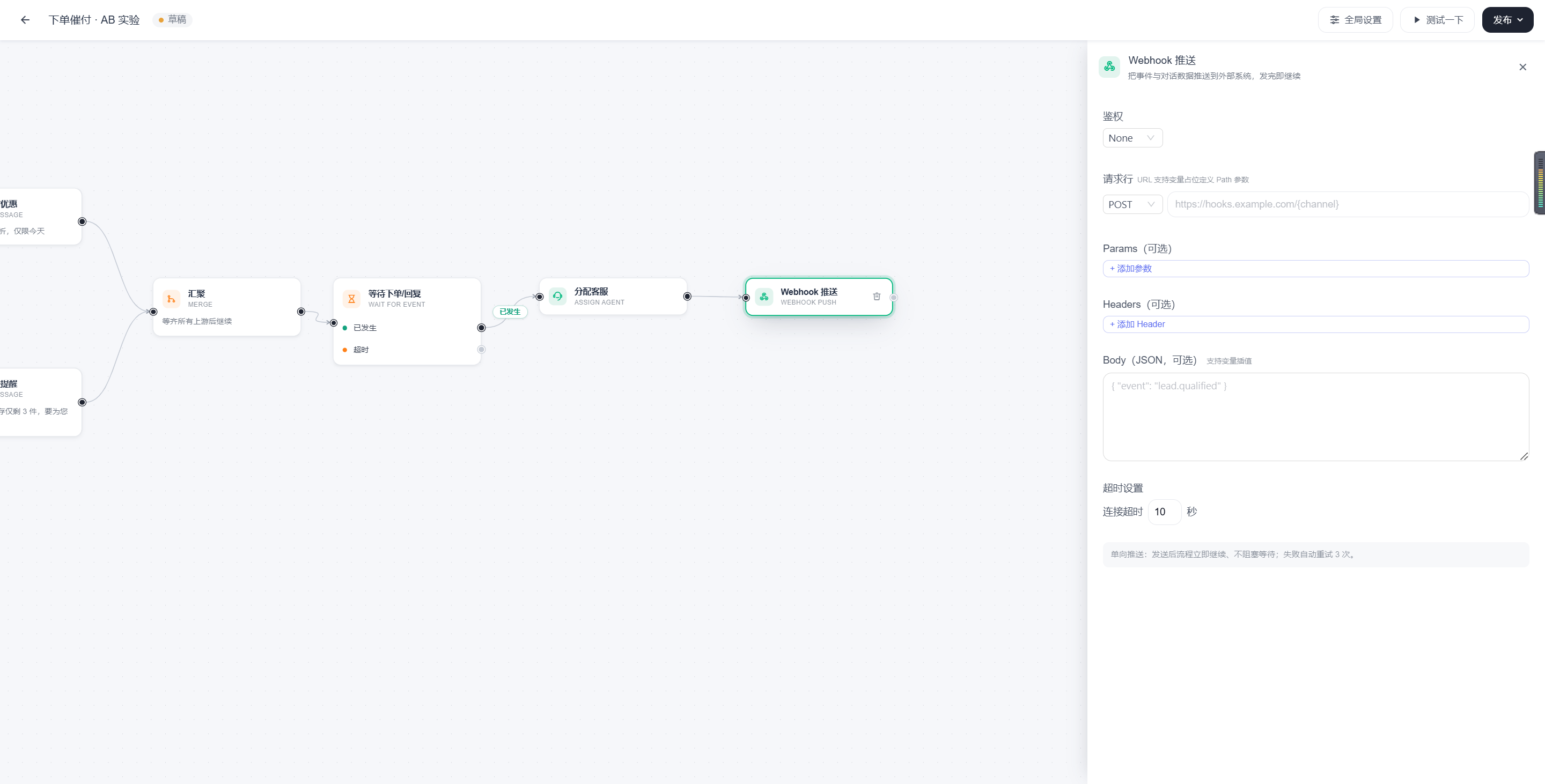
Webhook Push
Purpose
Push information from the current process to an external system.
Applicable Scenarios
- Notify a CRM
- Notify a BI system
- Synchronize with a bot or intermediate platform
Key Parameters
| Parameter | Meaning | Required | Description |
|---|---|---|---|
| Request Method | Which HTTP method to use | Yes | For example, POST or GET. |
| URL | The push address | Yes | The address that receives the data in the external system. |
| Request Headers | Additional header information | Optional | Used for authentication or content requirements. |
| Request Parameters / Request Body | The data to push | Optional | Used to organize business data. |
| Timeout | The maximum wait time | Recommended | Controls stability. |
Output Exits
- Continue by default
Considerations
- A webhook is suitable for “pushing information out,” but not for relying on returned results to perform complex decisions.
- If routing based on the external response is required, the Call API to Retrieve Data node is more suitable.
Example
“When a user enters the human handoff path, synchronize the conversation information with an external system.”
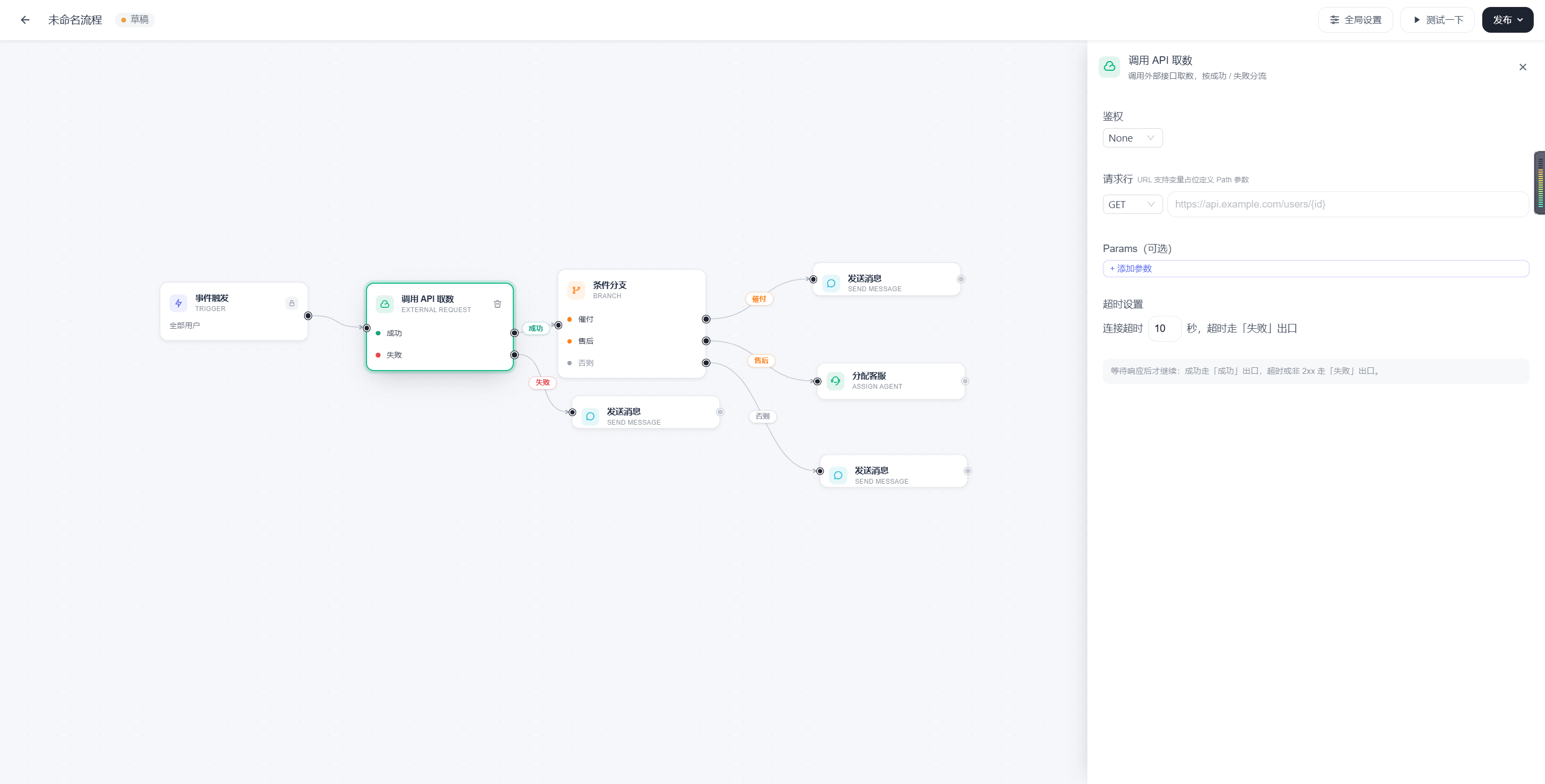
Call API to Retrieve Data
Purpose
Send a request to an external system and use the result for subsequent process decisions.
Applicable Scenarios
- Query order status
- Query inventory
- Query user level
Key Parameters
| Parameter | Meaning | Required | Description |
|---|---|---|---|
| Request Method | Which HTTP method to use | Yes | Such as GET or POST. |
| URL | The request address | Yes | The external interface address. |
| Request Headers | Additional header information | Optional | Used for authentication. |
| Parameters / Request Body | The values to send | Optional | Can include variables. |
| Timeout | The maximum wait time | Recommended | Prevents the process from waiting too long. |
| Result Binding | Where to write the returned result | Recommended | Makes it easier for subsequent nodes to use. |
Output Exits
- Success
- Failure
Considerations
- An API node is more suitable for “retrieving a result and then making a decision.”
- It is recommended to promptly write returned data to variables or the conversation profile for use by subsequent nodes.
Example
“First check the order payment status, then decide whether to follow the payment reminder path or the after-sales path.”
General Parameter Guidelines
To make nodes easier to maintain, complete parameters according to the following principles:
- Copy parameters: Keep them direct and concise, and avoid ambiguity.
- Condition parameters: Make them verifiable and avoid vague conditions.
- Time parameters: Always specify the unit and business meaning.
- External call parameters: Use standardized names to simplify later lookup.
- Variable parameters: Use consistent naming and avoid different names for the same concept.
Limitations and Scope of Use
The following are not technical implementation details, but boundaries you should understand before configuring the process.
Text Length
- Keep text messages concise.
- Long copy can affect the reading experience.
- In multichannel scenarios, long text may display differently on different devices.
Number of Buttons
- It is recommended to limit the number of buttons in a single message.
- Prefer to retain only the one or two most important choices.
- Too many buttons can reduce the click-through rate and are more likely to encounter channel differences.
Attachment and Rich Media Capabilities
- Supported file types, quantities, and sizes may vary by channel.
- Before configuring attachments or rich media, confirm the compatibility range of the target channel.
Scope of Branch Buttons
- Branch buttons are suitable for clear next-step choices.
- For complex interaction scenarios, test and verify them in the target channel first.
Assignment Target Restrictions
- When assigning an agent, team, or AI, comply with the current business scope and handoff rules.
- If the configured target is outside the supported handoff scope, the process may not produce the expected result.
Stability of External Calls
- Both webhook and API calls depend on the availability of external systems.
- Always consider failure, timeout, and fallback paths.
