

How to Create Custom Events?
EngageLab MA provides two ways to create custom events:
Method 1: Automatic Creation
Call the API to report an event directly. If the event does not yet exist, the system will automatically create it.
Method 2: Manual Creation
Manually create events on the management page, supporting the following two operations:
Single Creation: Add events individually via a form.
Batch Creation: Import event information in batches using an Excel template.
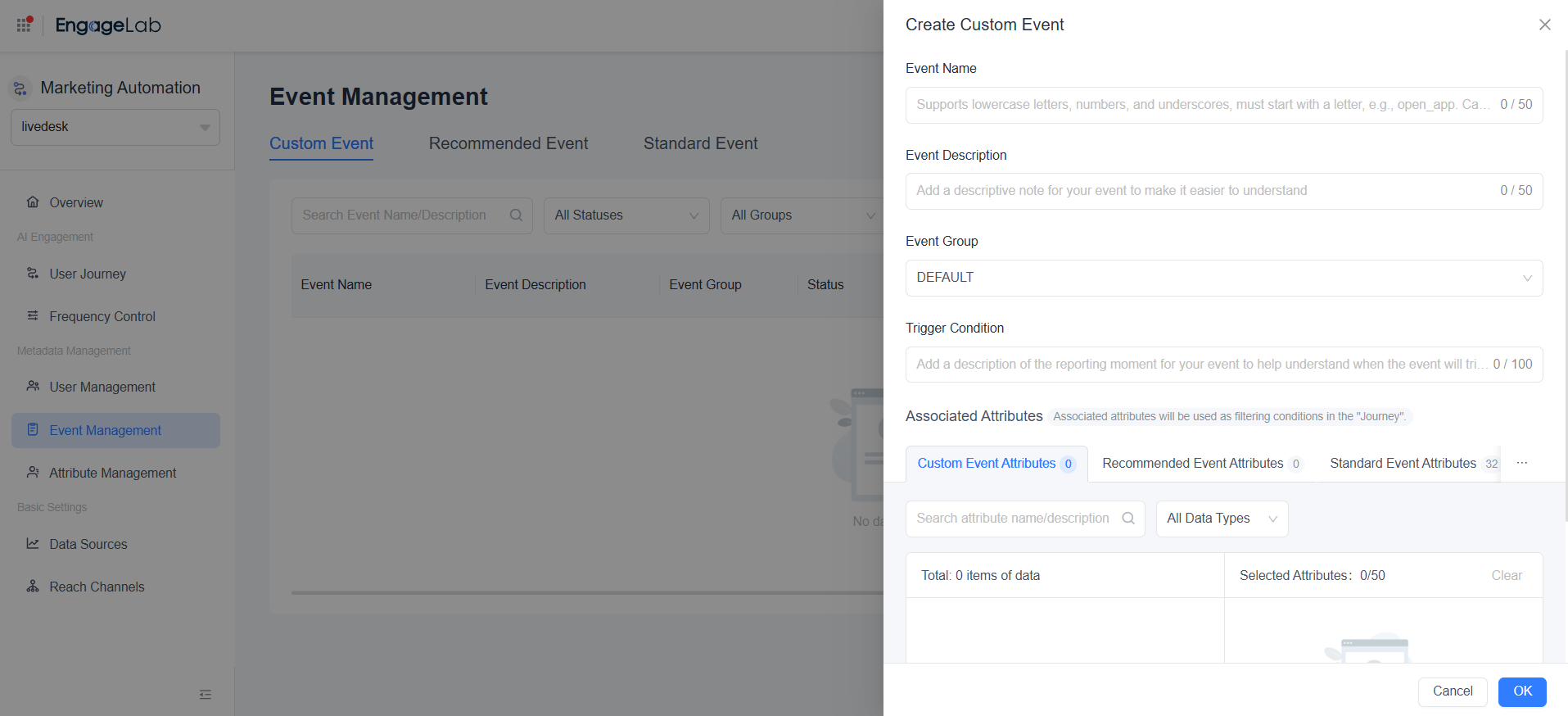
When creating events on the page, you need to complete the event definition information. The relevant details are as follows:
| Information | Required | Description |
|---|---|---|
| Event Name | Required | The name of the reported event. Supports lowercase letters, numbers, and underscores, and must start with a letter (e.g., open_app). Cannot be changed once set. |
| Event Description | Required | A clear explanatory note for your event, up to 50 characters. Can be modified after being set. |
| Event Group | Optional | Create a new event group to classify events by business scenario for easier searching. Can be modified after being set. |
| Trigger Condition | Optional | Add a description of when the event is reported to clarify the triggering scenario. Can be modified after being set. |
| Associated Attributes | Optional | Used to describe more event information. Once associated, they can serve as filter conditions in user journeys for user selection. Can be modified after being set. * Recommended: Associate custom/recommended event attributes. * Standard event attributes, user attributes, and device attributes are automatically associated and do not require additional processing. |

Still Have Questions?
Can't find what you're looking for? Our experts are here to provide personalized assistance. Ask your question now and get a timely response.

