Elena Rodriguez
Updated: 2026-07-17
A lead taps an ad promising a same-day quote. WhatsApp opens with a blank message box. Five minutes later, an agent asks, “How can we help?” The campaign technically worked, but the promise, conversation, and sales process never met. Good click to WhatsApp ads are designed past the click.
This guide connects creative, destination setup, the first message, qualification, agent routing, and attribution. The aim is a conversation the right team can understand, answer, and move toward a measurable outcome.
Quick answer
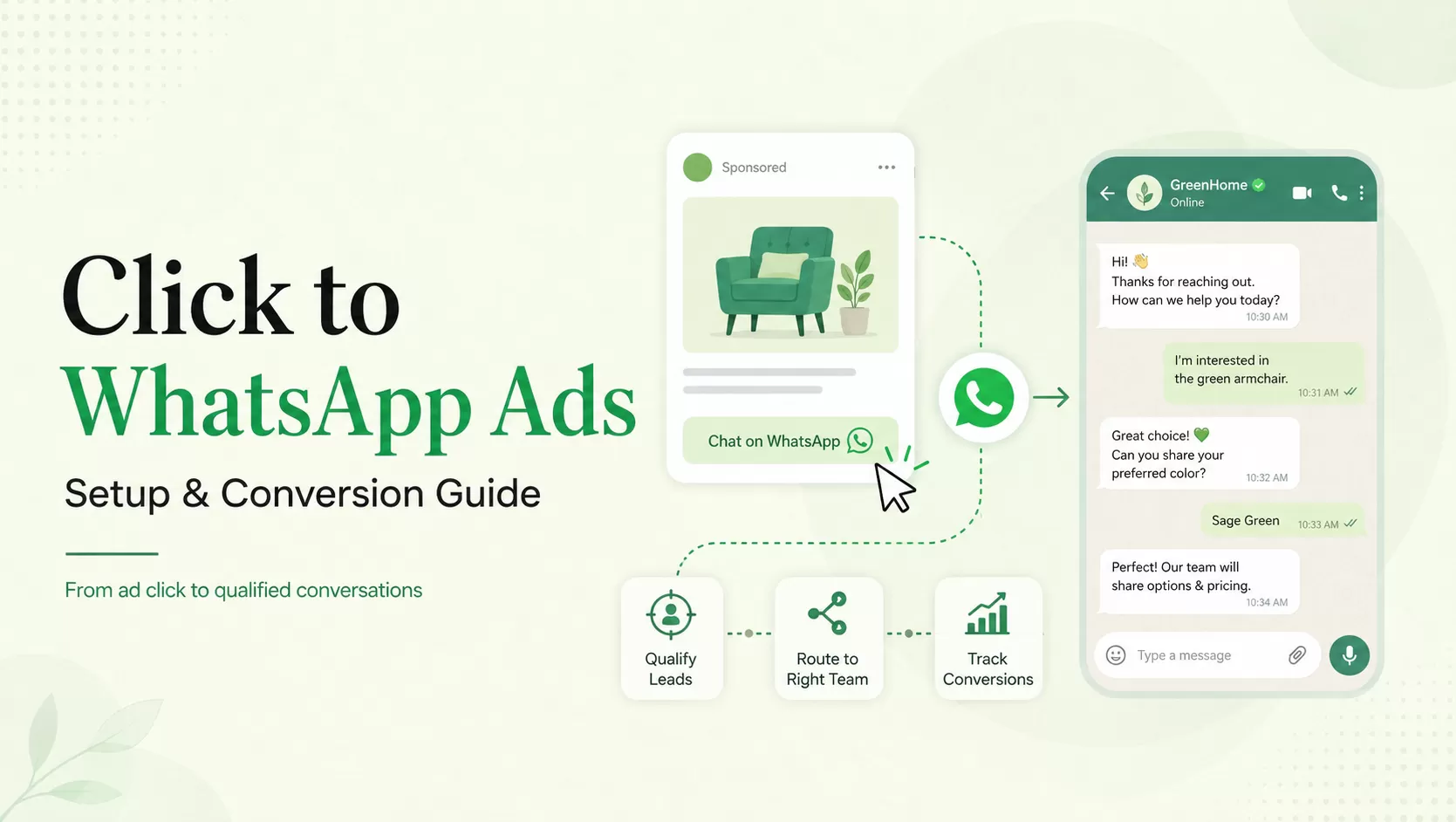
A click-to-WhatsApp ad is a Facebook or Instagram ad that opens a conversation with a business on WhatsApp. The ad creates intent; conversion depends on expectation match, a useful prefilled message, fast qualification, correct routing, and tracking the result after chat begins.
How Click to WhatsApp Ads Turn Attention Into Conversation
According to the official WhatsApp Business page (2026) , ads that click to WhatsApp can appear across Facebook and Instagram, including Feed, Stories, and Marketplace, and can support lead generation, sales, and marketing. The destination is a WhatsApp thread with the business rather than a landing page form.

The format removes form friction, but it also removes the structure a form normally provides. Without a designed opening message, the agent may not know the campaign, product, location, language, or customer intent. Preserve that context in the creative, prefilled text, campaign metadata, and routing logic.
Confirm 6 Prerequisites Before You Spend
- Connected business assets: confirm the correct Facebook Page, ad account, WhatsApp business number, and permissions.
- One campaign promise: the chat must deliver the quote, consultation, catalog, availability, or support offered in the ad.
- A staffed response path: define hours, first-response target, overflow, language, and escalation.
- Qualification fields: ask only what changes routing or the next action.
- Consent and policy review: align audience, creative, follow-up, and message use with applicable Meta rules and local requirements.
- Outcome tracking: decide how a conversation becomes a qualified lead, booking, order, or resolved request.
If the team cannot answer number three or six, pause the media buy. More clicks will only create a larger invisible queue.
Set Up Click to WhatsApp Ads in 7 Practical Steps
- Choose the objective that matches the business result. Do not optimize for conversations if the organization measures booked appointments and cannot connect the two.
- Select WhatsApp as the messaging destination. Verify the number shown to users and the business identity attached to it.

Meta's setup guidance emphasizes clear expectations, connection-building, budget and duration testing, and directing people to the right messaging app.
- Build one ad set per meaningful routing dimension. Region, language, product, or audience stage may justify separate paths.

- Write creative that previews the chat. Tell users what they can ask, what they will receive, and when someone responds.
- Create a prefilled message with context. “I need the Jakarta enterprise quote” is operationally better than “Hi.”

- Preview every placement. Check text truncation, image crop, CTA, and destination on a real mobile device.
- Run a controlled budget first. Measure qualified outcomes and agent capacity before expanding audiences.

Design the First 5 Messages to Qualify Without Interrogating
The conversation should feel like help, not a form rebuilt one bubble at a time. Start by acknowledging the ad promise and offering a small number of clear paths.
| Message | Purpose | Example |
|---|---|---|
| 1. Context | Confirm the campaign and offer | “You came from our enterprise demo ad. I can help with pricing, setup, or use cases.” |
| 2. Intent | Let the lead choose a path | “Which would be most useful?” with three reply buttons |
| 3. Qualifier | Ask one routing question | Country, team size, product, or timeline |
| 4. Value | Answer before asking again | Share the relevant range, document, or availability |
| 5. Handoff | Set ownership and timing | “A solutions specialist will join within 10 minutes.” |
A bot should not pretend to be a person. Say what is automated, preserve the answers already collected, and give the human agent the campaign, ad, language, and qualification context. Repeating questions is one of the fastest ways to turn paid intent into frustration. For the template mechanics behind these bubbles, from approval to send status, see our guide to sending WhatsApp messages through the API .
Route Conversations Before the Queue Starts to Scale
EngageLab WhatsApp Business API supports customer acquisition entry points, automated messaging, notifications, and ongoing conversion workflows. The practical value after an ad click is the operating layer: templates, routing, APIs, analytics, and connections to the systems that own the lead or order.

Route by the smallest set of dimensions that changes ownership: language, market, product, customer status, and intent. Push captured answers into the CRM, attach the campaign identifier, and alert an agent only when the lead reaches a defined state. The honest watch-out is implementation: API access does not create a sales process. The business still needs owners, service levels, fallback, and data mapping.
Build the conversation before scaling the campaign
Connect one ad set to a qualification and routing flow in EngageLab, then measure qualified outcomes and response capacity.
Start a WhatsApp pilotMeasure the Funnel Beyond Cost per Conversation
| Stage | Metric | Diagnostic question |
|---|---|---|
| Ad | Click-through rate | Does the creative attract the intended buyer? |
| Chat start | Conversation start rate | Does WhatsApp open with a clear next action? |
| Response | First-response time | Can the operation keep the promise made in the ad? |
| Qualification | Qualified conversation rate | Are targeting and opening questions filtering correctly? |
| Outcome | Booking, order, or accepted lead rate | Does chat produce a business result? |
| Quality | Block, complaint, and drop-off rate | Is the campaign creating pressure or confusion? |
Use campaign-specific links or metadata, CRM stage updates, Conversions API or approved offline conversion methods where appropriate, and a consistent outcome definition. The official WhatsApp Business page notes that Meta provides tools such as Pixel, Conversions API, and Offline Conversions for measurement beyond the conversation. Choose the implementation that matches your stack and privacy obligations.
Frequently Asked Questions About Click to WhatsApp Ads
What are click to WhatsApp ads?
They are ads on Facebook or Instagram that open a WhatsApp conversation with the advertiser. They are useful when a buyer benefits from asking a question before purchasing, booking, or submitting details. Performance depends on the post-click workflow, including context, response time, qualification, routing, and outcome tracking.
How much do click to WhatsApp ads cost?
Media cost varies by auction, audience, market, placement, optimization, and creative. The more useful business number is cost per qualified conversation or completed outcome. Include agent time, automation, WhatsApp platform costs , CRM work, and follow-up rather than evaluating only cost per click or conversation start.
Do I need the WhatsApp Business API?
A small business may begin with the WhatsApp Business app, depending on availability and requirements. Teams that need multiple agents, automation, integrations, templates, routing, reporting, and higher operational scale should evaluate the WhatsApp Business Platform through an approved solution provider setup . Confirm current Meta eligibility and policy requirements.
Why do conversations fail to convert?
Common causes are a mismatch between ad and chat, a blank or vague opening, slow response, too many questions, lost campaign context, incorrect routing, and no defined next action. Audit the transcript from the lead's perspective before changing targeting: in most failing campaigns, the transcript shows the breakdown starting after the click.
Click to WhatsApp ads work when advertising and conversation operations share one promise. Build the route from creative to qualified outcome, test it with a small budget, and let response quality determine when to scale. More conversations are valuable only when the team can recognize, answer, and measure them.

![Fintech Push Notifications: Best Practices, Workflows & Use Cases [2026]](https://img.engagelab.net/en/article/fintech-push-notifications-best-practices-use-cases.webp)
![Firebase Cloud Messaging Alternatives: 7 Platforms Compared for Multi-Channel Scale [2026]](https://img.engagelab.net/en/article/fcm-alternatives-cover.webp)