Elena Rodriguez
Updated: 2026-11-19
Your AI support agent sends a helpful response to a customer. The customer replies with another question, but that message lands in an employee's Gmail inbox. The agent never sees it, and the conversation starts again. Handing the agent OAuth access to a human inbox patches that for a week, until it reads mail it should never have seen.
An email API for AI agents offers a more controlled approach. Below, we cover what an email API for AI agents does and how the receive-and-reply loop works, then compare six providers and walk through a five-step setup.
TL;DR: An email API for AI agents gives an agent its own email address and a way to receive messages, participate in conversations, and send replies via the API. It works well for customer support and other workflows requiring two-way communication. If your agent only sends notifications, a transactional email API may be sufficient. For two-way communication, check domain requirements and approval controls before choosing a provider.
Part 1: What Is an Email API for AI Agents?
An email API for AI agents gives an agent a mailbox of its own. The agent can receive incoming emails, read their contents, and send replies from its own email address based on the conversation. The API manages the underlying agent email infrastructure and enables developers to integrate email functionality with an AI model or an automated workflow.
For example, a customer might email support@yourcompany.com about an order. The API delivers the message to an AI agent email address, which checks the order information and prepares a response. If the customer replies, the agent can continue the conversation using the existing email history.
This differs from giving an agent OAuth access to a human Gmail/Outlook inbox and a one-way transactional API. A transactional email API remains useful for receipts or password-reset messages. Email for AI agents becomes relevant when the recipient needs to reply and expects the conversation to continue.
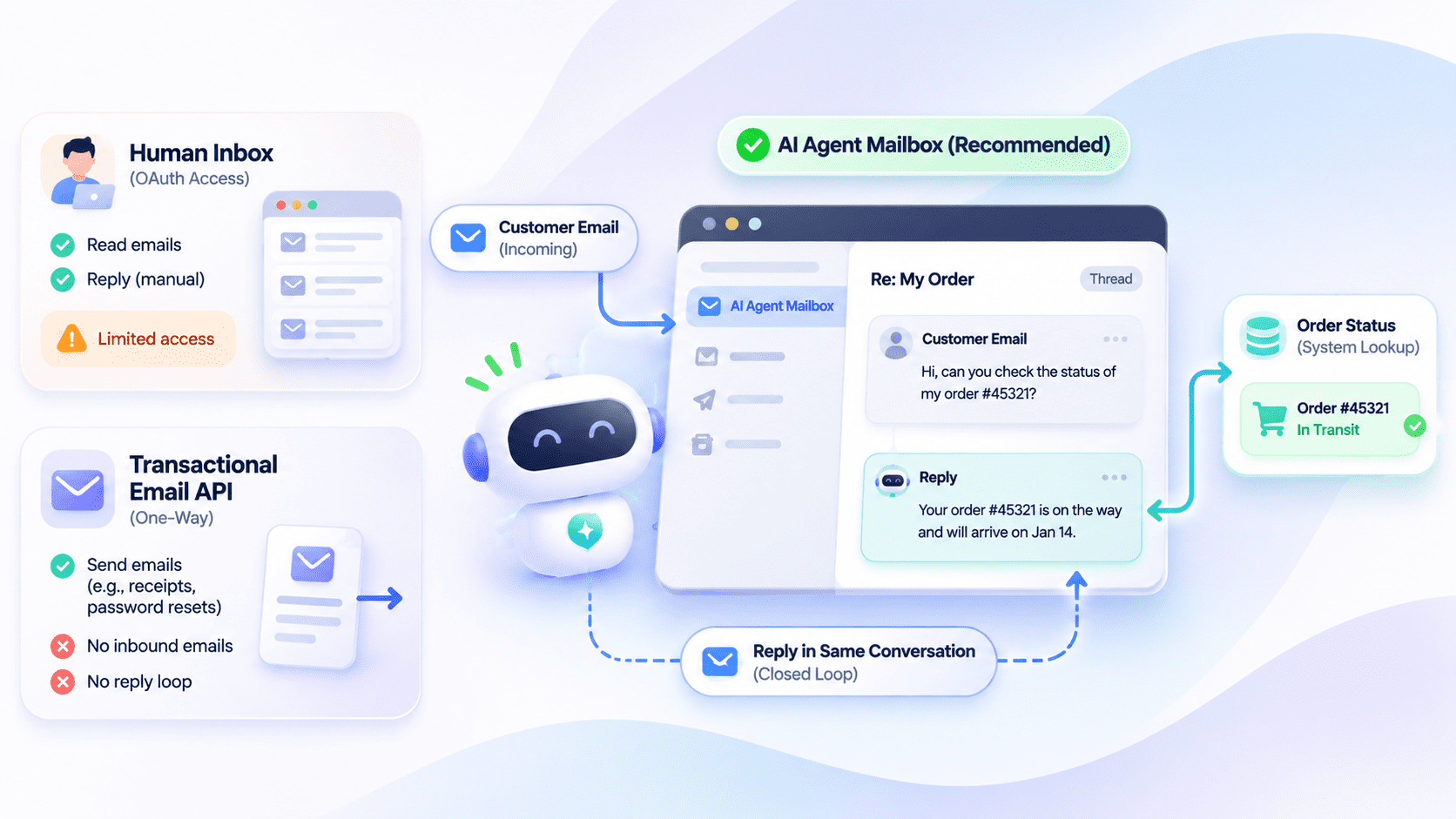
AI Agent Email vs. Human Inbox vs. Transactional Email API
| Email Solution | Who Owns the Address? | Who Handles Replies? | Main Limitation |
|---|---|---|---|
| AI agent email API | A dedicated agent identity | The agent through API tools | Requires access controls and agent integration |
| Agent on a human inbox (OAuth) | An employee or shared team | Human or connected agent, in one mailbox | Agent permissions may expose unrelated messages |
| One-way transactional email API | An application or business | Separate receiving workflow, if configured | Sending alone provides no agent inbox |
Part 2: Why AI Agents Need Their Own Email Address
When AI agents communicate with customers or external services, they need an email identity that remains accessible across interactions. The following are four reasons why AI agents need email addresses of their own.
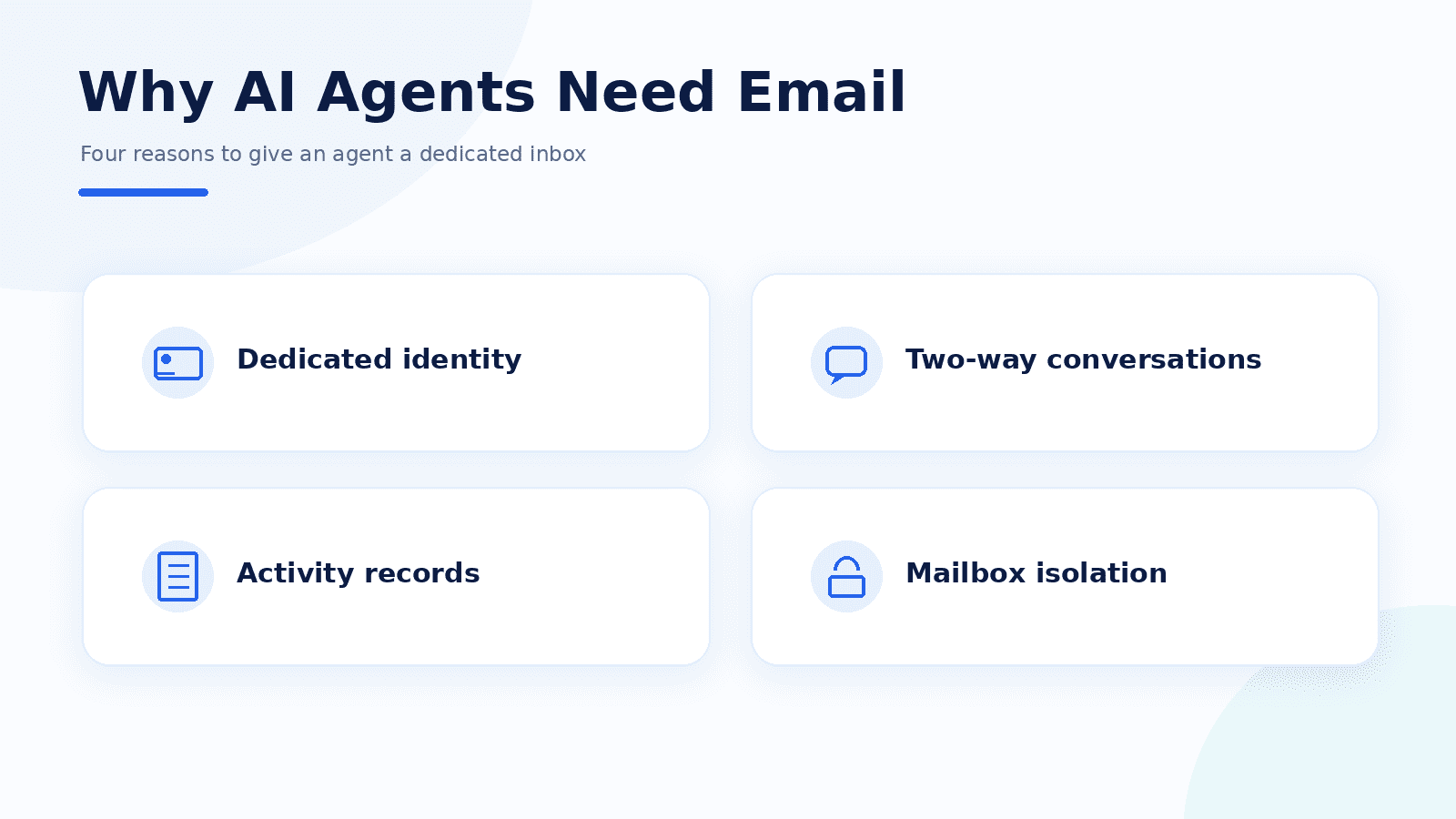
1 A Dedicated Identity for External Communication
Sign-ups and vendor portals need an address that can receive an answer, and so do customers. Email sits at the center of most sign-up and account-recovery flows, so an agent without its own address cannot register anywhere itself, and verification codes land in a person's inbox. Using an employee's mailbox also blurs which messages the agent sent and which a person wrote.
2 Two-Way Conversations Without Losing Context
An AI agent inbox receives replies and preserves conversation history, which allows the agent to continue an earlier discussion. If the agent can only send emails and incoming responses may end up in another mailbox, it leaves the agent without the information needed to follow up.
3 Clear Records of Agent Activity
Emails provide a timestamped record of an agent's communications, including who sent each message and when. When combined with application logs, these records help teams investigate errors and understand the agent's actions. They can also help verify whether sensitive responses received the required human approval.
4 Better Security and Mailbox Isolation
Giving an agent access to an employee's inbox can expose private correspondence. If the agent sends inappropriate messages or excessive emails, it may also damage the account's sending reputation. A dedicated mailbox helps limit these risks by restricting what the agent can access and allowing teams to set separate sending limits.
When is a shared inbox enough?
A shared human inbox can still work when an agent only summarizes emails for its owner under restricted, read-only access. If it needs to contact external parties and manage ongoing conversations, a separate address offers clearer control over its activity.
Part 3: How an Email API for AI Agents Works: Receive, Think, Reply
Let's understand how AI agents send and receive email using a customer support request as an example. Consider a customer who previously contacted an online store about an order. The customer replies to that email: "Order #4821 still shows processing. Has it shipped?"
The following workflow explains how an agent email API handles that message from arrival to response.
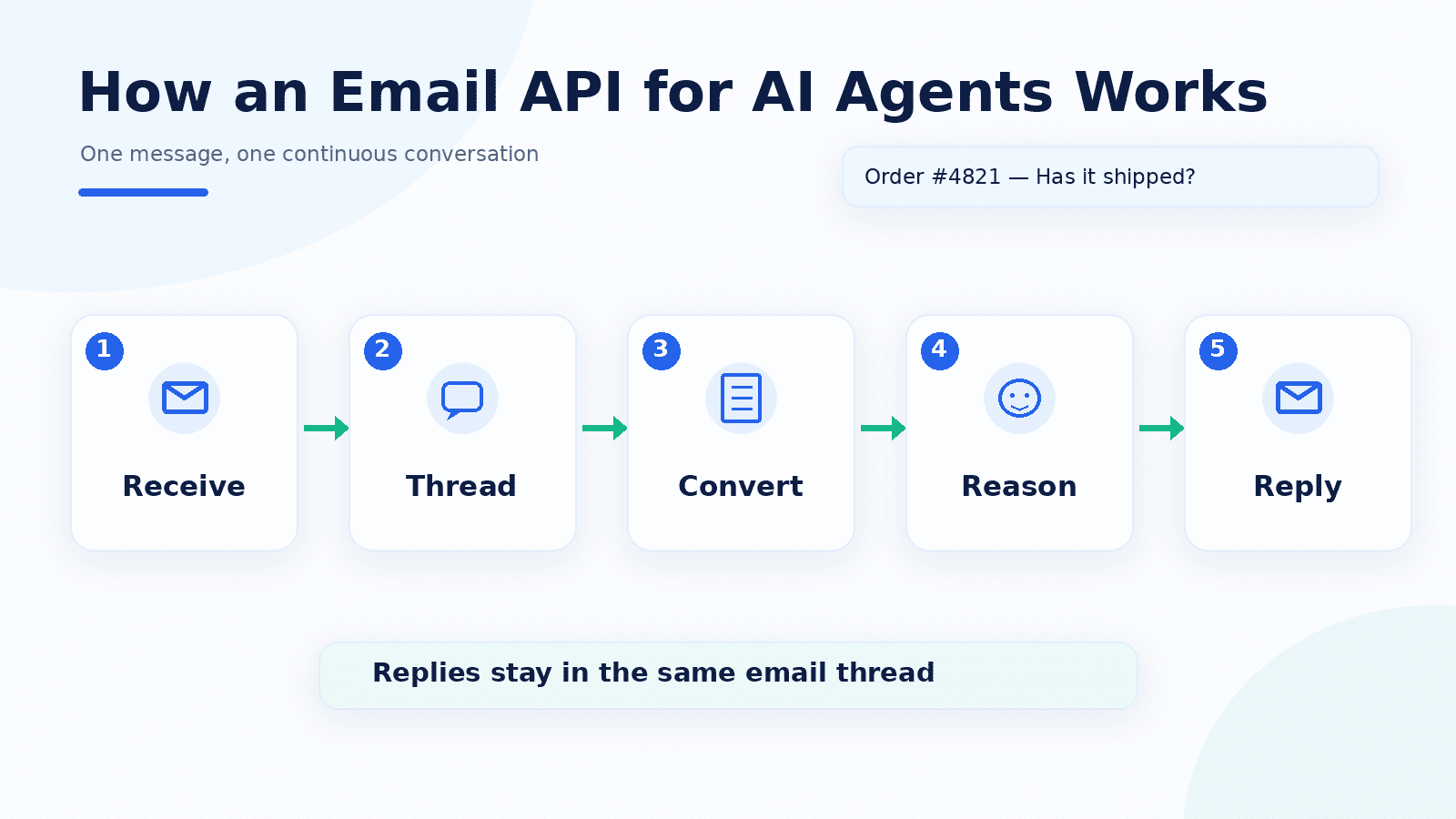
- Receive the incoming email: The customer's reply arrives at the AI support agent's mailbox. The email API captures the message along with its sender details and email headers.
- Group it into the existing thread: The API identifies the earlier order conversation and links the new message to it. The agent can now access the customer's previous questions and the replies already sent.
- Convert the email into readable data: The service processes the email's formatting and converts its content into structured plain text and events. This gives the AI model a readable message along with the relevant conversation context.
- Understand the request and prepare a reply: The agent recognizes that the customer wants a shipping update. It checks the connected order system and finds that order #4821 shipped that morning. Using this information, it prepares a response confirming the shipment.
- Reply within the same conversation: After the reply is authorized, the API sends it with the appropriate In-Reply-To and References headers. These link the response to the earlier messages, which helps Gmail and Outlook display it in the existing thread. For example, EngageLab Agent Email automatically groups incoming messages into threads and adds the required headers when sending replies.
Shared Domain vs. Custom Domain
The agent also needs a sending domain. Developers can choose between two approaches:
- Shared sending domain: The provider supplies an existing domain and sending infrastructure. Developers can start sending emails without configuring DNS records, which makes this option convenient for initial testing.
- Custom domain: The business uses its own address, such as support@yourcompany.com . This requires SPF and DKIM authentication, while DMARC helps protect against domain spoofing. The business must also manage its sending reputation.
How Does the Agent Detect New Replies?
After the agent answers the shipping question, it needs to check whether the customer has replied. There are two ways to do this:
Polling: The agent checks the inbox at regular intervals. With cursor-based polling, it saves the ID of the last message it processed and retrieves only newer emails the next time it checks.
Webhooks: The email service notifies the application when a new message arrives, so the agent can retrieve it without repeatedly checking the inbox.
EngageLab Agent Email supports both methods, so developers can choose which method to use based on how their application handles incoming messages.
Part 4: 5 Agent Email Use Cases
The following are five practical agent email use cases , each starting with a trigger and ending at the point where a person takes over.
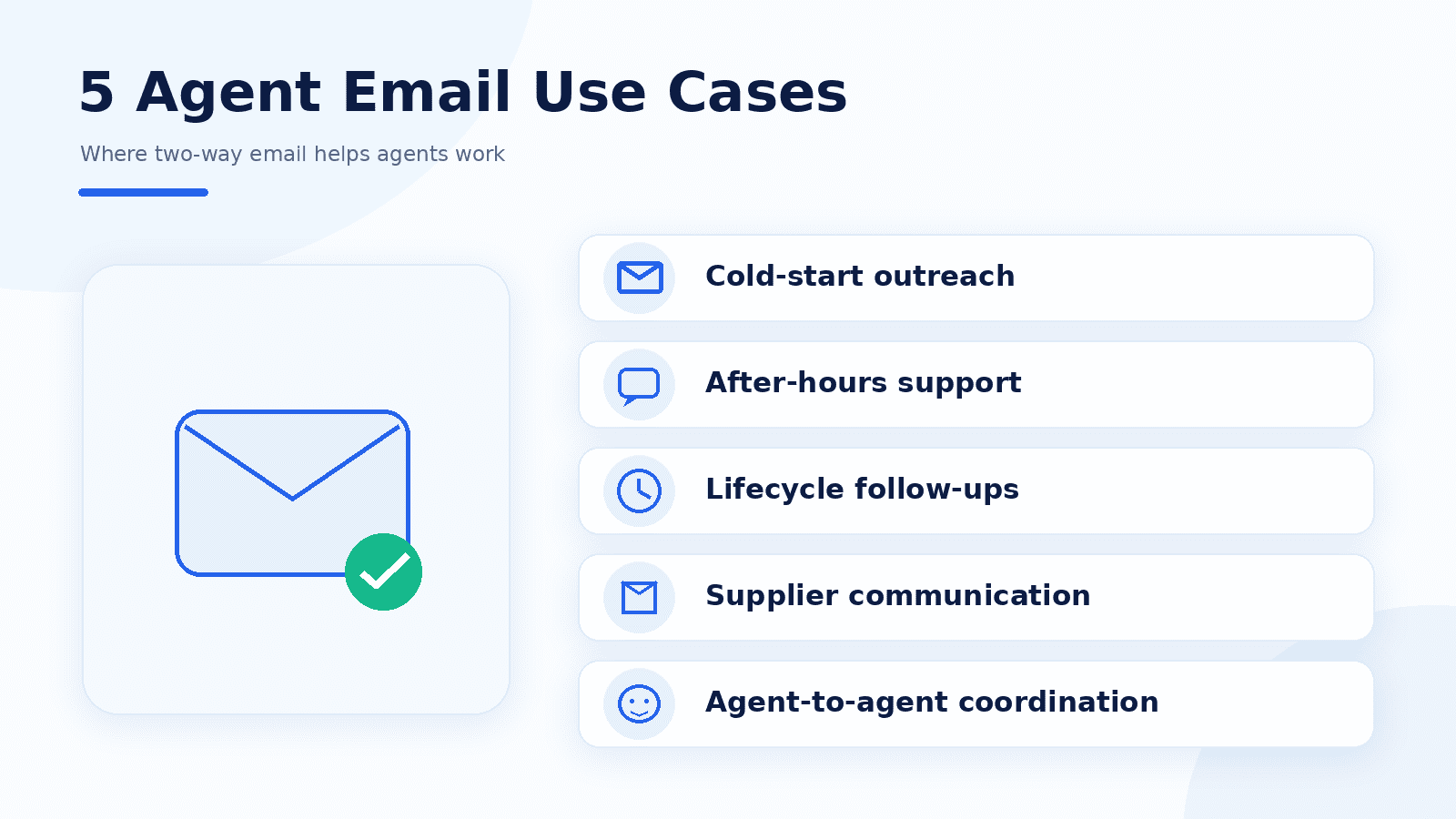
1 Cold-Start Outreach on a Shared Domain
A startup has a list of prospects it can legally contact but hasn't set up a branded email domain. Using a provider that permits outreach from its shared domain, the agent sends approved introductory emails and monitors responses. It qualifies interested prospects and adds warm leads to the CRM for the sales team to follow up.
A salesperson approves the initial outreach template and any pricing commitments. However, compliance matters here. CAN-SPAM applies to individual commercial emails and requires accurate sender information and a valid postal address. Opt-out requests must be honored within 10 business days. Other regions have their own consent requirements, and some email providers prohibit cold outreach.
2 After-Hours Customer Support
A customer emails a technical question while the support team is offline. The agent reads the conversation and uses retrieval-augmented generation (RAG) to find an answer in the company's knowledge base. It then replies within the same email thread, which makes it possible for customers in different time zones to receive assistance.
Refund requests and unresolved technical issues go to a human support representative. The same applies to major service outages that require further investigation.
3 Customer Lifecycle Follow-Ups
A customer replies to an onboarding email with a question about migrating their data. Months later, they return to the same conversation to ask about renewal. The agent can review the earlier messages and respond with the relevant context. It keeps the discussion in one thread from sign-up to renewal.
Cancellations and billing disputes remain with the appropriate team, especially when changes to subscription terms require approval.
4 Vendor and Supplier Communication
AI email agent use cases usually begin with quotation requests in procurement. An agent emails approved suppliers and tracks their responses in separate threads. If a supplier leaves out delivery information, the agent can ask for clarification or propose a meeting time.
The purchasing manager reviews the offers before accepting a quote. Any commitment involving delivery terms or a binding agreement also requires approval.
5 Agent-to-Agent Coordination
One AI agent completes a research task and emails structured results to another agent responsible for preparing a report. The receiving agent reads them on its next poll, and the email waits in the inbox if that agent is offline. As explained in Nylas's agent-to-agent email guide, teams can also use outbound allowlists to control which addresses an agent may contact.
Part 5: Email APIs for AI Agents Compared: 6 Options
The search for the best email API for AI agents depends on how your application handles incoming messages and how much email infrastructure you want to manage. Some providers offer ready-to-use agent inboxes, while others connect to existing email services or let developers build custom workflows.
The table compares six AI agent email providers, where each falls into a specific category. Consider the table as a map rather than a ranking list.
| Option (Category) | Best For | Receives Mail? | Own Domain Needed? | Agent Tooling | Pricing (USD, 2026) | Watch-Out |
|---|---|---|---|---|---|---|
|
EngageLab Agent Email (email infrastructure with agent Skills) |
Agents starting on a shared domain and moving to a branded address later | Yes, with automatic thread grouping | No; shared domain available | CLI (@engagelabemail/cli ), Skills for Codex, OpenClaw, Cursor, Claude Code, and Hermes | Custom pricing | Setup requires an API user and mailbox binding; confirm sending limits before deployment |
|
AgentMail (agent-native inbox API) |
Applications that create an inbox for each user or task | Yes | No; Free includes one optional custom domain | REST API, SDKs, webhooks, MCP | Free: 3 inboxes, 3,000 emails/month, 100/day. Developer: $20/month; Startup: $200/month | Free-plan emails include an AgentMail footer |
|
Mails.ai (agent-native inbox API) |
Agents that process structured replies with prompt-injection screening | Yes | No; shared domain on Free, custom domains on paid plans | REST API, TypeScript/Python SDKs, MCP | Free: 1 agent, 3,000 emails/month and 3,000 inbound replies/month. Pro: $20/month; Scale: $99/month | Cold outreach and bulk marketing are blocked by the API |
|
Zoho AgentInbox (email vendor's agent inbox) |
Teams needing programmable mailboxes with administrative controls | Yes | Depends on region; some receive a default domain | REST API, MCP, webhooks | Free: 5 mailboxes, 2,000 inbound and 2,000 outbound emails per mailbox/month. Pro: $1/mailbox/month (billed annually) or $1.20/mailbox/month (monthly) | Free sending is capped at 100 emails/day; confirm regional access and waitlist availability |
|
Nylas (email/calendar integration API) |
Agents needing email and calendar access, including existing user accounts | Yes, through Agent Accounts or connected mailboxes | No; custom Agent Account domains available on paid plans | REST API, CLI, MCP, webhooks | Free: 3 Agent Accounts, 3,000 emails/month. Essentials: $15/month for 10 Agent Accounts | Hosted Agent Accounts and connected mailboxes have separate usage allowances |
|
Cloudflare Email Service (edge email platform) |
Developers building email workflows on Cloudflare Workers | Yes, through Email Routing and Workers | Yes; domain must use Cloudflare DNS | Workers bindings, REST API, SMTP sending, Agents SDK | Inbound routing: free. Workers Paid: $5/month, including 3,000 outbound emails; then $0.35/1,000 | Developers must configure routing and implement the agent's email-handling logic |
Part 6: How to Give an AI Agent an Email Address in 5 Steps
To give an AI agent an email address, you need a mailbox that can receive messages and a way for the agent to send replies. This setup uses EngageLab's CLI and Email Skill: create a mailbox, then connect the CLI to test sending and receiving. The later CLI steps require Node.js and npm.
Create an EngageLab account first if you do not already have one, then go to Step 1 to create the mailbox.
Create a mailbox on a shared domain or your own domain, keep inbound replies in the same thread, and connect through the official CLI or Skills for Codex, OpenClaw, Cursor, Claude Code, and Hermes.

1 Step 1: Create an Agent Email Mailbox
Goal: Set up an address that your agent can use for two-way communication.
Open the Agent Email setup in the EngageLab console and complete these configurations:
- Choose a domain: Use EngageLab's shared domain or verify your own through DNS.
- Create an API_USER: This account authenticates the agent's outgoing emails.
- Create an inbound mailbox: Assign an address and bind it to the API_USER for replies.
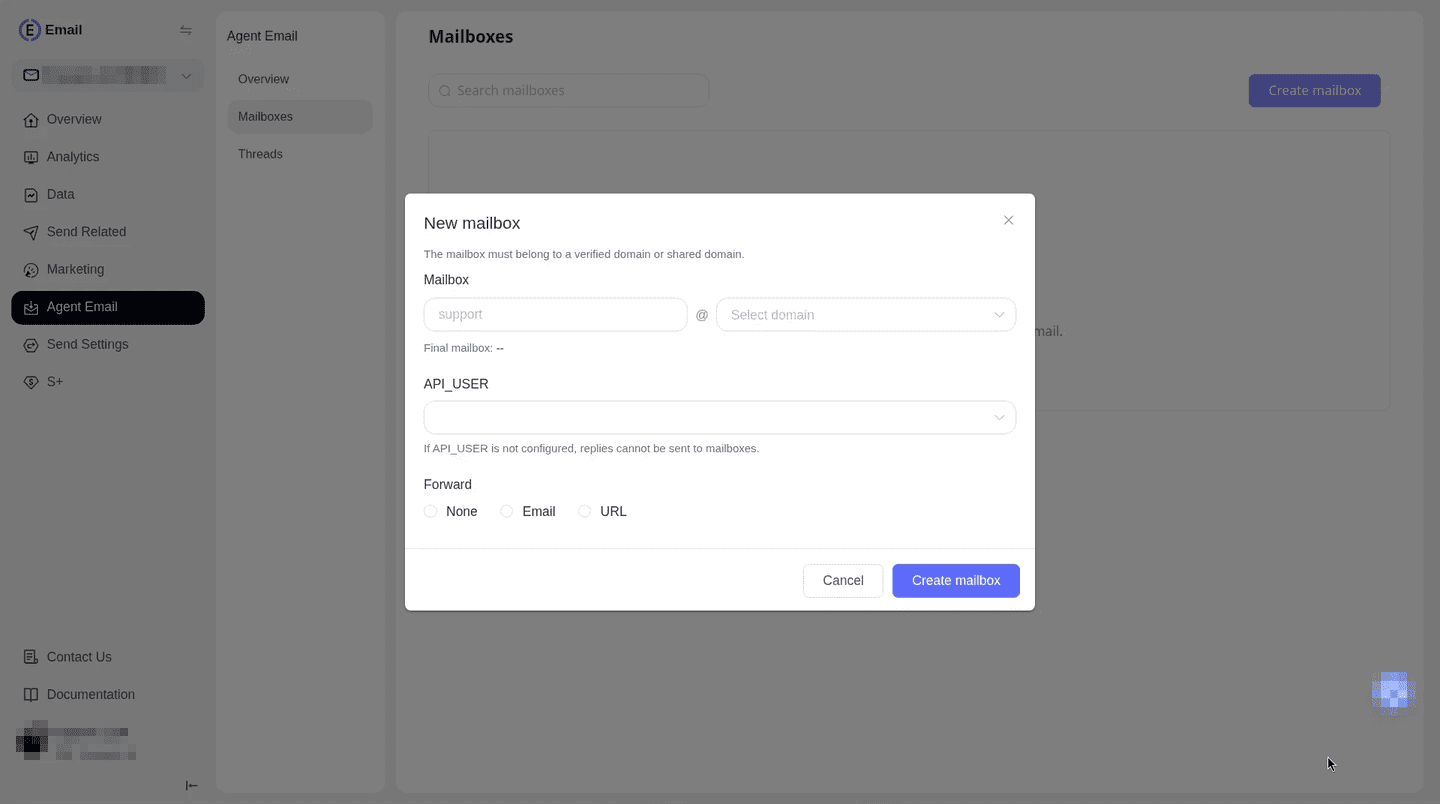
The mailbox becomes active, usually within one to two minutes , and starts recording email conversations.
If it fails: Check the domain configuration and API-user binding. Email forwarding alone cannot give the agent access to conversation threads. An inbound mailbox is required.
2 Step 2: Get and Save the Secret Key
Goal: Give the agent permission to access EngageLab's email service.
The CLI needs a Secret Key to authenticate requests. Retrieve the key associated with your Agent Email configuration in the EngageLab console.
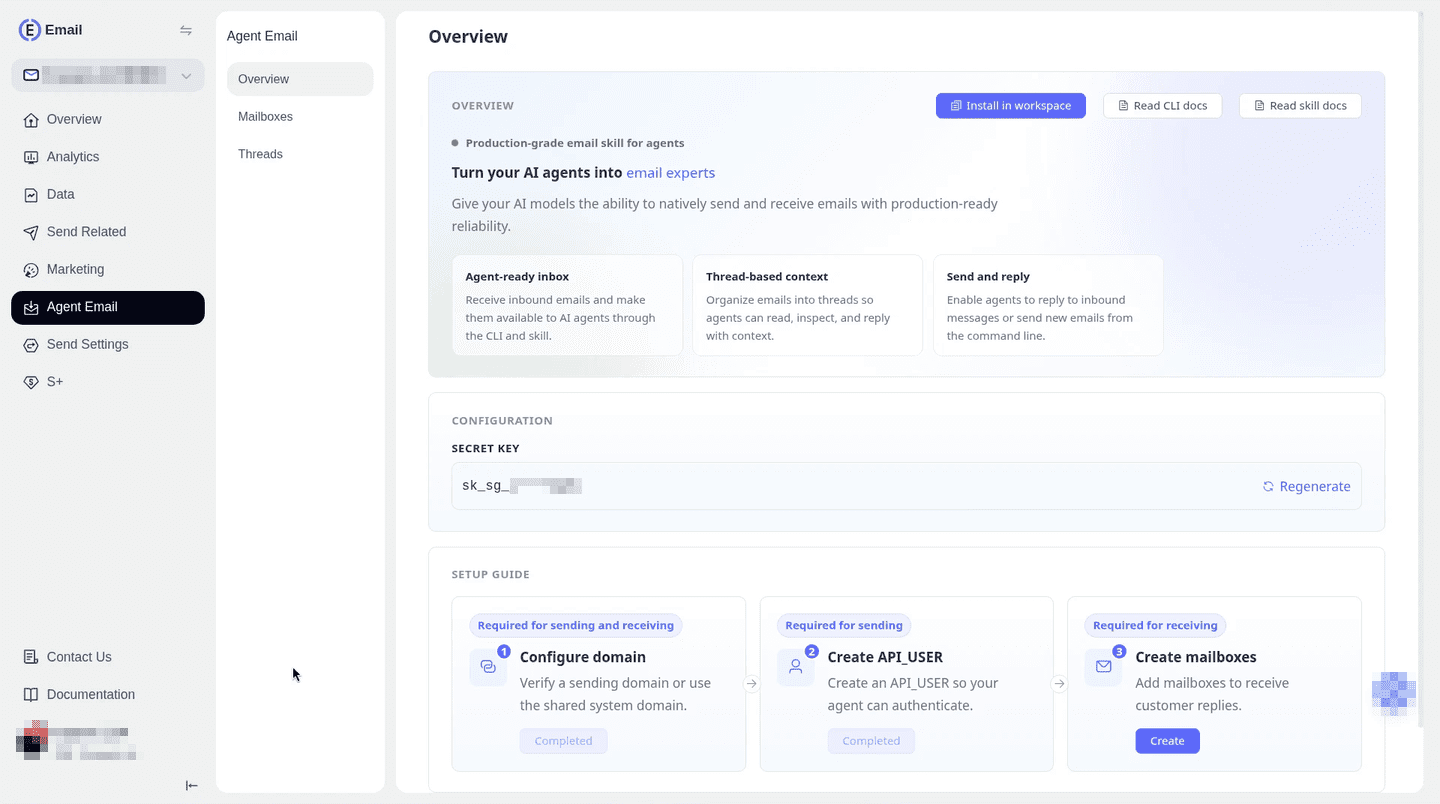
EngageLab uses region-aware keys in this format:
sk_ & lt;
dcPrefix & gt;
_ & lt;
random & gt;
Keep the key in a secure environment or credential manager. Avoid exposing it in screenshots or sharing it with the AI model through ordinary chat messages.
If it fails: Check that you copied the complete key. The CLI can recognize supported region prefixes. Otherwise, you will need to configure the correct service URL.
3 Step 3: Install and Configure the CLI
Goal: Connect your development environment to EngageLab.
Install the official CLI following the EngageLab Email CLI guide:
npm install -g @engagelabemail/cli
Check the installed version:
engagelab - email - cli - V;
Save your Secret Key locally:
engagelab-email-cli config set \
  --secret-key "YOUR_SECRET_KEY"
If the CLI cannot determine the service region automatically, configure the Agent Email service URL using the documented --base-url or ENGAGELAB_EMAIL_BASE_URL environment variable. Confirm the correct endpoint for your deployment.
Check your saved configuration:
engagelab-email-cli config list
When everything goes right, the CLI displays its saved configuration with the Secret Key masked.
If it fails: Exit code 1 indicates a parameter or configuration problem. Exit code 2 indicates failed authentication. Check the key and service address before continuing.
4 Step 4: Connect the Email Skill and Test the Mailbox
Goal: Allow your AI agent to send emails and handle incoming replies.
Follow EngageLab's Agent Email Skill guide to connect your agent environment. Claude Code, Cursor, and Codex are supported.
Once connected, test the following operations.
1. List available mailboxes
engagelab-email-cli mailbox list \
  --page-size 10 --json
Find your mailbox ID in the response.
2. Test sending
engagelab-email-cli emails send \
  --mailbox-id 1001 \
  --to you@example.com \
  --subject "Agent Email test" \
  --text "Please reply to this email." \
  --sandbox --json
Replace the mailbox ID and recipient with your own test details.
Sandbox mode sends nothing. EngageLab validates the request parameters without delivering the email. Once the command succeeds, remove --sandbox and send an approved live message to an inbox you control.
3. Check the incoming reply
Reply to the live test message and list incoming emails:
engagelab-email-cli emails receiving list \
  --mailbox-id 1001 \
  --page-size 10 --json
Use the returned message UID to inspect the email with emails receiving get . You can also retrieve the conversation history through thread messages .
4. Reply within the thread
After reviewing and approving the response, run:
engagelab-email-cli emails receiving reply \
  "MESSAGE_UID" \
  --text "Thanks, your reply was received." \
  --json
Replace MESSAGE_UID with the actual identifier.
If everything goes right, your test inbox receives the agent's response in the same email conversation .
If it fails: Check the sending quota and mailbox-to-API-user binding. Keep the reply subject consistent with the original message to preserve threading.
5 Step 5: Poll for New Emails and Save the Cursor
Goal: Help the agent detect new messages without repeatedly processing older ones.
EngageLab supports cursor-based polling through the listen command. After the initial fetch, continue from the last recorded cursor:
engagelab-email-cli emails receiving listen \
  --after 1500 --limit 10 \
  --interval 5 --json
Replace 1500 with the cursor returned by your previous polling result. For the first fetch, omit --after .
The command checks for new messages every five seconds and returns JSON output. Store the latest successfully processed cursor so the agent can resume after restarting.
If everything goes right, the agent retrieves newer messages while preserving its progress.
If it fails: Check that the saved cursor is correct and that incoming mail reaches the configured mailbox. Keep a record of processed message UIDs to prevent duplicate replies.
Create a shared-domain mailbox, test with sandbox mode, and connect the CLI to your agent.
Part 7: Deliverability and Safety Rules for Agent Email
Before allowing an AI agent to send emails, check how its messages will be delivered and who can receive them. These six safeguards help protect agent email deliverability and reduce the security risks of automated communication.
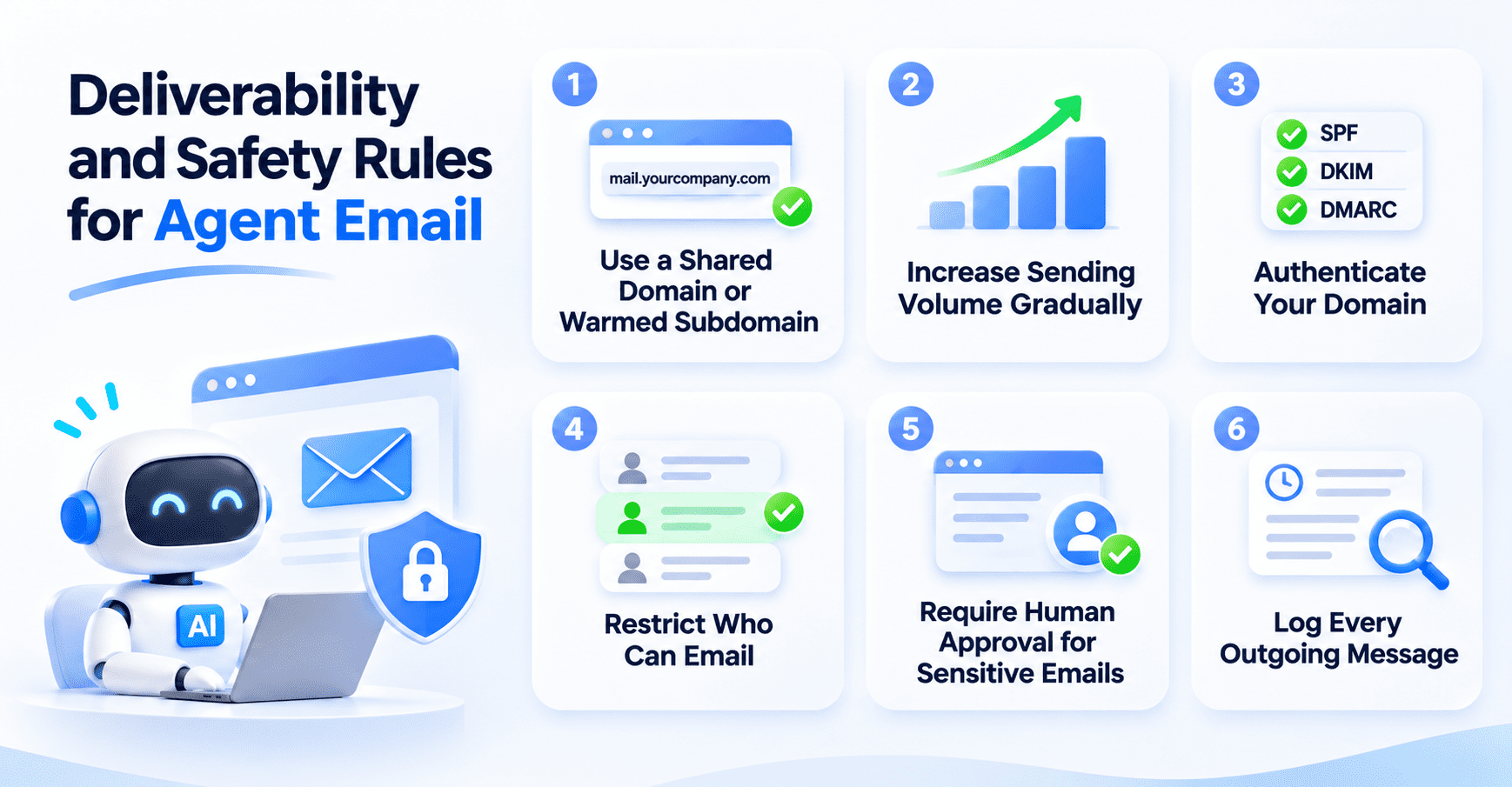
- Start with a shared domain or warmed subdomain. A provider-managed shared domain lets you begin without configuring DNS. If you use your own domain, consider a dedicated subdomain with an established sending history. A new domain may face filters until it builds a positive reputation.
- Increase sending volume gradually. Sending hundreds of emails from a new address on the first day can trigger spam filters. Start with a small number of legitimate messages and increase volume as delivery performance improves. Monitor bounces and spam complaints.
- Authenticate your sending domain. When moving to a custom domain, configure SPF to authorize your sending servers and DKIM to sign outgoing messages. Add a DMARC policy to help receiving servers handle messages that fail authentication checks. These records help prevent domain spoofing and reduce authentication-related delivery failures.
- Restrict who the agent can email. An outbound allowlist limits sending to approved addresses or domains. This is an important AI agent email security measure because incoming messages may contain malicious instructions meant to make the agent contact unauthorized recipients. Treat email content as untrusted data.
- Require human approval for sensitive emails. A person should review first-contact messages and replies involving pricing commitments or other high-value decisions. EngageLab's Email Skill security guidelines require explicit confirmation of the recipient and a draft before sending.
- Log every outgoing message. Record the recipient and sending timestamp, along with the message's thread ID. These records help teams investigate delivery failures and review the agent's actions. Limit access to sensitive email data and apply appropriate retention policies.
Why are two-way replies important?
Genuine conversations can help build sender reputation because they reflect recipient engagement. Two-way interaction is considered a factor that may improve long-term domain trust. However, replies alone cannot guarantee inbox placement. Sending practices and recipient spam complaints still influence whether an email reaches the inbox.
Final Thoughts
When choosing an email API for AI agents, consider whether your agent needs to receive replies and whether you have a domain with an established sending reputation. Begin with sandbox testing and require human approval for first-contact emails. Once live, monitor incoming replies and sending performance before increasing volume.
To get started, follow EngageLab's Agent Email documentation or create an account on the EngageLab email delivery platform to test the setup yourself.
Create a shared-domain mailbox, test sandbox send and receive, and connect the CLI to your agent.
FAQs
Can an AI agent have its own email address?
Yes. An AI agent can have a dedicated email address through an agent email service. The agent can receive messages and send replies using its assigned identity. Providers offer APIs and integrations that allow developers to connect these inboxes to AI applications.
Do I need my own domain for an AI agent email?
No, you can start without one. Some providers offer shared domains, which allow you to create an agent mailbox without purchasing a domain or configuring DNS records. If you want to use a branded address, you will need to verify your domain and configure email authentication. A domain with an established sending reputation can help with ongoing communication.
Can an AI agent reply in the same email thread?
Yes. Email APIs with threading support use headers such as In-Reply-To and References to connect replies with earlier messages. This helps Gmail and Outlook display the conversation in one thread. Agent email services automatically handle these headers when an agent replies to an incoming message.
Is it allowed to send cold email with an AI agent?
It depends on the recipient's location and the applicable marketing laws. In the US, the FTC's CAN-SPAM Act applies to commercial emails, including individual messages. UK rules may require consent when contacting individuals. Always check local regulations and your provider's sending policies before starting outreach.
How is agent email different from a transactional email API?
A transactional API sends one-way messages such as receipts and alerts. Agent email adds an inbox, which involves inbound mail, thread grouping, and replies that stay in the same conversation under one address. Choose the transactional route when the agent never needs to read an answer.