Jacob Morrow
Updated: 2026-09-10
A customer pays, closes the checkout page, and waits for a confirmation. When nothing arrives, they may wonder whether the order went through—or whether they should try again. Choosing a transactional SMS service means planning for moments like this: which event triggers the text, how quickly it needs to arrive, and what happens if it does not.
What Is a Transactional SMS Service?
A transactional SMS is an automated text message sent in response to a user action, account event, transaction, or service update. Common examples include order confirmations, shipping updates, payment alerts, appointment reminders, and security notifications.
A transactional SMS service is the platform and delivery infrastructure that connects those business events to mobile networks. It typically provides an SMS API, approved templates or sender identities where required, personalization, delivery-status reporting, and tools for investigating failed sends.
SMS is one channel within transactional messaging, a broader category that can also include email, push notifications, and messaging apps.

Transactional SMS vs. Promotional SMS
The distinction depends primarily on the message's purpose and content—not only on when it is sent. Adding an offer to an operational notification may change how the message is classified under applicable rules.
| Factor | Transactional SMS | Promotional SMS |
|---|---|---|
| Primary purpose | Provide information about an action, account, transaction, or service | Promote an offer, product, upgrade, or campaign |
| Typical trigger | Order placed, payment processed, appointment approaching, or login detected | Campaign schedule, audience segment, or marketing event |
| Timing | Usually tied to the event and often time-sensitive | Usually scheduled and less dependent on immediate delivery |
| Examples | Receipt, delivery update, OTP, account alert | Discount, product launch, abandoned-cart offer |
| Compliance | Consent, identification, registration, and opt-out requirements vary by destination and message purpose. Confirm the rules that apply in every target market. | |
Transactional SMS is generally a type of application-to-person (A2P) messaging, but A2P also includes promotional and other system-generated messages. “Bulk SMS” describes sending at scale, not whether a message is transactional or promotional.
Transactional SMS Use Cases and Examples
The clearest transactional SMS examples show how transactional text messages help a customer complete or understand a specific action. Each transactional message should contain only the details needed for that moment and a safe next step where one is required.
- Order confirmation: After checkout, the customer's first question is simple: did it work? Send the confirmation once the order is accepted, with the brand name, order reference, and a link to the details.
-
Shipping update: Trigger it when fulfillment or carrier status
changes. Include the brand, order reference, latest status, and tracking link
so the customer can follow the delivery without contacting support.
🚚 Example: Shipping Update
[Brand name]: Your order #4821 has shipped. Track its latest status: [secure tracking link].
-
Payment alert: Send it after a payment succeeds, fails, or
requires action. Identify the order or invoice, state the outcome, and provide
a secure payment or support link so the customer can resolve a failed charge.
💳 Example: Payment Failed
[Brand name]: Payment for order #4821 failed. Update your payment securely: [payment link].
-
Appointment reminder: A reminder is more useful when the
recipient can act on it. Include the date, time, and location, plus a
straightforward way to reschedule if their plans have changed.
📅 Example: Appointment Reminder
[Brand name]: Reminder for your appointment on 18 Sep at 3:00 PM, 25 Main Street. Reschedule: [appointment link].
- Account or security notification: Send it after a login, password reset, or material account change. State what happened and provide a secure action for users who do not recognize the activity.
- One-time password (OTP): triggered by an authentication request. Include the brand, short-lived code, expiry, and a warning not to share it. See the dedicated OTP guide for deeper coverage.

How Does a Transactional SMS Service Work?
-
A business event occurs
A customer places an order, and the order system records that the purchase has been accepted.
-
The application submits the message data
The order system uses an API, a software connection between systems, to submit the customer's number, the order-confirmation template, and variables such as the order number.
-
The platform processes and sends the SMS
The SMS platform fills the approved template with the order details, applies the configured sender identity, and sends the message through a mobile carrier.
-
Status information returns to the business
The platform returns the send or delivery status for the order confirmation. A delivery receipt is the carrier or handset status returned after a send, which the order system can record for support and monitoring.
Delivery status is not a read receipt: A delivery receipt does not prove that the recipient read the SMS or completed the intended action. Measure the customer's next action separately when it matters.
How to Choose a Transactional SMS Provider
Match the provider to the notification. Order updates depend on system integration and status tracking. Verification codes place more weight on timing and authentication requirements. International operations need confirmed sending conditions and complete costs in their priority markets.
Test your most time-sensitive notification first: Use a priority country and carrier before comparing global coverage claims or headline prices.
- Target-market coverage and sender requirements: Check which sender types are available in each destination. Long codes and toll-free numbers can support replies, short codes suit high-volume sending, and alphanumeric sender IDs make the brand immediately recognizable but are usually one-way. Availability, registration, throughput, and cost vary by market, so prioritize the countries that matter most. EngageLab's guide to sending SMS online explains how sender identities and templates fit into the wider setup.
- Delivery speed and capacity: Check expected latency, peak-load handling, and test performance in priority markets. Delays that are acceptable for a shipping update may break a short-lived verification or payment flow.
- Integration and visibility: If a customer says the confirmation never arrived, can your team find that message and see what happened? Look for searchable records, delivery reports, and useful error details, alongside the API and template support your developers need.
- Failure handling and support: Ask what happens after a failed send. Will the provider retry it, should your application retry it, or does someone need to investigate? Agree on those responsibilities before launch so both systems do not resend the same notification.
- Total cost: An order confirmation that fits in one segment in English may become two after a long name, tracking link, or translation is added. Registration, carrier surcharges, taxes, support, and minimum commitments can widen the gap further. Compare providers using your real templates and destination mix; the EngageLab guide to SMS character limits and encoding explains how small copy changes affect the segment count.
Transactional SMS Best Practices
Keep Messages Strictly Transactional
Separate service information from offers and promotional language, then apply the consent, registration, quiet-hour, identification, and opt-out requirements for each destination. For examples of how rules differ, review the CTIA Messaging Principles and Best Practices for the US ecosystem and the UK ICO's service-message and direct-marketing guidance. For a country-by-country starting point, see EngageLab's international SMS compliance guide.
Make the Sender and Next Step Clear
Identify the brand, include only the information needed for the event, and prioritize one clear action. Use an authenticated or appropriately secured link for sensitive account, health, or payment details instead of placing them in the SMS.
Prevent Duplicate and Outdated Messages
A payment reminder that arrives after the customer has paid creates confusion. Before retrying, check whether the message is still needed and whether the same event has already triggered a send. Record each event's send state and cap retries for temporary failures.
Test Real Message Variations
A template that looks fine with a short test name may look very different with a long customer name or a translated message. Test those variations, along with links, sender display, delivery status, and failure responses in your priority markets.
Measure the Business Outcome
Monitor delivery status and latency alongside the next relevant behavior, such as a completed payment, confirmed appointment, successful verification, or reduced support contact.
How to Send Transactional SMS with EngageLab
Start with a notification your business already needs to send, such as an order confirmation. With EngageLab SMS, your application can trigger the message through the REST API, while your team manages the template and reviews sending results in the console.
Build and Verify Your First SMS Flow
-
Enable SMS and create an application
Register or log in, enable SMS, enter the SMS sub-console, and create an application as described in the EngageLab SMS Quick Start.
-
Configure the required sender or signature and template
Create the sender configuration and reusable message template required for the destination, then wait for any applicable review before sending.
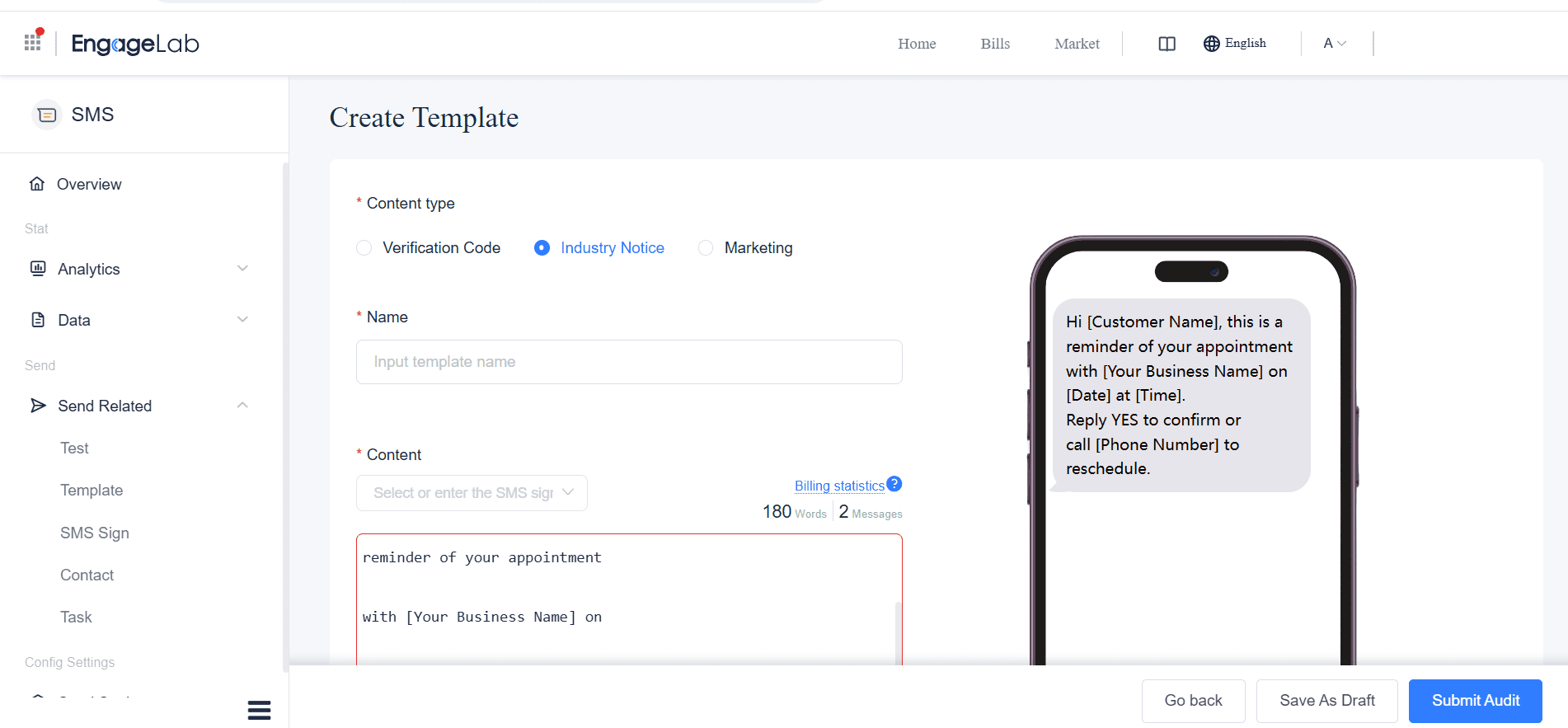
Review template variables and the message preview before sending. -
Connect your business event through the API
Create an API key, connect the event to the EngageLab SMS REST API, and use the key securely on your server. Keep the API secret out of browser, mobile, and public repository code.
-
Send a test and check its delivery status
Trigger a test order, check that the confirmation contains the correct order details, and review its delivery status. Configure a status callback if the business system needs the result automatically.

Review sent and delivered message results after the test.


Start with one priority destination, verify the template and sender setup, then check the delivery result.
![70 Holiday Greeting Messages for Business on Every Occasion [2026]](https://img.engagelab.net/article/happy-holiday-msg-cover.png)

![Best SMS Short Code Providers: 10 Options Compared [2026 Updated]](https://img.engagelab.net/article/sms-short-code-service-provider.png)