


Business Process
Silent Auth uses the carrier network to verify whether a phone number matches the number associated with the SIM card currently used for mobile data on the device. Silent Auth requires SDK integration in the App and API integration on the developer server. The authentication flow is outlined below.
Authentication Flow
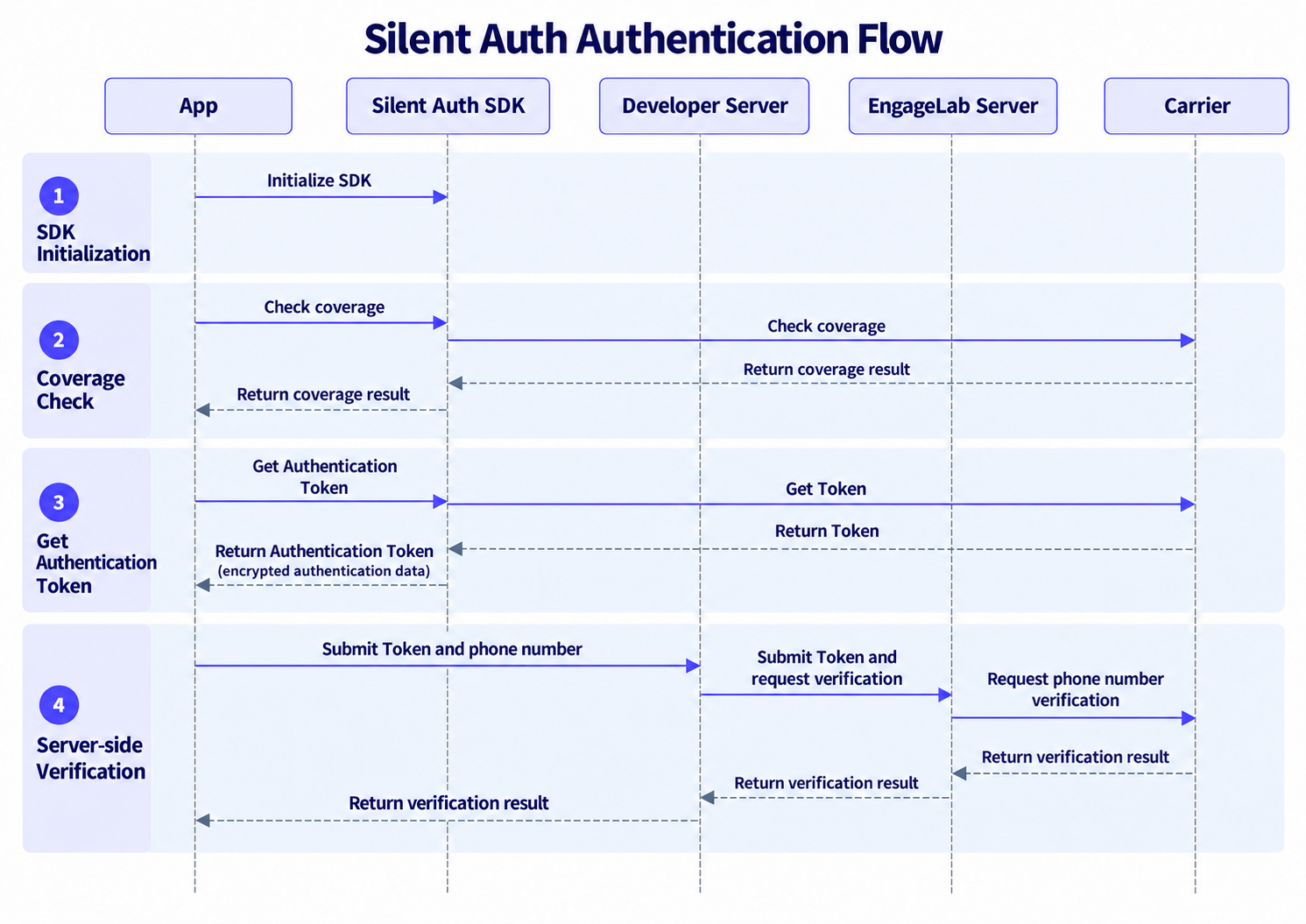
1. SDK Initialization
The App initializes the SDK to load the application configuration required for authentication. Once initialization succeeds, coverage checks and phone number authentication can proceed.
2. Coverage Check
The App uses the SDK to check whether the phone number and current network environment support Silent Auth, then determines whether to proceed with authentication based on the result.
3. Get Authentication Token
After the coverage check passes, the SDK communicates with the carrier to obtain the required authentication data, encrypts it on the device, and returns the resulting authentication Token to the App.
The authentication Token is transmitted in encrypted form via the App and developer server, reducing plaintext exposure of the carrier's raw authentication data in the business flow.
4. Server-side Verification
The App submits the Token and phone number to the developer server, which initiates a phone number verification request to EngageLab. The EngageLab server decrypts the authentication data, completes phone number verification with the carrier, and returns the result to the developer server.
The developer server returns the final result to the App, and the business system uses it to continue registration, login, or other verification workflows.
