Jacob Morrow
Updated: 2026-05-06
Around 75% of all SaaS trial users abandon products that don’t have effective onboarding support (Churnward, 2025). Chilling, isn’t it? So what’s the reason? After all, most SaaS teams have enough leads. What they don't have? Enough time, consistency, or ability to react to what users need in real time.
When manual campaigns get too big, they fall apart. Late emails, missed follow-ups, personalizations that become a luxury… to grow a SaaS firm, you need more than just a bigger sales team; you need an infrastructure.
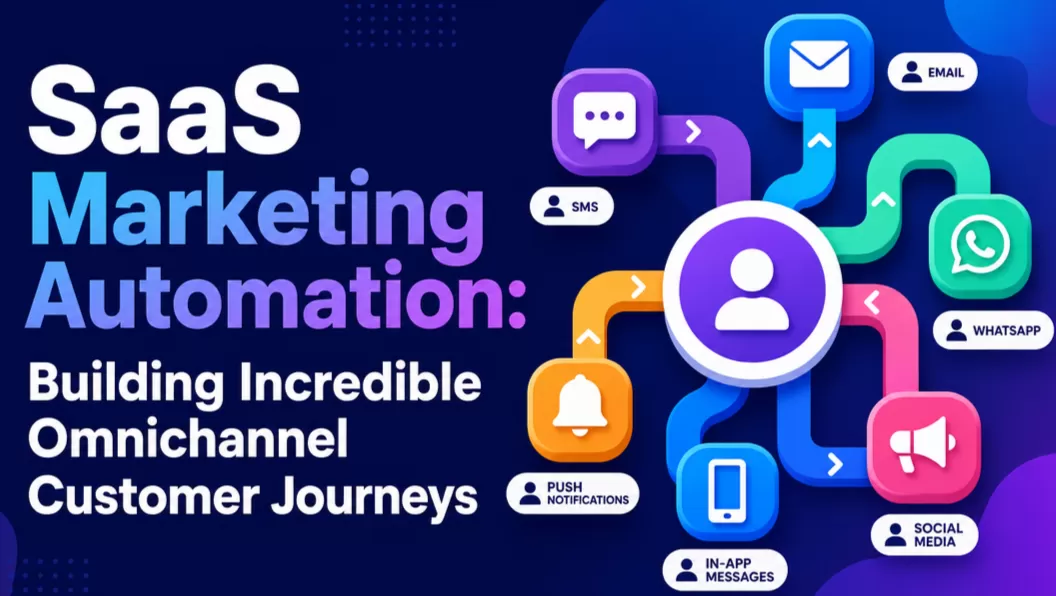
That’s where SaaS marketing automation comes in! Not as a fancy instrument, but as the backbone of your ops, silently handling communication from acquisition to retention. Make sure that every user gets the correct message at the right time by switching from static batch-and-blasts to dynamic behavioral triggers.
SaaS Marketing Automation: Boosting Efficiency Across the Customer Lifecycle
Automation, personalization, and optimization of marketing workflows across the client lifecycle are the goals of SaaS marketing automation.
SaaS marketing automation is lifecycle-native, unlike standard marketing automation, which focuses on top-of-funnel lead generation or email sequences. Intended to bridge “product usage” and “marketing communication,” it drives 77% higher conversion rates (Marketing Automation Statistics, 2026). It matches the three SaaS growth pillars:
1. Getting high-intent leads.
2. Activating signups into "Aha! moment" users.
3. Engagement, growth, and churn reduction are retention goals.

Mastering the Core Elements of Modern SaaS Automation Platforms
An omnichannel automation platform needs to do more than just "if/then" logic to do well in a competitive market. It needs to give a complete picture of the user.
- Behavioral Triggers: The most useful tool in the SaaS toolbox. Immediate reactions happen when a person "signs up but doesn't log in within 24 hours" or "hits 90% of their data limit."
- Omnichannel Automation: Today's users are all over the place. A scheme that only employs email will not work. Leading systems handle communication through email, SMS, push notifications, and in-app chat to make sure customers are reached where they actually talk to each other.
- Visual Journey Builders: Growth teams can make their own customer journey without having to wait for developers to support them or write any code, due to drag-and-drop workflow builders.
- Deep Segmentation: This helps segment users by group and uniquely respond to each group with personalized messages. Users are basically classified based on:
○ Behaviour
○ Lifecycle
○ Firmographic factors (like the size of their organization or the industry they work in)
- Real-Time Analytics: The best automation is done via access to real-time performance statistics like churn signals and rates of trial-to-paid conversions. Basically? This makes it easy to make instant changes if need be.
Unlocking Scalability: The Strategic Advantages of Marketing Automation
1 Automation of the lifecycle
SaaS growth depends on moving customers through phases quickly, from an inquisitive visitor to a power user. Automation makes sure that no stage is missed. Workflows lead users like a well-lit hallway instead of having to push them ahead by hand. The lifecycle keeps going, whether it's a "Welcome" series or a "Pro Tip" that starts after three days of inactivity.
2 Nurturing Leads on a Large Scale
In the B2B arena, SaaS sales frequently need a lot of contact points before a sale is made. Marketing automation for SaaS organizations makes sure that leads don't go cold between encounters. You can develop trust without having to do anything by sending whitepapers, case studies, or webinar invites that are relevant to the prospect's sector.
3 Personalization without adding more people
According to research, dynamic customization can increase trial-to-paid conversions by 6% (Encharge, 2025). In the past, this kind of customization needed a huge marketing crew. Automation lets you customize messages depending on user data, including their job title or how they utilize certain features, without having to hire more people.
4 Improving Conversion
Timing is frequently what makes a user convert or depart. Automation works at the exact moment when intent is highest. Think of it like this — if someone visits your pricing page three times in one hour, your system could send an automated demo-booking notification or even a limited-time discount to push them to buy.
5 Customer Retention
Retention is what makes SaaS businesses profitable. Automated nudges assist keep users from leaving for good. You could even contact people who are inactive for a week or more with inactivity triggers, giving them a personalized check-in to get them back on track.
6 Making choices based on data
With a marketing automation platform that works with other tools, organizations may go from making guesses to seeing real results. You can see exactly which email subject line got the most people to sign up or which push notification was rejected, so you can always improve the growth engine.
What Not to Do
- When done incorrectly, autoevery interaction, which causes "notification fatigue."
- Sending messages that are too general and don't feel personal, like spam.
- Ignoring the user's situation, such sending of information can go wrong. Stay away from:
Doing too much automation on a "buy now" email to someone who just filed a high-priority support issue.
Proven Use Cases for High-Impact SaaS Marketing Automation
SaaS marketing automation works best when you focus on scenarios that have a big effect. These are the most common and helpful methods to use them.
1 Onboarding Flows
A user signs up for a free trial but doesn't know where to begin or how to reach the "Aha!"
How it works: Automated emails and messages in the app help customers with certain setup tasks, such "Upload your first file" or "Invite a teammate."
Why this is important: According to a 2024 study of 73 B2B SaaS companies, automating onboarding workflows raised completion rates from 61% to 84% compared to manual processes (Athenic, 2024).
2 Abandoned Signup Recovery
Consider a person who starts the signup process, submitting their email… and then stops before completing their profile, entering the payment info, or so on. That’s a problem. A behavioral trigger could solve it.
How it works: Abandoned sign-up triggers would basically send a follow-up email or text message around 30 minutes after the session to offer support or a quick-start guide to the user.
Why it matters: This is perfect because optimized payment recovery strategies in SaaS actually recover 15–30% of failed or at-risk revenue from abandoned processes according to recent research (Kaplan Collection Agency, 2025)!
3 Re-engagement Campaigns
Another trigger scenario may be if there’s activity from the user in the first week, but since then, they haven’t logged in for over 14 days.
How it works: Automated nudges can tell a story about a delighted customer, flag up new services, or give a reward for "we miss you."
Why it matters: Products delivering the "aha moment" within five minutes via re-engagement automation show 40% higher 30-day retention compared to those taking 15+ minutes (SaaS Onboarding Statistics, 2026).
4 Upsell and Expansion Workflows
A person is on the "Starter" plan, however they have used up 95% of their seats or usage allotment.
How it works: An automatic message offers that customers upgrade to the "Pro" plan and lists the exact benefits they will enjoy, such as "Add 5 more teammates and get advanced reporting."
Why it matters: When linked to real needs, upsells seem more like helpful suggestions than "sales pitches."
5 Real-World Case Study: EngageLab for Mobility
In an industry that is very competitive, a worldwide mobility app needed to get more daily active users (DAU) and get them to book again.
How it works: The team set up push notifications that would happen when certain behaviors happened using EngageLab. Think about the customer who looked for a route but hadn’t booked it; who hadn't used the app in three days; getting targeted pushes with local incentives.
The results? The app got 18% more daily users after moving from manual batching to behavior triggers! This indicates that automation can make people more interested without needing to be watched all the time.
Architecting Your Roadmap to Build a Winning SaaS Automation Strategy
A strategy is the difference between "sending emails" and "growing a business." Follow this five-step framework to build a scalable system.

1 Set Clear Goals
Set goals that you can measure. If you don't know what you're measuring, you're just making noise.
→Increase the number of people who go from trial to paid by 20%.
→Cut down on turnover by 10%.
→Increase the percentage of people that finish onboarding by 15%.
2 Map The User's Journey
There are five stages in your life cycle: Awareness, Signup, Activation, Retention, and Expansion. Find the places where things become stuck. Where do users stop? Where do they most often leave? These are the people who are most likely to be automated.
3 Design Workflows
Make flows for the most important situations that have been found.
- Welcome Sequence: To let people know what to expect.
- Activation Nudge: To get people to use the features.
- Re-engagement Loop: To keep people from leaving.
- Operational Insight: Begin with little steps. You simply need two or three workflows that have a big effect.
4 Triggers and Conditions
The heartbeat of your system? The triggers. Set the exact signals that start a workflow:
→Page visits, such going to the "Enterprise Pricing" page.
→Using a feature, such clicking "Export" for the first time.
5 Optimize, Optimize, Optimize!
Keep an eye on KPIs like conversion rates and engagement rates across all your platforms. utilize A/B testing to improve your scheduling, messaging, and even the channel you utilize (for example, see if an SMS works better than an email for resetting passwords).
Implementing Marketing Automation with EngageLab
The purpose of using a platform is to make a system that changes based on how people use it. EngageLab is made for this kind of flexibility, giving you the tools you need to handle large numbers of complicated user lifecycles.

 Important Features for SaaS Teams:
✔Visual Experience Design: Plan out the full customisable customer experience with a drag-and-drop interface.
✔Advanced Segmentation: Don't just use static tags to put people into groups; use what they do in real time.
✔Omnichannel Integration: You can deliver messages to users by email, SMS, online push, app push, and in-app messaging all from one spot.
✔Pre-made Templates: Use SaaS workflow templates that have been tested and proven to speed up your time to market.
How to Implement SaaS Marketing Automating with EngageLab?
Start with EngageLab Marketing AutomationStep 1: Configure Data Source
The foundation of any automation is clean data. You must first connect your product backend, CRM, or third-party analytics tools. EngageLab supports integration via APIs, SDKs, and terminal reporting. This step consolidates fragmented data into a single customer view, allowing the platform to "see" user events like plan upgrades or feature pings in real time.

Step 2: Report Data
Once the source is connected, you need to verify that data is flowing correctly. Use the Integration Document provided in the dashboard to test and complete your data reporting. This ensures that when a user performs an action—such as "Signing Up" or "Completing a Profile"—the event triggers the system with sub-second latency.

Step 3: Configure Communication Channels
Before building a journey, you must define how you will reach your users. EngageLab centralizes Omnichannel Integration in one spot. In this step, you configure the settings for:
AppPush & WebPush for real-time nudges.
Email & SMS for formal communication and alerts.
WhatsApp for direct, high-engagement messaging.

Step 4: Create User Journey
This is where the magic happens. With your data flowing and channels ready, click "Create Now" to enter the visual builder; a canvas for marketers, not code developers.

Why is that important? Well, the interface grees you with an intuitive drag-and-drop experience. No more waiting on developers, no more engineering tickers. Just a clean visual canvas where you deine how users move through the funnel, set trigger conditions (e.g., "Account Created"), and then connect the logic nodes to create personalized journeys.
What makes this builder stand out more? The sheer diversity of the components. You could plug in:
👉App Push
👉Web Push
👉SMS
👉Custom Message Types
Each component simply snaps into the journey visually, giving you a bird’s eye view.
Continuous Optimization: Performance & A/B Testing
Once your journey is live, the work doesn't stop. Use EngageLab’s real-time monitoring to track the "Conversion Milestone" of each flow.
And here’s a pro tip for better results — sse A/B Testing nodes to experiment. Does an "In-App Nudge" on Day 1 mean higher retention, or does an "Email Follow-up" on Day 2?

Common Mistakes
| Mistake | Root Cause | The Fix |
|---|---|---|
| Over-automation | Trying to automate every interaction with a user at once. | First, pay attention to the most important times (Onboarding, Recovery, Upsell). |
| Poor Segmentation | Not treating all signups the same, no matter why they signed up or what their role is. | Break it down by stage of the lifecycle, how the product works, and the type of user. |
| Ignoring Data Hygiene | Syncing data from your CRM that is old or messy. | Before starting any automated workflow, make sure your data is clean and correct. |
| Sales & Marketing Gap | Marketing automates a lead that Sales is already calling manually. | To do this, connect your CRM to your automation platform. ensure a single source of truth. |
| Static Content | Setting a workflow and forgetting to update the messaging for months. | Set up audits every three months to update the content and try out new hooks. |
| Vanity Metrics | Instead of "Revenue" or "Upgrades," track "Opens" and "Clicks." | Pay attention to metrics that affect revenue, like trial-to-paid conversion and retention. |
Ideas Won’t Scale Your SaaS, But This Growth Engine Will
The truth is, not having ‘ideas’ doesn’t stop SaaS from growing, and when execution can’t keep up with the size, it fails. When your user base grows from 100 to 10,000, it becomes impossible to control manually. That’s where SaaS marketing automation jumps up to fill in the gap, turning repetitive manual tasks into organized and adaptable workflows.
Since the automation helps keep users engaged, the right SaaS marketing automation software helps them understand the real value of the product, helping retain your customer from the initial interaction to long-term loyalty.
If you're not sure what to do next, start small. Look for one or two problems in your life cycle. For example, your trial-to-paid conversion rate can be lower than the average for your industry. After that, make workflows around them and watch what occurs. After that, slowly increase the size of your automation footprint.
Are you ready to stop doing marketing by yourself and start using a growth engine that can grow with you? Learn how EngageLab can help you build, launch, and enhance automation that really works.
Build Your Scalable Growth System with EngageLab Today
![How to Make SMS Segmentation Worth the Effort [With 6 Examples]](https://img.engagelab.net/en/article/sms-segmentation-cover.webp)