




















Una plataforma · Diez productos
Notificaciones push para móviles
- 8 canales externos + 1 canal propio, alcanzando una tasa de entrega del 99 %.
- 7 + estilos de mensajes,10 + reglas de agrupación de usuarios para llegar con precisión a los usuarios objetivo.
- Seguimiento de datos durante todo el ciclo de vida, embudo de mensajes multidimensional y perfil del comportamiento del usuario.
- Selección global de múltiples nodos de datos, adaptación inteligente a múltiples zonas horarias e idiomas.
Servicio de notificaciones web push
- Proceso de configuración ultra-simple, 3 minutos de desarrollo rápido en línea.
- Servicio W3C + notificaciones construidas por EngageLab para una cobertura del 100% de los navegadores.
- Apoyo para 'Guía de suscripción' personalizada para aumentar la tasa de suscripción en más de un 70%.
- Apoyo para Shopify y otras plataformas independientes para crear rápidamente WebPush.
API de email transaccional y de marketing
- Regulación inteligente de la estrategia de envío, 99% de tasa de bandeja de entrada, 99,97% de tasa de entrega.
- Sender, certificación BIMI para aumentar la notoriedad de la marca y generar confianza en la marca.
- Más de 100 plantillas de correo electrónico para crear mensajes atractivos fácilmente.
- Seguimiento completo del ciclo de vida de los datos de correo electrónico, análisis multidimensional y retroalimentación del comportamiento del usuario.
API de SMS masivos y transaccionales
- Conexión directa con más de 200 países/regiones con una cobertura mundial.
- Conmutación inteligente de canales para llegar a los usuarios en 5 segundos.
- Proporción de información de estado en tiempo real, con informes intuitivos y fiables.
- Posibilidad de recibir respuestas por SMS para estar informado puntualmente de los comentarios de los usuarios.
API de WhatsApp Business · Meta BSP
- BSP oficial de Meta: precios competitivos a nivel global, verificación empresarial y cobertura en más de 200 países.
- Reducción de costes y eficiencia, con tasas de entrega de hasta el 95% y costes reducidos en un 70%;
- Más de 10 tipos de mensajes para cerrar el círculo comercial y convertir usuarios dentro de WhatsApp;
- Análisis de datos del ciclo de vida completo con informes completos del estado de la entrega.
¿Por qué los líderes globales eligen EngageLab?
Entrega fiable, infraestructura propia
La infraestructura propia para correo electrónico y notificaciones push ofrece más control sobre la entregabilidad, ciclos de feedback más claros y un menor coste total que las soluciones de revendedores.

Datos unificados del ciclo de vida del cliente
Los datos del cliente se integran en verificación, engagement y soporte. Los equipos de crecimiento y servicio comparten una única vista 360° del cliente.
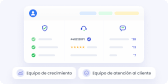
Empiece por cualquier producto y crezca en una sola plataforma
La arquitectura modular permite a las empresas empezar con un producto (SMS, Email, OTP) y escalar sin fricciones. Sin cambiar de sistema, sin perder datos.

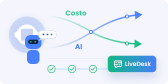
IA nativa impulsada por GPTBots · Sin tarifas por puesto
IA nativa diseñada para tareas complejas y flujos de trabajo empresariales, combinada con un modelo de precios sin tarifas por puesto en LiveDesk. Cuanto más resuelve la IA, menores son sus costes de servicio.
Cumplimiento global y residencia de datos
Implantación de centros de datos multirregión (Europa, APAC) que cumple con la normativa local, incluido el RGPD y la PDPA, y supera las revisiones de seguridad empresarial.

API pensadas para desarrolladores y escalabilidad demostrada
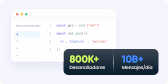
API de alto rendimiento y fácil integración, respaldadas por documentación completa y un ecosistema consolidado, en las que confían más de 800.000 desarrolladores y que procesan más de 12.000 millones de mensajes al día.
Soluciones a medida de EngageLab
EngageLab integra múltiples canales y funciones de engagement con el cliente para proporcionar a las organizaciones una plataforma todo-en-uno, altamente integrada que cubre una amplia gama de funciones.
Fianzas
E-commerce
MediNoticias
Sector turístico
Gaming

Basado en la confianza. Elegido por los clientes.
La seguridad de nivel empresarial se une a una experiencia galardonada.
- ISO 27001
- ISO 27701

- SOC 2 Type II


Más posibilidades de EngageLab
¡Nuevo! Marketing Automation


Confianza de empresas de todo el mundo
EngageLab se ha ganado la confianza de las empresas gracias a sus tecnologías de vanguardia y a su servicio de atención al cliente profesional.
Elena
Gerente de clientes en un banco
EngageLab ha integrado flujos de trabajo automatizados, facilitando a los clientes la solicitud de nuevas tarjetas y cambios de su información. Permite transferir consultas del servicio al cliente y responder a tiempo, lo que ha incrementado ligeramente los ingresos. La solución de mensajería omnicanal de EngageLab es la opción principal del banco para comunicarse con los clientes.
Chuan Leekpai
CEO de SEA Online Grocery Company
EngageLab nos permite encontrar formas efectivas de facilitar el contacto con los clientes a través de SMS y notificaciones push. Esta opción es especialmente útil para una parte de nuestro público objetivo, como las madres a tiempo completo, que no suelen utilizar correo electrónico ni tienen tiempo para realizar llamadas telefónicas.
Jerry Abego
Vicepresidente de una aplicación de noticias
El engagement de los usuarios en la App es muy importante para la industria de las noticias y los medios de comunicación. ¡Sorprendentemente, EngageLab ofrece un conjunto completo de herramientas de análisis de datos! Las estadísticas son fáciles de consultar y exportar, lo que nos ha ayudado a perfeccionar nuestras estrategias de distribución.
Carlos Ramirez
Director de operaciones de una plataforma de viajes
Sabemos lo importante que es obtener ayuda rápidamente al viajar; EngageLab es seguro y estable. Siempre estamos listos para responder a todas las necesidades de nuestros encantadores clientes. Después de usar nuestro servicio un tiempo, nos dicen que hemos hecho su experiencia mucho más fácil.