Elena Rodriguez
Updated: 2026-11-25
Your app's password-reset emails worked fine during testing. After deployment, your cloud host blocks port 25, and your mail server's IP address is on a blocklist. Customers can't reset their passwords, but switching to a hosted SMTP relay could fix the delivery problem without changing your existing email code.
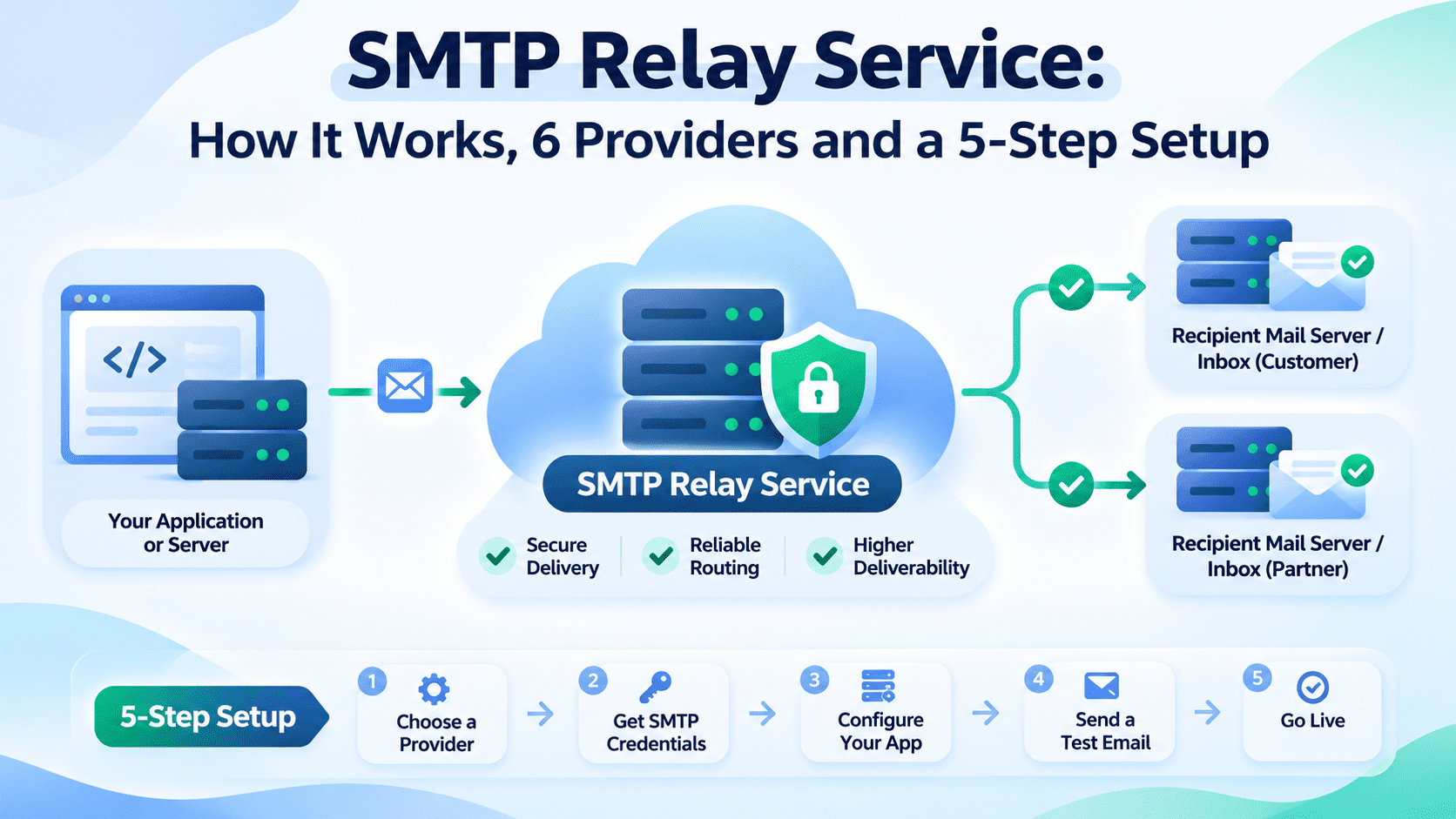
Quick Answer: An SMTP relay service accepts outgoing emails from your application over SMTP and forwards them through provider-managed mail servers with an established sending reputation. Most providers support port 587 with STARTTLS or port 465 with TLS . You will need SMTP credentials and a sending domain configured with SPF and DKIM . Choose an SMTP relay when your application only supports SMTP . An email API may be a better fit for programmatic templates or detailed per-message tracking at higher volumes.
Part 1: What Is an SMTP Relay?
An SMTP relay is a server that accepts outgoing emails from your application over SMTP and forwards them to the recipients' mail servers. For example, when an online store sends an order confirmation, the SMTP relay server handles the transfer to the customer's email provider. This process is also called mail relay.
| Term | What It Means |
|---|---|
| SMTP | The protocol that defines how email is transferred between mail systems. |
| SMTP server | A server that accepts or processes email using SMTP. |
| SMTP relay | A server that forwards outgoing email to another mail server for delivery. |
| SMTP relay service | A hosted provider that manages sending infrastructure, sender reputation, and delivery analytics. |
| Smart host | A designated SMTP server that applications or other mail servers use to route outgoing messages. |
These definitions follow the terminology in RFC 5321 .
Part 2: How SMTP Relay Works, Step by Step
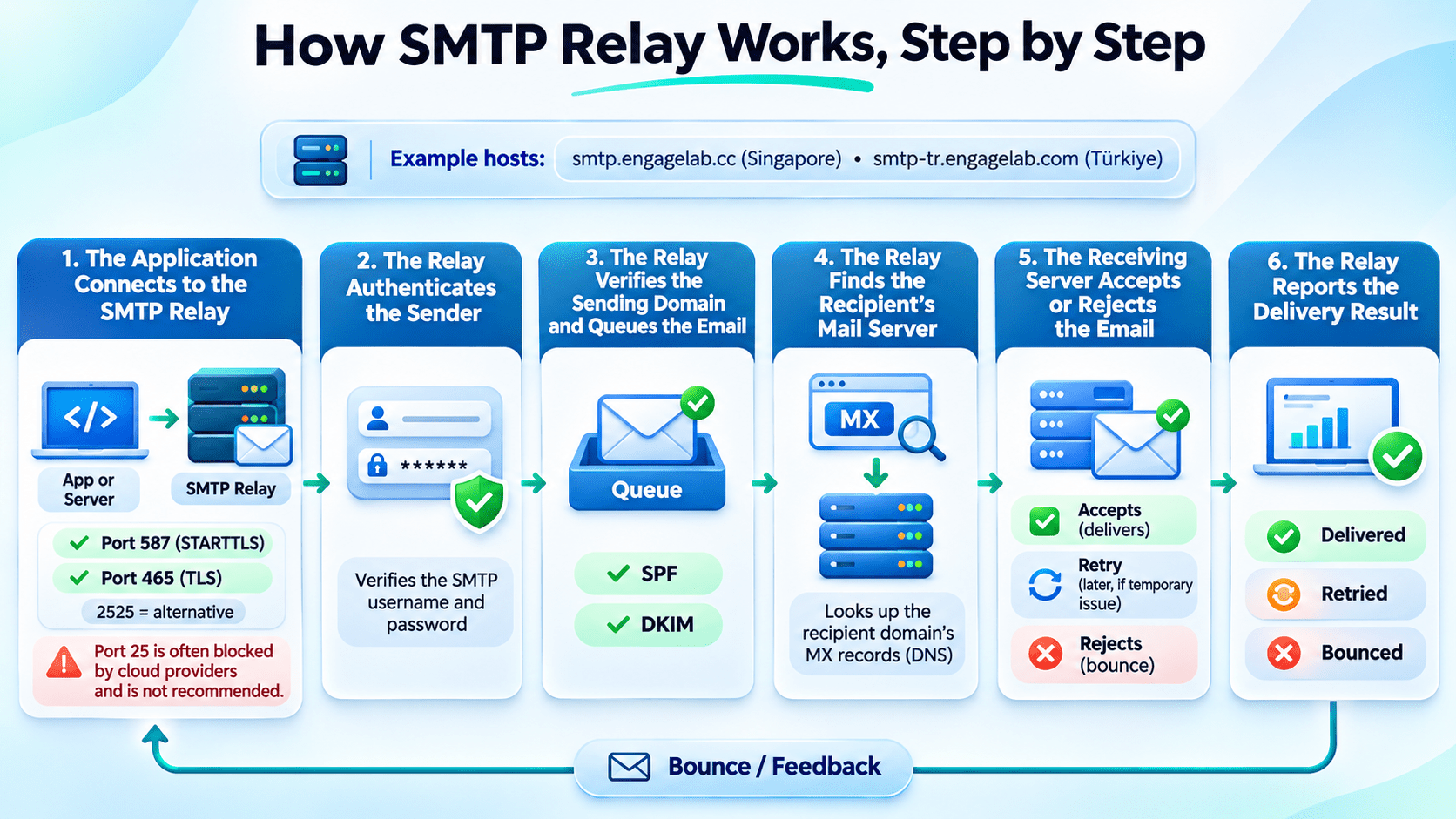
The easy way to understand how SMTP relay works is to consider a customer requesting a password reset from an online store. The application generates an email containing the reset link and sends it through a hosted SMTP relay. The message reaches the customer's email provider through these steps:
1. The Application Connects to the SMTP Relay
The application connects to the relay server using its configured SMTP relay port. Port 587 uses STARTTLS to establish an encrypted connection before authentication, while port 465 starts with TLS encryption.
For example, EngageLab provides smtp.engagelab.cc for Singapore and smtp-tr.engagelab.com for Türkiye. Both support ports 587 and 465.
2. The Relay Authenticates the Sender
The application submits its SMTP username and password. The relay checks these credentials to confirm that the application has permission to send emails. If authentication fails, the server rejects the request with an error such as 535 5.7.8 .
3. The Relay Verifies the Sending Domain and Queues the Email
After authentication, the provider checks whether the sender is authorized to use the configured domain. For example, EngageLab requires SPF and DKIM records during domain setup.
When the message passes the relay's acceptance checks, it enters the delivery queue.
4. The Relay Finds the Recipient's Mail Server
The relay looks up the recipient domain's MX records through DNS. These records identify the servers responsible for receiving email.
5. The Receiving Server Accepts or Rejects the Email
The relay attempts delivery to the recipient's mail server, which checks authentication results and applies its spam-filtering policies.
If the receiving server reports a temporary problem, the relay can keep the message queued and retry later. A permanent rejection generally results in a bounce.
6. The Relay Reports the Delivery Result
The SMTP relay records the outcome and may provide delivery details through its dashboard or webhooks.
An SMTP 250 response from the relay means it has accepted the message for processing. It doesn't confirm that the email has reached the customer's inbox. Check the provider's delivery records for subsequent failures or bounces.
Why Is SMTP Port 25 Often Blocked?
Port 25 is traditionally used for mail transfer between servers, but many cloud hosting providers restrict outbound connections on this port to reduce spam and abuse.
For example, Amazon EC2 blocks outbound port 25 traffic to public destinations by default. Applications using this port may encounter connection timeouts.
For application email submission, use port 587 with STARTTLS or port 465 with implicit TLS , as per your provider's configuration.
Part 3: SMTP Relay vs. Email API: Which Should You Use?
Both methods send emails through a provider, but they connect to your application in different ways. An SMTP relay uses the standard SMTP protocol. An email API accepts structured HTTP requests.
| Feature | SMTP Relay | Email API |
|---|---|---|
| Setup effort | Usually requires updating the SMTP host and credentials | Requires API integration and code changes |
| Legacy app support | Works with WordPress plugins and older CRMs. Also supports many printers and ERP systems | Requires built-in API support or custom development |
| Speed and batching | SMTP connections involve multiple protocol exchanges; batching depends on the client and provider | HTTP requests can reduce connection overhead; some APIs support batch sending |
| Tracking and webhooks | Available through providers offering delivery logs and webhooks | Often provides message identifiers and structured delivery events directly through API integrations |
| Templates | Usually handled by the application; some providers support template-related extensions | Often supports hosted templates with variables supplied in API requests |
| Error details | SMTP status codes during submission, with later failures available through provider logs | Structured HTTP errors and message IDs; delivery failures still require follow-up events |
When Should You Choose SMTP Relay?
Use SMTP relay when your application already supports SMTP and you want to switch email providers with minimal development work.
For example, a WordPress contact-form plugin may only require a new SMTP host and login credentials. Older CRMs often work the same way. Network printers and legacy ERP systems may also rely on SMTP without offering an email API integration.
When Is an Email API Better?
An email API is a good choice when your application sends high volumes of messages and needs more control over individual requests .
Developers can pass template variables and custom metadata directly through an API. Some providers also offer batch endpoints that reduce the overhead of sending messages individually. For example, a transactional email API can help an ecommerce application send personalized order confirmations while tracking delivery results for each message.
However, SMTP can support some of these features through provider-specific extensions. For example, EngageLab's X-SMTPAPI header supports recipient-specific substitutions and tracking settings, including opens and clicks. EngageLab also documents messageId for identifying an SMTP submission and emailId for identifying individual recipient emails.
They require extra configuration: EngageLab's X-SMTPAPI header must be Base64-encoded for SMTP submission.
Part 4: 6 SMTP Relay Services and What Each Is Best For
The best SMTP relay service for your application depends on sending volume and integration requirements.
The following table compares six SMTP relay providers, including their free allowances and connection requirements.
| Provider | Best For | Free Tier / Entry Price (USD) | SMTP Ports and Regions | Watch-Out |
|---|---|---|---|---|
| Twilio SendGrid | Applications needing SMTP delivery with reporting tools | 60-day trial: 100 emails/day. Essentials: from $19.95/month. Pro: from $89.95/month. | 25, 465, 587, 2525; global infrastructure and EU-specific SMTP option | Free trial expires after 60 days; dedicated IPs require Pro or higher |
| EngageLab | Existing SMTP apps needing Singapore or Türkiye endpoints and a REST API path | Free: 50 emails/day. Paid: usage-based (pricing calculator ) | 25, 465, 587, 2525; Singapore and Türkiye SMTP endpoints | SMTP hosts only in Singapore and Türkiye; confirm account SMTP eligibility |
| Mailgun | Developers needing regional sending and detailed event logs | Free: 100/day. Basic: $15/month for 10,000 emails | 25, 465, 587, 2525; US and EU, with AU under contract | Free and Basic plans retain logs for one day |
| Postmark | Transactional messages from existing applications | Free: 100/month. Basic: $15/month | 25, 2525, 587; globally distributed SMTP endpoints | Port 465 is unsupported; transactional and broadcast mail use separate streams |
| Amazon SES | AWS applications needing regional control | Essentials: $0.16/1,000 emails; à la carte: $0.10/1,000 | 25, 587, 2587 (STARTTLS); 465, 2465 (TLS). Region-specific endpoints | Requires AWS configuration; SMTP access is unavailable in some SES regions |
| Brevo | Small businesses combining transactional and marketing email | Free: 300/day. Starter: from $9/month | 465, 587, 2525; geographically distributed relays | Daily sending limits apply on Free; transactional emails share the allowance |
Note: Pricing verified November 25, 2026 (USD). Plan allowances and additional charges depend on the provider’s terms.
1 Twilio SendGrid: For Established Email Integrations
Twilio SendGrid allows applications to send emails through smtp.sendgrid.net using an API key for authentication. Existing systems can connect by updating their SMTP settings.
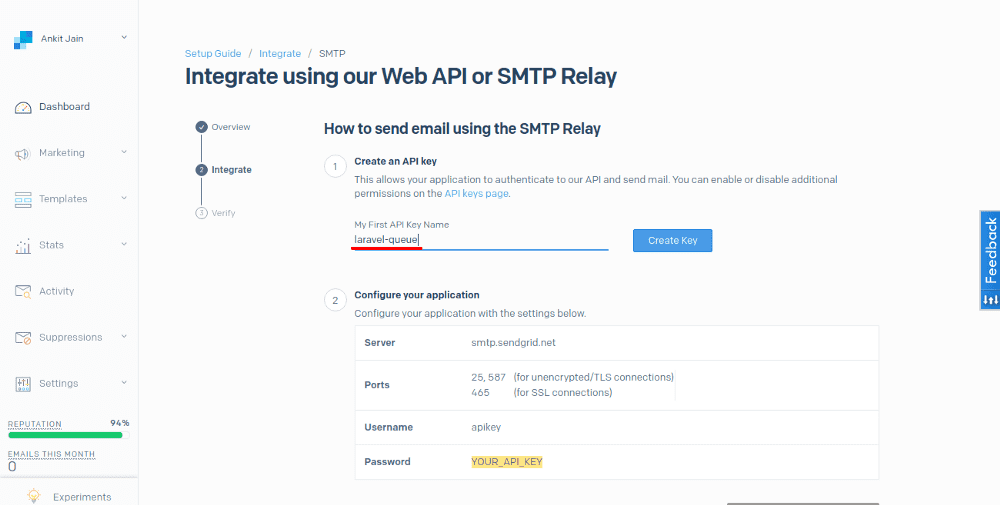
SendGrid also provides email activity monitoring through its dashboard. The Event Webhook reports delivery failures and successful handoffs to receiving servers, so developers can investigate missing emails. For applications with EU data-residency requirements, SendGrid offers a separate SMTP endpoint through appropriately configured EU accounts.
2 EngageLab: For SMTP and API Email Delivery
EngageLab supports SMTP sending alongside its REST email API. Applications can connect through smtp.engagelab.cc in Singapore or smtp-tr.engagelab.com in Türkiye. Both endpoints support port 587 with STARTTLS and port 465 with implicit TLS.

Applications authenticate with an API_USER and API_KEY , and each API_USER sends only from a domain that has passed SPF, DKIM, and MX checks. The X-SMTPAPI header adds per-recipient substitutions to standard SMTP, and the console filters delivery status by Delivered, Soft Bounce, and Invalid address .
When to choose EngageLab Email: Try it first if an app, WordPress plugin, or CRM already sends password resets or order confirmations over SMTP and only needs a new host and credentials. Before moving production traffic, confirm that your account includes SMTP sending and the advertised 50 emails/day , and that the Singapore or Türkiye endpoint fits your data-location needs.
3 Mailgun: For Developer-Controlled Email Delivery
Mailgun supports SMTP sending with domain-specific credentials and separate regional infrastructure. Developers can use smtp.mailgun.org for US-based sending or smtp.eu.mailgun.org for Europe. An Australian endpoint is also documented for contracted accounts.
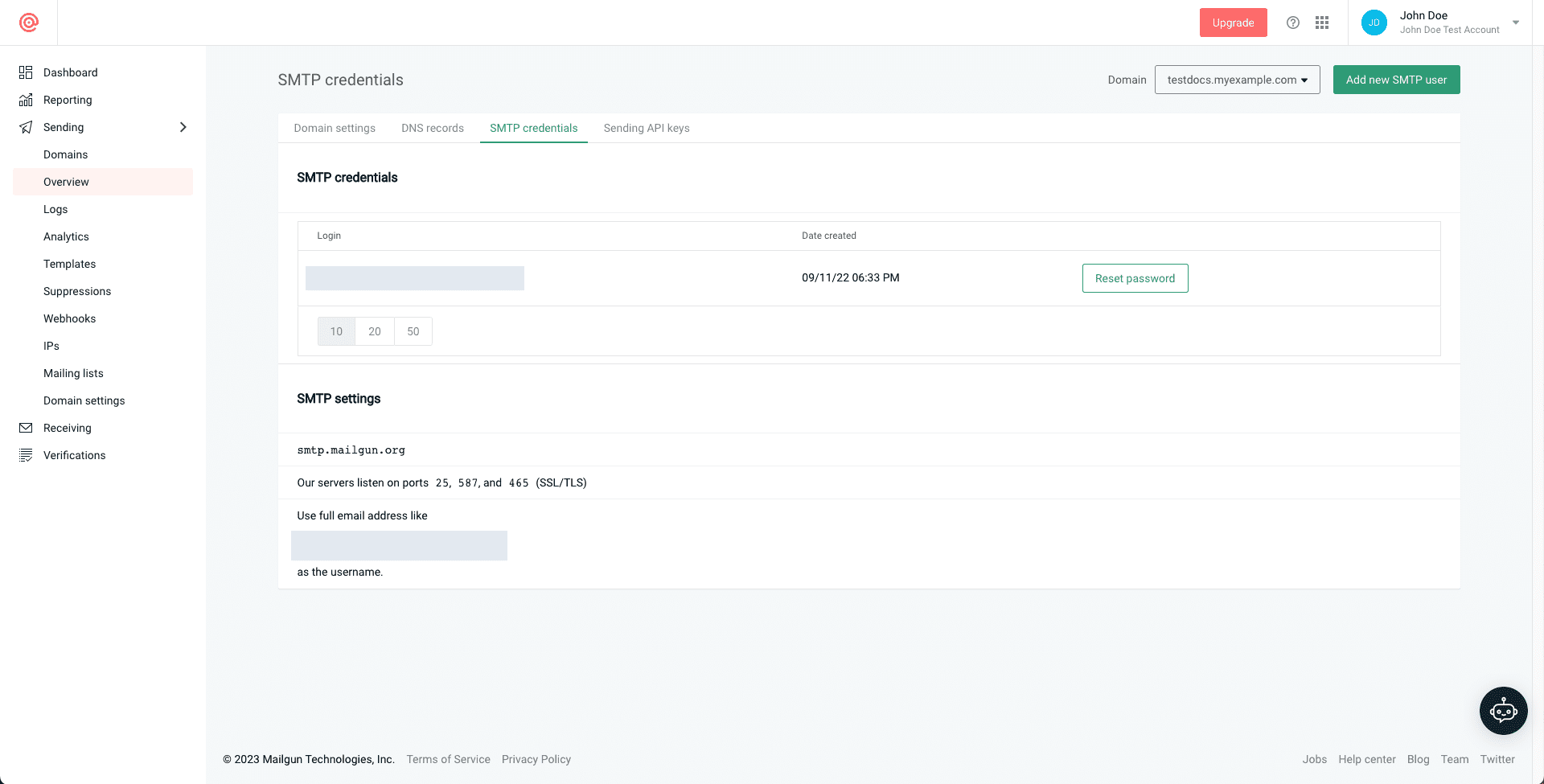
Its SMTP integration supports custom headers that provide additional control over outgoing messages. For example, developers can use X-Mailgun-Tag to group email statistics and X-Mailgun-Track to control tracking. Mailgun also supports delivery-event webhooks, which makes it useful for applications that need detailed reporting without replacing their existing SMTP integration.
4 Postmark: For Transactional Messages
Postmark is for application-generated emails such as password resets and account notifications. Developers can connect existing applications to smtp.postmarkapp.com using SMTP credentials, often without changing how the application creates messages.
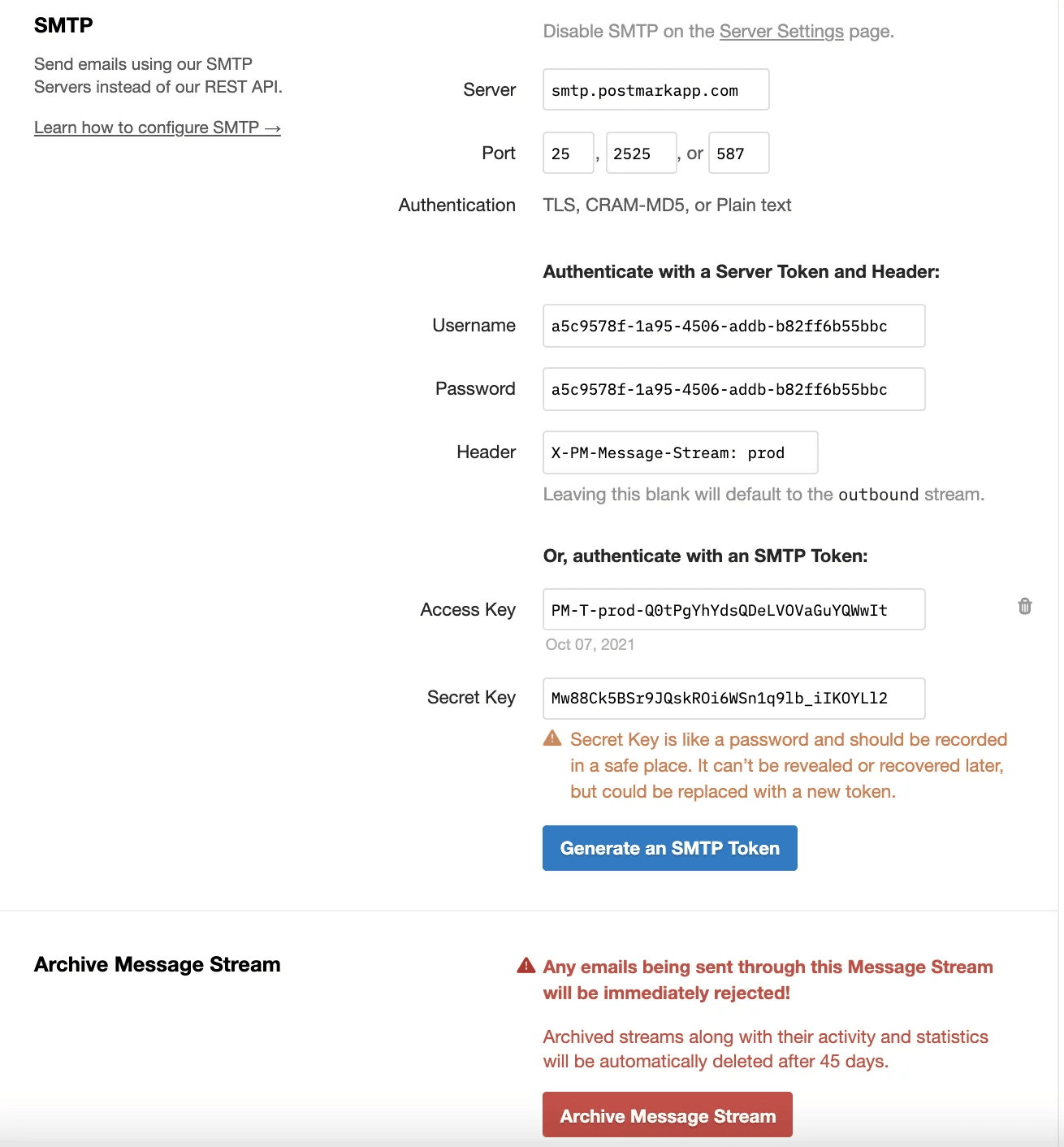
One useful feature is its separation of transactional and broadcast email into different message streams. Postmark also supports custom SMTP headers for message tags and metadata. These help developers organize delivery activity and identify messages associated with particular application events.
5 Amazon SES: For AWS-Based Applications
Amazon Simple Email Service provides SMTP delivery through AWS regional endpoints, such as email-smtp.us-east-1.amazonaws.com. It works well for applications hosted on AWS that need to send email through their existing SMTP libraries.
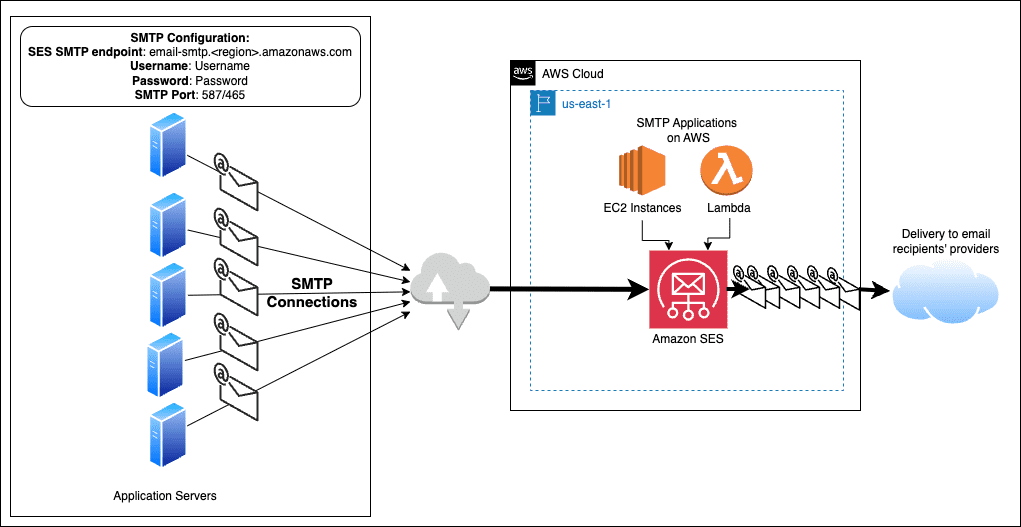
Developers must verify their sending identities and generate SMTP credentials for the AWS region they use. SES also supports configuration sets for monitoring email activity. Delivery events and bounce notifications can be routed through Amazon SNS, which allows applications to respond when messages fail.
6 Brevo: For Marketing and Transactional Email
Brevo provides SMTP relay through smtp-relay.brevo.com for websites and applications to send transactional emails using their existing SMTP configurations. It supports messages triggered by customer actions, such as purchase confirmations or account registration.
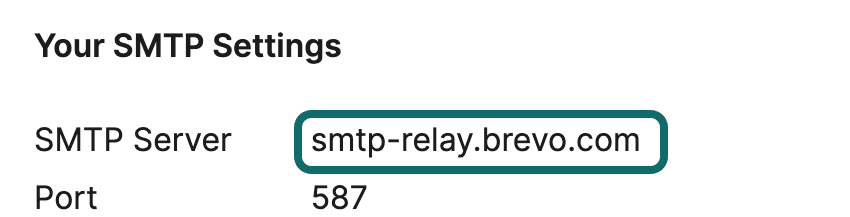
Brevo also offers email templates and transactional reporting within its wider platform. Applications authenticate through a dedicated SMTP key, which is separate from Brevo's REST API credentials. Its relay infrastructure selects a suitable regional SMTP server when applications connect, while email data is processed in Brevo's European data centers.
Confirm the Singapore or Türkiye host for your account, verify port 587 or 465, and track delivery status in the console.
Part 5: How to Set Up an SMTP Relay in 5 Steps
This SMTP relay setup uses EngageLab to show how to connect an existing application to a hosted SMTP server. You will need an EngageLab account , along with access to your domain's DNS settings and an application that supports SMTP.
Step 1: Add and Verify Your Sending Domain
Goal: Authorize your domain to send email through EngageLab.
Path: EngageLab Console → Email → Send Settings → Domain → Add domain.
Add your sending domain , such as xxx.example.com. EngageLab will provide DNS records to configure through your domain registrar or DNS provider.
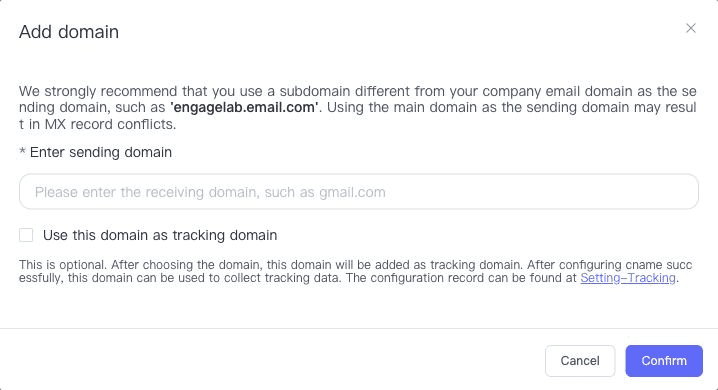
The required records are:
- SPF: Identifies the servers authorized to send email for your domain.
- DKIM: Allows receiving servers to verify the message's digital signature.
- MX: Required by EngageLab for sending-domain verification.
EngageLab also supports DMARC, which helps protect against spoofed messages using your domain. Add the records, then return to the console to check their verification status.
Expected result: The domain becomes Usable when all three required records pass verification, or Verified when the optional checks also pass. DNS changes can take 10–30 minutes to take effect.

If it fails: Check that each DNS record matches the value supplied by EngageLab. A domain with missing required records cannot be bound to an API user.
Step 2: Create SMTP Credentials
Goal: Give your application permission to send emails.
Path: EngageLab Console → Email → Send Settings → API_USER → Create API_USER.
Create an API_USER and select your verified sending domain. Choose the appropriate sending type: Trigger for transactional messages or Batch for bulk emails.
Next, generate an API_KEY for the user.
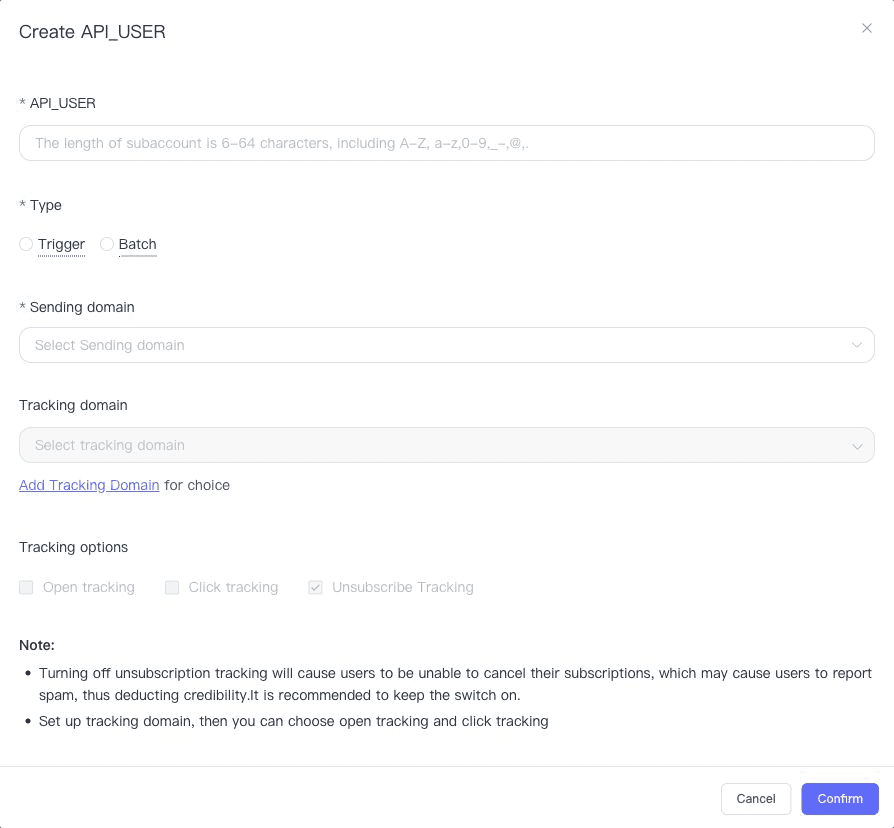
EngageLab uses these credentials for SMTP authentication:
| SMTP Setting | Credential |
|---|---|
| Username | Your API_USER |
| Password | The corresponding API_KEY |
Save the key securely when it appears. EngageLab does not display the same key again after its initial presentation.
Expected result: Your API user is associated with the sending domain, and you have credentials ready for SMTP authentication.
If it fails: Confirm that the domain is usable and bound to the API user. Check that you have copied the complete API key.
Step 3: Configure the SMTP Host and Port
Goal: Connect your application to EngageLab's SMTP relay.
Path: Your application's email settings → SMTP configuration.
For the Singapore data center, enter the following SMTP settings :
| Setting | Value |
|---|---|
| SMTP Host | smtp.engagelab.cc |
| Port | 587 |
| Encryption | STARTTLS |
| Authentication | Enabled |
| Username | Your API_USER |
| Password | Your API_KEY |
| From Address | An address using your authorized sending domain |
For Türkiye, use smtp-tr.engagelab.com.
EngageLab also supports port 465 with implicit TLS. If port 587 is unavailable, port 2525 is another option.
WordPress example: Open your SMTP plugin's settings and select its custom SMTP option. Enter the EngageLab host and credentials, then select the encryption method that matches your port.
Expected result: Your application has the required connection settings saved and is ready for a test send.
If it fails: Check the host and port settings. A connection timeout may indicate that your hosting provider blocks outbound SMTP traffic.
Step 4: Send a Test Email and Check Its Headers
Goal: Confirm that the relay accepted the message , the receiving server accepted it , and it reached the inbox .
Send a test message from your application to a Gmail account you control, then check three places:
- Application log: An SMTP 250 response means EngageLab accepted the message. It does not confirm delivery.
- EngageLab Console → Data: Delivered means the recipient's mail server accepted it. Soft Bounce or Invalid address means it was rejected.
- Gmail: Check whether it landed in Inbox or Spam, then open the three-dot menu next to Reply and select Show original .

Look for these authentication results:
spf=pass
dkim=pass
dmarc=pass
DMARC passes only when SPF or DKIM passes with an aligned domain.
Expected result: The console shows Delivered, the message is in your inbox, and SPF and DKIM pass. One successful test does not guarantee inbox placement for every recipient.
If it fails: If the app got a 250 but the console shows a bounce, read the reported reason and check your DNS records. If the message is Delivered but in Spam, see the reputation fixes in Part 6.
Step 5: Monitor Bounces and Complaints
Goal: Detect delivery problems during the first week of sending.
Path: EngageLab Console → Data.
After enabling live sending, review the delivery records daily.
- Status: Filter by Delivered, Soft Bounce, and Invalid address, and review the reported reasons.
- Soft Bounce and Invalid address: A soft bounce is temporary, so check whether retries succeed. Remove invalid addresses from future sends.
- Complaint: Review spam complaints and avoid sending further emails to recipients who have reported your messages.
EngageLab also provides a Delivery Response API for querying email status and supports webhook notifications for delivery events.
Expected result: You can identify delivery problems and take action before they affect a larger volume of email.
If it fails: Compare your application's SMTP submission result with EngageLab's delivery records. A successful SMTP submission confirms that the relay accepted the message for processing. It does not confirm final inbox placement.
Part 6: How to Fix Common SMTP Relay Errors
The six errors below cover the usual first-week failures. Any SMTP relay error carries a three-digit reply code, so start there.
| Error | Likely Cause | How to Fix It | Where to Check |
|---|---|---|---|
| 535 5.7.8 SMTP authentication failed | Incorrect username or password, or credentials associated with another service or region | Verify the credentials and confirm that the SMTP host matches your account configuration | Application logs and provider credentials |
| 550 relay denied | SMTP authentication is missing, or the server does not permit the requested relay | Enable authentication and confirm that the sending domain is authorized | SMTP session logs and domain settings |
| 554 transaction failed | The server rejected the message because of a policy or other processing failure | Read the complete server response to identify the rejection reason. Check the relevant delivery records | SMTP logs and EngageLab's bounce reports |
| Connection timed out on port 25 | A firewall or hosting provider blocks outbound SMTP traffic | Switch to port 587 with STARTTLS or port 465 with implicit TLS | Hosting provider's network rules and firewall settings |
| TLS handshake error | Incorrect encryption mode, outdated TLS support, or certificate validation failure | Use STARTTLS on port 587 or implicit TLS on 465. Check the client's TLS configuration | SMTP client settings and TLS error logs |
| Email accepted but lands in spam | Failed authentication, weak sender reputation or poor recipient engagement | Check SPF/DKIM results and review complaint rates. Increase sending volume gradually | Email headers and delivery reports |
RFC 5321 defines 550 as a refused action for reasons that include mailbox problems and policy, and servers word relay refusals in their own way. Match on the reply code and read the text that follows it.
If messages are being filtered because of sender reputation, review EngageLab's guides to email deliverability and IP warming .
Final Thoughts
An SMTP relay service is a practical choice for applications that already support SMTP and need managed email delivery without major code changes. As email volume grows or you need more detailed tracking, consider whether an email API would better serve your application.
Start with one transactional email, such as a password reset or order confirmation. Before moving live traffic, verify the sending domain and check the test message in both the delivery log and the recipient inbox.
Verify your domain, connect a staging app over SMTP, and check the delivery log.
SMTP Relay FAQ
1. Is SMTP relay free?
Yes, some providers offer a free SMTP relay service with limited sending allowances. Mailgun provides 100 emails per day. Postmark includes 100 emails per month. EngageLab advertises 50 emails per day . Paid plans offer higher sending limits and additional reporting features. Check the provider's free-tier restrictions before using it for production emails.
2. Which port should I use for SMTP relay?
Port 587 with STARTTLS is a common choice for SMTP submission. Port 465 uses implicit TLS, which encrypts the connection from the start. Some providers also support port 2525 as an alternative. Avoid port 25 for application sending because many cloud hosting providers restrict outbound connections on that port.
3. Is SMTP relay secure?
An SMTP relay can securely transmit emails when TLS encryption and sender authentication are configured correctly. SPF helps verify authorized sending servers, and DKIM validates message signatures. DMARC provides additional protection against domain spoofing. Keep SMTP credentials secure and use a provider that supports modern TLS. Transport encryption does not provide end-to-end message confidentiality.
4. Can I use Gmail as an SMTP relay?
Yes. Google Workspace offers an SMTP relay at smtp-relay.gmail.com for organizational applications and devices. Registered users can send up to 10,000 messages in 24 hours , with a limit of 100 recipients per SMTP transaction . Trial accounts may have lower limits. Personal Gmail has separate sending limits and configuration requirements.
5. What is the difference between an SMTP server and an SMTP relay?
An SMTP server accepts or processes email using the Simple Mail Transfer Protocol. An SMTP relay is a server that forwards outgoing messages toward other mail servers. A hosted SMTP relay service manages this forwarding infrastructure for your application, which allows you to send emails without operating and maintaining your own outbound mail server.