Jacob Morrow
Updated: 2026-09-18
A new user wants to reach a useful first result without sitting through irrelevant setup. A returning user does not want to enter the same preferences again. Someone who has fallen out of a routine needs a relevant next step—not another generic reminder.
Mobile personalization can reduce that friction by adapting content, timing, messaging, or the app experience to a user’s goals and behavior. This guide shows what that means across the user lifecycle, then turns one missed-workout scenario into a measurable personalization experiment.
A useful test: Can you explain which user signal changes what—and why that change makes the next step easier or more relevant?
What Is Mobile Personalization?
Mobile personalization is the practice of adapting an app experience or mobile communication using relevant information about a user’s goals, preferences, behavior, lifecycle stage, or current context. The change might affect onboarding, content, recommendations, defaults, offers, message timing, or the channel used for a follow-up.
Behavioral segmentation can support personalization. A dynamic segment might group users who abandon the same onboarding step, while additional attributes determine which explanation or next action each group receives. Personalization does not require an individually unique interface, real-time AI, or a separate rule for every person.
Personalization also differs from user-controlled customization. Customization lets users choose settings such as topics, layouts, or notification preferences. Personalization applies system-led rules or models to adapt what happens next. The two can work together: explicit preferences provide useful signals, while observed behavior helps the experience evolve over time.
Mobile App Personalization Examples Across the User Lifecycle
The most useful examples show the signal, the personalized action, and the benefit to the user. The following scenarios cover first use, everyday use, and re-engagement without assuming that every app needs an advanced recommendation engine.
First Use
A new user can drop off before reaching a meaningful result. Instead of showing the same tutorial to everyone, an app can ask one short question about the user’s goal and adapt the first task. Apple’s onboarding guidance recommends helping people start using an app without unnecessary setup or instruction.
For example, a fitness app could ask whether someone wants to build a daily habit, prepare for a race, or improve strength. It could then open with a relevant first workout and setup checklist, helping the user get started without sorting through options designed for different goals.
Everyday Use
Returning users benefit when an app learns from recent outcomes. Duolingo describes adaptive lessons that use recent performance to choose exercises at an appropriate difficulty, giving learners more practice where they need it without making every lesson feel the same.
Re-engagement
Re-engagement becomes more relevant when a journey uses both inactivity and prior intent. In an illustrative fitness workflow, a missed workout can trigger a reminder whose destination reflects the user’s stated goal. If the user completes a workout, the journey stops; if not, one limited follow-up can provide a simpler next step. The benefit comes from relevant timing and a clear stop condition, not from inserting a first name.

The transferable pattern is consistent: choose a signal that relates to the user’s goal, change something meaningful, and stop or refine the experience based on the outcome.
How Mobile App Personalization Works
Mobile app personalization can be organized as a feedback loop: collect an appropriate signal, apply a decision rule, deliver an action, observe the outcome, and refine the rule.
1Understand the User
Combine explicit information, such as a stated goal or saved preference, with relevant behavior and context. Google’s Firebase framework separates events from user properties: events describe actions, while properties describe attributes that can help define audiences. Collect only signals that have a clear use and an appropriate legal basis.
2Decide and Adapt
Turn the signal into an explainable decision. A rule might select an onboarding path, recommendation, default, message, channel, or send time. Start with simple rules when they can solve the problem; predictive models are useful only when their additional complexity improves the outcome.
3Observe the Outcome
Track the user outcome tied to the original problem. Depending on the use case, that could be onboarding completion, workout completion, feature adoption, or repeat purchase. Opens and clicks can help diagnose delivery and interest, but they do not prove that personalization improved activation or retention.
4Refine
Compare the personalized version with the existing default among users who otherwise meet the same eligibility rules. Then refine the signal, rule, content, or timing. User needs change, so entry, re-entry, frequency, and exit logic should be reviewed rather than left unchanged.
How to Start With Mobile Personalization
Mobile personalization may be built into the app itself or delivered through a messaging journey. The example below focuses on the second approach: the app reports user signals and outcomes, while a journey selects the appropriate branch, timing, and message through channels such as AppPush or an in-app notification. Changes to screens, recommendations, or other product logic remain app-side work.
Start with one high-friction moment, a measurable user outcome, and the minimum data needed to make a relevant decision. A rules-based experiment is often enough to learn whether a more advanced system is justified.
-
Define one problem, outcome, and baseline
Choose one meaningful friction point rather than several loosely related opportunities. Define the outcome before building the journey. For the fitness example, the primary outcome might be completing a scheduled workout within seven days. Record the completion rate for the existing default experience so the experiment has a baseline.
-
Confirm the data prerequisites and choose a signal
Before configuring the journey, confirm that the app reports a stable user identifier, the missed-workout event, the stated goal, and the workout-completion event. The relevant messaging channel must also be configured and the user must be eligible to receive it. Then express the rule in one sentence: a missed workout starts the journey, and the user’s stated goal determines the branch.
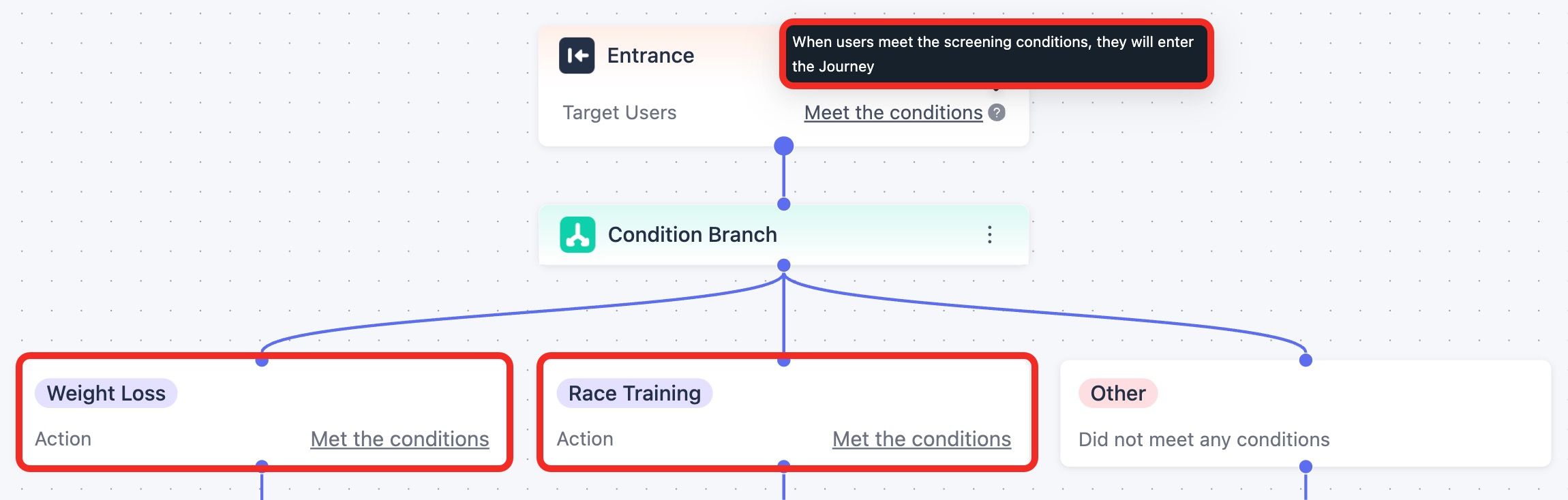
In EngageLab MA , a behavioral event can trigger the journey, while user attributes determine which path the user enters. -
Configure a small number of relevant branches
Create only the variants justified by the available signals. In this illustrative journey, the same missed-workout trigger leads to different content and destinations for users building a habit and users training for a race. Users without a reliable goal value should receive the default experience rather than being forced into a guessed branch.
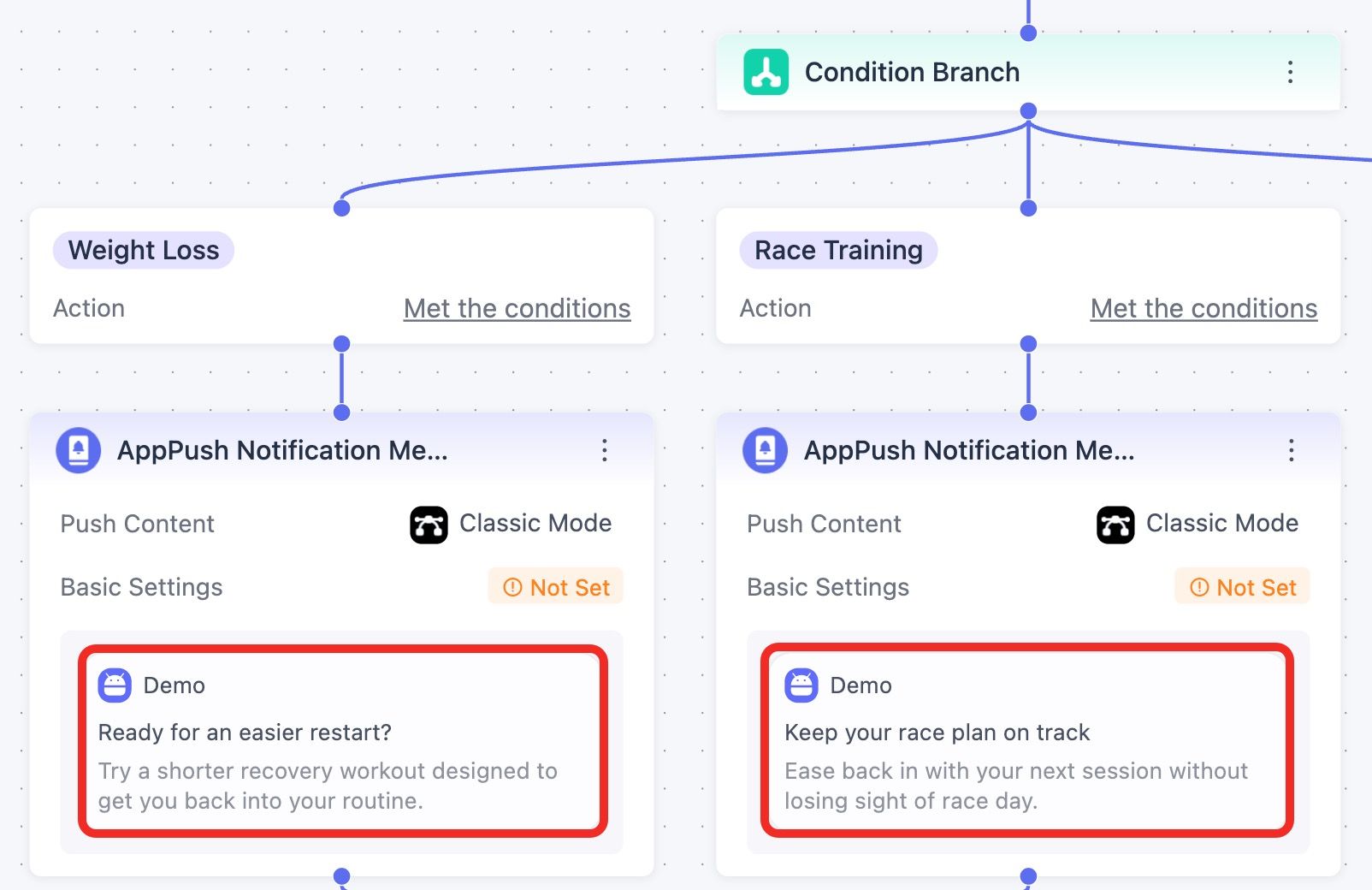
The same trigger leads to different next actions based on what each user is trying to achieve.
Define what happens after the message. Users who complete a workout should leave the journey immediately. Users who do not complete it within the selected window may receive one follow-up, subject to channel consent and frequency rules. Set repeat-entry rules so the same missed event cannot restart overlapping journeys.
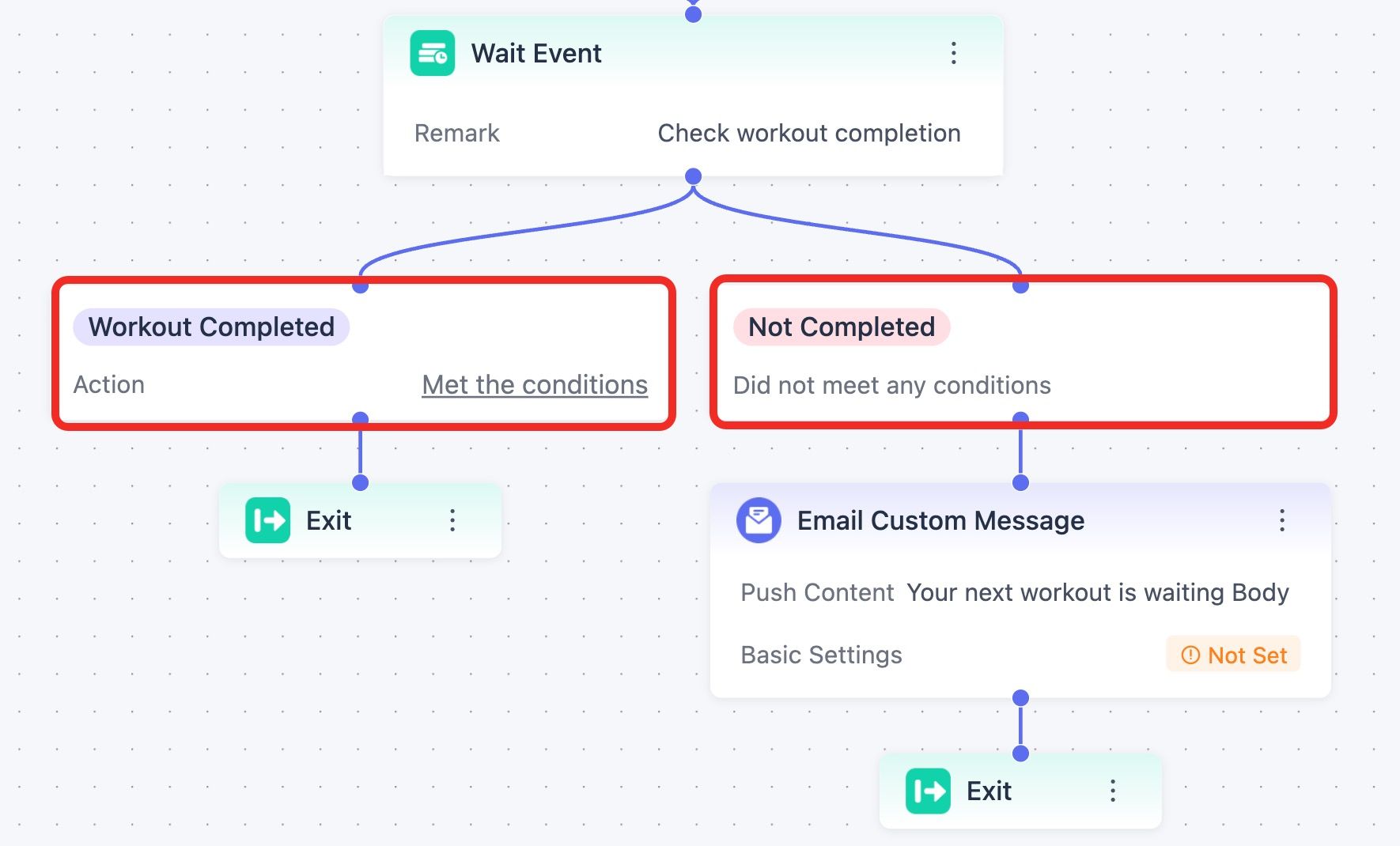
The journey adapts again based on whether the personalized experience actually leads to the intended behavior. -
Test the journey and compare it with a default experience
Before launch, test eligibility, event receipt, every branch, completion checks, repeat entry, exit conditions, frequency rules, message rendering, and destination links.
Then randomly assign comparable eligible users to the personalized journey or the existing default. Do not compare the habit and race-goal branches with each other, because those groups may already behave differently before the journey begins.
Measure whether users complete a workout within seven days of entering the journey. Also check message delivery, destination links, opt-outs, and notification disables so a higher completion rate does not hide delivery problems or a worse user experience. Use a longer window, such as four weeks, only if retention is defined in advance and the sample is large enough to interpret.
-
Use the result to refine, stop, or expand
If the personalized journey does not improve workout completion—or leads more users to opt out or disable notifications—adjust or stop it. If it helps, identify which signal, branch, or timing decision made the difference before expanding to another lifecycle moment.


The Boundary Between Helpful and Intrusive Personalization
Mobile app personalization should use proportionate data and give users meaningful control. The boundary between helpful and intrusive behavior depends on context, timing, transparency, frequency, and whether the experience knows when to stop. Compare these two illustrative re-engagement journeys.
Intrusive: More Touchpoints, Little Context

This journey treats inactivity as a reason to escalate from push to SMS within minutes, without checking whether the user returned. A first name makes it look personalized—not relevant.
Helpful: Use Context, Then Know When to Stop

A better journey adds context, adapts the experience, and stops messaging once the user returns.
The difference comes down to three principles: value, control, and long-term trust.
- Use only the context that earns its place. Knowing the last feature used may make a re-engagement message more useful; collecting unrelated data simply because it is available does not. McKinsey’s 2021 consumer research found that 71% of respondents expected personalized interactions and 76% were frustrated when they did not receive them. These figures concern broader consumer experiences, not mobile apps alone, and do not remove consent or privacy obligations.
- Keep preferences reversible. Users should be able to change preferences, correct a recommendation, or opt out of optional communications. App permissions, tracking authorization, marketing consent, and in-product preferences are related but separate controls. For example, Apple’s App Tracking Transparency framework concerns access to the advertising identifier and tracking across other companies’ apps and websites; it does not govern every use of first-party data for personalization.
- Protect long-term trust. Short-term clicks should never come at the expense of trust and retention. A notification may increase opens this week while causing more users to opt out over time. Review retention and opt-out rates alongside conversion so short-term gains do not hide a worse user experience.
Apply the privacy and consumer-protection requirements that govern the relevant jurisdiction, data, channel, and audience. Product risk also matters: an inaccurate shopping suggestion and an inaccurate health recommendation do not have the same consequences.
How EngageLab Enables Scalable Mobile App Personalization
Once a messaging experiment proves useful, EngageLab Marketing Automation gives marketing teams a visual way to turn the same logic into a repeatable journey. They can define who enters, branch on reported behavior or attributes, coordinate messages and timing, stop follow-ups when the goal is complete, and review journey results in one workflow.
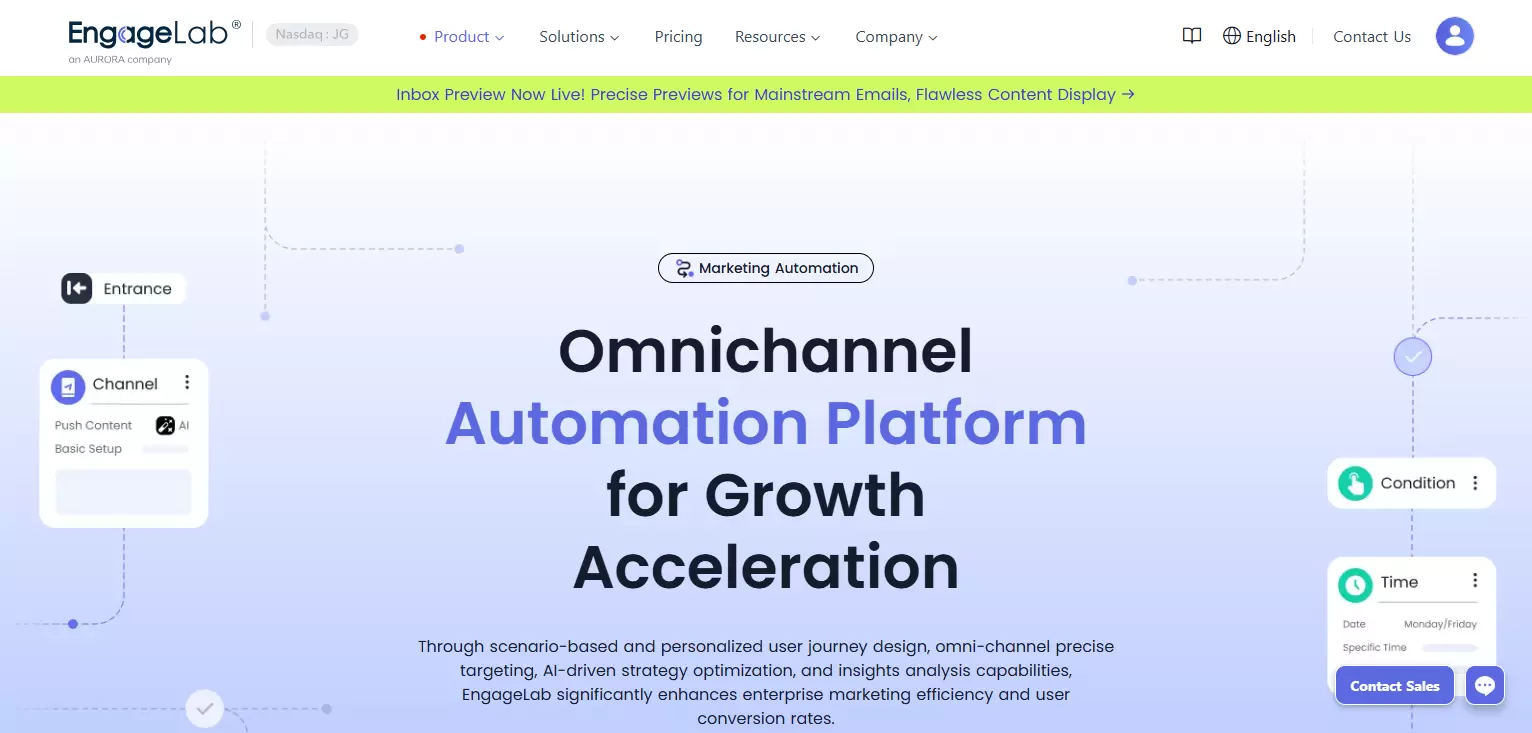
- Audience and entry rules: Use reported user attributes and behavior to define who can enter a journey.
- Behavior-based branches: Route users according to events or attributes, then use wait and time-window components to control follow-up timing.
- Messaging channels: Coordinate AppPush, WebPush, Email, SMS, and WhatsApp message components in the journey.
- Frequency and exit controls: Limit message frequency and connect every path to an end condition, such as the workout-completion event in the illustrative example.
- Journey reporting: Monitor sent and delivered messages, clicks, and configured conversion events to diagnose and refine the workflow.
That configuration still depends on reliable user identification, event reporting, channel setup, consent handling, and any required app-side destinations or product changes. EngageLab’s journey documentation describes the supported components and testing process.
Connect reported user signals to branching, timing, messaging, exit rules, and journey measurement.
Mobile Personalization FAQs
What is mobile app personalization?
Mobile app personalization adapts content, recommendations, defaults, flows, messages, or timing using relevant user goals, preferences, behavior, lifecycle stage, or context. It can use simple rules, dynamic segments, or predictive systems depending on the problem.
How is mobile app personalization different from user segmentation?
Segmentation groups users according to shared attributes or behavior. Those groups may be broad and static, or narrow and dynamically updated. Personalization can use a segment as one input, then apply additional preferences, events, or context to decide what a user receives. The concepts overlap rather than exclude each other.
What are common mobile app personalization examples?
Examples include goal-based onboarding, content ordered by saved preferences, recommendations based on recent activity, adaptive lesson difficulty, and behavior-triggered reminders that stop after the user completes the intended action.
What should I look for in a mobile app personalization tool?
Match the tool to the layer you need to change. A journey platform should support reliable events and attributes, audience rules, branches, timing, frequency limits, exit conditions, channel delivery, and outcome reporting. Changing app screens, ranking content, or recommendation logic may instead require feature-flag, experimentation, recommendation, or app-development capabilities.
Does mobile personalization require a large engineering team?
Not necessarily. Marketers may be able to configure a small messaging journey after the foundation is ready, but engineering is usually needed for initial event instrumentation, identity mapping, SDK or API integration, channel configuration, and any change to the app’s interface or product logic.
Conclusion
Effective mobile personalization starts with one user problem, one relevant signal, and one measurable outcome. Use the simplest rule that can improve the experience, compare it with an appropriate default, and expand only when the result benefits users without weakening trust.
![How to Make SMS Segmentation Worth the Effort [With 6 Examples]](https://img.engagelab.net/en/article/sms-segmentation-cover.webp)