Data Search
In order to facilitate customers to quickly locate problems, the platform currently provides online status and push lifecycle tools.
Online Status
Scenes
Since the Engagelab channel pushed by Engagelab relies on the online push process to receive push notifications, if the user feedback that the push is often not received, you can use this tool to check whether the device is online. If the device is not online, it is recommended to restart the application.
Parameter Description
Registration ID: the Registration ID of the user's terminal device on the Engagelab service platform, which is the unique device ID of the user. The Registration ID of different apps on the same mobile phone are different. Methods: Android, iOS
Instructions
- Enter the "Registration ID" of the App in the input box. Multiple RegIDs are supported, separated by ",".

- The query result shows "false" means the device is offline, "true" means the device is online, and you can view the last online time on the right.

- If the input Registration ID is incorrect, the query result displays the specific cause of the error.

Push Lifecycle
Scenes
If you still cannot receive push messages through online status query, you can use the lifecycle tool to query the message lifecycle and handle the message based on the error code.
Parameter Description
- Registration ID: the Registration ID of the user's terminal device on the Engagelab service platform, which is the unique device ID of the user. The Registration ID of different apps on the same mobile phone are different. Methods: Android, iOS
- Message ID:The ID of the push task.。
Obtain parameters in the console
On the notification details page to be queried, you can get the Message ID and click "View" on the message body to view the json message body of the push.
 If the push target is "Registration ID", the value of "receiverValue" is Registration ID.

Obtain parameters on the server
Get the msg_id (Message ID) in the response parameter after calling the API:
              {
    "sendno": "0",
    "msg_id": "2509042"
}
Instructions
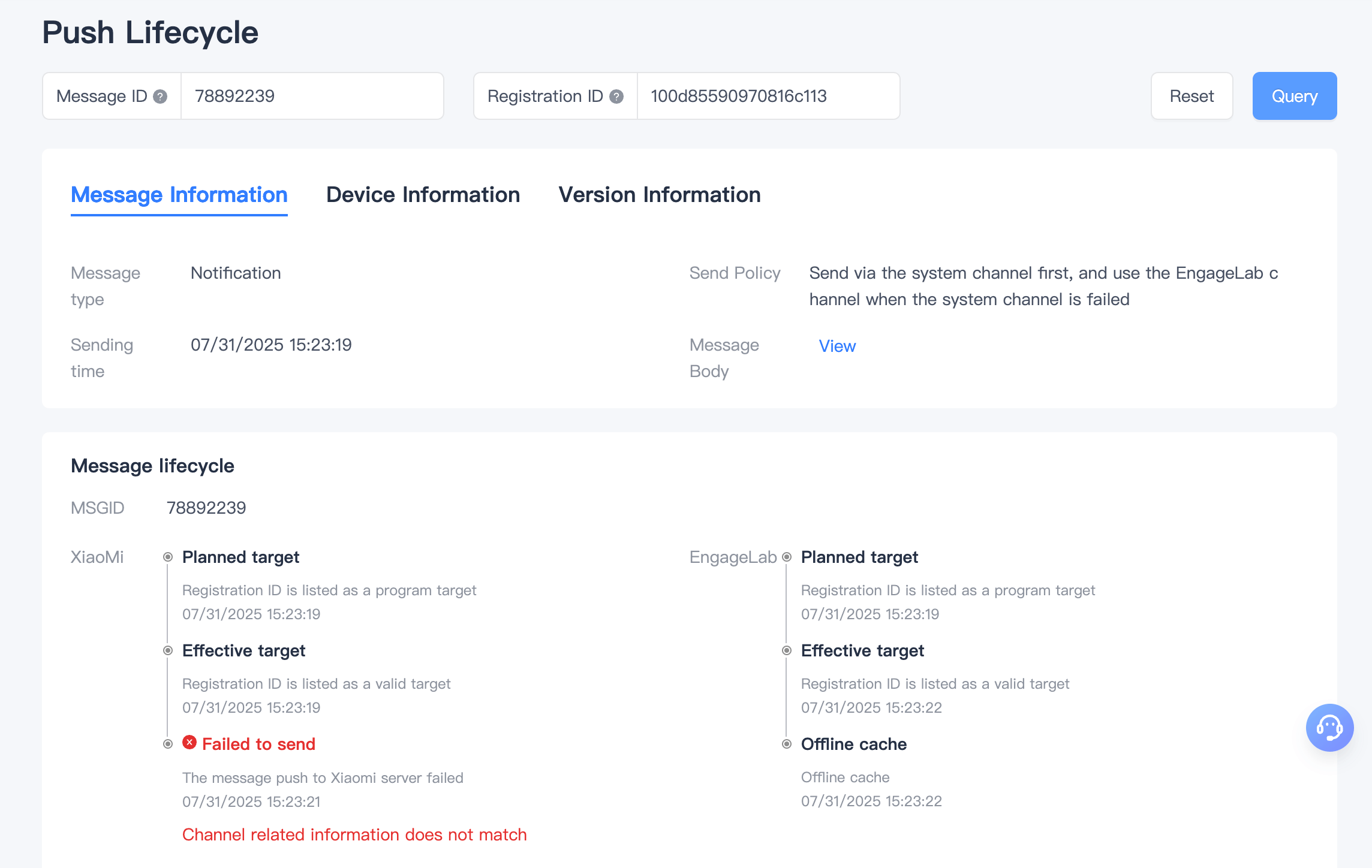
After obtaining the Message ID and Registration ID parameters, go to the [Data Query] - [Push Lifecycle] page, enter the parameters, and click "Query" to view the complete lifecycle of the push.
- If there is no lifecycle process, it means the device is not included in the target of this push. Please confirm whether the queried Registration ID is in the target of this push.
- This page includes the complete lifecycle of the device, from being listed as a [Planned Target] to being listed as a [Valid Target], to sending, delivery, and clicking. If a failure occurs at any node, the reason for the failure will be displayed.
- Due to EngageLab's push strategy on the Android platform, in cases where sending fails through certain manufacturer channels, we will switch to EngageLab's online channel for sending. The message will be temporarily cached on the server and sent to the user once they are online with a long connection. Therefore, you may see two lifecycles in the message lifecycle.