


Human Agents
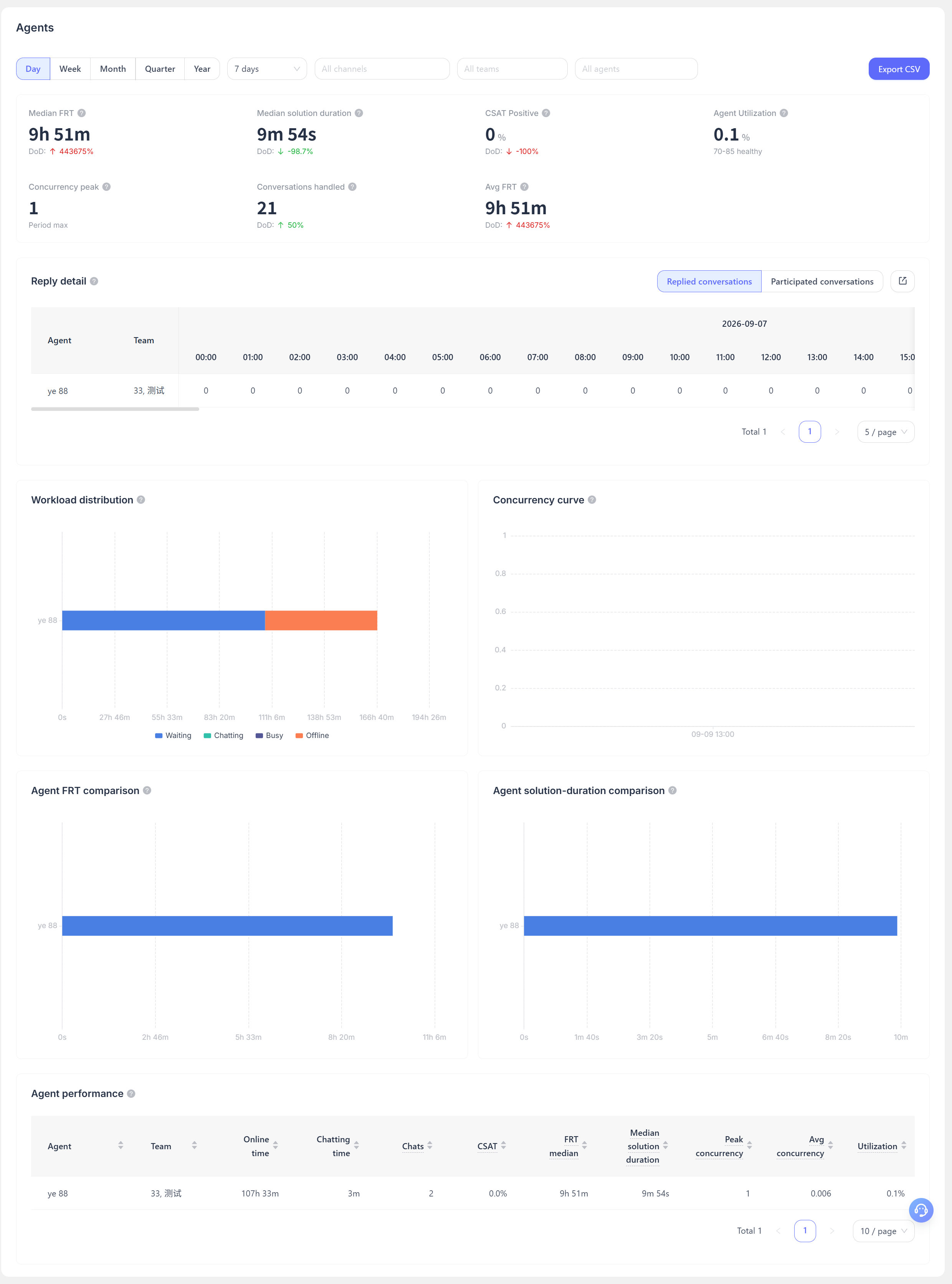
The "Human Agents" page helps you understand service workload, response efficiency, and service quality at both the team and individual agent levels. It is designed for customer service supervisors to manage daily scheduling, review performance, and improve service.
How to Use
After selecting the statistics period, time granularity, and channel, you can also filter by one or more teams or agents. When the filter conditions change, the overview charts and detail tables on the page update accordingly.
The page provides two types of exports: agent performance data and reply details. The exported content reflects the current filter conditions.
Page Content
| Section | Content | Use Case |
|---|---|---|
| Core Metrics | Median first response time, median resolution time, positive rating rate, agent utilization, peak concurrency, number of conversations participated in, and average first response time | Quickly assess the team's service speed and workload |
| Reply Details | The number of replies sent by each agent during different time periods | Identify whether there are insufficient replies during peak hours |
| Working Hours Distribution | The duration of statuses such as waiting, in conversation, busy, and offline | Determine whether scheduling and staffing allocations are reasonable |
| Concurrency Curve | Changes in the number of conversations handled simultaneously by agents | Identify busy periods that may affect service quality |
| Response/Resolution Efficiency Comparison | A comparison of first response times and resolution times across agents | Identify areas that need support, training, or knowledge sharing |
| Agent Performance Table | Individually sortable and paginated service metrics | Support routine reviews and export analysis |
Metric Description
- Median first response time: The median time elapsed from when a customer sends their first message to when they receive their first human reply. The lower the value, the shorter the wait time for most customers.
- Median resolution time: The median cumulative handling time from when a conversation begins being handled to when it is resolved. If a conversation is reopened and resolved again, a new statistical sample is generated.
- Positive rating rate: The proportion of positive ratings among valid customer satisfaction evaluations.
- Agent utilization: The proportion of time agents spend in the "in conversation" status relative to their online time. The healthy range shown on the page can be used as a scheduling reference and should not be used alone to assess performance.
- Peak concurrency: The highest number of conversations handled simultaneously by agents within the selected scope.
- Number of conversations participated in: The number of conversations an agent has participated in handling. If multiple agents participate in the same conversation, it is counted separately for each relevant agent.
Recommendations for Use
- First, view the core metrics and concurrency curve by team to determine whether the issue is insufficient overall capacity or differences among individual staff members.
- Then, filter for specific agents and use the reply details to identify response gaps during peak service periods.
- Review response speed, resolution time, and positive rating rate together. A fast reply does not necessarily mean the issue was resolved well, and a slow resolution may also be related to the complexity of the issue.
The agent names and team information shown are based on current profile data. Situations such as staff transfers and conversation reassignment may affect the apparent attribution of historical business data.
