


LiveDesk Teams
The "Teams" page allows you to compare the service performance of different customer service teams, helping managers assess differences in workload, response speed, and resolution efficiency across LiveDesk teams.
How to Use
After you select a date range and team, the page displays the team's service data. You can switch between teams within the same reporting scope to compare their performance.
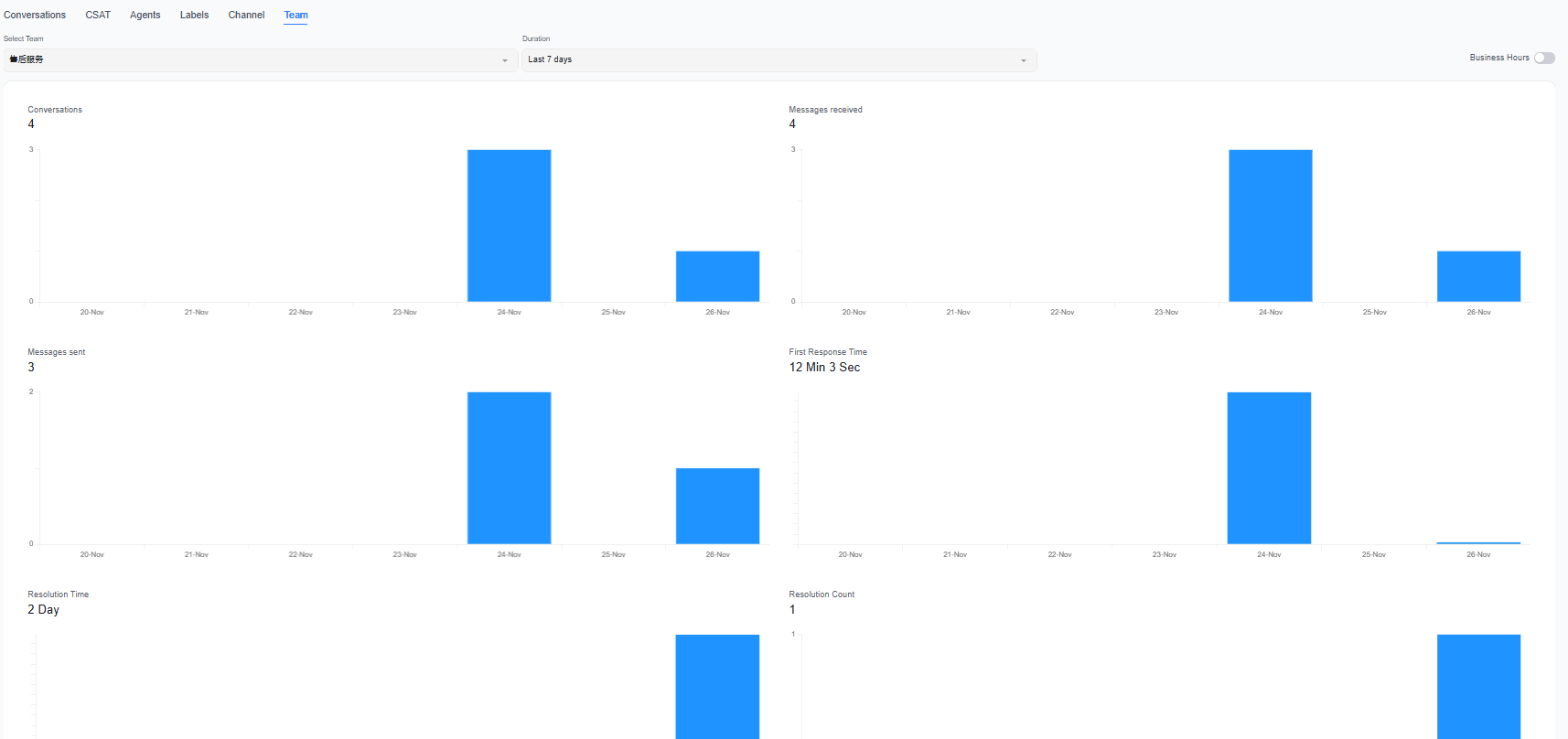
Key Metrics
| Metric | Description |
|---|---|
| Conversations | Number of conversations handled by the team |
| Messages Received | Number of messages sent by customers in the relevant conversations |
| Messages Sent | Number of messages sent by the team to customers |
| Average First Response Time | Average waiting time before customers receive their first reply |
| Average Resolution Time | Average time the team takes to resolve conversations |
| Resolved Conversations | Number of conversations resolved by the team |
Recommendations
- Compare conversation volume and response speed across teams to determine whether service pressure is evenly distributed.
- When a team's resolution time or number of resolved conversations changes, review the situation alongside staffing, channel assignments, and business peaks.
- To continue analyzing the utilization, concurrency, and reply details of each customer service agent on a team, use the "Human Agents" page.
Staff transfers and conversation reassignments affect team ownership. For scenarios requiring strict historical accountability, we recommend also reviewing the specific conversation records in LiveDesk.
